
When your AI training job stalls, it is rarely the GPU itself; it is often the fabric that feeds it. This article helps operators and field engineers compare optical modules for AI/ML infrastructure, from 25G leaf-spine links to 100G and 400G spine backplanes. You will get realistic reach and power numbers, compatibility gotchas, and a decision checklist you can use during a procurement call.
25G, 100G, and 400G optical modules: performance tradeoffs that matter
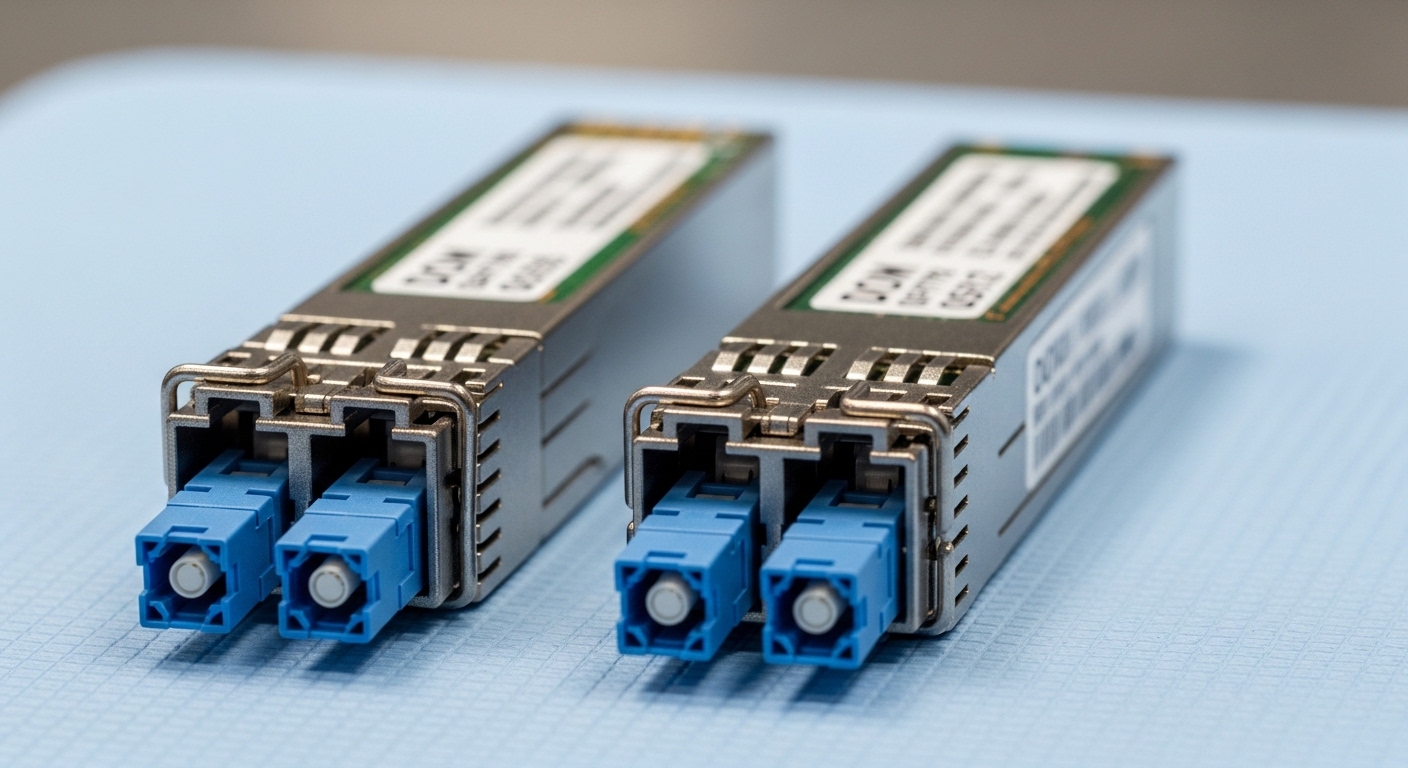
AI clusters tend to be bandwidth-hungry and latency-sensitive, but not every hop needs the highest rate. In practice, many deployments start with 25G for top-of-rack access, 100G for aggregation, and 400G for spine or high-radix uplinks. The key is matching module rate to switch ASIC lane width, then confirming optics reach and fiber plant constraints.
At the physical layer, these rates map to different modulation formats and optics classes. Common Ethernet optics use IEEE 802.3-defined interfaces; for example, 25GBASE-SR on 850 nm multimode fiber (MMF) is widely supported, while 100GBASE-SR4 typically uses four lanes. For 400G, QSFP-DD and OSFP style optics often combine multiple lanes and may require specific switch support for breakout modes.
Quick spec anchors you can sanity-check in the lab
If you are validating with a link budget mindset, you care about wavelength, reach class, and power/temperature behavior. Vendor datasheets also specify receiver sensitivity, transmitter launch power, and jitter performance tied to the electrical interface.
| Optical module type | Typical data rate | Wavelength | Connector | Reach class (typical) | Operating temp | Common use in AI fabrics |
|---|---|---|---|---|---|---|
| SFP28 SR | 25G | 850 nm (MMF) | LC | ~70 m (OM3) to ~100 m+ (OM4) | 0 to 70 C (standard) or -40 to 85 C (extended) | ToR access, GPU servers to leaf |
| QSFP28 SR4 | 100G | 850 nm (MMF) | LC | ~100 m class on OM4 | 0 to 70 C or -40 to 85 C | Aggregation uplinks, leaf to spine |
| QSFP-DD SR8 | 400G | 850 nm (MMF) | MT ferrules (array) | ~100 m class on OM4 (varies by vendor) | 0 to 70 C or -40 to 85 C | Spine high-radix links, dense fabrics |
Source to cross-check interface expectations: IEEE 802.3 Ethernet physical layer definitions for SR and LR variants are summarized in vendor documentation and the standard itself. For optical module expectations and electrical/optical compliance, see [Source: IEEE 802.3] and vendor datasheets for specific part numbers.
anchor-text: IEEE 802.3 Ethernet standard
Pro Tip: For AI fabrics, the biggest “gotcha” is often not the module rate, but the switch’s lane mapping and optics profile. Before you buy spares, confirm whether your switch supports the exact optic type (for example, QSFP28 vs QSFP-DD) and whether it enforces DOM thresholds that third-party modules may not meet.
Distance and fiber plant: SR multimode versus LR/ER single-mode reality
In AI/ML deployments, most traffic is “east-west” inside a data hall, so 850 nm SR optics on MMF dominate when cabling distances are under roughly 100 m. When you cross rows, go through mechanical pathways, or connect across buildings, you switch to single-mode variants like 1310 nm LR or 1550 nm ER/ZR depending on budget and reach.
During field installs, I typically see two failure patterns: mismatched fiber type (OM3 vs OM4) and dirty or damaged connectors. Even with SR optics, the link margin depends on patch cord quality, bend radius, and endface cleanliness.
What I measure on site before trusting the link
If you have access to an OTDR and a certified loss meter, verify installed insertion loss and contamination risk. A fast operational approach is to inspect endfaces, clean with validated procedures, and then re-run link-up tests with the exact patch cords used in production.
Cost and ROI: when third-party optical modules are worth it
Optical modules are a recurring operational cost, not a one-time line item, because you will replace failed units and manage spares. Typical pricing varies widely by vendor, but as a planning baseline: OEM-branded optics often cost more, while compatible third-party modules can be meaningfully cheaper with similar performance if they pass the same compliance checks.
In one real procurement pattern I have seen, a team planning 10G/25G access spares budgets an extra 5% to 10% of expected annual failures depending on temperature exposure and handling discipline. For AI racks with high airflow and frequent moves, failure rates can spike if connectors are repeatedly unplugged without proper cleaning.
Cost drivers you should include in TCO
When comparing optical modules, include not just purchase price but also downtime cost, RMA logistics, and the time your NOC spends troubleshooting optics DOM alarms. Also account for power draw: newer high-rate modules can have higher consumption, which affects cooling, especially when you scale to hundreds of ports.
For compatibility and compliance, check vendor support matrices and switch release notes. Many switches also enforce optics profile expectations through vendor-specific compliance mechanisms; if you hit DOM parsing errors, you may get link flaps or “unsupported module” states even if the optics would transmit fine electrically.
Compatibility and interoperability: DOM, switch profiles, and vendor lock-in
Optical modules rely on standardized management interfaces such as I2C for DOM (Digital Optical Monitoring), but the practical behavior varies by vendor. In AI/ML infrastructure, you often see three compatibility layers: physical connector form factor, electrical lane mapping, and DOM profile validation.
For example, a 10G SFP+ module (e.g., Cisco SFP-10G-SR) will not be a drop-in replacement for a 25G SFP28 port, and a QSFP-DD optic will not fit a QSFP28 cage. Even when form factors match, some switches require specific optics profiles; if the DOM parameters deviate, the switch can mark the module as “invalid” and disable it.
Real-world deployment scenario: AI training cluster leaf-spine
In a 3-tier data center leaf-spine topology with 48-port 25G ToR switches feeding GPU servers, we deployed 25G SR optics on OM4 with typical patch lengths of 20 to 40 m. Uplinks were aggregated into 100G links between leaf and spine, using QSFP28 SR4 optics over the same OM4 plant. For spine-to-core in a second phase, we introduced 400G QSFP-DD SR8 optics on short runs of ~60 to 90 m to handle a new training workload burst, while keeping 850 nm multimode inside the hall to avoid the cost of single-mode conversion.
The operational win came from standardizing fiber types and connector handling. We created a cleaning station, enforced lint-free wipe rules, and ran link validation after every patch change. The result was fewer intermittent CRC errors and faster incident resolution because field staff could narrow issues to fiber loss or DOM behavior quickly.
Head-to-head comparison: choose the right optical module class for AI links
Below is a comparison matrix that mirrors how teams choose optical modules during design reviews. Use it as a quick filter, then confirm the exact part numbers against your switch vendor’s compatibility list.
| Choice | Best fit in AI fabric | Strengths | Limitations | Procurement risk |
|---|---|---|---|---|
| 25G SFP28 SR | GPU servers to leaf | Lower cost per port, mature ecosystem, good MMF reach | Requires lane support; not interchangeable with 10G SFP+ | Low if switch supports SFP28 SR |
| 100G QSFP28 SR4 | Leaf to spine aggregation | Efficient uplink density, common OM4 reach class | Higher per-module cost; more lanes to validate | Medium due to breakout/lane mapping differences |
| 400G QSFP-DD SR8 | Spine high-radix or core uplinks | Massive throughput, fewer physical cables at scale | More sensitive to MPO/array cleanliness; higher power | Higher if switch firmware optics profiles differ |
| Single-mode LR/ER | Long runs or inter-building | Predictable reach, less sensitive to MMF plant variations | More expensive fiber and optics; careful with wavelength | Medium; ensure correct optic pair type |
Selection criteria checklist for optical modules in AI/ML networks
- Distance and fiber type: confirm OM3 vs OM4 vs OS2, and measure installed patch cord lengths.
- Switch compatibility: verify exact port type (SFP28 vs QSFP28 vs QSFP-DD) and supported optic list in the switch vendor docs.
- DOM support and thresholds: check whether your switch expects specific DOM behavior; confirm DOM alarms in staging.
- Operating temperature: AI racks run hot; choose extended temperature optics if the environment exceeds standard ranges.
- Budget and TCO: compare OEM vs third-party pricing, but include downtime and RMA time in your model.
- Vendor lock-in risk: decide how much you want to rely on a single vendor’s optics ecosystem for future scaling.
- Connector and handling discipline: plan cleaning tools and procedures; cleanliness issues mimic “bad optics” failures.
Common mistakes and troubleshooting tips (field tested)
Mistake 1: Installing the right speed in the wrong form factor. Root cause is physical mismatch or switch port misconfiguration, such as attempting to use an SFP+ module in an SFP28-only cage or mixing QSFP-DD optics with a QSFP28 port. Solution: confirm module form factor and speed support in the switch hardware guide, then stage-test optics before racking.
Mistake 2: Assuming all multimode fibers are the same. Root cause is OM3 vs OM4 differences, plus patch cord grade and endface geometry variation. Solution: certify the installed link loss; standardize on OM4 for 25G/100G SR where possible, and re-check after any re-termination.
Mistake 3: Dirty connectors causing CRC errors and link flaps. Root cause is contamination on LC or MPO/array ferrules, leading to intermittent optical power drops. Solution: use validated cleaning kits, inspect with a scope, then re-seat the optic and retest. In many cases, this resolves issues that initially look like “bad optics.”
Mistake 4: DOM incompatibility with switch profiles. Root cause is DOM parameter deviations or unsupported optics profile enforcement by the switch firmware. Solution: test third-party optics in a spare slot with debug logging enabled; if you see “unsupported module,” treat it as a compatibility issue rather than an optical power issue.
Which option should you choose?
If you are building a fresh AI cluster with predictable in-hall distances, choose 25G SFP28 SR for server-to-leaf connectivity when you want cost control and mature support. For leaf-to-spine uplinks, 100G QSFP28 SR4 is usually the best balance of density and operational simplicity. If you are scaling to very high spine bandwidth and can standardize MPO/array handling and switch firmware support, 400G QSFP-DD SR8 is a strong fit, but only after you validate DOM behavior and temperature margins in staging.
For longer runs, the “cheapest” option can be the one that reduces troubleshooting time: use single-mode LR/ER when fiber plant constraints or building crossings make multimode operationally risky. Next step: map your current topology and fiber lengths, then compare against the selection checklist using the exact switch model and supported optics list via optical module compatibility testing.
FAQ
Q: What are optical modules in AI/ML infrastructure, and why do they fail?
Optical modules are pluggable transceivers that convert electrical Ethernet signals into optical signals over fiber. Failures commonly come from connector contamination, exceeding link distance or fiber quality, or DOM/profile incompatibility with switch firmware.
Q: Can I mix OEM and third-party optical modules in the same switch?
Often yes for pure physical connectivity, but compatibility is not guaranteed. I recommend staging tests that confirm DOM alarms, link stability, and BER/CRC behavior before mixing across production.
Q: Which is better for AI clusters: 25G or 100G optical modules?
25G is usually best for server access links where you want lower cost per port and sufficient bandwidth for typical ToR patterns. 100G becomes attractive for uplinks to reduce oversubscription and improve fabric headroom, especially when your training jobs generate bursty east-west traffic.
Q: When should I choose 400G optical modules?
Pick 400G when you have a verified need for high spine throughput and can support QSFP-DD optics with your switch’s exact lane mapping and firmware optics profiles. Validate in staging because array optics cleanliness and DOM behavior can be less forgiving.
Q: How do I troubleshoot link flaps quickly?
Start with connector inspection and cleaning, then verify fiber loss and patch cord lengths. If the optics is clean and within reach, check switch logs for DOM or unsupported module messages and confirm the optics profile is accepted by the firmware.
Q: What should I budget for spares?
A common operational approach is to plan an extra 5% to 10% of expected annual failures as spares for high-change environments. Your exact number should reflect your temperature exposure, handling practices, and historical RMA rates.
Alex Morgan is a field-focused network builder who documents optics, cabling, and switch validation from rack to rack. He helps teams reduce AI fabric outages by turning optical module troubleshooting into repeatable, measurable procedures.
