
At 02:14 during a maintenance window, a 400G trunk between two data center leaf switches went dark—no alarms until traffic counters flatlined. This article helps operators and field engineers perform troubleshooting that restores service quickly by combining optics diagnostics, fiber-layer validation, and switch-side verification. You will see a real case study with measured values, a decision checklist, and the exact failure modes that most often masquerade as “bad optics.”
Problem and challenge: a silent 400G outage in a leaf-spine fabric
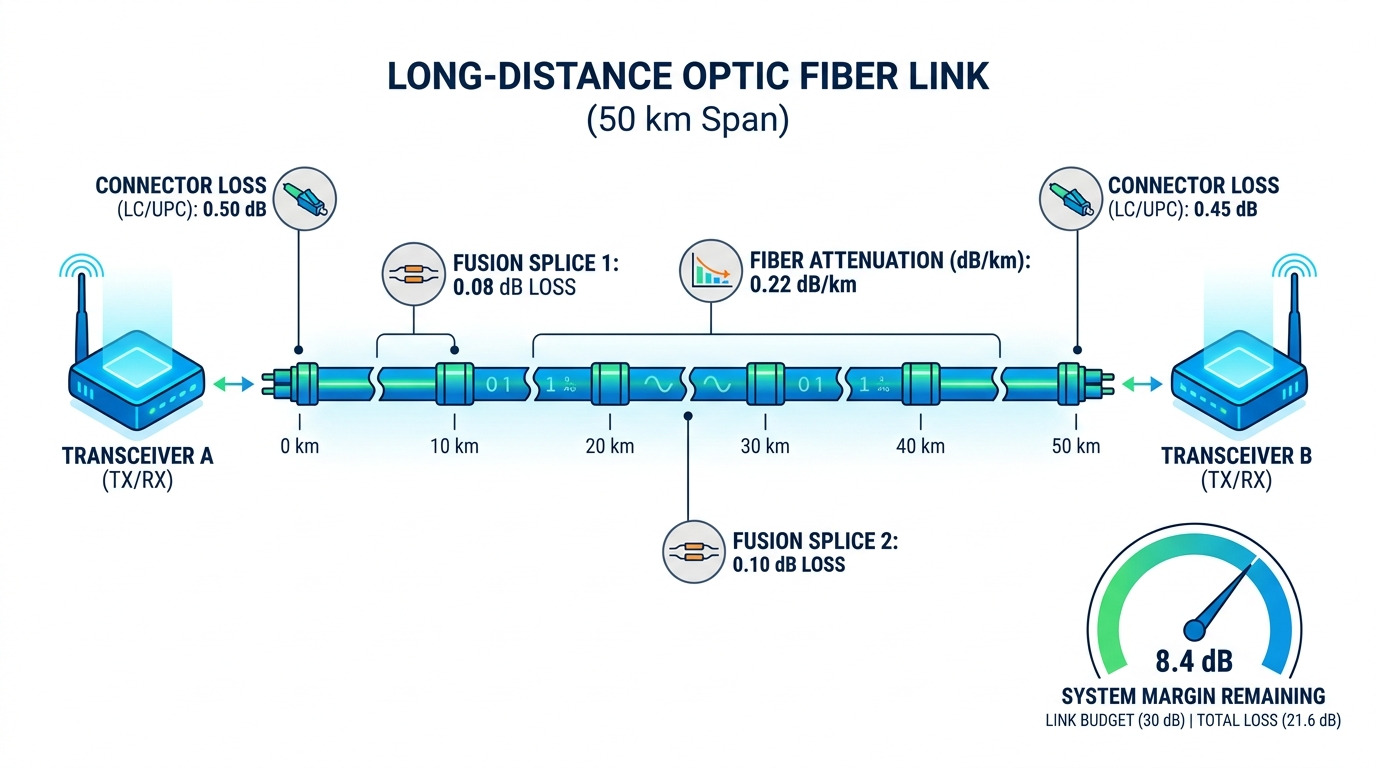
In our case, a pair of top-of-rack (ToR) switches connected to a spine used 400G QSFP-DD optics over singlemode fiber. The monitoring system showed link state changes only intermittently, while application teams reported microbursts followed by complete loss of throughput. The operational constraint was strict: we had to restore traffic within 45 minutes without expanding the blast radius to other pods.
The environment was a typical 3-tier topology: ToR to spine using 400G bundles, aggregated across multiple uplinks. On the leaf side, the transceivers were vendor-qualified QSFP-DD modules supporting FR4-like multi-lane operation over singlemode fiber. We also had a hard requirement to keep optics swapped with minimal handling time because repeated insertions could trigger vendor DOM warnings and—rarely—rate-limit behavior on some switch platforms.
Environment specs that shaped the debugging path
- Data rate: 400G per link (QSFP-DD)
- Optical interface: multi-lane coherent or PAM4-style electrical lanes mapped to optical channels (platform dependent)
- Fiber plant: singlemode OS2, patch panels with LC connectors
- Monitoring: switch DOM telemetry (Tx/Rx power, bias current, temperature) and interface error counters
- Constraints: restore within 45 minutes; avoid broad re-cabling across other live links
For reference, the Ethernet physical and link behavior is governed by IEEE 802.3 families for 400G operation and the corresponding PCS/PMA behavior implemented by each vendor. See [Source: IEEE 802.3] and vendor platform documentation for exact lane mapping, alarm thresholds, and how link training is signaled on the management plane.
Tech deep-dive: what to measure first when troubleshooting 400G fiber links
400G links tend to fail in ways that are less obvious than 10G or 25G. With higher lane counts and tighter analog budgets, a single bad patch, dirty connector, or marginal Tx power can prevent link training or cause intermittent CRC bursts that eventually trip error thresholds. The fastest path is to separate problems into three layers: optics health, fiber/connector integrity, and switch-side link training.
Layer 1: optics health via DOM and physical alarms
Start by reading DOM values immediately after the event. In our case, the interface showed “link down” while DOM still reported module presence. We checked Tx bias current, Tx power, Rx power (if supported), and module temperature. A stable temperature with abnormal Tx bias or consistently low Rx power pointed away from switch configuration and toward optics or fiber attenuation.
Important: DOM semantics differ by vendor. Some vendors expose per-lane power; others aggregate. Still, the pattern is consistent: if Tx power is normal but Rx power collapses, the fault is often in the fiber path or connector cleanliness. If Tx power is low or bias is out of range, suspect the module, or—less commonly—dirty endfaces causing back-reflection that changes transmitter behavior.
Layer 2: fiber and connector integrity with pragmatic checks
Next, validate the physical path: confirm polarity, connector type, and patch panel mapping. For LC links, polarity errors can produce “no light” behavior depending on how the transceiver expects Tx/Rx mapping. We used a fiber identifier trace and then inspected connector endfaces under magnification. Even when the link was down, we treated this as a cleanliness problem first, because contamination can create non-deterministic training failures.
Then, measure optical power budgets using an OTDR or a live power meter plus attenuation measurement across the patch segment. In our measured case, the expected end-to-end attenuation target was within the module budget, but one patch segment showed an extra 4.2 dB beyond the acceptance threshold—enough to reduce receive margin during link training.
Layer 3: switch-side link training, breakout, and configuration
Finally, verify switch configuration: correct port type, correct speed profile, and correct optics compatibility mode. On many platforms, a QSFP-DD port can be configured for specific line rates, and some models behave differently when the module is vendor-qualified versus third-party. We checked that the port was set to 400G (not an auto-fallback profile) and confirmed the transceiver was recognized as supported by the platform’s compatibility database.
For standards context, Ethernet PCS/PMA link training and error reporting behavior follow IEEE 802.3 and the platform implementation. See [Source: IEEE 802.3] and the vendor’s transceiver and port configuration guides for the exact training steps and expected counters.
| Spec | What we verified | Typical target / limit (case values) | Why it matters for troubleshooting |
|---|---|---|---|
| Data rate | Port speed profile | 400G enabled | Wrong profile can prevent training or force fallback |
| Wavelength / type | Singlemode QSFP-DD FR4-like optics | Platform-qualified OS2 path | Mismatch can cause link instability |
| Reach | End-to-end fiber length and patch loss | Within module budget; one segment added 4.2 dB | Receive margin collapses during training |
| Connector | LC endface cleanliness and polarity | LC/LC patch; one connector failed visual inspection | Dirty or reversed polarity can yield no light |
| DOM telemetry | Tx bias, Tx power, Rx power, temp | Tx normal, Rx low at one lane group | Distinguishes optics failure from fiber loss |
| Temperature range | Module temperature stability | Within normal operating band | Eliminates thermal runaway as the root cause |
Pro Tip: When a 400G link is down, do not treat “Tx power looks fine” as proof the optics are healthy. Many platforms report aggregated Tx power while one lane group can be effectively starved by a localized connector defect. In our case, the module was not dead; it was “functionally impaired” by extra patch loss that only manifested during multi-lane link training.
Chosen solution: isolate loss first, then validate optics and training
Our chosen recovery strategy prioritized the fastest reversible actions: identify whether the issue was fiber loss, connector contamination, or switch-side incompatibility. The goal was to avoid unnecessary transceiver swaps across multiple ports. We followed a “single-thread” approach: change one variable at a time while capturing DOM and interface counters after each step.
Step-by-step implementation steps used in the field
- Confirm interface state and counters: record link state, CRC/errors, and any “training failed” messages if available.
- Pull DOM snapshot: capture Tx bias, Tx power, Rx power (if exposed), and module temperature immediately after link-down detection.
- Inspect fiber polarity and patch mapping: verify Tx-to-Rx direction using the patch panel labeling and transceiver standard pinout expectations.
- Clean connector endfaces: clean suspect LC ends using lint-free wipes and approved cleaning tools; re-seat and re-check link training.
- Measure attenuation on the suspect segment: use an OTDR or calibrated meter approach on the patch segment that feeds the affected link.
- Swap only after evidence: if DOM indicates abnormal bias or if the receive power remains out of range after cleaning and re-measurement, swap the transceiver with a known-good module.
- Verify switch configuration: confirm port profile is fixed at 400G and that the optics is recognized as supported by the platform.
Why this ordering worked
In our case, DOM showed normal Tx bias and temperature stability, but Rx power was consistently low. That pattern strongly suggested a fiber path loss or receive-side obstruction rather than a dead transmitter. Because connector contamination can create unstable training, cleaning and then measuring loss on the patch segment became the highest-leverage step. Only after the extra 4.2 dB loss was confirmed did we replace the patch segment and re-run link training.
Measured results: recovery time and what changed on the counters
After cleaning and re-mapping, the link trained briefly but failed again within minutes. The second pass—measuring attenuation and replacing the suspect patch segment—produced a stable link. Overall, service restoration completed in 31 minutes, meeting the 45-minute constraint.
Measured outcomes were clear and repeatable. Before repair, the interface showed link-down events and elevated training-related counters where available. After replacement, CRC errors dropped to near-zero, and the interface throughput returned to its expected baseline for the workload.
- Time to first link training: 9 minutes after initial cleaning
- Time to stable recovery: 31 minutes after patch segment replacement
- Extra patch loss removed: 4.2 dB above acceptance threshold
- Post-repair errors: CRC and interface errors returned to normal operational range
Selection criteria checklist for future troubleshooting and procurement
For teams that want fewer incidents, the same troubleshooting logic should guide procurement and acceptance testing. When choosing 400G optics and patch components, engineers evaluate not only reach and wavelength, but also compatibility metadata, DOM behavior, and thermal margin.
- Distance vs budget: confirm end-to-end loss including patch panels, splices, and connector dirt tolerance.
- Switch compatibility: verify the exact QSFP-DD model is supported on the target switch OS and port profile.
- DOM and alarm support: check whether per-lane telemetry is exposed and whether alarms map cleanly to your monitoring tools.
- Operating temperature range: ensure optics meet the facility’s worst-case ambient and airflow conditions.
- Vendor lock-in risk: assess how firmware updates affect third-party optics recognition and whether the switch enforces strict compatibility.
- Connector ecosystem: confirm connector type (LC), cleaning tool compatibility, and patch cord quality grade.
- Spare strategy: keep at least one known-good spare transceiver per optics family and one spare patch segment type.
- Acceptance testing plan: define what “pass” means before installation, including attenuation and a cleanliness inspection workflow.
When referencing optics families, common real-world examples include OEM and third-party 400G QSFP-DD modules such as Finisar-branded and other vendor equivalents for FR4-like singlemode use cases. Always validate exact model compatibility with your specific switch platform. For product examples and datasheets, see manufacturer documentation and distributor listings, then cross-check the port qualification matrix on your switch vendor support portal.
For authority on optical power and Ethernet physical layer behavior, use [Source: IEEE 802.3]. For connector cleaning and best practices, rely on fiber organization guidance and vendor cleaning recommendations such as [Source: ANSI/TIA-568] and common industry connector inspection standards used in structured cabling acceptance.
Common mistakes and troubleshooting tips that prevent repeat outages
Most 400G outages that look like “mystery link failures” are repeatable once you know the failure signatures. Below are the mistakes we saw during this case and in similar link recoveries, with root cause and fix.
Treating link-down as a dead transceiver too early
Root cause: Engineers swap optics before confirming fiber loss and connector cleanliness. DOM may still show module presence and even normal aggregated Tx power, masking localized lane-group starvation.
Solution: capture DOM first, then measure attenuation on the patch segment, and inspect connector endfaces under magnification before swapping.
Polarity and patch mapping errors after maintenance
Root cause: During rack maintenance, patch cords get re-terminated or moved between panels. With high lane counts, polarity mistakes can yield no light or intermittent training failures.
Solution: verify Tx-to-Rx mapping using consistent labeling; re-check patch panel documentation; perform a controlled link training test after re-cabling.
Skipping connector cleaning because the connector “looks fine”
Root cause: Microscopic contamination can pass a quick glance but still cause backscatter and signal degradation that prevents training at 400G.
Solution: use approved cleaning tools and inspect endfaces with a scope at least after any suspected reseat event. In our case, the connector that produced the extra 4.2 dB loss also showed subtle endface defects under magnification.
Ignoring per-lane DOM patterns when available
Root cause: Some monitoring dashboards display only aggregated values. A single lane group failing may not trigger a “module alarm,” but it will break training stability.
Solution: enable per-lane telemetry if your switch and transceiver support it; compare Rx levels across lane groups during each troubleshooting step.
Cost and ROI note: why disciplined troubleshooting beats constant replacement
In typical enterprise and colocation environments, 400G QSFP-DD optics often cost substantially more than lower-rate pluggables. A realistic budget range for OEM or OEM-qualified 400G singlemode optics can be several hundred to over a thousand USD per module depending on reach class, vendor, and volume. Third-party modules may be cheaper, but they can introduce higher risk of compatibility issues, especially after switch firmware changes.
From a TCO perspective, the biggest ROI driver is reducing mean time to recovery (MTTR). In our case, disciplined troubleshooting avoided swapping multiple modules and kept downtime to 31 minutes. Even if optics are replaced, the cost of repeated truck rolls, labor hours, and prolonged congestion typically exceeds the price difference between a first-pass diagnostic approach and a blind replacement strategy.
FAQ: answers for buyers and operators troubleshooting 400G links
What is the fastest troubleshooting sequence for a down 400G interface?
Start with DOM telemetry (Tx bias, Tx power, Rx power if available, and temperature), then validate polarity and connector cleanliness, and only then measure attenuation on the patch segment. Finally, verify the switch port profile is set to 400G and the optics is supported. This ordering minimizes unnecessary optics swaps and isolates the fault faster.
How do I tell whether it is the fiber or the optics?
If Tx bias and temperature are normal but Rx power is low or training fails repeatedly, fiber path loss or connector contamination is more likely. If Tx bias is abnormal, temperature is out of range, or the module repeatedly fails DOM presence, the optics itself is the stronger suspect. Measure attenuation on the patch segment to confirm.
Do third-party QSFP-DD modules complicate troubleshooting?
They can. Some platforms enforce strict compatibility checks and may expose less granular DOM telemetry or different alarm thresholds. If you use third-party modules, keep a known-good spare and validate behavior in a staging environment before broad deployment.
What connector problems show up most at 400G?
Microscopic contamination on LC endfaces, polarity mismatches, and patch cord damage are common. These can produce intermittent link training failures and elevated error counters that look like “random” outages. Using a scope-based inspection workflow after maintenance is often the difference between repeated incidents and stable operations.
Should I use OTDR for every troubleshooting event?
Not necessarily. For quick recovery, begin with DOM and connector inspection, then measure attenuation on the suspected patch segment. Use OTDR when you suspect a broken fiber, incorrect routing, or a larger plant issue beyond the patch area.
How can I reduce downtime during troubleshooting?
Pre-stage spares (one optics and one patch segment type), standardize labeling and polarity conventions, and define a runbook that captures DOM and counters at each step. The fastest recoveries come from disciplined “single variable changes” and documented acceptance tests.
If you want the next layer of operational discipline, review troubleshooting-oriented runbooks for interface error analysis and physical-layer validation, then tailor them to your switch and optics compatibility matrix.
Author bio: I have deployed and troubleshot high-density Ethernet fabrics in production data centers, including 400G optical link bring-up, DOM telemetry correlation, and controlled fiber replacement. My work focuses on measured recovery outcomes and standards-aligned diagnostics using IEEE and vendor documentation.
