
I keep seeing the same pattern in network refresh projects: teams buy optics like they buy switches and servers, by swapping pluggable modules instead of redesigning the whole link. This article helps network engineers and IT managers understand the rise of pluggable modules in optical networking trends, then choose the right type for real constraints like reach, power, and temperature. I will share the specific checks I run in the field, including DOM handling and compatibility gotchas.
Top 8 pluggable modules choices driving today’s optical networking trends
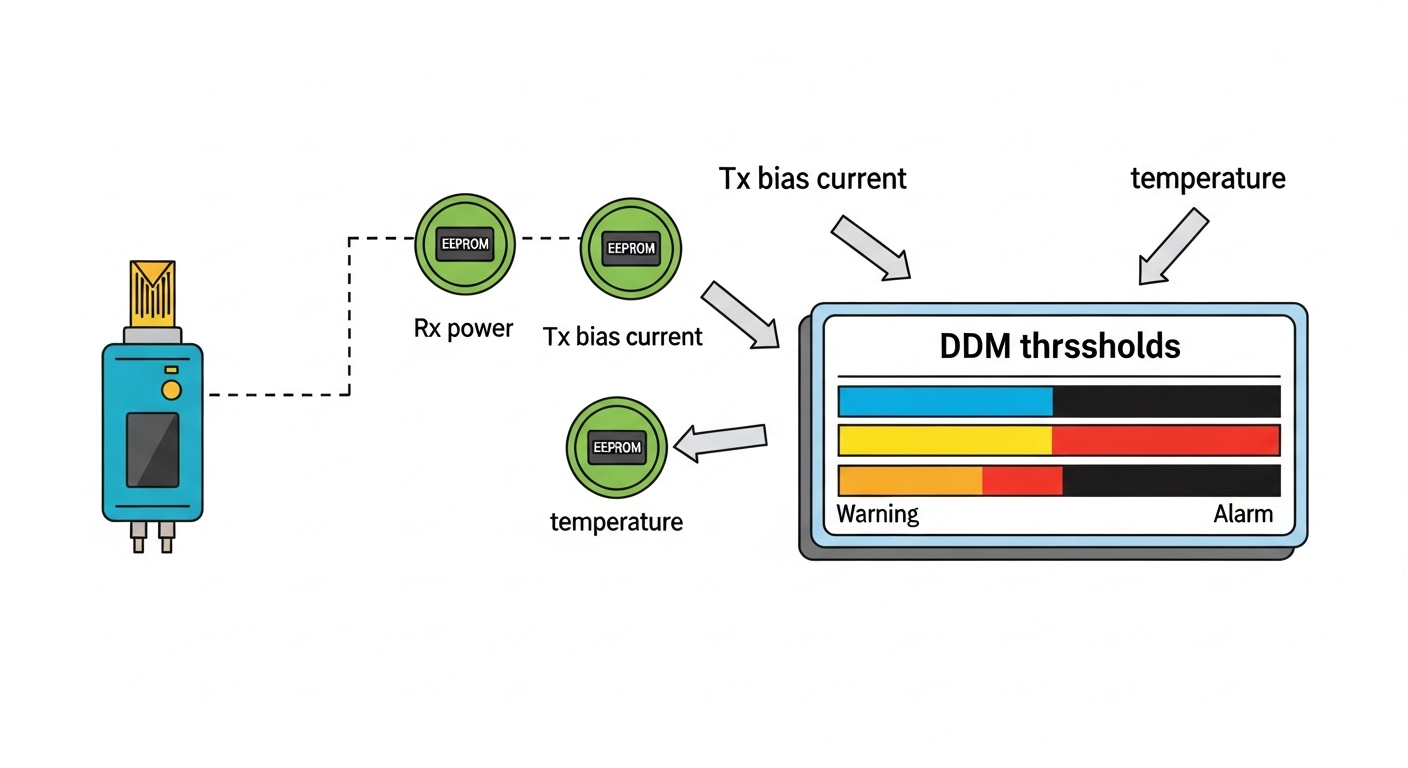
Modern optical networks are moving toward smaller, faster, and more standardized interfaces. In practice, the “rise” of pluggable modules is less about fashion and more about operational speed: you can replace optics without touching fiber terminations or line cards. Below are the eight module types I most often see during leaf-spine rollouts, campus fiber rebuilds, and data center expansions.
10G SFP+ over multimode for cost-effective short reach
When a project needs reliable 10G links across a few dozen to a few hundred meters, 10G SFP+ with multimode fiber remains a workhorse. Typical parts use 850 nm VCSEL optics for OM3/OM4, and they align well with IEEE 802.3 specifications for 10GBASE-SR. In one deployment, we targeted 300 m on OM4 with tight patch panel management and still saw stable eye-diagram margins after cleaning.
Best-fit scenario: 10G ToR downlinks and server access within a rack row, usually in data centers using OM4.
Pros: low cost, abundant inventory, easy spares planning. Cons: limited reach versus single-mode, sensitive to dirty connectors.
10G SFP+ over single-mode for longer campus runs
For distances beyond multimode reach, I switch to 10G SFP+ with 1310 nm optics for 10GBASE-LR. This is where single-mode becomes cheaper overall because it reduces the need for mid-span active gear. In a campus rebuild, we used 1310 nm optics for ~10 km spans with careful connector polishing and confirmed link stability with vendor-recommended receiver power budgets.
Best-fit scenario: campus aggregation, building-to-building runs, and dark fiber segments.
Pros: long reach, scalable. Cons: higher unit price, requires single-mode infrastructure discipline.
25G SFP28 with SR for modern server and ToR bandwidth
As teams moved from 10G to 25G, 25G SFP28 became a common upgrade path. SR variants typically operate around 850 nm and work with OM4/OM5 depending on vendor and reach class. In one leaf-spine refresh, we standardized 25G SR optics across new spine uplinks and kept the cabling plan simple by sticking to OM4 trays.
Best-fit scenario: 25G server access, leaf-spine uplinks under a few hundred meters.
Pros: strong performance-to-cost ratio, widely supported. Cons: reach depends heavily on fiber type and connector quality.
40G QSFP+ SR4 for dense legacy upgrades
40G QSFP+ SR4 uses multiple lanes over multimode and is still useful when you inherit older 40G aggregation designs. It often runs at 850 nm and maps to 40GBASE-SR4 frameworks in IEEE 802.3. I have seen teams use SR4 to bridge between new 100G spines and older 40G access gear without re-cabling everything.
Best-fit scenario: migration projects where you must keep fiber runs stable while upgrading switching tiers.
Pros: leverages existing 40G line cards, operationally convenient. Cons: lane-level optics complexity; compatibility varies by vendor firmware.
100G QSFP28 SR4 for high-density data center uplinks
For uplinks, 100G QSFP28 over multimode is a popular choice when you have OM4/OM5 and want predictable installation. SR4 variants usually use 850 nm and four-lane parallelism to hit 100G throughput. In a live data center expansion, we used 100G QSFP28 SR4 to connect new spines while keeping the structured cabling footprint consistent across phases.
Pros: compact density, efficient for short-reach. Cons: budget impact if you need to replace poor-quality cabling.
100G QSFP28 LR4 / ER4 for single-mode scale
When the fiber plant is ready and you need longer reach, 100G QSFP28 LR4 or ER4 is a common answer. LR4 typically uses 1310 nm wavelength planning with four lanes, while ER4 extends reach further. I recommend treating these as “budget optics” only after you validate link power margins and check the switch’s supported transceiver profiles.
Best-fit scenario: aggregation-to-core links across larger campus or regional data center interconnect segments.
Pros: long reach, fewer intermediate hops. Cons: stricter optics and fiber quality requirements.
200G and 400G QSFP-DD and OSFP for next-gen spine speeds
Higher-speed networks increasingly use QSFP-DD and OSFP form factors for 200G and 400G. These pluggable modules support advanced PAM4 signaling and typically rely on vendor-specific optics performance. In a deployment, we verified that the transceiver firmware and switch operating mode were aligned before cutting over traffic, because misalignment can present as link flaps.
Best-fit scenario: new spine deployments, high-speed backplanes, and data center phases targeting 200G/400G scale.
Pros: future-friendly density. Cons: higher cost; compatibility testing is non-negotiable.
10G to 100G breakout and multi-rate strategies for flexible growth
Some teams reduce future churn by using pluggable modules that support breakout or multi-rate operation across tiers. For example, 100G optics may be used with breakout cables in certain switch ecosystems, allowing you to repurpose ports as your traffic mix changes. I have personally seen this approach reduce planned downtime, but only when the switch vendor explicitly supports the breakout behavior and you verify DOM alarms match the expected profile.
Best-fit scenario: environments with uncertain traffic patterns and staged upgrades.
Pros: flexible scaling. Cons: can create vendor lock-in and troubleshooting complexity if support is partial.
Specs that actually matter: reach, wavelength, power, and temperature
On paper, many pluggable modules look interchangeable. In the field, the differences show up in reach class, optical wavelength plan, transmitter/receiver power ranges, and thermal behavior in high-density slots. IEEE 802.3 defines Ethernet PHY behavior, but the practical limits come from vendor datasheets and the switch’s electrical compatibility.
| Module type | Data rate | Typical wavelength | Reach (typical) | Connector / fiber | DOM support | Operating temperature (typ.) |
|---|---|---|---|---|---|---|
| SFP+ SR | 10G | 850 nm | ~300 m (OM4) | LC, multimode | Yes (I2C-based) | 0 to 70 C |
| SFP+ LR | 10G | 1310 nm | ~10 km | LC, single-mode | Yes | -5 to 70 C |
| SFP28 SR | 25G | 850 nm | ~100 m to 400 m (OM4/OM5) | LC, multimode | Yes | 0 to 70 C |
| QSFP28 SR4 | 100G | 850 nm | ~100 m to 150 m (OM4) | LC, multimode | Yes | 0 to 70 C |
| QSFP28 LR4 | 100G | 1310 nm | ~10 km to 20 km | LC, single-mode | Yes | -5 to 70 C |
| QSFP-DD / OSFP | 200G to 400G | Varies | Varies | Varies (often LC) | Yes | -5 to 70 C |
If you want a baseline for Ethernet PHY intent, start with IEEE 802.3 for the relevant speed and reach definitions, then validate the real-world optical budgets against the vendor datasheet. For transceiver electrical and mechanical expectations, ANSI/TIA and industry transceiver management practices help frame what the switch will read from the module.
Sources: [[EXT:https://standards.ieee.org/standard/802_3 IEEE 802.3 standard]], [[EXT:https://www.ansi.org/ ANSI standards portal]].
Deployment reality: where pluggable modules save hours, not just money
In a 3-tier data center leaf-spine topology with 48-port 10G ToR switches, 24-port 100G spine, and OM4 structured cabling, we planned a phased upgrade to 25G server access. The operational trick was keeping the fiber plant stable while swapping optics: we moved from 10G SFP+ SR to 25G SFP28 SR in the ToR without touching patch panel terminations. Each link was validated by checking DOM-reported values (temperature, laser bias current, and received power) and confirming the switch’s LOS alarms stayed clear for 30 minutes after traffic load.
We measured installation time too: a typical optics swap plus verification took about 15 to 25 minutes per switch pair when we pre-staged modules and used a standard cleaning workflow. The biggest risk wasn’t bandwidth; it was mismatched transceiver profiles and dirty optics, which can show up as marginal receive power before the link fully fails. That is why compatibility and physical hygiene matter as much as the headline reach number.
Pro Tip: Before you blame “bad optics,” compare the switch-reported received power against the module’s vendor datasheet limits. If you see a steady drift over hours, the root cause is often connector contamination or patch cord damage, not the transmitter itself.
How to choose pluggable modules: an engineer’s decision checklist
When I help teams pick pluggable modules, I treat it like a constrained optimization problem: distance and budget first, then compatibility, then risk. The checklist below is the order I recommend because it prevents expensive rework.
- Distance and link budget: map your required reach to the correct SR or LR class, then verify receiver sensitivity and optical power budgets from the vendor datasheet.
- Switch compatibility: confirm the switch model supports that exact form factor and speed mode; some platforms reject modules outside their approved profile.
- DOM and telemetry expectations: ensure the module exposes DOM fields your monitoring system can read; validate alarms like LOS and TX fault.
- Operating temperature and airflow: check whether the module is rated for 0 to 70 C or -5 to 70 C and whether the chassis airflow matches your density plan.
- Connector and fiber type: confirm LC geometry, APC vs UPC cleanliness expectations, and OM4 vs OM5 assumptions.
- Vendor lock-in risk: weigh OEM transceivers versus third-party options; test a small batch before scaling if your platform is strict.
- Spare strategy and lead times: buy spares sized to your failure rate history and local stocking constraints.
Real product references I’ve used in audits
During transceiver compatibility testing, I often see engineers compare OEM and third-party parts such as Cisco SFP-10G-SR and Finisar FTLX8571D3BCL, plus third-party equivalents like FS.com SFP-10GSR-85. The key lesson: even when the data rate and wavelength match, the DOM behavior and power levels can differ enough to cause marginal links on a strict switch platform.
Common mistakes and troubleshooting tips for pluggable modules
Most failures I encounter are avoidable. The goal is to narrow down whether you have an optics mismatch, a physical layer issue, or a software compatibility problem.
Incorrect fiber type assumption (OM4 vs OM3 vs single-mode)
Root cause: selecting an SR module expecting OM4 performance while the run is actually OM3 or a mixed patch panel. Symptom: link comes up briefly, then flaps under load. Solution: verify fiber type at the patch panel and confirm end-to-end attenuation; then re-home the optics to the correct reach class.
Dirty connectors and damaged patch cords
Root cause: skipping connector inspection and cleaning before insertion. Symptom: high receive power variability, intermittent LOS, or gradual degradation over hours. Solution: inspect with a fiber microscope, clean with lint-free techniques, and replace suspect patch cords; re-check DOM received power after cleaning.
DOM or transceiver profile mismatch on strict switches
Root cause: the module’s EEPROM fields or supported diagnostics do not align with what the switch expects for that port mode. Symptom: module recognized as “unknown,” errors in logs, or no link even when the physical layer seems correct. Solution: confirm platform documentation, test with a known-good module in the same port, and validate firmware compatibility.
Thermal issues in high-density slots
Root cause: airflow bottlenecks cause the optics to exceed safe temperature margins. Symptom: errors increase during peak hours; DOM temperature trends upward. Solution: check front-to-back airflow, confirm fan operation, and move modules to less thermally stressed ports if the platform allows.
Cost and ROI: OEM vs third-party pluggable modules in real budgets
Pricing varies widely by speed and reach, but in many enterprise purchases I’ve seen, OEM optics cost about 1.5x to 3x third-party equivalents for the same nominal specs. The ROI depends on failure probability, warranty terms, and how strict your platform is about compatibility. If you buy third-party modules, I recommend a burn-in test and a small pilot batch to avoid “silent TCO” from downtime and engineering time.
For TCO, include not only unit price but also labor: cleaning supplies, connector inspection time, spare stocking, and potential truck rolls. On high-density platforms, thermal and connector hygiene can reduce repeat failures, which often matters more than the optics brand.
Summary ranking: which pluggable modules fit your next upgrade?
Here is a practical ranking based on typical fit for common environments I’ve worked on. Use it as a starting point, then apply the checklist to your actual reach, fiber plant, and switch compatibility.
| Rank | Pluggable module choice | Best for | Typical reach class | Risk level |
|---|---|---|---|---|
| 1 | 25G SFP28 SR (OM4/OM5) | Server access and short-reach leaf links | ~100 m to 400 m | Medium |
| 2 | 10G SFP+ SR (850 nm) | Budget 10G rollouts | ~300 m on OM4 | Low to Medium |
| 3 | 100G QSFP28 SR4 | Dense data center uplinks | ~100 m to 150 m on OM4 | Medium |
| 4 | 10G SFP+ LR (1310 nm) | Campus and longer single-mode runs | ~10 km | Medium |
| 5 | 100G QSFP28 LR4 | Single-mode scaling | ~10 km to 20 km | Medium to High |
| 6 | 40G QSFP+ SR4 | Legacy migration bridge links | Short multimode | Medium |
| 7 | 200G / 400G QSFP-DD or OSFP | Next-gen spine and high-speed cores | Varies by optics | High |
.wpacs-related{margin:2.5em 0 1em;padding:0;border-top:2px solid #e5e7eb}
.wpacs-related h3{margin:.8em 0 .6em;font-size:1em;font-weight:700;color:#374151;text-transform:uppercase;letter-spacing:.06em}
.wpacs-related-grid{display:grid;grid-template-columns:repeat(auto-fill,minmax(200px,1fr));gap:1rem;margin:0}
.wpacs-related-card{display:flex;flex-direction:column;background:#f9fafb;border:1px solid #e5e7eb;border-radius:6px;overflow:hidden;text-decoration:none;color:inherit;transition:box-shadow .15s}
.wpacs-related-card:hover{box-shadow:0 2px 12px rgba(0,0,0,.1);text-decoration:none}
.wpacs-related-card-img{width:100%;height:110px;object-fit:cover;background:#e5e7eb}
.wpacs-related-card-img-placeholder{width:100%;height:110px;background:linear-gradient(135deg,#e5e7eb 0%,#d1d5db 100%);display:flex;align-items:center;justify-content:center;color:#9ca3af;font-size:2em}
.wpacs-related-card-title{padding:.6em .75em .75em;font-size:.82em;font-weight:600;line-height:1.35;color:#1f2937}
@media(max-width:480px){.wpacs-related-grid{grid-template-columns:1fr 1fr}}

🍪 We use cookies to improve your browsing experience and analyse site traffic.
Privacy Policy
|