
When an optical link drops, the fastest teams do not “guess” — they follow a troubleshooting framework that maps symptoms to measurements, then validates fixes with repeatable checks. This helps NOC engineers, field techs, and data center operators restore service while protecting expensive optics and minimizing downtime. You will get a top list of the most common failure modes, what to measure first, and how to confirm that the root cause is truly resolved.
Top 7 failure modes to triage first in your troubleshooting framework
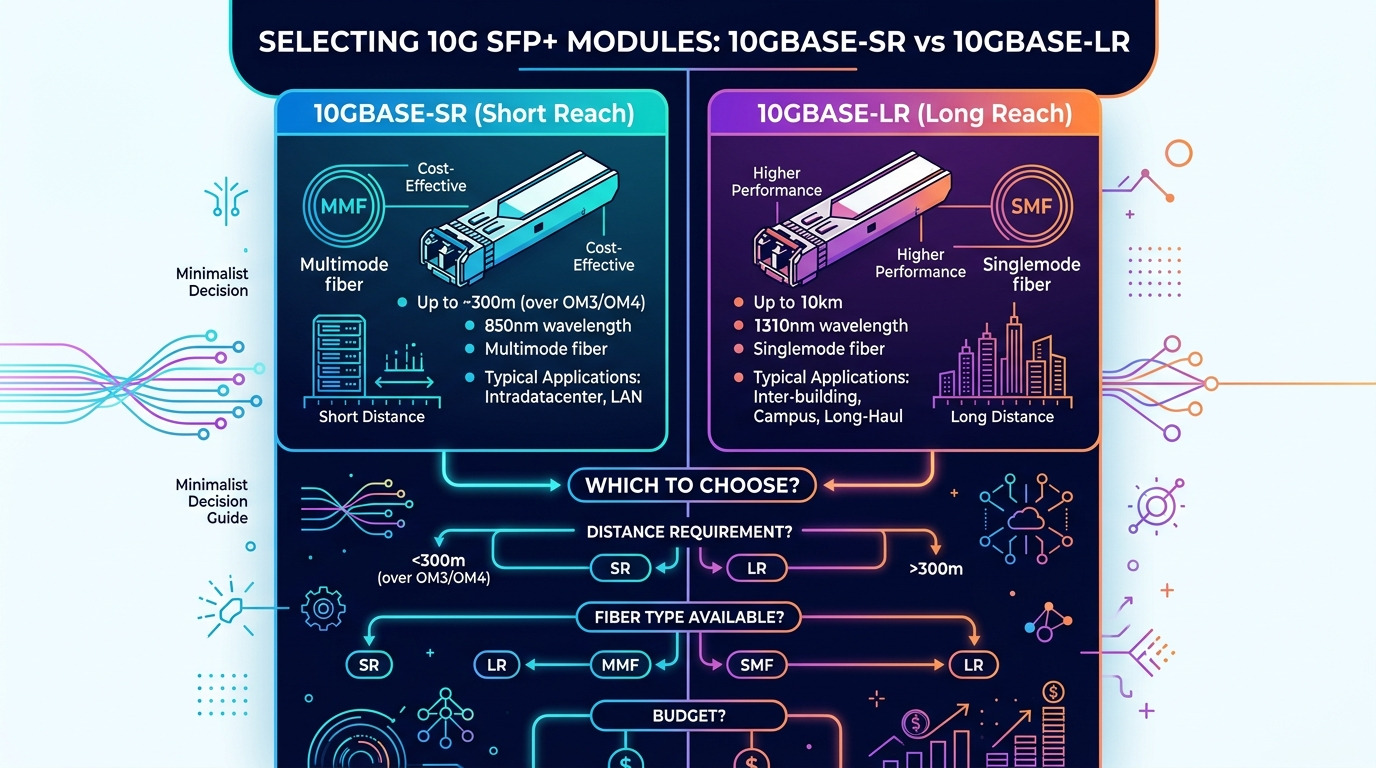
Optical outages usually cluster into a few predictable categories: bad alignment, dirty connectors, wrong fiber type, failing transceivers, power budget issues, optics compatibility quirks, and physical layer resets that never fully settle. The goal is to reduce time-to-isolate by selecting the highest-probability test at each step.
Dirty connectors and bad fiber endface cleanliness
Key signals: intermittent link flaps, sudden drop after maintenance, high error counters, and links that come up only when cables are re-seated.
Best-fit scenario: after a patch panel change or when connectors were handled without end caps.
Pros: fast to fix; low cost. Cons: often missed if you skip microscope inspection.
Power budget shortfall (loss, aging, or wrong patching)
Key signals: link stays up but errors rise, BER spikes, or the link only works at shorter patch lengths.
Best-fit scenario: mixed-length runs in a leaf-spine fabric where patch cords were extended beyond design.
Pros: quantifiable with optical power readings. Cons: requires correct reference values and careful accounting of insertion loss.
| Optics type (examples) | Wavelength | Typical reach | Connector | Operating temp | Common failure symptom |
|---|---|---|---|---|---|
| Cisco SFP-10G-SR / Finisar FTLX8571D3BCL | 850 nm | ~300 m on OM3 (varies by budget) | LC | ~0 to 70 C (module dependent) | High errors after patch changes |
| FS.com SFP-10GSR-85 (OM3/OM4 class) | 850 nm | ~400 m on OM4 (varies) | LC | ~0 to 70 C (module dependent) | Intermittent link flaps |
| 10GBASE-LR class (e.g., 1310 nm optics) | 1310 nm | ~10 km on SMF (varies) | LC | module dependent | No link after wrong fiber assignment |
Wrong fiber type or polarity mismatch
Key signals: persistent “down” state, consistent link failure after cabling changes, or link that only works on one side.
Root cause: OM3/OM4 swapped with a mismatched run, or duplex polarity reversed (common with MPO trunks).
Pros: deterministic once verified. Cons: requires correct labeling and documentation discipline.
Failing transceiver or laser/receiver degradation
Key signals: link comes and goes, optical power trends drift, or module diagnostics show rising temperature or bias current.
Standards lens: Many modules expose diagnostics via digital optical monitoring (DOM) using vendor-defined thresholds; the physical layer still follows IEEE 802.3 Ethernet electrical/optical behavior [Source: IEEE 802.3].
Pros: measurable with DOM. Cons: replacement must match wavelength and data rate class.
Incompatibility or strict optics validation on the switch
Key signals: module recognized but link fails, or link fails only on certain ports.
Best-fit scenario: mixed vendor optics during refresh cycles.
Pros: preventable with procurement rules. Cons: may require vendor-approved parts or firmware updates.
Bent cable, damaged patch cords, or connector strain
Key signals: intermittent behavior that worsens when the cable is moved, or damage visible near strain relief.
Pros: visible during inspection. Cons: can be subtle without targeted cable movement tests.
Reset loops and partial reinitialization at the physical layer
Key signals: counters increase right after link negotiation, then stabilize poorly; repeated interface flaps.
Best-fit scenario: after power events or when optics are hot-plugged during traffic.
Pros: often recoverable with a controlled sequence. Cons: can mask a deeper hardware issue if you only reboot.
Real-world deployment scenario: leaf-spine outage in a 10G fabric
In a 3-tier data center leaf-spine topology with 48-port 10G ToR switches, an outage hit 6 downlinks after a patch panel consolidation. Field checks showed the affected links were all 10G SR optics using OM3 LC duplex cabling, but the patch cords were extended by 120 m total per path. DOM readings indicated RX power near the vendor minimum, and interface counters showed a sharp rise in CRC errors while the link stayed “up” briefly. After swapping to correct-length patch cords and cleaning LC ends with a fiber scope, the links stabilized and error counters returned to baseline within 30 minutes.
Selection criteria checklist engineers use in this troubleshooting framework
- Distance vs spec reach: confirm fiber type (OM3/OM4/SMF) and total insertion loss including patch cords.
- Switch compatibility: validate transceiver class and any vendor optics validation behavior.
- DOM support and thresholds: check whether the platform exposes RX/TX power, temperature, and bias current.
- Connector type and cleanliness: plan microscope inspection before and after cleaning.
- Operating temperature: compare module and cage temperature; overheating can accelerate degradation.
- Budget and spares strategy: balance OEM optics vs third-party with known reliability history.
- Vendor lock-in risk: document part numbers and keep an approved compatibility matrix for procurement.
Common mistakes and troubleshooting fixes (what usually fails first)
Mistake 1: Cleaning without verifying with a fiber microscope
Root cause: technicians “wipe and retry” without confirming endface damage or persistent contamination. Solution: inspect before cleaning; re-inspect after cleaning; replace damaged endfaces.
Mistake 2: Swapping optics but ignoring power budget math
Root cause: the link is marginal due to excess insertion loss; a new module only delays failure. Solution: compute budget using vendor specs, measure RX power, and reduce patch length or loss.
Mistake 3: Assuming “link down” equals bad transceiver
Root cause: polarity, wrong fiber type, or a partial negotiation issue can look identical at the interface level. Solution: verify cabling polarity and fiber type; perform a controlled re-seat and port reset sequence.
Mistake 4: Over-tightening or bending cables during re-seat
Root cause: strain or microbends degrade optical performance. Solution: route cables with proper bend radius, relieve strain, and test with a known-good patch cord.
Cost and ROI note: manage TCO, not just sticker price
OEM optics often cost more, but they typically reduce compatibility surprises and may come with tighter characterization and support pathways. Third-party transceivers can be cost-effective, yet total cost of ownership depends on failure rate, return logistics, and time spent troubleshooting compatibility. As a ballpark, many 10G SR optics sit in the mid-range per module, while spares strategy and labor hours dominate TCO during outages. If your site has strict change windows, spending more upfront on validated optics and cleanliness tooling often yields faster recovery and fewer repeat incidents.
Pro Tip: In many real outages, the fastest confirmation is to compare RX power trend across multiple “known-good” ports on the same switch. If one side shows a consistent downward drift only on a specific patch panel path, you likely have loss or contamination upstream, not a random module failure.
FAQ
How do I start a troubleshooting framework when a link is flapping?
Begin with connector inspection and endface cleanliness, then check DOM RX/TX power and error counters. If the link only fails after movement or maintenance, treat it as a physical layer issue first, not a software problem.
References & Further Reading: IEEE 802.3 Ethernet Standard | Fiber Optic Association – Fiber Basics | SNIA Technical Standards
What measurements matter most for optical power budget troubleshooting?
Measure RX power at the switch, then account for insertion loss from patch cords, couplers, and splices. Use the vendor’s module minimum/maximum optical power and your fiber type assumptions to determine whether you are outside spec. [
