
technology guide: choosing transceivers for edge computing
If your edge site keeps dropping links, it is usually not the router being dramatic; it is the transceiver selection. This technology guide helps network engineers and field teams choose the right optics for edge computing environments with tight budgets, variable distances, and “please make it work by Friday” timelines. You will get a head-to-head comparison of common transceiver classes, real spec checkpoints, and troubleshooting tactics that do not require a crystal ball.
Edge computing optics: performance tradeoffs by interface speed
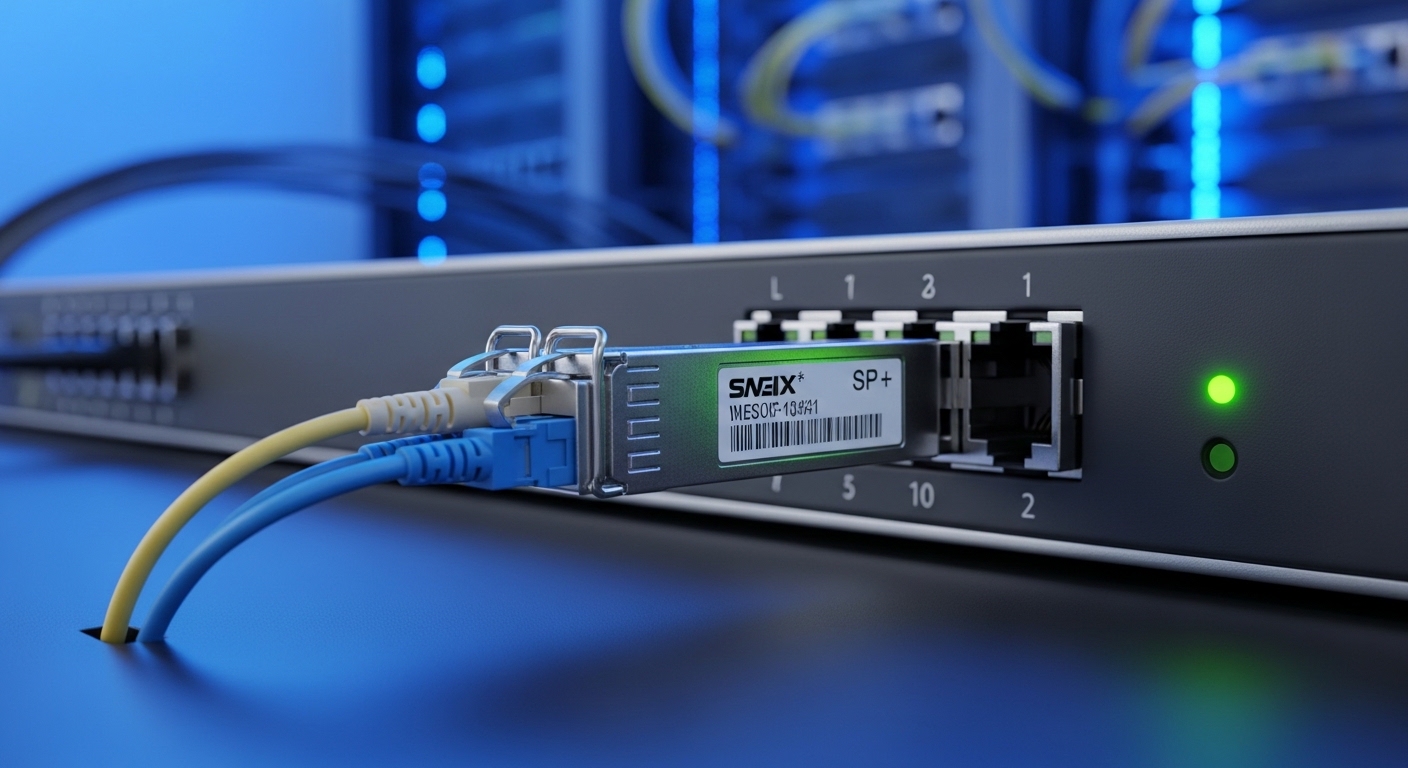
Edge sites often mix traffic patterns: bursty video uploads, telemetry, and occasional backups. That means your transceiver must handle both peak throughput and stable link behavior over the installed fiber plant. In practice, you are balancing data rate, forward error correction expectations, and how forgiving the optics are to fiber quality and connector loss.
10G SFP+ for “it already works, just faster” upgrades
For many existing edge deployments, 10G SFP+ is the pragmatic upgrade path because it fits older switch platforms and cabling ecosystems. Typical options include SR (850 nm over multimode) and LR (1310 nm over single-mode). SR is common when you want short-reach simplicity and can keep patch cords clean.
25G SFP28 for modern leaf-spine lite at the edge
25G SFP28 has become a popular edge sweet spot when you want to avoid 40G+ port costs. It is also a nice stepping stone toward 100G aggregation without immediately redesigning the entire rack. You will see both SR (multimode) and LR/ER (single-mode) variants, depending on whether the site is a campus annex or a remote cabinet.
100G QSFP28 for aggregation, not for every drawer
100G QSFP28 is great when you are aggregating multiple 25G or 10G uplinks. However, it increases optics cost per port and can require careful attention to switch port bifurcation and platform support. At the edge, it is often best reserved for sites where you truly need the uplink capacity, not as a default “because bigger is better” choice.
Pro Tip: In edge environments, the most common “speed mismatch” outage is not the transceiver itself; it is the switch setting. Verify the port mode (speed/auto-negotiation behavior) and optics type support in the vendor compatibility list before you blame the fiber. Many platforms will accept the module electrically but refuse a stable link if the negotiated mode differs from what the optics expects.
Distance and fiber type: SR, LR, and ER explained like you are on-site
Edge computing transceiver selection is mostly distance math plus fiber reality. The key fiber parameters are core size, modal bandwidth (for multimode), attenuation, and connector cleanliness. If your fiber plant is aging, you may have higher insertion loss than the original design assumed, which can turn a “works on the bench” module into a “works until you sneeze” module in the field.
Multimode SR (850 nm): fast install, strict cleanliness
For short distances—typically within a few hundred meters—SR optics over multimode fiber (MMF) are convenient. You will commonly see 10G SR and 25G SR using 850 nm. The catch is that MMF performance depends heavily on fiber grade (OM3 vs OM4) and the channel’s total optical loss and patch cord quality.
Single-mode LR/ER (1310/1550 nm): longer reach, more stable install
Single-mode transceivers (LR around 1310 nm and ER around 1550 nm depending on spec) are the go-to option for longer distances and inter-building runs. They are generally more tolerant of modal effects, but you still need to respect total loss budgets and ensure the connector endfaces are clean. In edge sites with splices and patching, single-mode is often the safer bet when you cannot guarantee MMF plant quality.
Technical specifications table: representative module classes
Use the table below as a field-oriented starting point. Always confirm exact reach and optical power budgets in the specific vendor datasheet and your switch compatibility list.
| Transceiver class | Data rate | Wavelength | Typical reach | Fiber type | Connector | DOM/monitoring | Operating temp (typ.) | Common use at edge |
|---|---|---|---|---|---|---|---|---|
| SFP+ SR (850 nm) | 10G | 850 nm | ~300 m (OM3) / ~400 m (OM4) | Multimode | LC | Often supported | 0 to 70 C or broader variants | Short in-building links |
| SFP28 SR (850 nm) | 25G | 850 nm | ~100 m (OM3) / ~150 m (OM4) | Multimode | LC | Often supported | -5 to 70 C typical | Rack-to-demarc and nearby cabinets |
| SFP28 LR (1310 nm) | 25G | 1310 nm | ~10 km | Single-mode | LC | Often supported | -5 to 70 C typical | Inter-building and remote edge runs |
| QSFP28 SR (850 nm) | 100G | 850 nm | ~100 m (OM4 class, variant-dependent) | Multimode | LC (often MPO) | Often supported | 0 to 70 C typical | High-density local aggregation |
| QSFP28 LR (1310 nm) | 100G | 1310 nm | ~10 km | Single-mode | LC | Often supported | 0 to 70 C typical | Edge-to-core uplinks |
Standards and interoperability are grounded in IEEE optics-related ecosystems and industry transceiver management conventions. For optical interface standards, refer to vendor and IEEE Ethernet guidance such as IEEE 802.3 for Ethernet PHY behavior, and the transceiver management ecosystem (SFF-8472 for SFP digital diagnostics, SFF-8436 for QSFP digital diagnostics). [Source: [Source: IEEE 802.3 Ethernet standards portal], [Source: SFF-8472 and SFF-8436 via SFF committee documentation]]
Compatibility and diagnostics: DOM, vendor lists, and what breaks links
Edge networks live on uptime, and optics compatibility can be the difference between “green lights” and a ticket storm. Many switches support pluggables via the transceiver’s serial ID and digital diagnostics. The big practical lever is DOM support because it tells you real received power and temperature trends before the link collapses.
DOM matters more in the field than in the lab
Digital Optical Monitoring (DOM) typically includes receive power (Rx), transmit power (Tx), bias current, and temperature. If you are operating at the edge where maintenance windows are rare, DOM lets you trend degradation. A common pattern is slowly decreasing Rx power due to connector contamination or fiber aging, followed by a sudden threshold crossing during peak environmental stress.
Switch compatibility: use the platform’s matrix like it is a seatbelt
Even if a transceiver is “standard,” some platforms enforce strict compatibility checks. Your safest workflow is to validate the exact module part number against the switch vendor’s compatibility list. For example, Cisco and Juniper platforms often publish tested optics lists and may require specific firmware behaviors for certain speeds or optics types.
Real-world deployment scenario: edge aggregation with mixed distances
In a 3-tier edge deployment, imagine 12 remote cabinets connected to a central edge router. Each cabinet has a ToR switch with 24x 25G downlinks to servers and 2x 25G uplinks to the aggregation point, plus occasional 1x 100G uplink for a video processing cluster. Distances vary: cabinet A is 70 m over OM4, cabinet B is 2.8 km over single-mode, and cabinet C is 8.5 km across a campus run. The winning design used 25G SFP28 SR for the OM4 short runs, 25G SFP28 LR for the 2.8 km links, and reserved 100G QSFP28 LR for the aggregation uplink because the site needed burst capacity during scheduled uploads. DOM alerts were configured so that if Rx power dropped more than a defined threshold, the team received a maintenance ticket before a total outage.
Cost and ROI: OEM vs third-party optics in edge budgets
At the edge, the optics bill is rarely just a line item; it is a long-term operational cost. OEM optics usually come with higher unit pricing but often better documentation, tighter compatibility, and predictable diagnostics. Third-party optics can be cheaper, but you must budget for validation time and potential compatibility surprises.
Typical price bands engineers actually see
Street pricing varies by region and volume, but realistic ranges for budget planning are usually:
- 10G SFP+ SR: roughly $40 to $200 per module
- 25G SFP28 SR: roughly $60 to $300
- 25G SFP28 LR: roughly $150 to $600
- 100G QSFP28 LR: roughly $800 to $2,500
TCO includes optics replacement probability, truck rolls, downtime risk, and time spent troubleshooting. A “cheap” optics purchase can become expensive if it triggers intermittent link flaps due to marginal optical power or vendor-specific EEPROM behavior.
Compatibility caveat: third-party is not automatically “plug and pray”
Some third-party modules provide excellent performance, especially when they are based on reputable OEM laser/receiver designs. But you should verify DOM format compatibility and platform acceptance. If your switch enforces strict transceiver checks, you may need specific firmware or the exact module SKU.
For ROI thinking, vendor datasheets and field reports are your friend. Also consult IEEE 802.3 expectations for PHY behavior and SFF diagnostic standards for how monitoring is expected to function. [Source: [Source: IEEE 802.3], [Source: SFF-8472 / SFF-8436 transceiver diagnostic standards]]
Selection criteria checklist: the ordered decision path for edge optics
Here is the decision checklist I use when walking into an edge install with a ladder, a label maker, and a healthy fear of bad fiber.
- Distance & fiber type: Confirm MMF grade (OM3 vs OM4) or SMF plan (single-mode). Measure or validate loss with a fiber test report.
- Required data rate: Choose 10G SFP+, 25G SFP28, or 100G QSFP28 based on actual uplink demand and switch port availability.
- Connector and polarity: Verify LC vs MPO, and confirm polarity requirements for your patch panel method.
- Switch compatibility matrix: Validate exact module part numbers for your switch model and firmware.
- DOM support and monitoring: Ensure the module provides DOM fields compatible with your switch or monitoring stack.
- Operating temperature: Prefer extended temperature optics for cabinets without reliable HVAC; verify the module spec range.
- Vendor lock-in risk: If you plan multi-vendor optics long-term, test at least one spare module per class in advance.
- Optical power budget: Check Tx/Rx power, sensitivity, and maximum link loss in the datasheet for your exact reach class.
Pro Tip: Before you buy optics, confirm your installed fiber loss includes connectors and patch cords, not just cable attenuation. A link can be within spec on paper and still fail in production because one forgotten dirty connector adds enough insertion loss to push Rx power below the receiver sensitivity threshold.
Head-to-head comparison: which transceiver class fits which edge scenario?
Let us compare the options by performance, cost pressure, cabling complexity, and operational risk. Think of this as a “choose your adventure” map, except the dragon is a flaky connector.
| Option | Best for | Reach profile | Deployment complexity | Compatibility risk | Cost pressure | Operational visibility |
|---|---|---|---|---|---|---|
| 10G SFP+ SR | Short edge links, upgrades on older switches | Hundreds of meters on OM3/OM4 | Low (LC), but MMF cleanliness critical | Low to medium | Low | Usually good with DOM |
| 25G SFP28 SR | Modern server-to-switch in edge racks | Short MMF runs (variant-dependent) | Medium (still LC, but tighter margins) | Medium | Medium | Good with DOM |
| 25G SFP28 LR | Inter-building edge connectivity | Up to multi-km on SMF | Medium (single-mode handling) | Medium to low | Higher | Excellent with DOM |
| 100G QSFP28 LR | Aggregation uplinks and high-capacity edge backhaul | Multi-km on SMF | Higher (QSFP, often more expensive optics) | Medium | High | Good with DOM |
Common mistakes / troubleshooting tips from the trenches
Here are the classic failure modes I have seen in edge deployments, along with root causes and fixes. If you have ever stared at a link light that refuses to stay lit, you are in good company.
Wrong fiber grade assumptions (OM3 vs OM4)
Symptom: Link flaps at high temperature or after a site visit; it may work during commissioning and fail later. Root cause: The design assumed OM4 but the installed plant is OM3 or mixed-grade with bad patch cords. Solution: Pull the fiber test results (OTDR or certified insertion loss) and replace patch cords or re-terminate with verified OM4; consider single-mode LR optics if margins are thin.
Dirty connectors and endfaces
Symptom: DOM shows low Rx power; link intermittently drops during vibration or temperature shifts. Root cause: Contamination on LC endfaces or MPO trunk connectors increases insertion loss and scatter. Solution: Clean with approved fiber cleaning tools, inspect with a scope, and re-check link status and DOM thresholds after cleaning.
Switch compatibility mismatch despite “it plugs in”
Symptom: Module is detected but link never comes up, or it comes up at a downgraded mode. Root cause: Platform firmware enforces module compatibility or expects specific electrical/optical parameters. Solution: Confirm the exact module part number in the vendor compatibility matrix; update switch firmware if the vendor recommends it, and replace with a supported SKU.
Polarity errors on patch panels
Symptom: Total link failure after a re-cabling event; DOM may show Rx but no traffic. Root cause: Transmit and receive fibers are swapped, especially in MPO or pre-terminated assemblies. Solution: Verify polarity with a polarity tester or known-good mapping; re-terminate or re-route jumpers according to the patching standard used.
Temperature and power budget surprises
Symptom: Works in the cool morning, fails in afternoon heat. Root cause: Optics are within spec on the datasheet but your real cabinet temperature exceeds the module’s safe operating range or your link loss is near the limit. Solution: Use extended temperature optics, improve airflow, and verify link loss against the datasheet’s maximum channel loss.
Which Option Should You Choose?
Pick based on your edge distance, existing switch platform, and how much pain you want to endure during maintenance. If you have short in-building links and older gear, choose 10G SFP+ SR to minimize risk and cost. If you are modernizing server connectivity at the edge and your MMF is certified OM4, choose 25G SFP28 SR; if you are crossing buildings or dealing with uncertain fiber quality, choose 25G SFP28 LR. For aggregation where you truly need uplink capacity, select 100G QSFP28 LR and plan spare optics ahead of time.
Next step: audit your current fiber loss and switch optics compatibility, then build a “known good optics” spare kit using the exact module SKUs listed in your platform documentation. Use fiber-optic-troubleshooting-checklist to tighten your diagnostic workflow before the next edge deployment.
FAQ
Q: What matters more for edge optics, reach or switch compatibility?
Both matter, but compatibility is the gatekeeper. A module that is out of reach will fail; a module that is incompatible may never establish a stable link. Always verify the exact part number against your switch vendor’s compatibility matrix first, then validate reach using the datasheet and certified fiber loss reports.
Q: Can I mix OEM and third-party transceivers in the same switch?
Often yes, but do not assume. Mixing can work if both modules meet the same optical class and the switch supports them, yet monitoring behavior and DOM field interpretation can differ. Test at least one spare per optics class and confirm DOM visibility in your monitoring tool.
Q: How do I know whether I should use SR or LR at the edge?
If your certified distance fits within SR limits and your MMF plant is OM4 with low end-to-end loss, SR is convenient. If you have longer runs, inter-building links, or uncertain MMF quality, LR over single-mode usually reduces operational risk even though the optics cost more.
Q: What DOM metrics should I alert on?
Start with Rx power thresholds and temperature. If your switch exposes bias current and Tx power, trend those too, but Rx power is usually the most actionable signal for impending link degradation. Calibrate thresholds based on your normal operating baseline after commissioning.
Q: Do I need special cleaning tools for LC optics?
Yes. Use an approved fiber cleaning kit and inspect with a scope; visual cleanliness is not the same as optical cleanliness. Contamination is one of the most common causes of intermittent edge outages.
Q: Are extended temperature optics required for outdoor edge cabinets?
Usually, yes, especially if the cabinet sees large day-night swings or limited HVAC. Check your module’s rated temperature range and compare it to worst-case cabinet conditions, not average weather.
Author bio: I am a veteran network admin who has installed and debugged edge backhaul links across messy fiber plants, from patch panels to hand-spliced runs. I write like a field engineer: with measured loss budgets, switch compatibility gotchas, and just enough humor to survive the pager.
