
If you run a wireless sensor network that is powered by harvested energy, your budget is not just money; it is also joules per packet. This article helps field engineers and network owners choose a WSN fiber transceiver that can survive low-power realities while still meeting Ethernet timing, link budgets, and environmental constraints. You will get a step-by-step implementation plan, a specs comparison table, and practical troubleshooting that does not rely on wishful thinking.
Prerequisites: what you must measure before buying a WSN fiber transceiver
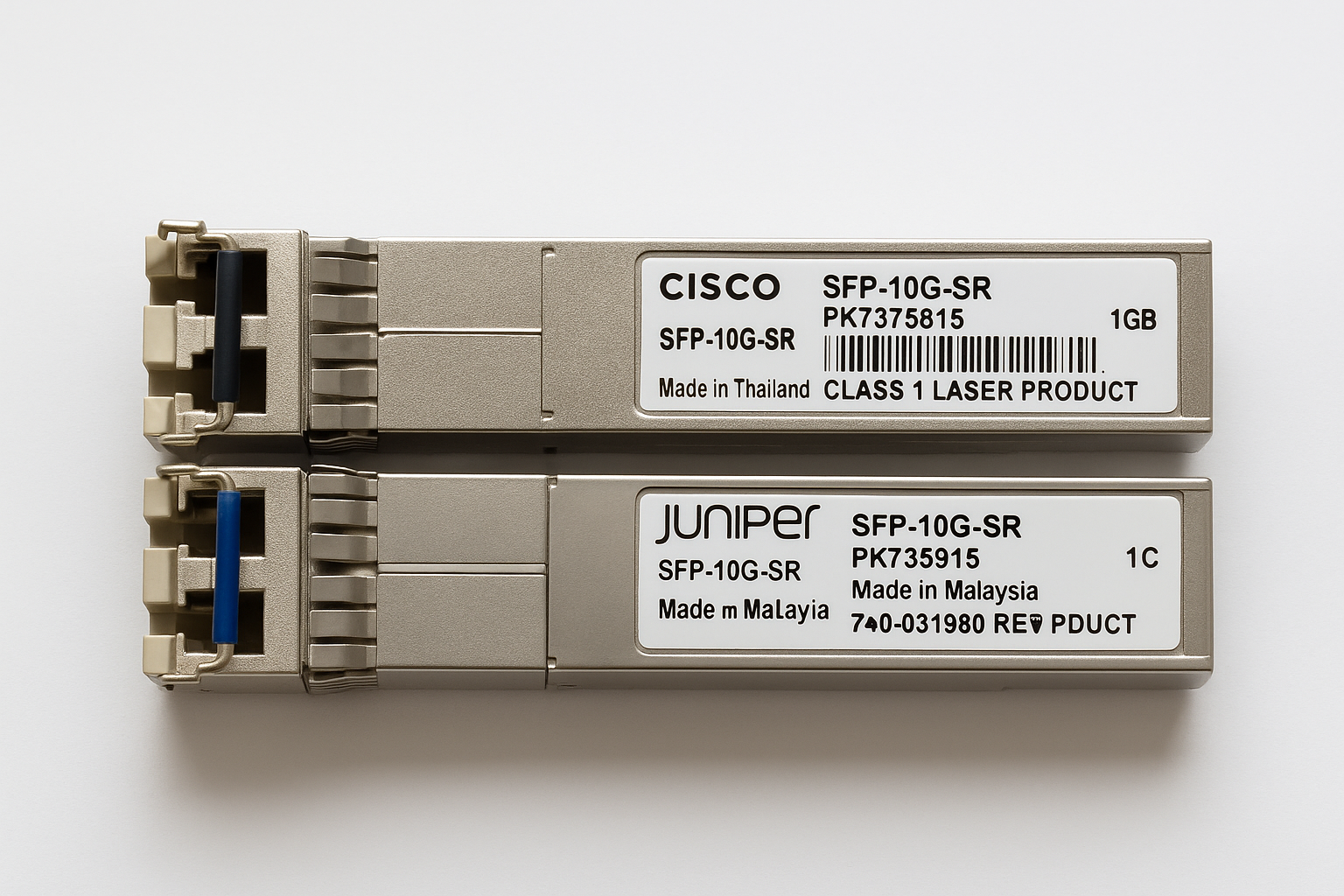
Before you pick optics, you need numbers. Optical power and receiver sensitivity are only half the story; harvested-energy nodes also care about startup current, LED/laser drive behavior, and how often you can afford to re-sync links. Also, confirm your network interface type (SFP/SFP+/SFP28/GBIC) and whether your switch supports DOM (Digital Optical Monitoring).
Inventory your link endpoints
Write down the physical ports and media on both ends. For example: an access switch that accepts SFP+ (10G) and a remote gateway that accepts SFP+ or SFP (depending on your design). Record connector type (LC vs SC), fiber type (single-mode vs multi-mode), and the planned topology (point-to-point vs star).
Expected outcome: a one-page “port map” with port numbers, transceiver form factor, and fiber type per hop.
Measure the real distance and fiber loss budget
Do not guess. Measure or verify span length and include conservative margins for splice loss, patch cords, and aging. A typical field worksheet includes: fiber attenuation (dB/km), splice loss (dB per splice), connector loss, and a safety margin (often 3 to 6 dB).
Expected outcome: a link budget spreadsheet with worst-case received power estimate.
Define the energy-harvesting duty cycle
Energy-harvesting systems often operate in bursts: wake up, transmit, then sleep. Determine your active time window and how quickly you must establish a link. If your node wakes for 200 ms every 10 seconds, you may not want optics that behave like drama queens during long power-down cycles.
Expected outcome: a duty-cycle profile that maps to transceiver startup and re-link behavior.
- Step 4: Confirm Ethernet standard expectations (e.g., 1G/10G) and interface speed.
- Step 5: Decide whether you need DOM readings for monitoring and remote diagnostics.
- Step 6: Check environmental constraints (temperature, vibration, humidity) and enclosure thermal design.
Expected outcome: a requirements list you can actually enforce at procurement time, not just admire in a spreadsheet.
How a WSN fiber transceiver affects energy-harvesting sensor nodes
A fiber transceiver is not just optics; it is a bundle of analog electronics, laser/LED drivers, and often an integrated serializer/deserializer. In energy-harvesting designs, the power you burn during link establishment can be a meaningful fraction of your total budget. You should also consider that some modules draw more power when actively transmitting than when idle, and that sleep modes are not always standardized across vendors.
Match optics to your data rate and link type
For sensor networks, many deployments use low throughput but still need reliable timing and low latency. If you are using a gateway that aggregates sensor traffic into Ethernet, you may choose 1G or 10G depending on backhaul density. The key is that the transceiver must match the switch port speed and negotiate correctly over the supported standard.
Use a link budget, not vibes
Laser safety classifications, wavelength choice (850 nm for short-reach; 1310/1550 nm for longer reach), and receiver sensitivity determine whether the link will stay up under real conditions. For energy-harvesting nodes, if the link fails often, you pay the energy penalty of repeated retries and re-authentication at higher layers.
Pro Tip: Many field failures blamed on “bad fiber” are actually transceiver vendor mismatches or missing DOM compatibility. If your switch expects DOM reporting for alarms and link suppression, a non-compatible module can cause flapping even when the raw optical budget looks fine. Verify DOM support during selection, not after the installation crew has already moved on to the next job.
Specs that matter: choosing wavelength, reach, connector, and power envelope
Below is a comparison of common transceiver families that teams actually deploy in sensor network backhauls and remote gateways. Your exact model should come from the vendor datasheet, but the table gives you the practical selection axes: wavelength, reach class, connector, operating temperature, and typical power behavior.
| Transceiver example | Data rate / Form factor | Wavelength | Reach class | Connector | Operating temp | Power notes (practical) |
|---|---|---|---|---|---|---|
| Cisco SFP-10G-SR | 10G / SFP+ | 850 nm | Up to 300 m on OM3/OM4 | LC | Commercial/Industrial varies by SKU | Higher active TX power than passive sleep; plan duty-cycle |
| Finisar FTLX8571D3BCL | 10G / SFP+ | 850 nm | Up to ~300 m (MMF) | LC | Standard industrial options vary | Laser/driver power depends on lane activity |
| FS.com SFP-10GSR-85 (example) | 10G / SFP+ | 850 nm | ~300 m on OM4 typical | LC | Commercial/industrial versions | Third-party modules can vary; validate with your switch |
| 10G SFP+ LR (example class) | 10G / SFP+ | 1310 nm | Up to 10 km on SMF | LC | Wider range in industrial SKUs | Usually fewer re-link events over distance; power vs reach trade |
In practical WSN backhaul designs, 850 nm (SR) is common for short runs from outdoor enclosures to a nearby gateway. For longer spans between buildings, 1310 nm (LR) or 1550 nm (ER/ZR classes) may be justified, especially when you want fewer maintenance visits and lower probability of marginal links.
Implementation plan: deploy your WSN fiber transceiver without wasting energy
This section is a numbered, field-style execution guide. It assumes you are installing a fiber backhaul from energy-harvesting sensor nodes to a gateway that uplinks to a switch.
Pre-validate transceiver compatibility with the switch
Before climbing ladders, confirm the switch firmware supports your module type. Check whether the switch enforces vendor whitelists or requires a specific diagnostic page for alarms. If you have access, test two modules: one from your planned procurement source and one known-good vendor unit.
Expected outcome: you avoid the classic “it lights up but the port is unhappy” scenario.
Confirm DOM and monitoring behavior
If your switch supports DOM, ensure the transceiver reports temperature, supply voltage, laser bias, and received optical power. Some monitoring dashboards depend on DOM thresholds; missing fields can trigger link-disable logic or SNMP alerts that look like network outages.
Expected outcome: stable port status and meaningful telemetry.
Set up link bring-up testing and verify error counters
Bring up the link and watch interface counters. On many switches you can check optical and Ethernet errors. If you see CRC errors, FCS drops, or frequent link renegotiation, treat it as a fiber or optics problem, not “traffic.”
Expected outcome: clean link with minimal errors under realistic traffic bursts.
Optimize gateway timing for energy-harvesting nodes
In bursty systems, coordinate wake windows so that the gateway is ready to forward immediately. If the gateway’s transceiver powers up later than the node’s transmission, you can lose packets and waste energy on retries. Where possible, keep the gateway side continuously powered and let the sensor nodes sleep.
Expected outcome: fewer retransmissions and lower energy per delivered payload.
- Step 13: Validate connector cleanliness and mating depth (especially LC).
- Step 14: Verify optical receive power stays above minimum sensitivity with margin across temperature.
- Step 15: Document the exact part numbers, serials, and DOM readings for future swaps.
Selection criteria checklist: what engineers weigh for WSN fiber transceivers
Use this ordered checklist. It is short enough to follow during procurement, and strict enough to prevent “surprise features” in the field.
- Distance and fiber type: choose SR vs LR vs ER classes based on measured loss and connector/splice budget.
- Data rate and interface type: confirm SFP vs SFP+ vs other form factors match the switch.
- Budget and TCO: include failure rate, spares strategy, and labor cost for truck rolls.
- Switch compatibility: verify firmware compatibility and whether vendor locking or DOM expectations exist.
- DOM support: ensure your monitoring stack can read power and temperature diagnostics.
- Operating temperature: outdoor sensor gateways often need industrial SKUs with guaranteed performance across a wide range.
- Vendor lock-in risk: weigh OEM pricing vs third-party availability, while planning a test-and-qualify step.
- Energy behavior under duty cycle: confirm startup and link re-establishment behavior aligns with your wake schedule.
Common mistakes and troubleshooting tips (top failure modes)
Fiber optics rarely fail like movies. They fail like accountants: quietly, consistently, and in ways that cost you time. Here are three high-frequency pitfalls with root causes and solutions.
Troubleshooting failure point 1: Link flaps under temperature swings
Root cause: a marginal optical budget combined with temperature-dependent laser output and receiver sensitivity; also possible connector contamination. If your received power is near the threshold, the link may drop when enclosure temperature changes.
Solution: measure DOM received optical power at cold and warm conditions; clean LC connectors using proper inspection and cleaning tools; replace questionable patch cords; add optical margin where needed.
Troubleshooting failure point 2: Port shows “up” but you see CRC errors
Root cause: bad fiber termination, micro-bends, or a mismatch between intended optics and actual fiber type. Less glamorous: dust on end faces can cause elevated error rates even if the link appears alive.
Solution: inspect connectors with a microscope/inspection scope; confirm correct fiber grade (OM3 vs OM4 vs single-mode); re-terminate if needed; check interface error counters after re-cleaning.
Troubleshooting failure point 3: After power cycling, link never stabilizes
Root cause: incompatibility between switch firmware expectations and transceiver behavior during startup, especially when gateway power is sequenced differently than sensor transmissions. Also possible: transceiver is not rated for your temperature range.
Solution: test power sequencing; ensure both sides are powered long enough for optics to stabilize; choose an industrial-rated module; validate DOM and alarms so the switch does not administratively suppress the port.
Cost and ROI note: OEM vs third-party in energy-harvesting deployments
Pricing varies by speed and reach, but as a realistic planning range, many 1G/10G SFP/SFP+ modules land roughly in the $40 to $150 per unit range for common short-reach variants, with OEM units often at the higher end. Third-party modules can be cheaper, but the ROI depends on your qualification process: a failed module can cost far more than the savings once you include labor and truck rolls.
TCO should include: spare inventory (how many modules you keep), expected replacements over temperature cycles, and monitoring time. In energy-harvesting networks, the hidden cost is energy waste from repeated link retries; reducing link flaps can improve delivered data per joule, which is a business metric disguised as a physics problem.
Standards and authority references (for sanity, not superstition)
This article aligns with widely used Ethernet PHY behaviors and optical module practices. For deeper protocol context, review IEEE Ethernet specifications and vendor datasheets for your exact part numbers.
FAQ
Q1: What kind of WSN fiber transceiver works best for short outdoor runs?
For many deployments, an 850 nm SR SFP+ class transceiver with LC connectors is common for runs around a few hundred meters on OM3/OM4. The best choice depends on your measured loss budget and how cleanly you can maintain connectors in the field.
Q2: Do energy-harvesting sensor nodes need fiber transceivers on every node?
Usually, no. Common architectures place a fiber-connected gateway near the cluster and let sensor nodes communicate wirelessly or via short local links. The fiber transceiver then sits on a continuously powered gateway, reducing startup energy penalties.
Q3: How important is DOM support for troubleshooting?
It is very important in practice because DOM gives you received power, laser bias, and temperature telemetry. If your monitoring system depends on DOM thresholds, a non-DOM or partially compliant module can cause false alarms or suppress port behavior.
Q4: Can I mix OEM and third-party WSN fiber transceiver modules?
You can, but you should qualify them with your specific switch model and firmware. Compatibility issues often show up as port flaps, missing diagnostic fields, or higher error counters even when optical levels look acceptable.
Q5: What should I check first when a fiber link is down?
Start with connector cleanliness and fiber polarity/termination, then verify the optical budget using measured received power. After that, check switch port settings and DOM alarms, because sometimes the port is up but administratively unhappy.
Q6: What operating temperature range should I plan for?
Plan for the enclosure and ambient extremes where the transceiver will live. For outdoor gateways, industrial-rated optics (with guaranteed performance across wider temperature bands) often reduce mysterious link drops that happen only on cold mornings or hot afternoons.
Implementation success comes from matching optics to distance, qualifying compatibility with your exact switch, and engineering energy usage around bursty sensor behavior. Next step: review fiber transceiver link budget for sensor networks|link-budget methods for sensor-network optics and build your own measurement-driven worksheet.
Author bio: I am a practicing engineer who has deployed fiber uplinks from field cabinets and tested optical modules under real duty cycles and temperature swings. I also review vendor datasheets and Ethernet behavior in the lab, because “it should work” is not a deployment plan.
