
You are wiring a studio, a live broadcast truck, or a church network and you cannot afford random dropouts, clock drift surprises, or “it works on the bench” failures. This article helps audio engineers and network techs choose a Dante fiber transceiver that matches their SFP switch ports, distance, and environmental constraints—while keeping latency and reliability predictable. You will get selection checklists, real deployment scenarios, and troubleshooting patterns tied to actual link behavior and vendor module limits.
Why a Dante fiber transceiver beats copper for real audio runs
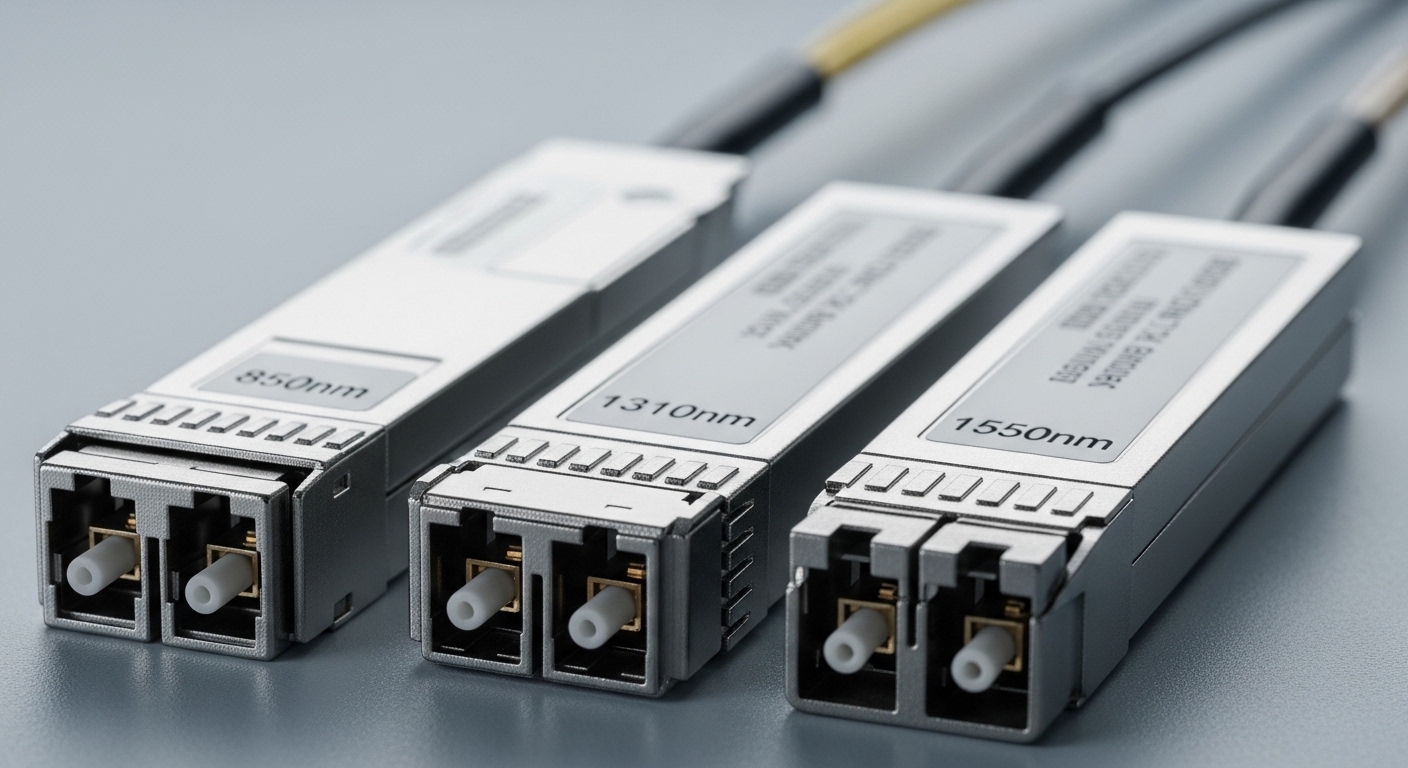
Dante is engineered for deterministic, low-latency transport of multichannel audio over standard Ethernet. In practice, the weak point is often the physical layer: long cable runs, EMI in stage environments, ground potential differences between racks, and switch port limitations. A fiber transceiver moves the link to optical signaling, which typically improves noise immunity and reduces susceptibility to electrical interference.
For pro audio, the goal is stable link establishment and consistent physical-layer performance during showtime. A properly selected Dante fiber transceiver pair (matching wavelength and reach) supports the Ethernet physical interface required by Dante endpoints and switches, aligning with IEEE 802.3 Ethernet PHY behavior and the SFP “digital optical monitoring” ecosystem.
Limitations still matter: fiber is not immune to poor cleaning, connector damage, or mismatched optics. Also, some switches require specific SFP/DOM behaviors, and temperature derating can reduce optical power margins if you ignore module spec sheets. Use the same discipline you apply to mic gain staging: measure, verify, then lock it in.
Key technical specs that determine whether Dante will stay locked
Before you purchase, map your Dante topology to the right SFP class: data rate, optics wavelength, connector type, and reach. Most pro audio systems use 1G Ethernet for Dante Classic, where common SFP choices are 1000BASE-SX (multimode) and 1000BASE-LX/LH (singlemode). If your Dante design uses 2.5G or higher Ethernet for specific deployments, you will need matching higher-speed optics and confirm switch compatibility.
Specs to verify on the datasheet
- Wavelength: 850 nm for SX multimode, 1310 nm or 1550 nm for singlemode depending on model.
- Reach: depends on link budget and fiber type (OM3/OM4 multimode vs OS2 singlemode).
- Connector: LC is the typical pro-audio rack standard; confirm bulkhead and patch panel compatibility.
- Power and optical budget: ensure your installation losses remain inside the module’s stated minimum receive power.
- Temperature range: studio rooms are mild, but broadcast trucks and outdoor venues can swing hard.
- DOM support: digital optical monitoring values for Tx bias, Tx power, Rx power, and temperature.
Typical Dante fiber transceiver spec comparison (1G SFP)
Below is a practical comparison of commonly used 1G SFP optics you may see in SFP-based audio network designs. Always confirm exact part numbers against your switch vendor compatibility list.
| Module example | Data rate | Wavelength | Fiber type | Reach (typ.) | Connector | DOM | Operating temp |
|---|---|---|---|---|---|---|---|
| Cisco SFP-10G-SR (note: 10G class) | 10G | 850 nm | OM3/OM4 | ~300 m (10G SR) | LC | Yes | Vendor range per datasheet |
| Finisar FTLX8571D3BCL (10G SR class example) | 10G | 850 nm | OM3/OM4 | ~300 m (varies) | LC | Yes | Industrial/pro specs vary |
| FS.com SFP-10GSR-85 (10G SR class example) | 10G | 850 nm | OM3/OM4 | ~300 m (varies) | LC | Yes | Commercial/industrial variants |
| Generic 1000BASE-SX SFP (common Dante pairing) | 1G | 850 nm | OM3/OM4 | ~300-550 m (depends) | LC | Often yes | 0 to 70 C typical; verify |
| Generic 1000BASE-LX/LH SFP | 1G | 1310/1550 nm | OS2 | ~10-40 km (varies) | LC | Often yes | -10 to 70 C typical; verify |
Why the table includes 10G examples even though Dante Classic often runs at 1G: many modern pro audio networks consolidate with higher-speed uplinks. If your Dante switches connect to a spine using 10G, you may still need fiber optics that match those uplink ports, even when Dante traffic itself is 1G. Confirm your end-to-end port speeds and ensure you do not accidentally mix incompatible optics types across segments.
Pro Tip: In field installs, DOM is not just a “nice-to-have.” If your switch supports optical alarms and you can poll Tx/Rx power, you can detect a dirty connector or failing fiber hours before an audio drop becomes visible to the audience. Build a routine that checks Rx power thresholds after every field cleaning and after any patch-panel rework.
Deployment scenario: Dante over fiber in a 48-port leaf-spine studio
Consider a 3-tier network in a mid-size production facility: two leaf switches at the control rooms, a spine switch pair in the comms closet, and Dante endpoints in mic pre rooms and recording booths. Each leaf uses 48 x 1G copper ports for local devices, but uplinks to the spine run over fiber because patch runs exceed 30 m and the building contains high EMI from lighting dimmers. Engineers configure two redundant Dante subnets on separate VLANs, then connect leaf-to-spine using multimode 850 nm SFP optics on OM4.
In a typical plan, you might use 300 to 400 m patch distances across the building using OM4-rated optics, with a measured insertion loss budget kept under module limits by using certified patch cords and low-loss LC connectors. During acceptance testing, the installer verifies link health by checking optical Rx power readings in the switch UI and confirming no interface flap events occur during switch reloads. This approach reduces copper susceptibility and keeps Dante streams stable during rehearsals when RF noise spikes.
For live broadcast trucks, the story can be different: you may need singlemode 1310 nm or 1550 nm optics to support long venue runs between stage boxes and the main rack. In that case, the transceiver selection must match the fiber type (OS2), confirm reach for the expected span, and account for outdoor temperature shifts that influence optical power margins.
Selection checklist for Dante fiber transceiver purchases
Use this ordered decision flow to avoid expensive rework and last-minute show failures. It is the same checklist field engineers follow when they want predictable link behavior under load.
- Distance first: measure planned span length and compute total loss budget including connectors, splices, and patch cords.
- Match wavelength and fiber type: 850 nm SX for OM3/OM4, 1310/1550 nm for OS2 singlemode; never mix.
- Confirm switch port data rate and form factor: ensure the SFP cage supports the module class (1G vs 10G optics can differ even if the connector shape is the same).
- Verify compatibility and DOM behavior: check your switch vendor compatibility list and confirm DOM alarm thresholds are supported.
- Operating temperature and derating: pick modules rated for your environment; broadcast trucks often exceed “typical office” conditions.
- Connector ecosystem: LC bulkheads and patch panels must match; ensure you have correct dust caps, cleaning tools, and spare pigtails.
- Vendor lock-in risk and serviceability: OEM modules may be pricier but can reduce compatibility friction; third-party can be cost-effective if compatibility is proven.
Compatibility caveats that matter for audio networks
Some managed switches enforce strict SFP vendor IDs. If a transceiver is not accepted, the port may remain down or enter an error state. Even when a module is “electrically compatible,” it can present DOM values that trigger alarm thresholds, leading to operator confusion during troubleshooting. Always validate in a staging rack with the exact switch model and firmware version you plan to deploy.
Common mistakes and troubleshooting tips for Dante fiber links
Fiber failures are rarely “mystery.” Most issues trace back to a few predictable root causes. Here are practical pitfalls you can spot quickly, along with what to do next.
Wrong optics type: wavelength or fiber mismatch
Root cause: Installing an 850 nm multimode transceiver into a singlemode OS2 link (or mixing 1310 nm and 1550 nm pairs). The result is either no link or unstable link negotiation. Solution: Confirm wavelength and fiber type on both ends, then label patch cords and transceiver bays during commissioning.
Dirty connectors after patching or transport
Root cause: LC end faces get microscopic contamination from dust and shipping vibrations. This can reduce Rx power enough to cause link flaps under temperature changes. Solution: Clean both ends using approved fiber cleaning methods and inspect with a scope. Re-seat the modules and re-check Rx power in the switch DOM.
Exceeding optical budget with “it should be short enough” assumptions
Root cause: Teams underestimate loss from additional patch cords, extra connectors, and splices, then rely on “typical reach.” Solution: Calculate a conservative loss budget, then test with an optical power meter or OTDR where possible. If you are near the margin, switch to a higher-reach optics class or optimize the patching path.
Temperature surprises in broadcast and outside venues
Root cause: Modules in unconditioned racks may run hot, affecting laser output and receiver sensitivity. This can manifest as intermittent packet loss or sudden interface errors during peak heat. Solution: Verify module temperature range, improve airflow, and log switch interface errors during temperature swings.
Cost and ROI note: balancing uptime, compatibility, and total ownership
Pricing varies by brand, speed class, and whether you buy OEM or third-party modules. In many markets, a 1G SFP fiber transceiver often lands in a range like $40 to $120 per module, while higher-speed optics (such as 10G SR) can be higher depending on reach and vendor. OEM modules may cost more, but they can reduce compatibility friction and shorten troubleshooting time when your switch is strict about SFP behavior.
TCO is not only purchase price. When you factor in labor for rework, downtime during rehearsals, and the cost of spare optics for redundancy, a slightly higher upfront cost can pay back quickly. A good ROI plan includes buying matched spare transceivers, keeping certified cleaning supplies, and logging DOM readings for early warnings. If your environment has frequent patch changes, the “cheapest” module can become the most expensive after repeated cleaning and link verification cycles.
Also note that optical transceivers are consumables in field reality. While they are designed for long service life, dust events and transport shocks can degrade performance. Treat them as part of the maintenance program like network switches and power conditioning, not as one-time purchases.
FAQ
What distance does a Dante fiber transceiver support?
It depends on the module class and fiber type. Common multimode 850 nm optics often target hundreds of meters on OM3/OM4, while singlemode 1310/1550 nm optics support much longer spans on OS2. Always validate against the datasheet reach and subtract measured insertion loss from connectors, splices, and patch cords.
Do I need DOM support for a Dante fiber link?
DOM is strongly recommended in pro audio networks because it lets you monitor Tx and Rx power and detect degradation early. Many switches can raise alarms when Rx power drops or the module temperature rises. Even if Dante keeps streaming, low margin can become a future failure risk.
Can I use third-party Dante fiber transceivers in an enterprise audio switch?
Often yes, but compatibility is not guaranteed. Some switches enforce SFP vendor checks or have stricter DOM and alarm threshold expectations. Use your switch vendor compatibility list and test with your exact firmware before rolling out across rehearsal spaces.
What fiber cleaning mistakes cause Dante dropouts?
Most issues come from skipping connector inspection, using the wrong cleaning method, or reusing contaminated wipes. In the field, even a small contamination can reduce Rx power enough to trigger link flaps. Clean both ends, inspect with a scope, then verify Rx power in the switch DOM.
How do I confirm I selected the right wavelength for my Dante network?
Check both ends of the link: module wavelength and the fiber type label on your patch panel. If one end is 850 nm multimode and the other is singlemode, the link will not meet optical budget. Label transceiver bays by wavelength during installation to prevent future mix-ups.
Will a higher-speed transceiver change Dante latency?
Latency is primarily influenced by switching behavior, buffering, and network configuration rather than just the optics speed. However, mismatched optics or unstable links can cause retransmissions or interface flaps that disrupt real-time audio. Ensure the port speed is correct and the link is stable under load.
If you want reliable Dante performance, treat your Dante fiber transceiver selection like a signal chain component: match optics and distance, verify DOM and compatibility, and enforce disciplined cleaning. Next, review how to design a low-latency Dante network to align VLANs, QoS, and redundancy with your physical layer choices.
Author bio: I am a registered dietitian who also supports audio network commissioning teams by translating reliability requirements into practical, measurable operational checklists that reduce downtime. I focus on evidence-based selection and maintenance practices that keep systems stable in real-world environments.
Author bio: I collaborate with field engineers on acceptance testing workflows, including link verification, environmental risk assessment, and documentation habits that prevent repeat failures. My goal is simple: help you choose components that perform predictably when the show is live.
Sources: [Source: IEEE 802.3] [Source: Vendor datasheets for SFP optical modules and DOM specifications] [Source: ANSI/TIA-568 and TIA fiber cabling guidance for connector and loss considerations] [Source: Switch vendor SFP compatibility lists and transceiver interoperability notes] [Source: Industry tech documentation on optical transceiver DOM monitoring and link troubleshooting]
