If your OpenStack or VMware NSX environment is running VXLAN overlays, the fiber module you pick directly affects latency stability, link uptime, and maintenance cost. This article helps network and procurement teams compare common 10G/25G/40G optics used with SFP-style ports for leaf-spine and ToR aggregation. You will get a spec comparison, real deployment considerations, a selection checklist, and troubleshooting pitfalls that commonly surface during commissioning and upgrades.
VXLAN fiber module performance: reach, optics type, and link stability
For VXLAN overlay networks, the physical underlay must deliver consistent throughput and low error rates because encapsulated traffic increases frame size and sensitivity to loss. In practice, most deployments use multimode or single-mode optics depending on rack-to-rack distance and the underlay topology. The key procurement question is whether you are buying an optics class that meets your distance budget while staying within the switch’s electrical and optical tolerances.
What changes under VXLAN overlays
VXLAN adds overhead (Ethernet plus UDP plus VXLAN headers), which increases the likelihood of microbursts and buffer pressure. While VXLAN itself does not change wavelength or receiver sensitivity, any marginal optics—especially those with high module temperature or aging—can raise bit error rate and trigger retransmissions. For engineers, the measurable symptoms are CRC errors, FCS drops, and intermittent link flaps during temperature swings.
Spec comparison: typical SFP-based optics candidates
Below is a head-to-head comparison of commonly procured optical options used in overlay-ready underlays. Exact part numbers vary by vendor, but the physics and compliance expectations are consistent across IEEE 802.3 transceiver standards.
| Option (typical form factor) | Wavelength | Reach (typical) | Data rate | Connector | Receiver power class | Operating temp range | Notes for VXLAN underlay |
|---|---|---|---|---|---|---|---|
| 10G SR (SFP+) | 850 nm | Up to 300 m over OM3 | 10G | LC | Class 1 LED/laser safety | 0 to 70 C (typical) | Best for ToR-to-aggregation inside buildings |
| 10G LR (SFP+) | 1310 nm | Up to 10 km | 10G | LC | Higher budget for SMF | -5 to 70 C (typical) | Use for longer underlay spans and campus segments |
| 25G SR (SFP28) | 850 nm | Up to 100 m over OM4 | 25G | LC | Receiver sensitivity aligned to 25GBASE-SR | 0 to 70 C (typical) | Common in modern leaf-spine overlays |
| 40G SR4 (QSFP+) | 850 nm | Up to 150 m over OM3 | 40G | MPO | Multi-lane optics | 0 to 70 C (typical) | Used when upgrading aggregation without full port repurpose |
Standards alignment matters. IEEE 802.3 defines optical interfaces and electrical requirements for 10GBASE-SR, 25GBASE-SR, and related link classes, while vendor datasheets define minimum receiver sensitivity and maximum transmit power. For procurement, validate the module’s compliance and the switch’s transceiver compatibility list before ordering large quantities. [Source: IEEE 802.3 Ethernet Working Group]

Cost and ROI: OEM vs third-party VXLAN fiber module economics
Optics procurement is rarely just unit price. Total cost of ownership (TCO) includes failure rate, warranty coverage, spares strategy, and the labor cost of swapping modules during maintenance windows. In VXLAN-heavy environments, link churn is expensive because it can cascade into VM network disruptions, BGP/EVPN adjacencies (if present), and orchestration retries.
Typical price ranges you can budget
In many enterprise purchasing cycles, OEM optics often carry a premium for guaranteed compatibility. Third-party modules can cut direct cost, but you must factor in acceptance testing and the risk of incompatibility with specific switch firmware builds.
- 10G SFP+ SR 850 nm: often budget roughly in the tens of dollars to low hundreds per module depending on vendor and temperature grade.
- 25G SFP28 SR 850 nm: commonly higher than 10G SR, and price swings are more sensitive to supply and optics yield.
- Longer reach single-mode (10G LR or 25G LR variants): typically the highest cost class because of tighter laser and receiver requirements.
ROI levers that procurement can control
ROI improves when you standardize on a small number of approved optics SKUs across the underlay. That reduces training time for field techs, speeds RMA handling, and improves spares forecasting. Also consider power: optics draw is usually modest, but at scale (hundreds of ports), you can see measurable differences in switch thermal margins and fan curves.
For compatibility verification, use the switch vendor’s transceiver matrix and confirm DOM behavior (Digital Optical Monitoring). DOM telemetry often feeds monitoring systems and alerts on bias current and optical power degradation. [Source: Cisco SFP and QSFP documentation; vendor datasheets for DOM support]
Pro Tip:
In overlay networks, engineers often blame VXLAN when the symptom is packet loss, but a frequent root cause is optics that pass basic link-up tests and then fail under sustained temperature drift. Require a burn-in and telemetry validation plan (DOM transmit power and receive power thresholds) before you declare a third-party VXLAN fiber module approved.
Compatibility with OpenStack and VMware NSX underlays: what to verify before purchase
Neither OpenStack nor VMware NSX directly dictates the wavelength or connector type; they depend on the physical underlay behaving predictably. The practical compatibility layer is switch firmware, port speed negotiation, and transceiver DOM support that your monitoring stack expects. If your underlay uses leaf-spine, you need consistent optics behavior across every ToR and spine pair to avoid asymmetric performance.
Compatibility checklist for switch ports and overlay readiness
- Distance budget and fiber type: confirm OM3 vs OM4 vs OS2, and validate the link margin with an optical time-domain reflectometer or certified loss results.
- Switch port compatibility: verify the exact module is listed for your switch model and firmware release.
- Data rate and breakout mode: ensure the port is configured for the expected optics speed (for example, 25G vs forced 10G fallback behaviors).
- DOM support and monitoring integration: confirm the switch reads DOM and your telemetry tools (polling intervals, alert thresholds) map correctly.
- Operating temperature and airflow assumptions: confirm the module’s spec matches the rack inlet temperature and expected worst-case fan failure scenarios.
- Vendor lock-in risk: if you plan to use third-party modules, pilot them on a subset of ports and record DOM telemetry trends over time.
Concrete real-world deployment scenario
In a 3-tier data center leaf-spine topology with 48-port 25G ToR switches and 96-port spine switches, a team running VMware NSX used VXLAN with 10,000 VMs over an underlay of 25G links. The rack-to-rack fiber distance averaged 35 m with OM4 patching, so they standardized on 25G SFP28 SR with LC connectors for ToR-to-spine. During a maintenance window, they upgraded switch firmware and observed intermittent CRC errors on only a subset of third-party modules; DOM showed receive power drifting near the vendor’s minimum sensitivity under higher inlet temperatures. After replacing those SKUs with OEM-approved optics and re-baselining alert thresholds, link errors dropped to near-zero and orchestration events stabilized.
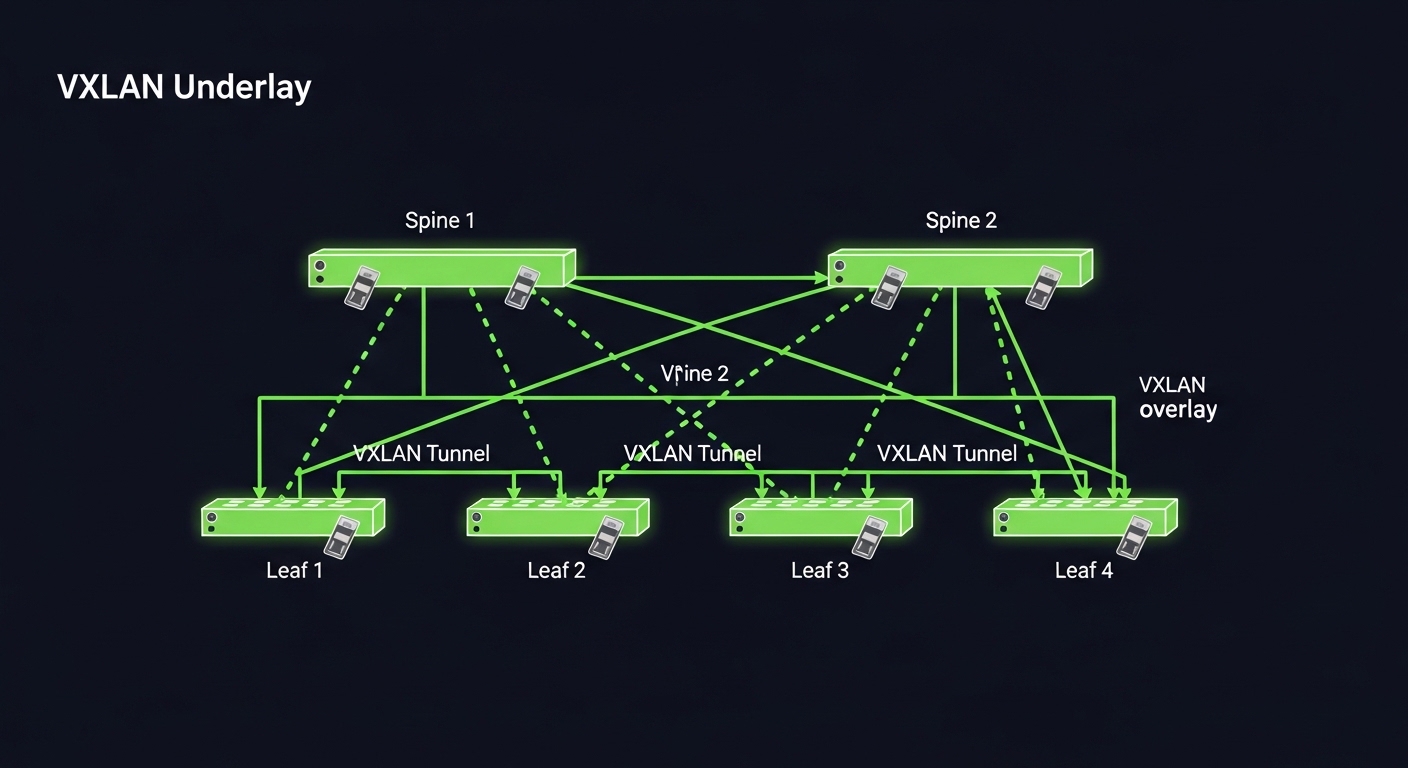
Selection criteria decision matrix: SFP-style modules for VXLAN overlays
Procurement decisions are easier when you score the options against the constraints that actually cause outages: distance mismatch, compatibility gaps, and monitoring blind spots. Use the matrix below as a starting point for selecting a VXLAN fiber module class for SFP-style ports.
| Criteria | 10G SR (SFP+) | 25G SR (SFP28) | 10G LR (SFP+) | 40G SR4 (QSFP+) |
|---|---|---|---|---|
| Typical underlay use | Legacy ToR and moderate density | Modern leaf-spine at higher throughput | Longer SMF spans, campus or cross-row | Aggregation upgrades with fewer physical ports |
| Distance fit | Short multimode links | Short multimode links (OM4 recommended) | Long single-mode links | Short-to-mid multimode links |
| Budget sensitivity | High value | Moderate to high | Lower value for short links | Varies by vendor pricing |
| Switch compatibility risk | Usually lower if on matrix | Higher if firmware is strict | Usually controlled by SMF requirements | MPO handling adds operational risk |
| DOM and monitoring | Often well supported | Often well supported | Often well supported | Lane-level issues can complicate alerts |
| Operational risk | Low if fiber is clean and aligned | Medium: more sensitive at 25G | Medium: higher alignment constraints | Medium-high: MPO polarity and cleaning |
Common mistakes and troubleshooting tips for VXLAN fiber module failures
Optics failures are predictable if you know the usual failure modes. Below are concrete pitfalls seen during commissioning, firmware upgrades, and seasonal temperature changes.
Distance mismatch that still “links up”
Root cause: The module is rated for a reach on paper, but your installed fiber has higher attenuation, patch panel losses, or poor connector quality. The link may come up because the receiver has margin at room temperature, then degrade under heat.
Solution: Pull certification results, measure link margin, and verify transmit power and receive power via DOM. Replace patch cords first, then modules if margin remains insufficient.
Dirty LC or MPO connectors
Root cause: Contamination increases insertion loss and can produce intermittent CRC errors rather than total link failure. MPO systems add complexity because polarity and lane mapping issues can mimic “bad optics.”
Solution: Use a fiber microscope and cleaning kit per best practice. Re-seat connectors and confirm MPO polarity with a polarity tester before swapping modules.
Firmware-specific compatibility gaps
Root cause: Some switch firmware versions enforce transceiver checks (including DOM vendor IDs or supported thresholds). A module may negotiate at the wrong speed or exhibit unstable readings after reboot.
Solution: Upgrade firmware in a controlled pilot, compare DOM telemetry between approved and unapproved modules, and keep a rollback plan. Always use the vendor transceiver matrix for your exact switch model and release.
Temperature and airflow assumptions during peak load
Root cause: Rack inlet temperatures exceed module operating limits during fan degradation or during seasonal HVAC swings. High-bias operation can accelerate optical aging.
Solution: Validate inlet temperature with sensors, set conservative alert thresholds for DOM transmit power, and ensure fan redundancy and airflow paths are maintained.

Which option should you choose? (recommendations by buyer type)
Pick the simplest optics class that meets your distance and throughput needs, then optimize for compatibility and operational safety. If you have strict uptime requirements and limited tolerance for trial-and-error, prioritize OEM-approved modules for the first deployment wave. If you are scaling rapidly and have strong testing discipline, third-party can work well when you enforce DOM and telemetry validation.
- Best for reliability-focused enterprises: Choose OEM-approved 25G SFP28 SR (for OM4, short underlay) and keep a matched spare kit. This minimizes compatibility surprises during firmware changes.
- Best for budget-constrained scaling (with testing): Consider vetted third-party 10G SR or 25G SR SKUs that appear on the switch transceiver matrix, then run DOM burn-in across representative racks.
- Best for long spans or multi-site underlays: Select 10G LR style single-mode optics with certified SMF link budgets and strict connector hygiene procedures.
- Best for port-constrained upgrades: Use 40G SR4 only when your operational team is comfortable with MPO polarity, cleaning, and lane-level monitoring.
Next step: if you are standardizing an underlay for NSX and OpenStack, map your rack distances and fiber plant first, then align optics to the switch matrix using DOM telemetry expectations. For related procurement guidance, review Transceiver compatibility checklist for data center switches.
FAQ
What is a VXLAN fiber module in practice for NSX and OpenStack?
It is the physical-layer optical transceiver used on switch ports that carry the VXLAN underlay traffic. NSX and OpenStack rely on the underlay to be stable; the module’s reach, receiver sensitivity, and DOM telemetry determine whether links stay clean under load. [Source: VMware NSX networking documentation; OpenStack Neutron underlay design guidance]
Can I use multimode VXLAN fiber module optics for leaf-spine?
Yes, if your distances fit the OM3/OM4 reach and your fiber plant is certified. Most leaf-spine designs use SR optics (850 nm) for short in-building segments, while longer links use LR-style single-mode. Always verify the switch compatibility matrix.
Do I need DOM support for overlay networks?
DOM is not strictly required for VXLAN to function, but it is highly valuable for operations. DOM enables proactive detection of optical power drift and helps troubleshoot CRC errors faster during maintenance windows. Many monitoring stacks assume DOM readings are present and stable.
What breaks first when third-party optics are incompatible?
Common failures include link flaps after reboot, incorrect speed negotiation, or noisy telemetry that triggers false alarms. In stricter firmware environments, modules may fail transceiver validation unless they match expected parameters. Validate on a pilot set and capture DOM trends before scaling.
How should procurement handle spares for a VXLAN underlay?
Maintain a