
Smart city fiber optic networks fail in predictable ways: the wrong transceiver reach, mismatched optics, or thermal stress inside street cabinets. This guide helps operations engineers and field technicians choose smart city fiber optic SFP modules for traffic signal control and video surveillance backhaul. You will get a practical selection checklist, a specs comparison table, and troubleshooting steps validated against real deployment constraints like cabinet temperature swings and switch DOM behavior.
Where SFP modules fit in smart city fiber optic traffic systems
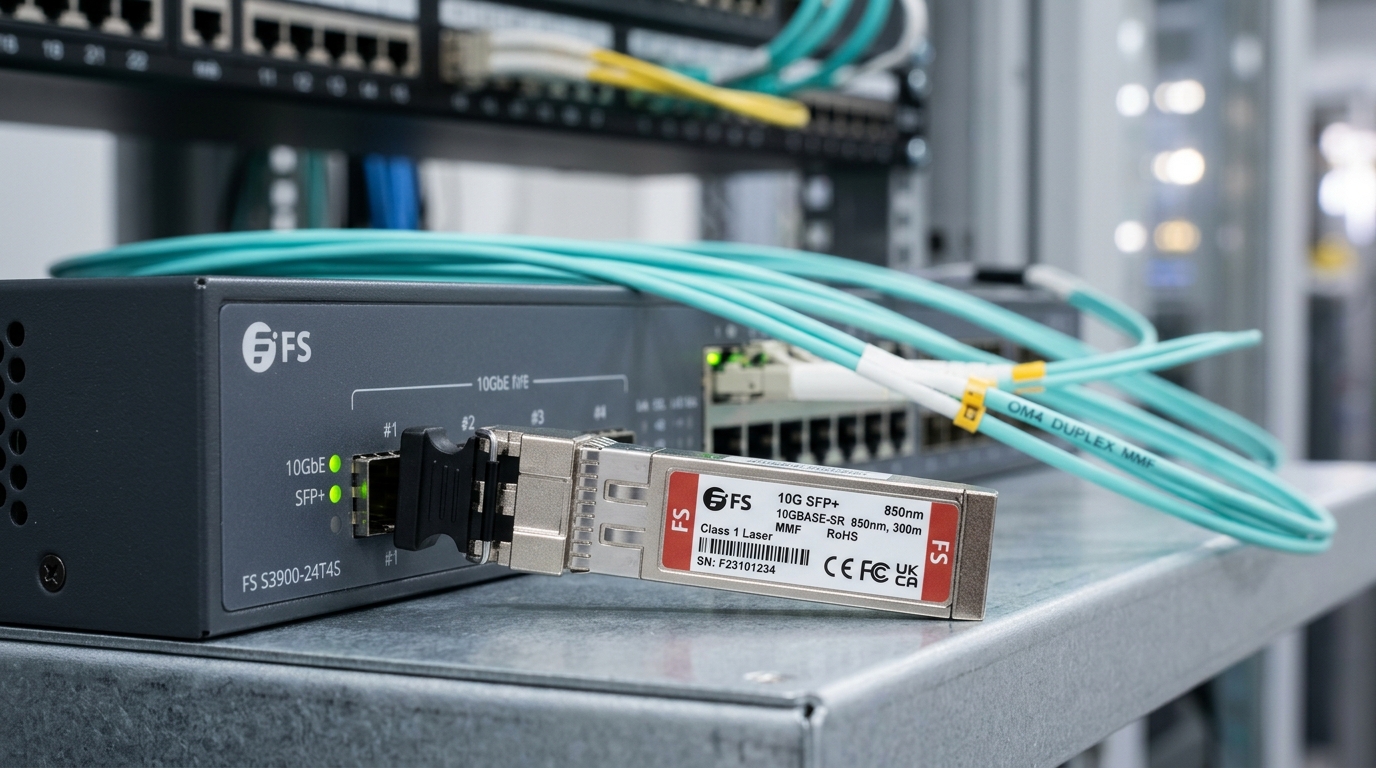
Traffic and surveillance deployments often use ruggedized aggregation switches in roadside cabinets, then fan out to cameras, license-plate readers, and radar sensors over fiber. In many designs, the uplink from an edge switch to a nearby aggregation node uses 10G SFP+ or 1G SFP optics depending on camera density and latency budgets. SFP form factor matters because it supports hot-swapping and standardized wiring to minimize truck rolls during maintenance windows. For field teams, the key is aligning the SFP optical parameters with the fiber plant and the switch vendor’s transceiver requirements.
Typical link patterns you will see
- Edge cabinet to aggregation: 1G or 10G Ethernet over OM3/OM4 multimode, or OS2 single-mode for longer spans.
- Surveillance ring: redundant ring topology, where one transceiver must survive frequent link flaps during restoration.
- Traffic controller backhaul: low jitter needs; link stability is more critical than raw throughput.
Pro Tip: In roadside cabinets, the dominant failure pattern is not “bad fiber” but “DOM and temperature mismatch.” If your switch enforces strict transceiver policies or your SFP lacks reliable digital diagnostics, you can get intermittent link drops even when optical power looks acceptable.
SFP spec comparison for smart city fiber optic reach and interfaces
Before ordering, map your required distance to the fiber type and data rate. Then verify the SFP wavelength, connector style, and optical budget assumptions. For operational reliability, also confirm the temperature range and whether the SFP supports digital optical monitoring (DOM) that your switch can read.
| Use Case | Data Rate | Wavelength | Typical Fiber | Reach (Typical) | Connector | DOM | Operating Temperature | Representative Models |
|---|---|---|---|---|---|---|---|---|
| Roadside surveillance uplink (short/mid) | 10G | 850 nm | OM3/OM4 multimode | ~300 m (OM3) to ~400 m (OM4) | LC | Yes (commonly) | 0 to 70 C (typical) or wider (industrial) | Cisco SFP-10G-SR, Finisar FTLX8571D3BCL, FS.com SFP-10GSR-85 |
| Inter-cabinet long run | 1G | 1310 nm | OS2 single-mode | ~10 km (typical) | LC | Yes (commonly) | -40 to 85 C (often industrial) | Common 1000BASE-LX SFP examples (vendor-specific) |
| High-density aggregation to core | 10G | 1310/1550 nm (as designed) | OS2 single-mode | ~10 km or more (model-dependent) | LC | Yes (commonly) | Wider industrial range preferred | Vendor 10GBASE-LR/LR variants (check datasheet) |
Operationally, treat reach as a budget, not a guarantee. Your budget must include fiber attenuation, connector losses, splice losses, and aging effects from outdoor temperature cycling. Standards alignment matters: Ethernet optics implementations are specified in IEEE Ethernet PHY families and optics are typically validated to vendor datasheets and interoperability guidance. For baseline Ethernet behavior, consult IEEE 802.3 for 1G and 10G link requirements, and validate exact optical parameters in the SFP datasheet. IEEE 802.3 standards page
Selection criteria checklist for smart city fiber optic SFP deployments
Use this ordered checklist to reduce commissioning time and prevent mismatched optics. It is designed for field procurement and on-site acceptance testing, where you often have limited time and incomplete as-built documentation.
- Distance and fiber type: measure span length; confirm OM3/OM4 vs OS2. If distance is unknown, assume worst-case and verify with OTDR or link trace.
- Data rate and Ethernet mode: choose SFP for the exact PHY (for example 1GBASE-SX vs 10GBASE-SR). Do not substitute without verifying optical and electrical compatibility.
- Wavelength and reach: match 850 nm SR to multimode; match 1310/1550 nm LR to single-mode. Ensure reach includes connector and splice losses.
- Switch compatibility and transceiver policy: some switches enforce vendor part numbers or strict DOM thresholds. Check the switch documentation and confirm the SFP is supported.
- DOM support and threshold behavior: confirm the SFP provides temperature, laser bias, and optical power telemetry compatible with the switch. Validate alarm thresholds during commissioning.
- Operating temperature and enclosure thermal design: street cabinets can exceed indoor ratings during summer sun. Prefer industrial-grade modules with wider temperature ranges.
- Connector and patching standard: verify LC vs SC, and ensure fiber polarity and cleaning practices match the implementation.
- Vendor lock-in and spares strategy: evaluate OEM vs third-party. Keep at least one known-good spare per cabinet type to shorten restoration time.
Hands-on acceptance tests you should schedule
- Verify link up with live traffic and confirm error counters remain stable (CRC, FCS, and interface drops).
- Check DOM values for receive power and laser bias; confirm they sit within datasheet ranges.
- Run a controlled failover test for ring or redundant uplinks to ensure restoration behavior is clean.
Common pitfalls and troubleshooting for smart city fiber optic SFP links
When a smart city fiber optic link underperforms, the root cause is usually repeatable. The following pitfalls include typical symptoms, likely causes, and field-ready solutions.
Link flaps after cabinet temperature peaks
Symptom: link drops or renegotiations during hot afternoons, recovers overnight. Root cause: SFP temperature range too narrow, or laser bias drifting outside thresholds. Solution: replace with an industrial-grade SFP with wider operating range; confirm DOM telemetry and adjust alarm thresholds only if supported by the switch.
“Works on the bench” but fails in the field
Symptom: bench test passes, but outdoor run fails intermittently. Root cause: connector contamination or insufficient cleaning; outdoor patching introduces micro-scratches and increased insertion loss. Solution: clean LC/SC using approved fiber cleaning tools; inspect with a microscope; re-terminate if necessary and re-check optical receive power.
Wrong fiber type for the optics
Symptom: no link or very high errors. Root cause: 850 nm SR SFP installed on OS2 single-mode, or 1310 nm LX installed on OM multimode with unexpected modal dispersion. Solution: verify fiber type at the site; label patch panels; use OTDR to confirm attenuation profile and validate the span before swapping optics again.
DOM mismatch or switch transceiver rejection
Symptom: interface shows “transceiver not supported” or intermittent alarms. Root cause: switch strict transceiver policy; DOM telemetry format differs between vendors. Solution: confirm compatibility lists; test one SFP model per switch line card family; keep OEM-approved equivalents when policy enforcement is strict.
Cost and ROI considerations for smart city fiber optic SFP spares
Costs vary widely by reach and grade, but for planning: 10G SR 850 nm SFP+ modules are often priced in a range that can be several tens to low hundreds of dollars per unit depending on brand and temperature grade; third-party options can be cheaper but may increase commissioning and compatibility effort. For ROI, include the total cost of ownership: truck rolls, downtime during camera outages, and spares management. OEM modules may reduce interoperability surprises with strict switch policies, while third-party modules can be cost-effective if you standardize models and validate them across your switch fleet.
Also factor power and thermal behavior. While SFP power draw is small per module, cabinet heat adds up; a module with a less efficient thermal design can contribute to accelerated aging. If your network has redundant uplinks, faster restoration time can outweigh marginal unit cost differences because surveillance and traffic systems are operationally time-sensitive.
FAQ for engineers deploying smart city fiber optic SFP optics
Which SFP is best for traffic cameras over short cabinet-to-cabinet distances?
For typical short runs over OM3/OM4 multimode, 10GBASE-SR (850 nm) SFP+ is common when the measured distance plus losses fits within the datasheet reach. Validate with receive power readings and confirm the switch supports DOM telemetry from that module type. smart city fiber optic
Can I mix OEM and third-party SFPs in the same switch?
Sometimes yes, but it depends on the switch’s transceiver policy and DOM handling. Test at least one third-party model in a staging rack that matches the production switch software version, then roll out only after stable error counters and alarms are confirmed.
How do I verify optical budget beyond “reach” marketing numbers?
Use OTDR or at least a conservative loss audit: include fiber attenuation, connector insertion loss, and splice losses, then compare to the SFP datasheet optical power budget. Commissioning should also include DOM-based receive power checks that match expected ranges.
What temperature range should I demand for roadside cabinets?
Prefer industrial-grade optics with wider ranges, especially if your cabinet can exceed typical indoor limits due to solar heating and poor ventilation. During commissioning, watch DOM temperature and verify link stability under worst-case conditions if feasible.
Why is link up but video quality still poor?
It may be excessive errors despite link being “up.” Check interface error counters, CRC/FCS increments, and consider inspecting fiber cleaning and patch cord quality; also confirm the correct SFP speed and duplex mode in the switch.
How many spare SFPs should I keep per site?
At minimum, keep one known-good spare per transceiver type per cabinet or per switch line card family, plus at least one spare per frequently failing location. In ring topologies, spares should cover both uplink directions so restoration does not require additional visits.
If you want the next step after selecting optics, plan your acceptance testing and maintenance workflow around DOM telemetry and link error counters. Start with smart city fiber optic for deployment planning guidance that matches real field operations and reduces downtime.
Author bio: I have deployed and validated Ethernet fiber links for surveillance and traffic networks using SFP and SFP+ modules in outdoor cabinets, with on-site DOM telemetry checks and OTDR-based loss audits. I write with a field engineer mindset, focusing on measurable acceptance criteria and interoperability constraints across switch platforms.
