
Nothing slows a network like a link that flaps, a port that stays dark, or a sudden rise in CRC and FEC errors. This article helps network engineers and field technicians perform transceiver failure troubleshooting with practical tests, switch-side checks, and fiber layer validation. You will learn how to separate optics faults from cabling, power, and host interface issues, and how to verify fixes with repeatable measurements.
Start with evidence: map symptoms to likely failure modes
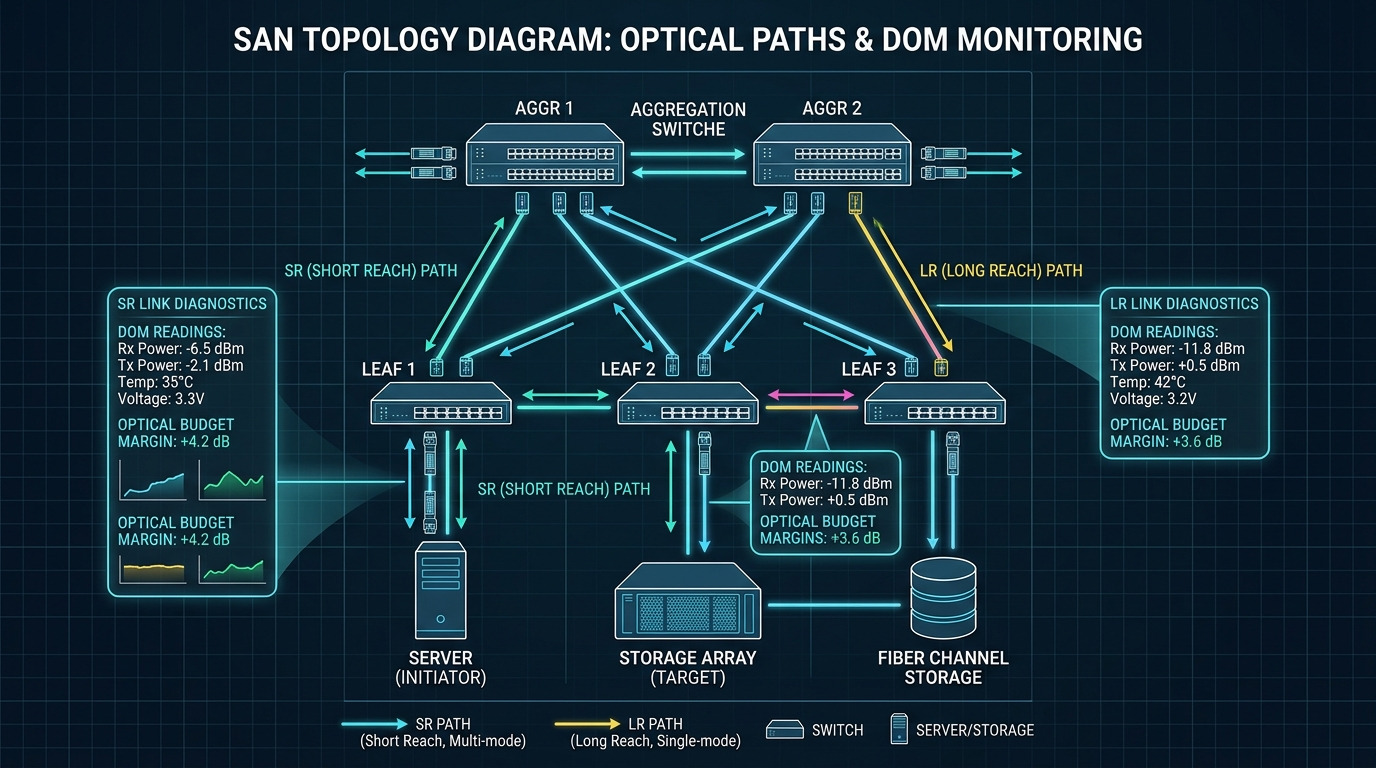
Before swapping parts, translate the symptom into a fault domain. In practice, a “bad transceiver” report often hides a fiber polarity issue, an incompatible wavelength pair, or an overloaded power budget. Use switch telemetry to classify the failure: link down, link up but high errors, or intermittent flaps under load.
Quick symptom-to-cause logic
- Link down immediately after insertion: common causes include wrong module type (SR vs LR), unsupported speed/encoding, dust or broken fiber, or DOM incompatibility.
- Link up but errors increase: suspect marginal optical power, dirty connectors, laser aging, incorrect fiber attenuation, or receiver overload.
- Intermittent flaps: often caused by poor cable management, connector micro-movement, marginal latch pressure, or thermal stress in a high airflow blind spot.
What to record on the first site visit
Capture these items in the ticket to avoid guesswork:
- Switch model and port number, plus interface type (for example, 10GBASE-SR on an SFP+ cage).
- Transceiver part number and vendor (examples: Cisco SFP-10G-SR, Finisar FTLX8571D3BCL, FS.com SFP-10GSR-85).
- DOM readings: receive power (dBm), transmit power (dBm), laser bias current (mA), and temperature (C).
- Fiber details: OS2 vs OM4, connector type (LC/UPC, LC/APC), and measured loss if available.
Pro Tip: In many field cases, the fastest win is comparing DOM thresholds across both ends of the link. If one side shows low received power while the other side looks normal, the issue is frequently cabling, polarity, or attenuation—not both optics. This approach reduces unnecessary swaps and shortens downtime.
Deep diagnostics: verify optics, power, and interface compatibility
Optical transceivers follow IEEE 802.3 specifications for link behavior, but real deployments add constraints like switch transceiver profiles, vendor-specific DOM behavior, and environmental limits. Your goal in transceiver failure troubleshooting is to confirm three things: electrical compatibility, optical budget health, and physical cleanliness.
Electrical and protocol checks
- Confirm the switch actually supports the module type and speed mode. For example, a QSFP28 cage configured for 100G typically will not negotiate correctly with a mismatched optic profile.
- Check interface counters: CRC, FCS, alignment errors, and (where applicable) FEC corrections. A rising correction count with stable link often indicates optical margin erosion.
- Validate whether the port is administratively forced or auto-negotiated. For Ethernet optics, “forced” settings can break expected behavior.
Optical power budget and wavelength alignment
For short-reach multimode optics (SR), typical link uses OM4 fiber with 850 nm lasers. For long-reach single-mode optics (LR), typical wavelength is 1310 nm. A mismatch in wavelength class (or connector polarity) can produce link-down or severe receiver errors.
DOM-based decision flow (hands-on)
When DOM is available, use it as a truth source. A common failure pattern is receiver sensitivity loss: DOM may show normal transmit power but weak receive power, or temperature/bias current drifting beyond vendor limits.
- Low receive power with otherwise normal transmit: check fiber loss, connector cleanliness, and polarity.
- High laser bias current with declining transmit power: suspect aging laser or thermal stress.
- Temperature excursions during flaps: inspect airflow, cage fit, and whether the module is seated fully.
Transceiver comparison: choose the right optic before chasing ghosts
Many transceiver failure troubleshooting efforts stall because the team is comparing the wrong module class. Use a quick comparison to ensure the optic matches the intended standard, fiber type, reach, and connector. The table below illustrates common 10G and 25G patterns you will see in data centers and campus networks.
| Module type | Wavelength | Target fiber | Reach (typical) | Connector | Power class (typical) | Operating temp | Common failure signals |
|---|---|---|---|---|---|---|---|
| SFP+ 10GBASE-SR | 850 nm | OM3/OM4 multimode | 300 m (OM3), 400 m (OM4) | LC | ~0.5 W to 1.5 W | 0 C to 70 C (vendor-dependent) | Low received power, high CRC, link flaps after reseating |
| SFP+ 10GBASE-LR | 1310 nm | OS2 single-mode | 10 km | LC | ~1 W to 2 W | -5 C to 70 C (vendor-dependent) | Link down due to wrong fiber type, high error rates from attenuation |
| QSFP28 100G SR4 | 850 nm (4 lanes) | OM4/OM5 multimode | 100 m typical (varies by spec) | MPO/MTP | ~3 W to 5 W | 0 C to 70 C | Lane imbalance, high FEC/BER, polarity mismatch on MPO breakouts |
| SFP28 25GBASE-SR | 850 nm | OM4 multimode | 70 m to 100 m (varies) | LC | ~1 W to 2 W | 0 C to 70 C | Marginal eye opening, rising errors under load |
Use vendor datasheets for exact optical power and receiver sensitivity. When in doubt, verify the module’s compliance and DOM behavior against the switch vendor’s optics compatibility list. References: IEEE 802.3 for optical PHY behavior [Source: IEEE 802.3], and vendor datasheets for DOM and operating limits [Source: Cisco Transceiver Documentation], [Source: Finisar/Viavi Optical Module Datasheets].
Selection criteria checklist: prevent repeat failures and avoid mismatch
Once you identify the failure domain, use this ordered checklist to select replacements and validate fixes. It is also the fastest way to prevent the “we replaced it but nothing changed” loop.
- Distance and fiber type: confirm OM4 vs OS2, and ensure the measured link loss plus margin fits the module budget.
- Standard and interface mode: match 10GBASE-SR, 10GBASE-LR, or SR4 lane mapping; do not assume “same speed” means “same optic.”
- Switch compatibility: confirm the switch supports the exact transceiver form factor and speed profile (SFP+, SFP28, QSFP28).
- DOM support: ensure DOM is readable and that thresholds align with your monitoring system. Some third-party optics expose DOM differently.
- Operating temperature and airflow: verify the cage environment stays within the module’s specified range; check for blocked vents.
- Vendor lock-in risk: assess whether the switch restricts unsupported optics; plan a qualification step before large rollouts.
- Connector quality and polarity: for MPO/MTP, verify polarity method (for example, polarity A vs B) and ensure correct breakout pairing.
Common mistakes and troubleshooting tips that actually work
Below are frequent failure modes seen during transceiver failure troubleshooting. For each, you get the root cause and a concrete fix path.
Pitfall 1: Swapping optics while ignoring fiber polarity
Root cause: In LC links, polarity mistakes are common after patching; in MPO links, polarity is even more likely due to breakout orientation. The receiver sees near-zero power, causing link-down or high errors.
Solution: Verify connector mapping end-to-end. Clean both ends, then test with a known-good reference patch. If the link uses MPO breakouts, confirm the polarity method matches your installation standard.
Pitfall 2: Trusting “link up” while errors silently rise
Root cause: A marginal optical budget can keep the link negotiated but degrade BER under load. You might see CRC/FCS increments or increasing FEC corrections without obvious link state changes.
Solution: Check error counters over time and compare DOM receive power to the vendor’s recommended minimum/typical range. Replace the patch cord first if receive power is low, then consider the optic only if the fault follows the module.
Pitfall 3: Using the wrong fiber type without noticing
Root cause: Installing a 850 nm multimode optic into a path that is OS2 single-mode (or vice versa) can fail immediately or produce severe attenuation and link instability.
Solution: Confirm fiber type at the patch panel or splice location using labeling and, if needed, an OTDR record. Validate the wavelength class (850 nm vs 1310 nm vs 1550 nm) against the transceiver standard before replacing hardware.
Pitfall 4: Skipping connector cleaning during “module replacement”
Root cause: Even a new optic can fail if the connector endfaces are contaminated with dust or residue. This produces repeatable low receive power and intermittent link flaps.
Solution: Clean using approved fiber cleaning tools and inspect with a microscope or inspection scope. Re-seat the transceiver after cleaning and re-run the link test.
Pitfall 5: Overlooking thermal issues in dense racks
Root cause: In high-density leaf-spine setups, insufficient airflow or blocked vents can push module temperature beyond spec, leading to laser power droop and intermittent errors.
Solution: Measure airflow and check cage seating. If possible, compare DOM temperature during the failure window and ensure the rack cooling path is unobstructed.
Cost and ROI note: when third-party optics make sense
Pricing varies by speed and reach, but budgeting reality helps. In many markets, OEM optics (for example, Cisco-branded) often cost more than third-party equivalents, while third-party modules can cut unit cost significantly yet add qualification and return risk.
- Typical price ranges: 10G SFP+ SR modules often fall in the tens to low hundreds USD; QSFP28 SR4 modules are commonly higher due to complexity.
- TCO drivers: qualification time, warranty/DOA rates, spares holding costs, and failure impact (downtime and labor).
- Power and efficiency: Most optics power differences are small relative to switch backplane power, but reducing repeated truck rolls by selecting compatible modules is usually the biggest ROI.
Operationally, the ROI comes from fewer incidents. In a real deployment, teams that standardize optics by exact part number plus fiber type typically reduce repeat “same symptom” events because the replacement selection is deterministic.
FAQ: transceiver failure troubleshooting questions from the field
How do I confirm a transceiver is actually bad, not the fiber?
Compare DOM values and error counters. If you move the same transceiver to a known-good port and the issue follows the module, it is likely the optic. If the issue stays with the port and cabling path, focus on fiber loss, polarity, and connector cleanliness.
What DOM metrics matter most during transceiver failure troubleshooting?
Watch receive power (dBm), transmit power (dBm), laser bias current (mA), and temperature (C). A pattern of low receive power with normal transmit suggests fiber/cabling problems, while high bias with declining transmit can indicate laser aging.
Can I use third-party optics without causing link problems?
Often yes, but compatibility varies by switch vendor and firmware. Verify the optics compatibility list, confirm DOM works with your monitoring, and qualify the exact part number in a staging environment before broad deployment.
Why does the link stay up but traffic still fails?
That usually indicates a marginal optical budget or rising BER that does not immediately drop link state. Check CRC/FCS counters and, if present, FEC correction counts to quantify degradation and correlate it with DOM receive power.
What is the most common root cause after a transceiver replacement?
The most frequent root cause is dirty connectors or incorrect polarity, especially after maintenance when patch cords are re-mated. Clean and inspect both ends, then validate polarity mapping for MPO/MTP links.
Which standards should I reference when troubleshooting optics?
For Ethernet PHY behavior, IEEE 802.3 is the baseline. For module-specific limits like power, temperature, and optical parameters, rely on vendor datasheets and the switch vendor’s optics documentation. These sources help you interpret DOM and establish pass-fail thresholds.
If you want to reduce repeat outages, treat transceiver failure troubleshooting as a structured evidence process: map symptoms to domains, validate optics budget with DOM, then confirm fiber polarity and cleanliness before swapping. Next, use optics compatibility and DOM monitoring best practices to standardize replacements and tighten your mean time to repair.
Author bio: I am a field-focused network reliability consultant who has deployed and troubleshot multi-vendor optics in high-density data centers and campus backbones, including DOM-based incident workflows. I write operational guides grounded in IEEE behavior, vendor datasheets, and the practical constraints engineers see during real outages.
