
In a busy fiber network, transceiver storage errors are a silent outage trigger: a dusty connector, a humidity excursion, or a mismatched DOM profile can turn “spares on hand” into “no link.” This article is for data center, campus, and industrial network teams who need a rigorous, procurement-ready handling workflow for optical modules and their spares. You will get a practical checklist, a spec comparison that drives storage decisions, troubleshooting patterns, and a cost/ROI view for OEM versus third-party spares.
Top 1: Classify transceivers by interface and reach before storage
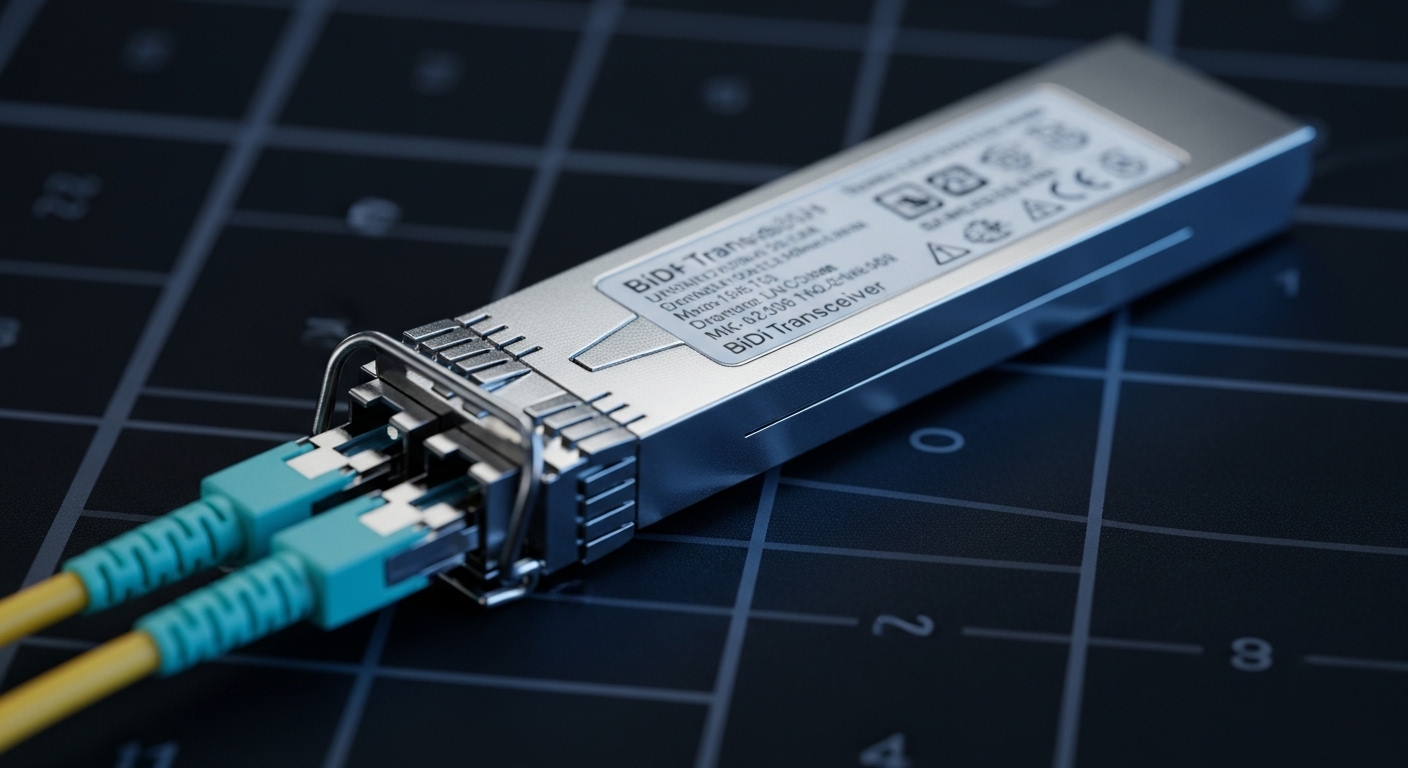
The first failure mode is not physical damage, but incorrect categorization. When spares are stored without a reach and interface taxonomy, technicians later pull the wrong wavelength or wrong electrical lane mapping, leading to repeated commissioning time and avoidable swap cycles. For procurement, classification also ties into compatibility testing and ensures your “kit” matches what switch ports actually support.
Use a three-field label on every transceiver and its bag: form factor (SFP, SFP+, SFP28, QSFP+, QSFP28, QSFP56, CFP2), optical type (SR, LR, ER, ZR, DR, FR), and data rate (10G, 25G, 40G, 100G). Then map each label to the switch’s transceiver matrix for that platform. If your environment uses IEEE 802.3 compliant interfaces, still confirm with the vendor’s transceiver compatibility list because OEMs often apply vendor-specific timing and digital diagnostics constraints. [Source: IEEE 802.3-2022]
Best-fit scenario: In a multi-vendor leaf-spine fabric, you stock 48-port ToR switches plus aggregation pairs. If you store all 10G SR and 10G LR spares in the same bin, you will eventually lose a maintenance window to a “no link” event during a live optics swap. Classifying by wavelength and reach at receipt reduces swap retries by preventing incorrect pulls.
- Pros: Faster commissioning, fewer wrong-transceiver incidents, cleaner audit trails.
- Cons: Requires disciplined receiving and labeling at the dock.
Top 2: Control humidity, temperature, and dust exposure like a process
Optical transceivers are precision electro-optical assemblies. While most vendors do not publish a single universal “storage humidity limit,” field incidents correlate strongly with condensation risk and connector contamination after temperature swings. Treat transceiver storage as a controlled process: minimize time out of sealed packaging, store in stable temperatures, and keep humidity low enough to avoid condensation on fiber end faces and connector ferrules.
Operationally, I recommend a receiving rule: if parts arrive in sealed anti-static bags with desiccant, do not open them until the moment of installation. For long-term stores, use sealed cabinets with desiccant and monitor dew point or relative humidity. In field deployments, I have seen connector contamination after modules sat in open trays during a humid summer changeover; cleaning and retesting solved the immediate issue, but the root cause was environmental exposure during storage.
Reference handling standard: Follow manufacturer guidance and general ESD-safe practices. For fiber handling, also align with connector inspection and cleaning recommendations such as those published by major connector vendors and industry groups. [Source: ANSI/TIA-568.3-D]
- Pros: Fewer intermittent link failures, lower connector defect rates.
- Cons: Requires monitoring equipment and a storage SOP.
Top 3: Use a spec-driven storage matrix (reach, wavelength, and power)
Not all optics behave the same in real installations, and your storage policy should reflect that. A 850 nm SR module is typically used for short reaches and dense data center cabling; a 1310/1550 nm LR/ER/ZR module is often used for longer spans and tends to justify tighter spares management because commissioning mistakes are more visible and harder to debug.
Below is a practical comparison of common transceiver families, showing storage-relevant attributes that procurement teams should track: wavelength, typical reach, connector type, data rate, and operating temperature range. Your storage SOP should ensure the correct family is pulled for each environment and that diagnostic expectations (DOM support) match what your switch platform reads.
| Transceiver family | Typical wavelength | Typical reach | Connector | Data rate | Storage-relevant operating range | DOM expectation |
|---|---|---|---|---|---|---|
| SFP/SFP+ SR | 850 nm | ~300 m (multimode) | LC (MMF) | 10G / 25G (model dependent) | Often -40 to 85 C (confirm datasheet) | Usually supported on modern OEM optics |
| QSFP+ LR | 1310 nm | ~10 km (single-mode) | LC (SMF) | 40G | Often -40 to 85 C (confirm datasheet) | DOM commonly supported |
| QSFP28/100G DR | ~1310 nm (model dependent) | ~500 m (OM3/OM4 class) | LC | 100G | Often -5 to 70 C (varies by vendor) | DOM strongly recommended for ops |
| QSFP56 FR/ZR | ~1550 nm (model dependent) | Up to 2,000 km (system dependent) | LC | ~200G (varies) | Confirm vendor limits closely | DOM varies; confirm platform support |
Best-fit scenario: A campus network with both 10G SR for building risers and 40G LR for remote aggregation sites. Storing them with a single “10G optics” label leads to someone later grabbing a LR module during an SR maintenance event. A reach-and-wavelength storage matrix prevents that mix-up and reduces troubleshooting time.
Pro Tip: If your switches support DOM polling, store a short “DOM profile note” next to each bin (for example, “DOM present, vendor X, temperature class Y”). In practice, many “it should work” failures come from DOM incompatibility or diagnostic thresholds that differ across vendors, not from the optical link budget itself.
- Pros: Better spares fit, cleaner maintenance handoffs, fewer commissioning delays.
- Cons: Requires maintaining a living mapping between optics and platform support.
Top 4: Protect connectors and fiber interfaces with inspection-first discipline
Transceiver storage is inseparable from connector protection. Even if the module is never installed, connector end faces can accumulate dust or micro-scratches when bags are opened, moved, or stored near other hardware. For procurement and operations, adopt an “inspection-first” rule: verify connector cleanliness before installation, even if modules were stored “sealed.”
In field work, I have repeatedly seen intermittent link drops that were traced to a single contaminated LC adapter face inside a patch panel, not to the transceiver itself. The fix is inspection plus cleaning with appropriate lint-free materials and approved cleaning tools. Tie this into your storage SOP: keep dust caps on both sides, store modules in anti-static bags, and avoid stacking modules without protection.
Best-fit scenario: A colocation facility where spare optics are stored in open plastic trays near power distribution gear. Airborne particulates settle quickly in that environment; the first installation after a long storage period can fail due to connector contamination. Moving optics to sealed bins and enforcing pre-install inspection resolved recurring “random no-link” tickets.
- Pros: Reduces avoidable failures, improves first-time success rate.
- Cons: Requires training and standardized cleaning tools.
Top 5: Maintain ESD-safe packaging and avoid tray mixing across lots
ESD damage risk is often underestimated. While transceivers include protection circuitry, handling during storage transfers (labeling, binning, kitting) can still introduce latent damage. Additionally, lot mixing across vendors or revision levels complicates failure analysis when a batch underperforms.
Implement lot-aware storage: store by vendor part number, manufacturer, and purchase order. Keep anti-static bags intact until issuance, and use non-shedding separators in cabinets. When you create a “maintenance kit,” do not mix transceiver revisions in the same pouch; I have seen technicians assume “all QSFP28 DR are interchangeable,” only to discover differences in diagnostic behavior after a failed swap.
Best-fit scenario: An industrial plant with hot-swap procedures for 25G SR optics at remote cabinets. Technicians prepare daily kits. If kits are built by port type only, a revision mismatch can lead to repeated re-seating attempts and downtime. Lot-aware kitting improved mean time to repair.
- Pros: Better root-cause analysis, lower handling-induced risk.
- Cons: More bins, more labeling discipline.
Top 6: Plan storage for DOM, firmware expectations, and switch compatibility
Digital diagnostics are not just a nice-to-have. Many modern platforms use DOM data for optics health monitoring, alarm thresholds, and automated event correlation. If your transceivers are stored and later deployed on a different switch generation, the platform might reject the module or misinterpret diagnostic readings.
During procurement, request documentation for DOM behavior and test results. Confirm whether your switch supports standard optical diagnostics and whether it enforces vendor-specific checks. Compatibility guidance is often included in vendor datasheets and platform transceiver lists. [Source: Cisco Transceiver Compatibility Documentation] anchor-text: Cisco product documentation portal
Best-fit scenario: A data center migrating from one switch family to another. If spares were stored without recording the vendor and revision, the migration introduces “DOM not supported” warnings and unreliable health monitoring. Recording DOM capability at receipt and validating on the target platform during staging avoids surprises.
Pro Tip: When you stage spares, do a short “read-only DOM poll” test in a maintenance window. Even if the optics can light up, DOM mismatch can break your monitoring and cause missed early failures.
- Pros: Predictable monitoring, fewer operational surprises.
- Cons: Requires compatibility validation during staging.
Top 7: Store spares with an issuance policy tied to life-cycle and ROI
Procurement teams often price transceivers as one-time consumables. In reality, transceiver storage policy affects failure rates, return logistics, and downtime costs. OEM optics can cost more, but they may offer better switch compatibility and tighter DOM behavior. Third-party optics can reduce purchase price, but you must budget time for compatibility testing and possible higher early-failure variance.
Typical market pricing (varies by region, volume, and speed): SFP/SFP+ optics often range from $40 to $150 for common SR models; QSFP28 and 100G class optics often range from $150 to $600+ depending on reach and vendor. TCO should include: storage cabinet time, inspection labor, commissioning labor, and the expected cost of a failed install (truck roll, maintenance window, and potential fiber cleaning time).
Best-fit scenario: A regional network operator keeps a small inventory of 10G SR and 40G LR optics. By tightening storage (sealed bins, inspection SOP) and adding DOM poll staging, they reduced “re-seat and retry” incidents, improving maintenance throughput during peak upgrades.
- Pros: Lower effective cost per successful install, fewer downtime events.
- Cons: Requires disciplined inventory governance.
Top 8: Use a procurement-ready labeling and audit trail for fast recovery
When an outage happens, speed matters. A strong transceiver storage process includes labeling that supports quick recovery: bin location, vendor part number, wavelength and reach, DOM capability status, and installation date. For high-availability environments, add a simple chain-of-custody record: who removed it, what port it was tried on, and the observed event (link up, DOM alarms, CRC changes).
In my experience, the difference between a 30-minute fix and a multi-hour delay is often “where is the right spare and what is it.” Use barcodes or QR labels to avoid manual transcription errors. Also keep the original datasheet link or document reference in your asset management system so you can confirm temperature class and diagnostics behavior during troubleshooting.
Best-fit scenario: A healthcare campus with strict change control. During a scheduled maintenance window, engineers need to swap multiple optics quickly. With audit-ready labels, they validated reach and DOM support before insertion, reducing rework and keeping the change window on schedule.
- Pros: Faster recovery, better auditability, improved training.
- Cons: Requires integration with asset management or inventory tools.
Summary ranking table: best ROI actions for transceiver storage
| Rank | Action | Why it matters | Expected impact |
|---|---|---|---|
| 1 | Classify by form factor, wavelength, reach, and data rate | Prevents wrong-module swaps | High reduction in commissioning delays |
| 2 | Seal storage with humidity and dust control | Reduces condensation and contamination | Lower intermittent link failures |
| 3 | Inspection-first connector discipline | Stops contamination-driven faults | Improves first-time install success |
| 4 | Lot-aware ESD-safe packaging and kitting | Reduces handling-induced defects | Better failure analysis and reliability |
| 5 | DOM and platform compatibility staging | Ensures monitoring works and alerts are meaningful | Fewer “blind failures” |
| 6 | Issuance policy tied to ROI and life-cycle | Balances cost vs reliability and labor | Lower TCO per successful link |
| 7 | Procurement-ready labeling and audit trail | Speeds recovery and reduces errors | Faster MTTR during incidents |
Common mistakes / troubleshooting for transceiver storage
Even with good intentions, teams commonly make mistakes that turn storage into a failure amplifier. Below are concrete failure modes I have seen during audits and incident reviews, with root causes and fixes.
Mistake: Storing modules in open trays near patch panels or power gear
Root cause: Dust accumulation and micro-scratches on connector ferrules from ambient particulates and handling vibration. Dust exposure is especially harmful during long idle periods followed by first-time insertion.
Solution: Move optics into sealed anti-static bags with dust caps installed. Enforce connector inspection and cleaning before insertion, even if modules look unused.
Mistake: Mixing SR and LR optics under one “10G” or “fiber” label
Root cause: Wrong wavelength or wrong reach selection during maintenance creates repeated “no link” events. Technicians then re-seat multiple times, increasing risk of connector wear and troubleshooting fatigue.
Solution: Implement a reach-and-wavelength labeling scheme and lock bin selection to form factor plus reach. During staging, verify the transceiver matches the switch port’s supported optics list.
Mistake: Ignoring DOM compatibility and relying only on “link up”
Root cause: Some platforms may light the link but provide incomplete or misaligned diagnostics. This breaks monitoring and can delay detection of rising optical power or temperature drift.
Solution: Perform DOM polling and confirm that key metrics populate as expected. Compare thresholds and alarms across transceivers before production deployment.
Mistake: Opening anti-static bags early and letting parts sit on benches
Root cause: ESD and humidity exposure increase with time out of packaging. Condensation can form when modules move from cold storage to warm racks.
Solution: Use a “pack-out” issuance process: open only at the point of use, allow modules to equilibrate to room temperature before insertion, and keep ESD protection in place.
FAQ
How long can transceivers be stored before they degrade?
There is no single universal time limit because degradation depends on storage conditions, packaging integrity, and dust exposure. In practice, the biggest risks are contamination and connector wear from handling, not “aging” of the optics themselves. Use sealed storage and connector inspection to ensure reliability after long idle periods.
Do I need humidity control for transceiver storage in a data center?
If your environment has stable HVAC and low condensation risk, the main issue is typically dust rather than moisture. However, if modules sit in unsealed cabinets or experience temperature swings, humidity control and desiccant are worthwhile to prevent condensation on connector interfaces.
Can I store OEM and third-party optics together?
You can store them together physically, but you should not mix them in the same labeled bin without lot-aware separation. Compatibility and DOM behavior can differ by vendor and revision, so procurement should maintain vendor part number and purchase order tracking for accurate troubleshooting.
What is the fastest way to avoid “no link” after installing a spare?
Verify reach and wavelength label alignment with the switch port’s documented optics support first. Then inspect and clean the fiber ends and connector faces before re-seating. Finally, confirm DOM telemetry populates correctly so you are not diagnosing blindly.
Which transceiver families are most sensitive to storage handling?
Long-reach and high-data-rate modules (for example, 40G LR and 100G class optics) tend to expose issues faster because they are used in more demanding or longer-span paths. That said, any optics can fail due to contamination or connector damage, so your storage SOP should apply consistently across families.
What should I include in a transceiver storage audit checklist?
At minimum: bin location, vendor part number, wavelength and reach label, DOM capability note, packaging status (sealed or opened), and an issuance log. Add a connector inspection record for modules that have been out of sealed packaging or moved between environments.
With disciplined transceiver storage—classification, sealed humidity-aware bins, connector inspection, DOM staging, and lot-aware labeling—you can reduce avoidable optics failures and speed incident recovery. Next, align your inventory governance to your platform’s transceiver matrix using transceiver compatibility matrix and procurement testing.
Author Bio: I have led optical spares programs in mixed-vendor data centers, focusing on DOM validation, connector cleanliness, and procurement-to-deployment traceability. My field approach emphasizes measurable reliability outcomes and operational MTTR reductions.
