
If you are rolling out network monitoring in a 10G environment, the bottleneck is often not analytics software, but the physical tap path. This guide helps network engineers and field techs deploy an 10G DAG transceiver inside SFP+ DAG taps with predictable link behavior, clean optics budgets, and measurable ROI. You will get a step-by-step implementation plan, a spec comparison table, and troubleshooting focused on the most common failure modes.
Prerequisites: what you must confirm before buying an 10G DAG transceiver
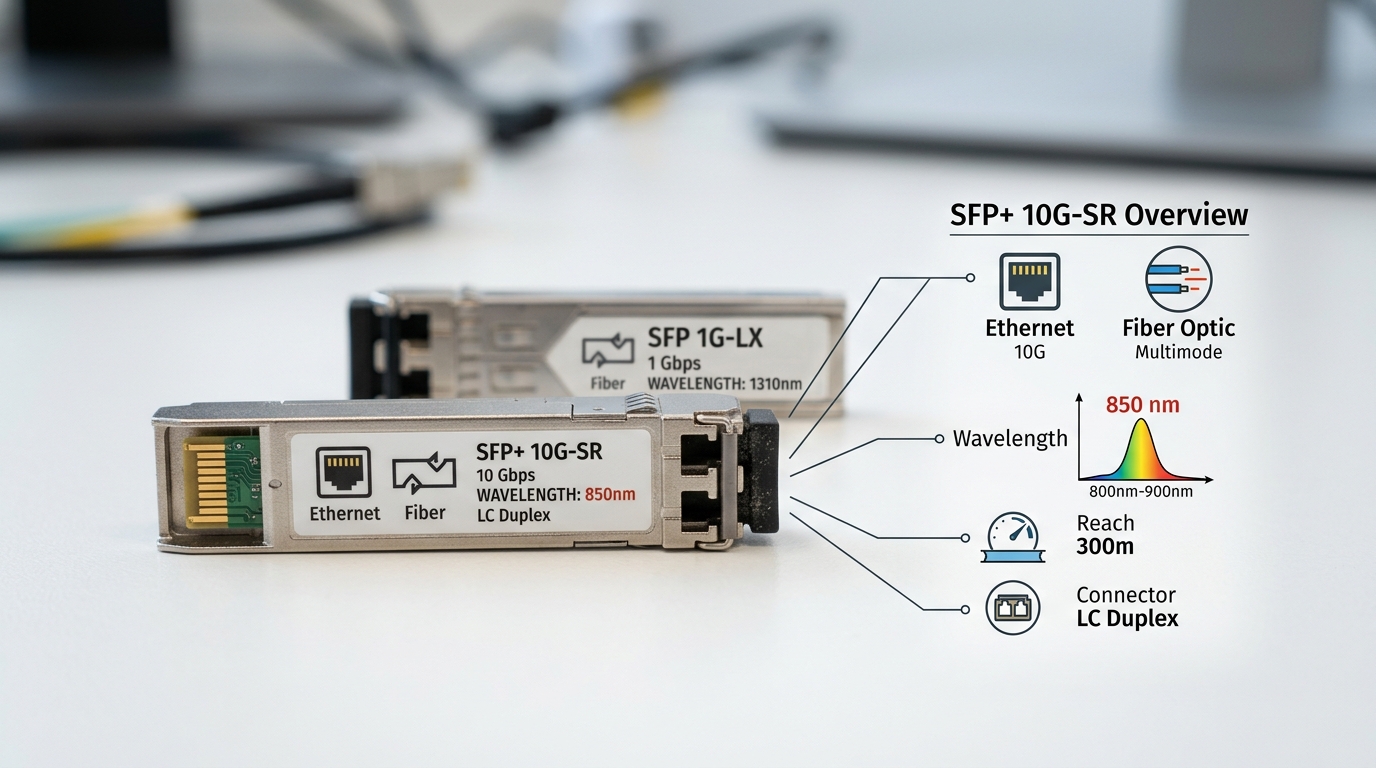
Before you order optics, treat the DAG tap as a link-level system: the tap optics, the transceiver type, the fiber plant, and the receiving switch or NIC all have to agree. Start by collecting the tap model, the monitor interface type, and the expected traffic direction (ingress, egress, or both). Then verify whether your monitoring collector expects SFP+ optics with digital diagnostic monitoring (DOM) and whether it requires a specific fiber type or wavelength.
For standards grounding, align your target with IEEE 802.3ae 10GBASE-SR for short reach and the vendor’s SFP+ electrical and optical requirements. For example, the SR class typically uses 850 nm multimode fiber and follows the 10GBASE-SR behavior described in the IEEE spec. [Source: IEEE 802.3ae]
Quick checklist (inputs to gather)
- Tap model and its supported SFP+ transceiver list (or generic SFP+ compatibility notes).
- Collector interface: switch port model and whether it supports DOM and the specific optics vendor profile.
- Fiber type: OM3 vs OM4 vs OM2 and patching loss budget (measured, not assumed).
- Expected link distance including patch cords and slack loops.
- Environmental constraints: cabinet temperature range, airflow, and any vibration exposure.
Expected outcome: You can confidently select the right wavelength, fiber type, and connector class without guessing.
Step-by-step implementation: wiring and configuration for SFP+ monitoring
In a DAG tap deployment, the transceiver is the “last mile” between the mirrored port output and your monitoring collector. The key is to set up the physical layer first, then confirm link integrity using deterministic checks (DOM, signal levels, and error counters).
Verify the tap output optics mode
Check the tap documentation for whether the monitor output is designed for 10GBASE-SR over multimode (typically LC) or another mode. If the tap output is fixed at SR, ensure your 10G DAG transceiver is an SR-compliant SFP+ module at 850 nm.
Expected outcome: You match the tap’s physical layer mode to the transceiver’s wavelength and fiber type.
Select a compatible SFP+ transceiver SKU and connector
Choose a module that matches the tap’s connector and the collector’s port expectations. Common SR modules include Cisco-branded and third-party optics. Examples you might see in the field include Cisco SFP-10G-SR (850 nm SR, LC) and Finisar/FS-style SR SFP+ parts such as FTLX8571D3BCL (850 nm SR) or FS.com SFP-10GSR-85 (850 nm SR). Always confirm the tap vendor’s compatibility guidance to reduce lock-in risk.
Clean fiber and seat the LC connectors correctly
Before you connect, clean both ends using lint-free wipes and an inspection scope. Then fully seat LC connectors until they latch; partial seating can cause intermittent link drops that appear like “bad optics.”
Expected outcome: Physical connections are reliable enough for stable monitoring sessions.
Install the transceiver and bring up the link
Insert the SFP+ module into the collector port, then wait for link negotiation. On many switches you can verify DOM readings and interface state. For example, check that the interface comes up as a 10G link and that DOM is readable (vendor-specific CLI differs by platform).
Expected outcome: The collector sees a stable 10G link with DOM present (if supported).
Validate monitoring traffic and error counters
Once link is stable, validate that mirrored traffic actually arrives. Then monitor counters for CRC errors, symbol errors, and interface resets. If you see rising CRC errors, treat it as an optics or fiber budget issue first, not a SPAN configuration issue.
Expected outcome: You confirm that mirrored packets are flowing with acceptable error rates.
Pro Tip: In DAG tap monitoring, “it links but analytics are empty” is often a timing or filtering issue, but “it links and errors climb” is usually physical: a too-tight optical budget, dirty LC ends, or a patch cord mismatch (OM3 vs OM4) that still “works” initially. Treat DOM plus error counters as your first diagnostic pair, not packet captures.
10G DAG transceiver specs that matter for SFP+ monitoring taps
Even when modules are all “SFP+ SR,” small differences in power class, DOM support, and temperature range can affect stability. Use the table below to compare typical 10G SR SFP+ modules used in monitoring tap builds.
| Parameter | Typical 10GBASE-SR 850 nm SFP+ | Example Part Numbers |
|---|---|---|
| Data rate | 10.3125 Gbps (10GBASE-SR) | All listed SR SFP+ examples |
| Wavelength | 850 nm | Cisco SFP-10G-SR; FTLX8571D3BCL |
| Reach (MM) | Commonly up to 300 m on OM3 / up to 400 m on OM4 (depends on power class) | Varies by module vendor and power class |
| Connector | LC (duplex) | Most SR SFP+ modules |
| Fiber type | Multimode (OM3/OM4 typical) | Tap and plant dependent |
| DOM | Often supported (check module spec sheet) | Varies by SKU |
| Operating temperature | Typically 0 to 70 C for commercial; extended variants exist | Check datasheet for your model |
| Power consumption | Commonly a few watts or less (varies) | Vendor dependent |
Expected outcome: You choose optics that match the tap’s SR mode and your multimode fiber plant, with DOM and temperature headroom.
Deployment scenario: 3-tier data center monitoring with DAG taps
In a 3-tier data center leaf-spine topology, a team mirrors traffic from 48-port 10G ToR switches to a monitoring cluster. Each leaf aggregates mirrored streams into a DAG tap feeding a dedicated monitoring NIC. The monitor collector is cabled with OM4 multimode using LC patch cords. For each tap, the 10G DAG transceiver is an 850 nm SR SFP+ module, and the patching path is measured at 120 m including jumpers, staying within the OM4 reach margin and accounting for connector loss.
Operationally, the team checks DOM on the collector port at install time and then alerts on CRC errors and interface flaps. They also standardize on one transceiver vendor family to reduce unexpected DOM interpretation differences across switch models. This approach keeps monitoring stable during peak traffic windows and reduces “mystery drops” blamed on analytics.
Expected outcome: Stable 10G mirrored traffic with error counters that remain near baseline under load.
Selection criteria decision checklist for a 10G DAG transceiver
When choosing optics for a monitoring tap, engineers optimize for link stability and predictable failure behavior, not just advertised reach.
- Distance and optical budget: Measure fiber length and patch cord loss; confirm OM3 vs OM4 compatibility.
- Wavelength and mode: Ensure 850 nm SR if the tap output is SR-only.
- Switch and tap compatibility: Match the collector port’s supported SFP+ optics behavior and tap vendor guidance.
- DOM support: Confirm whether the module reports power and temperature; validate how your switch interprets thresholds.
- Operating temperature: Use an extended temperature module if the cabinet exceeds commercial specs.
- Vendor lock-in risk: If you rely on a specific vendor’s DOM profile, test a second SKU before scaling.
- Connector and cleaning practicality: Prefer LC duplex designs that your team can clean reliably at scale.
- Failure rate and warranty terms: For monitoring, prefer optics with clear RMA processes and realistic lead times.
Expected outcome: A selection that minimizes downtime risk and reduces rework during rollout.
Common mistakes and troubleshooting tips
Below are the top failure modes seen in SFP+ DAG tap monitoring links, with root cause and a practical fix.
Failure point 1: Link comes up, but CRC errors spike
Root cause: Dirty LC ends, a marginal optical budget, or a patch cord with degraded condition. Sometimes the connector loss is higher than expected due to bending or poor termination.
Solution: Clean both ends, re-seat connectors, inspect with a scope, and re-check measured loss. If you can, swap in a known-good short patch cord to isolate plant loss versus optics.
Failure point 2: Interface flaps or negotiates inconsistently
Root cause: Transceiver incompatibility quirks, DOM threshold mismatch, or insufficient power/thermal headroom in the cabinet.
Solution: Confirm the module temperature range matches the installed environment. If DOM is supported, verify readings are within normal ranges and disable overly aggressive optics monitoring thresholds only as a controlled test.
Failure point 3: Monitoring shows no traffic even though link is stable
Root cause: SPAN or DAG tap directionality mismatch (ingress vs egress), VLAN filtering, or collector capture configuration that expects a different encapsulation.
Solution: Validate mirrored flow direction at the tap, confirm VLANs are included, and run a short packet sanity check on the collector to verify EtherType and tagging.
Cost and ROI note: budgeting optics for monitoring at scale
For 10G SR SFP+ optics, typical street pricing varies by brand and warranty. In many deployments, OEM optics can cost roughly $80 to $200 per module, while reputable third-party optics may land around $30 to $120. ROI comes from reducing downtime: if an optics failure causes even 30 minutes of monitoring blindness during an incident, the operational cost often outweighs per-module savings.
TCO should include cleaning supplies, spares inventory, and RMA friction. If your team uses DOM-based alerting, prefer optics whose DOM behavior is consistent with your switch platform to avoid false alarms that waste engineer time.
FAQ
What is a 10G DAG transceiver used for in SFP+ monitoring taps?
It is the optical interface module that converts the tap’s mirrored output into an SFP+ link your monitoring collector can ingest. In 10G SR designs, it typically runs at 850 nm over
