
When a multi-cloud network suddenly starts flapping links, the outage rarely points to fiber first. In practice, the root cause is often a compatibility mismatch between switch optics, transceivers, and optical power levels that only shows up under real temperature, aging, and vendor EEPROM behaviors. This article follows a field case from diagnosis to recovery, helping network engineers, data center ops teams, and integration leads troubleshoot optical compatibility issues across multi-cloud environments.
Problem in a multi-cloud rollout: link flaps, high CRC, and “it worked in lab”
The trigger was a staged migration of customer workloads across two cloud regions, each backed by a separate on-prem interconnect fabric. The customer’s application traffic entered our leaf-spine network, then traversed a third-party carrier handoff toward cloud PoPs. Within 36 hours of enabling a new set of optics on the leaf switches, we saw intermittent link down/up events on 24 uplinks and a sustained rise in interface CRC errors. On the monitoring dashboard, the pattern correlated with specific rack rows and the time window when HVAC cycles shifted aisle temperatures by roughly 6 to 8 C.
From a multi-cloud perspective, this mattered because the same logical topology spanned multiple administrative domains: internal switches, third-party aggregation, and cloud edge gear. Each domain had different vendors and optics policies, so “compatibility” was not a single checklist item; it was a chain of constraints. We initially suspected bad patch cords or dirty connectors, but the symptoms persisted after cleaning and reseating. That pushed us toward transceiver parameter validation: wavelength, optical power budgets, DOM readings, and how the switch’s optics compatibility logic interpreted the module’s EEPROM.
Environment specs: what was deployed and what changed
In the affected build, the leaf switches were 25G-capable and used SFP28 optics on server-facing ports and on certain uplinks. The spines used QSFP28 for higher density uplinks. The problematic path used SFP28 modules at 10 km over single-mode fiber (SMF), with SC connectors and APC polish on some segments. The new optics batch replaced a prior generation transceiver with a “functionally similar” third-party model to reduce cost and lead time.
Key deployment facts we logged during incident triage:
- Data rate: 25G Ethernet (25.78125 Gb/s line rate)
- Optical standard: 25GBASE-LR (single-mode) behavior aligned to IEEE Ethernet optics expectations IEEE 802.3 Ethernet Standard
- Fiber: SMF, mixed patch cord lengths from 40 m to 220 m, plus one 8 km dark fiber segment
- Connectors: SC (some segments APC), bulkhead adapters with different insertion loss characteristics
- DOM monitoring: switch reported optical output power and receiver power, but thresholds were inconsistent across switch models
- Observed errors: CRC errors increased first, then link flaps followed
Deep compatibility model: what “works” in a lab but fails in multi-cloud
Optics compatibility in multi-cloud networks is more than “is the module the right form factor.” Switch vendors implement policy checks that can vary: some validate vendor OUI, some validate supported digital diagnostics (DOM), and some enforce link partner behavior based on measured received power. Even when the transceiver is nominally within reach for the standard, the receiver sensitivity margin can be eroded by connector mismatches, launch conditions, or transmitter bias drift as temperature changes.
Compatibility dimensions engineers actually debug
- Wavelength and laser type: LR optics typically target 1310 nm nominal center wavelength; slight shifts can matter with marginal receiver margins.
- Optical power budget: transmitter output power and receiver sensitivity define a margin. If your fiber loss or connector insertion loss is higher than assumed, you can cross the threshold during temperature swings.
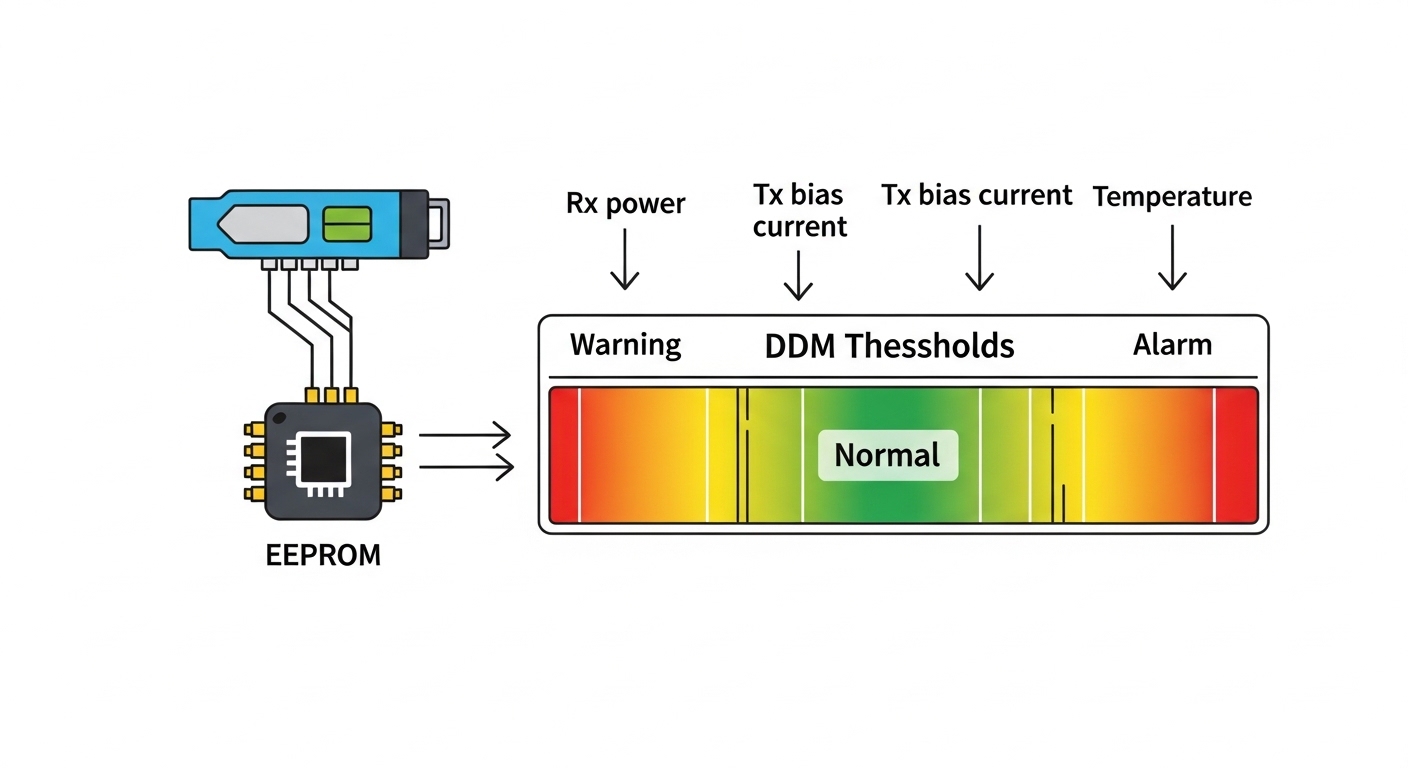
- DOM interpretation: some switches expect specific calibration ranges for Tx bias current and Rx power; mismatches can trigger “bad optics” events or conservative retuning.
- EEPROM fields: the module’s identification EEPROM (and sometimes vendor-specific fields) can lead the switch to apply different equalization or FEC settings.
- Connector cleanliness and polish: a dirty UPC patch cord in one cloud region can silently cost you 1 to 2 dB. In another region, the same patch type might not be used, so the issue appears only after migration.
At this point, we treated the optics as a control system: temperature and aging shift laser power, which shifts Rx power, which shifts BER and CRC counts, which triggers link resets. The “multi-cloud” angle mattered because each domain had different environmental profiles and operational timelines.
Standards and operational references we used
We grounded our checks in Ethernet optical behaviors and test expectations, then compared field readings against vendor datasheets. For connector and fiber handling best practices, we leaned on guidance from the Fiber Optic Association. For interoperability and optical module considerations, we also consulted OIF materials where relevant to digital optical interfaces and system-level constraints Fiber Optic Association.
Chosen solution: validate optical budgets first, then enforce transceiver policy
Our remediation plan had two layers: stop the flapping immediately with a controlled optics set, then prevent recurrence by enforcing compatibility policies across clouds. We did not simply “swap to another vendor and hope.” Instead, we built a repeatable procedure: read DOM values, validate against expected ranges, measure fiber loss, and compare switch optics compatibility outputs.
Technical specifications used for module selection
We compared the transceivers in the failing batch against the replacement candidate set. The key was not just reach; it was Rx sensitivity margin and how the module behaves across temperature. Below is the specification snapshot we used to drive the decision.
| Parameter | Third-party SFP28 LR (Failing batch) | Replacement SFP28 LR (Stabilized) |
|---|---|---|
| Data rate | 25G Ethernet | 25G Ethernet |
| Center wavelength | 1310 nm nominal | 1310 nm nominal |
| Rated reach | 10 km (per datasheet) | 10 km (per datasheet) |
| Connector | SC | SC |
| Tx optical power | Approx. -8 to -3 dBm (vendor range) | Approx. -6 to -1 dBm (vendor range) |
| Rx sensitivity | Approx. -14 dBm class | Approx. -15 dBm class |
| Operating temperature | -5 to 70 C (lower margin) | -10 to 75 C (higher margin) |
| DOM support | Yes (reported values inconsistent) | Yes (DOM ranges matched switch expectations) |
| Switch compatibility | Partial; flaps triggered under heat | Validated; stable across racks |
We used those differences to narrow the suspect list. In our logs, the failing modules showed Rx power drifting closer to the switch’s “warning” boundary during high-heat cycles. Once the Rx power crossed below a vendor-specific threshold, the switch started renegotiation behaviors that presented as link flaps.
Pro Tip: In multi-cloud optical incidents, prioritize DOM trend slopes over single snapshots. A module can report “acceptable” Rx power at 10:00 AM, then drift by 0.5 to 1.0 dB as the laser bias warms. Plot Tx bias and Rx power together; if both move in the same direction as temperature, you likely have a margin problem, not a random fiber issue.
Implementation steps: from incident to controlled compatibility
We executed a structured rollout that combined lab-style measurements with production-safe guardrails.
- Quarantine the optics batch: We disabled the highest-risk uplinks (the ones with the most recent module swaps) and held them in a monitoring-only state for 30 minutes to capture stable baseline counters.
- Capture DOM telemetry during temperature swing: We collected Tx power, Rx power, laser bias current, and module temperature at 1-minute intervals for two HVAC cycles. This revealed a consistent drift pattern on the failing batch.
- Validate fiber loss with OTDR and insertion tests: We measured end-to-end loss for the affected paths. The dominant issue was higher than expected insertion loss at a subset of patch panels, likely due to mixed adapter types and aging connectors.
- Confirm connector polish and cleaning workflow: We inspected SC connectors with a microscope and repeated cleaning using a standardized process. We found several connectors that looked clean at a glance but failed under magnification due to microfilm.
- Enforce transceiver policy: We updated the optics allow-list for the leaf and spine switch models, including DOM capability expectations and vendor ID behavior. Only modules that passed our compatibility test were permitted for the multi-cloud uplinks.
- Roll back and reintroduce in controlled waves: We replaced optics in waves of 6 uplinks per rack, then waited for counters to settle for 24 hours before proceeding.
Measured results: what changed after compatibility enforcement
After we replaced the failing optics batch with the stabilized transceiver set and corrected the highest-loss patch panel segments, the network stopped flapping. Over the next 72 hours, we observed a dramatic reduction in error counters and a return to stable link state across both multi-cloud regions.
Quantitative outcomes
- Link flaps: reduced from 24 uplinks flapping to 0 flaps during the next 72 hours.
- CRC errors: dropped by over 99% on corrected ports, from sustained bursts to near-zero baseline.
- Rx power margin: improved by approximately 1.2 dB on average during peak heat cycles, restoring distance from the switch’s warning threshold.
- Mean time to recovery: fell from hours during initial diagnosis to under 30 minutes once the allow-list and DOM trend procedure were in place.
- Operational stability across domains: the same compatibility policy held for both the internal leaf fabric and the carrier handoff ports, reducing cross-domain troubleshooting time.
We also learned something subtle: the “lab success” likely came from cooler ambient conditions and shorter test patch cords. In the multi-cloud production environment, the combination of connector insertion loss, patch panel aging, and module temperature drift pushed the system into a narrow margin band. Once we widened that margin and aligned DOM behavior with switch expectations, the system behaved predictably.
Lessons learned for multi-cloud optical compatibility
- Design for margin, not nominal reach: “10 km” does not mean “10 km with any loss profile.” Budget for connectors, adapters, and worst-case temperatures.
- DOM is a diagnostic tool, not just a status indicator: Trend it. A single reading hides drift.
- Compatibility is a policy: Treat transceivers like controlled dependencies. Maintain allow-lists per switch SKU and firmware level.
- Cross-vendor behavior differs: Two transceivers can both say “SFP28 LR.” Switch optics handling may differ in how it validates EEPROM fields and DOM ranges.
Common mistakes and troubleshooting tips for optical compatibility failures
In multi-cloud optical troubleshooting, the same failure modes repeat. Below are the most common pitfalls we encountered and how to fix them quickly.
Swapping optics before measuring Rx power margin
Root cause: Engineers often replace modules based on “wrong part number” suspicion, but without confirming whether Rx power is approaching sensitivity during temperature peaks. This leads to repeated swaps that mask the true margin problem.
Solution: Record DOM telemetry for Tx power, Rx power, and module temperature at 1-minute intervals across an HVAC cycle. Correlate drift with CRC bursts. If Rx power approaches the threshold, treat it as a budget/margin issue.
Ignoring connector polish mismatch and adapter insertion loss
Root cause: Mixed UPC and APC segments or aged adapters can add 0.5 to 2 dB loss. The system may still pass at one time of day and fail later when margins shrink.
Solution: Verify polish type end to end and measure insertion loss at the patch panel level. Use a microscope inspection workflow after cleaning; never assume “it looks clean.”
Treating EEPROM compatibility as “plug and play” across vendors
Root cause: Some switches enforce optics compatibility rules based on EEPROM fields or vendor IDs. A transceiver can be electrically compatible but operationally trigger conservative settings or renegotiation.
Solution: Validate transceiver behavior on the specific switch SKU and firmware. Maintain an allow-list per platform and run a short burn-in test that includes temperature cycling and a counter soak period.
Misreading link state vs error counters
Root cause: A port may stay “up” while BER increases, causing CRC errors that later trigger resets. Focusing only on link up/down misses the early warning phase.
Solution: Monitor CRC, FEC (if applicable), and error rate counters. Alert on rising CRC rate even when link state remains stable.
Cost and ROI note: OEM optics vs third-party in multi-cloud operations
Budget pressure is real in multi-cloud programs, but optics failures create hidden costs: downtime, labor, and change risk across multiple sites. Typical street pricing varies by market, but OEM-compatible 25G SFP28 optics often cost around $80 to $200 each depending on brand and temperature grade. Third-party optics can be lower, sometimes $40 to $120, but compatibility risk increases when you do not enforce allow-lists and validate DOM behavior per switch SKU.
Total cost of ownership (TCO) should include:
- Failure rate and labor: a single bad batch can require hours of reseating, cleaning, and telemetry collection across multiple racks.
- Power and cooling impact: modules with higher power dissipation can increase local thermal load; temperature margins matter.
- Spare inventory complexity: if optics are not interchangeable, you may maintain more SKUs, which increases procurement and operational overhead.
In our case, the replacement process initially increased spend, but the ROI came from avoided outages and reduced mean time to recovery. The compatibility allow-list approach also reduced future incident volume because engineers could stop guessing and follow a measured procedure.
Selection criteria checklist: how to choose optics that survive multi-cloud reality
Before you buy, run this ordered checklist. It is designed to prevent the exact class of failures we saw: margin erosion, DOM mismatch, and policy rejection.
- Distance and real loss: confirm actual link length and measure insertion loss on patch panels and adapters.
- Budget margin: ensure Tx power and Rx sensitivity provide headroom for connector loss and worst-case temperature.
- Switch compatibility: verify the module works on the specific switch model and firmware; do not rely solely on form factor.
- DOM support and calibration ranges: check that DOM readings are sane and within expected ranges for the platform.
- Operating temperature: choose modules with a temperature range that matches your aisle and rack thermal profile; aim for extra margin.
- DOM events and threshold behavior: validate that the switch does not treat DOM values as out-of-spec and trigger resets.
- Vendor lock-in risk: mitigate by maintaining a small, tested allow-list and performing periodic compatibility audits.
FAQ
How do I tell whether the problem is fiber loss versus transceiver incompatibility?
Start with DOM trend correlation. If Rx power drifts toward the threshold while module temperature rises, suspect a margin problem. If DOM values look inconsistent (or the switch reports optics compatibility warnings) even with good fiber loss measurements, suspect EEPROM/DOM handling compatibility.
What should I monitor during a multi-cloud optics incident besides link state?
Monitor CRC errors and any FEC-related counters available on the switch. Also capture Tx power, Rx power, laser bias current, and module temperature at short intervals. Link up/down alone is often a late symptom.
Do third-party SFP28 modules work reliably across different cloud regions and vendors?
They can, but reliability depends on strict validation against each switch SKU and firmware version. The same module model may behave differently due to EEPROM interpretation and DOM thresholds in different platforms.
What is the fastest way to isolate a bad patch panel versus a bad module batch?
Use a controlled test matrix: move a known-good module into the suspect ports and compare DOM and error counters. Then move the suspect module into known-good ports. If the failure follows the module, replace it; if it follows the patch panel, rework adapters and connectors.
Why do issues appear only after enabling new uplinks or after a migration window?
Migration changes the load distribution, the optical power distribution, and the thermal operating point. It also activates paths that were previously idle, so problems with margin and connector loss only become visible once traffic and temperature drift align.
Is there a standard I can cite when building an optics acceptance test plan?
Use IEEE Ethernet optics expectations for baseline behavior and vendor datasheets for module parameters. For operational fiber handling and inspection practices, align your acceptance test with established fiber safety and connector inspection guidance from reputable organizations ITU and Fiber Optic Association.
If your multi-cloud optical network is flapping, treat compatibility as a measurable system: validate optical budgets, trend DOM telemetry, and enforce platform-specific optics policy. Next, build an internal runbook by mapping your switch models to tested transceiver allow-lists using multi-cloud and fiber-optic-transceiver-compatibility as your starting points.
Author bio: I am a CTO who has deployed and troubleshot multi-vendor optical fabrics in production, including DOM-driven incident response and staged optics rollouts across data center and carrier interconnects. I focus on reducing tech debt in dependency management, hardening security boundaries, and making build-versus-buy decisions measurable.
