
Upgrading leaf-spine links, moving from 100G to 400G, or refreshing aging transceivers usually stalls on one question: which 400G optics actually work with your switches and fiber plant. This article is a field-friendly 400G buying guide for network engineers and infrastructure managers who need to choose the right transceiver fast, with fewer RMA surprises. You will learn how to match IEEE Ethernet 400G requirements to module types, reach, connector styles, power budgets, and DOM behavior. Updated: 2026-05-04.
Where 400G upgrades break in real networks (and how to avoid it)
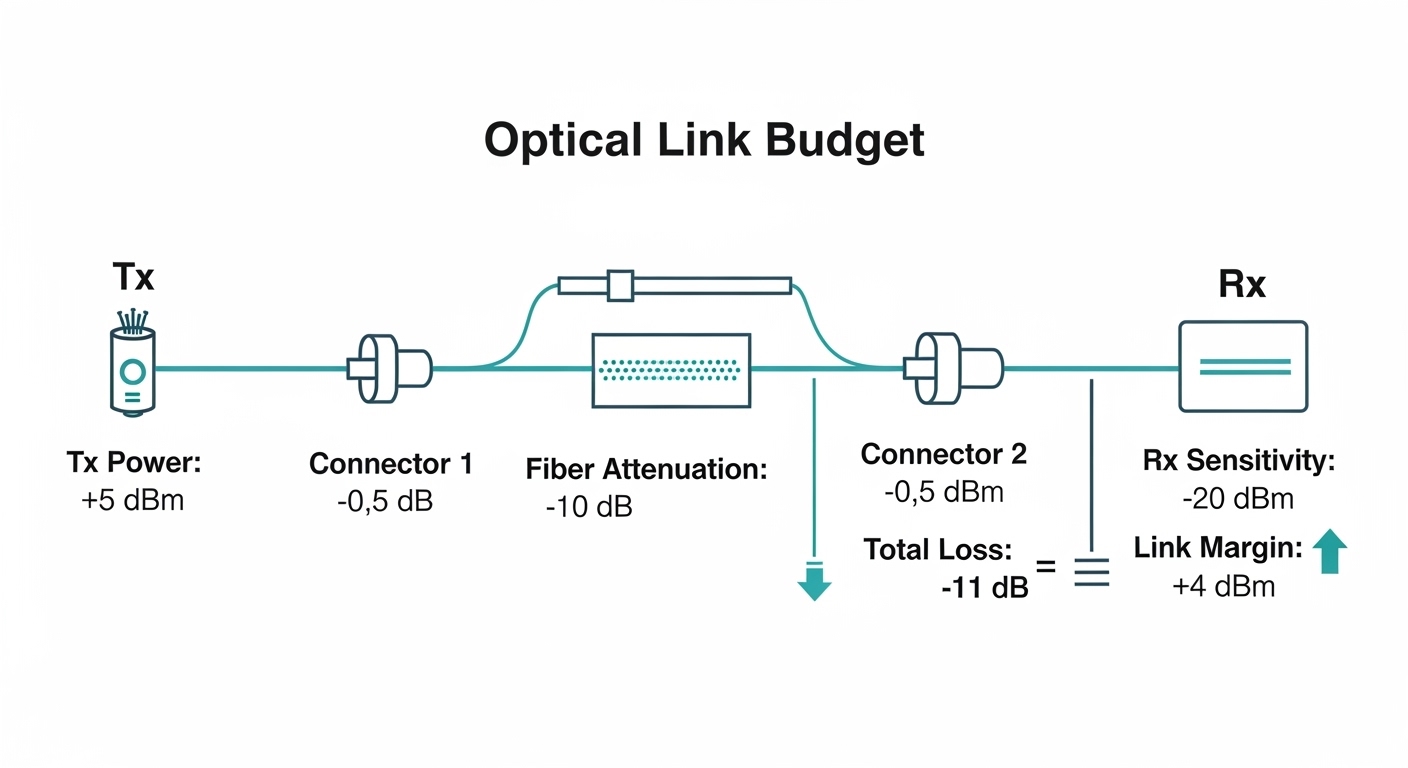
Most 400G projects fail late because teams buy optics by speed and forget the second-order constraints: link margin, vendor compatibility, and how the switch’s optics subsystem enforces transceiver rules. In practice, a 400G QSFP-DD or OSFP link is only as reliable as the combination of transceiver electrical interface, fiber type, launch power, receive sensitivity, and cleaning quality. IEEE 802.3 defines signaling and optical interfaces, but each vendor also adds operational checks like vendor IDs, DOM thresholds, and link training behavior. [Source: IEEE 802.3 Ethernet standard family]
Quick mental model: match optics to transport, not just ports
Before you pick a module, confirm whether your topology is short-reach datacenter, metro, or campus. Then map that to the fiber plant: OM3, OM4, OM5, or single-mode OS2. Finally, validate the switch’s supported wavelength and connector options (LC vs MPO/MTP, and whether it expects ferrule geometry like MPO-12). If you do this in the first hour, you avoid the classic “it lights but errors climb” scenario.
400G optics types you will actually buy (QSFP-DD, OSFP, and friends)
400G optics come in multiple physical form factors and link types. The two most common in modern DC and some metro designs are QSFP-DD and OSFP, each used with specific electrical lane mappings and optical interfaces. You will also see CFP2/CFP4 in older or carrier gear, but most new buying decisions are QSFP-DD or OSFP. Always verify the module form factor and speed grade your switch supports, because a mechanically compatible module can still fail link bring-up due to electrical interface rules. [Source: Cisco and Juniper optics compatibility guides; vendor datasheets]
Common 400G link patterns and typical wavelengths
In datacenters, you will often see multi-lane parallel optics using nominal wavelengths around 850 nm for multimode (OM3/OM4/OM5). For single-mode, common options use 1310 nm or 1550 nm depending on the design and reach target. The “right” wavelength isn’t just about reach; it also affects allowable fiber type and dispersion tolerance. If your plant is mixed OM3 and OM4, the safest move is to select a mode that is explicitly rated for the fiber type and then verify link margin with vendor specs.
Technical specifications table (what to compare before purchase)
Use this table to compare the practical fields that determine whether a 400G transceiver will behave on your network. Exact values vary by vendor and part number, so treat these as a checklist, then confirm with the specific datasheet you plan to buy.
| Spec category | Typical options for 400G | Why it matters |
|---|---|---|
| Form factor | QSFP-DD, OSFP, (older: CFP2/CFP4) | Switch cage compatibility and electrical lane mapping |
| Fiber type | MM: OM3/OM4/OM5; SM: OS2 | Determines wavelength and allowable reach |
| Wavelength | MM: ~850 nm; SM: 1310 nm or 1550 nm | Impacts attenuation and dispersion behavior |
| Reach (examples) | MM short reach (tens to ~300 m depending on type); SM short to long (hundreds of meters to 10 km) | Defines link budget margin and required cleaning |
| Connector | MM/parallel: MPO/MTP; SM: LC | Wrong connector type forces adapter errors and polarity mistakes |
| Data rate | 400G Ethernet (single module) | Confirms it is built for 400G PHY/PCS behavior |
| DOM support | Digital Optical Monitoring (temperature, bias, Tx power, Rx power) | Enables alarms and helps isolate failing links |
| Power consumption | Typically a few watts per module (varies widely) | Impacts switch thermals and PSU budget |
| Operating temperature | Commercial vs extended vs industrial grades | Determines reliability in hot aisles and constrained racks |
| Regulatory and safety | Laser class compliance and RoHS/CE | Reduces risk during audits and avoids noncompliant parts |
Reach and link budget: how to pick the right 400G distance class
When teams say “we need 400G optics,” the real requirement is distance plus margin. For multimode, your limiting factors are modal bandwidth, connector loss, and patch-cord quality; for single-mode, attenuation and end-to-end dispersion tolerance matter more. The goal is to choose a module whose transmit power and receiver sensitivity (plus the vendor’s recommended margin) can tolerate your measured worst-case losses. [Source: ANSI/TIA-568 and IEC fiber performance concepts; vendor link budget sections in datasheets]
Do the loss math like an engineer, not a buyer
Start with the fiber type and length, then add typical losses: connectors, splices, patch cords, and any MPO/MTP polarity adapters. If you have OTDR or at least certified test results, use those values. If you do not, assume conservative connector/splice losses and plan to clean and re-terminate where needed.
Example deployment math (short reach multimode)
In a typical 3-tier data center leaf-spine topology with 48-port 10G and 8-port 400G uplinks per ToR switch, you might run 50 m OM4 patching from ToR to a spine aggregation row. Suppose your worst-case measured loss is 2.5 dB per patch segment, plus 0.6 dB per MPO connection set and 0.3 dB per splice. If the vendor’s 400G OM4 module datasheet specifies an effective reach that assumes roughly 3 to 4 dB of margin, you are likely safe. If your plant is older and losses are closer to 6 to 7 dB, you should expect higher error rates and potential link flaps under temperature swings.
Compatibility checks that prevent “it won’t come up” incidents
Compatibility is where most ROI gets protected. Switch vendors often publish supported transceiver lists, and even when third-party modules work, they may require correct DOM behavior, vendor ID handling, or specific optics configuration. Use the switch’s transceiver compatibility matrix and verify: form factor, wavelength, connector type, and whether the switch enforces vendor lock rules. [Source: switch vendor optics compatibility documents; SFP/QSFP/OSFP transceiver vendor datasheets]
DOM behavior and monitoring thresholds
Digital Optical Monitoring (DOM) typically exposes temperature, laser bias, transmit power, and receive power. The crucial point is that the switch may treat out-of-range thresholds as a reason to disable the port or raise persistent alarms. Before rollout, check whether your NMS polls DOM and whether your alerting is tuned for your specific module class. If you swap OEM modules for third-party equivalents, confirm DOM calibration and alarm thresholds match what your platform expects.
Concrete part-number examples to sanity-check your search
When you begin vendor comparison, collect candidate module part numbers and verify their spec sheets match your fiber and distance. Examples you might encounter during evaluation include Cisco SFP-10G-SR style entries for smaller speeds, and for 400G the equivalents will be QSFP-DD or OSFP multi-lane optics. For single-mode 10G optics you may see parts like Finisar FTLX8571D3BCL or FS.com SFP-10GSR-85, but for 400G you should focus strictly on QSFP-DD/OSFP 400G models in the datasheets. The broader lesson: do not assume a family resemblance across speeds; always validate the exact 400G module and reach class.
Pro Tip: If your 400G link “comes up” but throughput is inconsistent, check DOM receive power and compare it to the vendor’s recommended operating range. A lot of field failures start as marginal optical budget issues that only show up under warm-up cycles or when a patch cord is re-seated.
400G buying guide decision checklist (ordered the way teams should work)
Use this ordered list to avoid last-minute surprises. It is written like a workflow you can hand to procurement plus the network team.
- Distance and fiber type: confirm OM3/OM4/OM5 or OS2, and the exact end-to-end length with certified test results.
- Module form factor and port support: QSFP-DD vs OSFP vs any legacy form factor; confirm switch cage compatibility.
- Wavelength and connector: ~850 nm for multimode, 1310/1550 nm for single-mode; MPO/MTP vs LC adapters must match your patching plan.
- Link margin: compare vendor Tx/Rx specs and ensure your worst-case loss plus safety margin fits the datasheet assumptions.
- DOM support and monitoring: verify the switch accepts DOM and that your NMS thresholds match the module class.
- Operating temperature: check for extended temperature rating if you run hot aisles; verify airflow assumptions in the rack.
- Vendor lock-in risk: if you use OEM only, you may pay more but reduce compatibility churn; if you use third-party, require a tested pilot and document acceptance criteria.
- Return policy and RMA SLA: ensure the supplier supports fast swaps and provides traceable serial number matching for failed units.
- Power and thermal headroom: validate switch line card thermal design; confirm module power draw does not exceed the platform envelope.
Common mistakes and troubleshooting tips for 400G optics
Here are real failure modes engineers run into, with root causes and fixes. Treat these as a pre-RMA checklist.
Link flaps after re-seating optics
Root cause: dirty MPO/MTP endfaces or oxidized LC connectors causing intermittent receive power drops. This is especially common when patch cords are handled during maintenance.
Solution: clean with approved fiber cleaning tools, inspect with a microscope, and re-test using a certified light source/OLTS workflow. Then confirm DOM Rx power stabilizes within the vendor’s recommended range.
“It comes up but errors spike”
Root cause: insufficient link margin due to higher-than-expected connector loss, too many patch segments, or mixed fiber types. In multimode, modal bandwidth limitations can also show up depending on the exact OM grade and launch conditions.
Solution: pull certified test results (or run targeted testing), compare against the datasheet’s effective reach assumptions, and reduce loss (shorten patch cords, replace worn adapters, correct MPO polarity).
Port stays disabled or shows transceiver warnings
Root cause: switch compatibility rules rejecting the module due to vendor ID handling, DOM alarm thresholds, or an electrical lane mapping mismatch.
Solution: use the platform optics compatibility list, try an OEM module for A/B testing, and verify the switch software version supports that transceiver type. If you must use third-party optics, run a pilot with monitoring and log collection before wide deployment.
Wrong connector polarity or flipped MPO pairs
Root cause: MPO polarity mismatches cause receive lanes to map to transmit lanes incorrectly, leading to low optical power and persistent CRC errors.
Solution: follow the polarity standard used in your design (MPO polarity method A/B) and label patch cords. Validate with a polarity test procedure before powering the link.
Cost and ROI note: OEM vs third-party 400G modules
Pricing varies heavily by vendor, reach class, and volume, but a realistic budgeting range for 400G optics in many markets is roughly $800 to $2,500 per module for short-reach multimode classes and $1,500 to $5,000+ for longer single-mode classes, depending on the exact specification and supply situation. TCO is not just unit cost: include labor for cleaning and testing, downtime risk, and the probability of RMA. OEM optics often reduce compatibility risk and may have tighter DOM calibration alignment, while third-party optics can cut upfront costs but require a more disciplined pilot and acceptance testing plan.
From a field perspective, the ROI hinges on avoiding “silent failures.” A slightly cheaper module that causes intermittent CRC errors will cost more in engineer time, ticket volume, and potential incident response than the savings from procurement. If you want third-party, negotiate an RMA SLA and require at least one pilot rack per switch model, not just a single lab test.
FAQ: 400G buying guide questions engineers ask during procurement
What form factor should I choose for 400G in a modern data center?
Most new designs use QSFP-DD or OSFP, depending on your switch model and line card. Check your switch’s hardware guide and optics compatibility list first; form factor determines whether the port will electrically and mechanically support the module.
Can I mix OEM and third-party 400G optics in the same fabric?
You can sometimes, but it is not guaranteed. Even if the link comes up, DOM thresholds, vendor ID checks, and alarm behavior can differ, causing noisy alerts or disabled ports. Plan a pilot and confirm monitoring behavior, not just link state.
How do I estimate whether I have enough reach margin?
Use your certified fiber test results to compute worst-case loss, then compare that to the module’s datasheet link budget assumptions for Tx power and Rx sensitivity. If you lack certification, assume conservative values and schedule cleaning and inspection before declaring the link healthy.
What should I verify about DOM before rollout?
Verify that your switch software polls DOM correctly and that your monitoring thresholds match the module’s expected operating range. Also confirm you can view temperature, Tx power, and Rx power for troubleshooting, and that alarms are not configured in a way that disables ports prematurely.
Why do some 400G links show CRC errors even when the fiber length is within spec?
Common causes include dirty connectors, MPO polarity mismatches, or higher-than-expected connector/adaptor loss from aging patch panels. Another cause is thermal stress: if the rack runs hot, laser bias and receiver margins can change during warm-up.
Is it worth buying higher-grade operating temperature optics?
If you run hot aisles or have restricted airflow, yes. Extended temperature-rated modules can reduce the odds of marginal performance during peak thermal conditions, which is often when errors show up first.
If you want a fast next step, start by listing your switch models and the exact fiber type and distance for each link, then use the checklist above to shortlist module part numbers and confirm DOM and reach assumptions from the datasheets. For broader planning around optics lifecycle and monitoring, see optical monitoring best practices next.
Author bio: I’ve deployed and troubleshot QSFP-DD and OSFP optics in live data centers, including link bring-up, DOM alarm tuning, and RMA-driven failure analysis across mixed OEM and third-party fleets. I translate vendor datasheet specs into practical acceptance tests so teams can buy 400G confidently.
References & Further Reading: IEEE 802.3bs 400GbE Task Force | OIF 400G Technical Specs | Fiber Optic Association
