
Smart cities live or die on fiber availability, latency stability, and predictable field repairs. This article helps network and facilities engineers select the right optical module for urban networking solutions—covering reach, wavelength, DOM support, connector type, power budgets, and operational limits. You will also get a practical troubleshooting checklist that maps common failures to likely root causes.
Where optical modules fail in real smart-city deployments
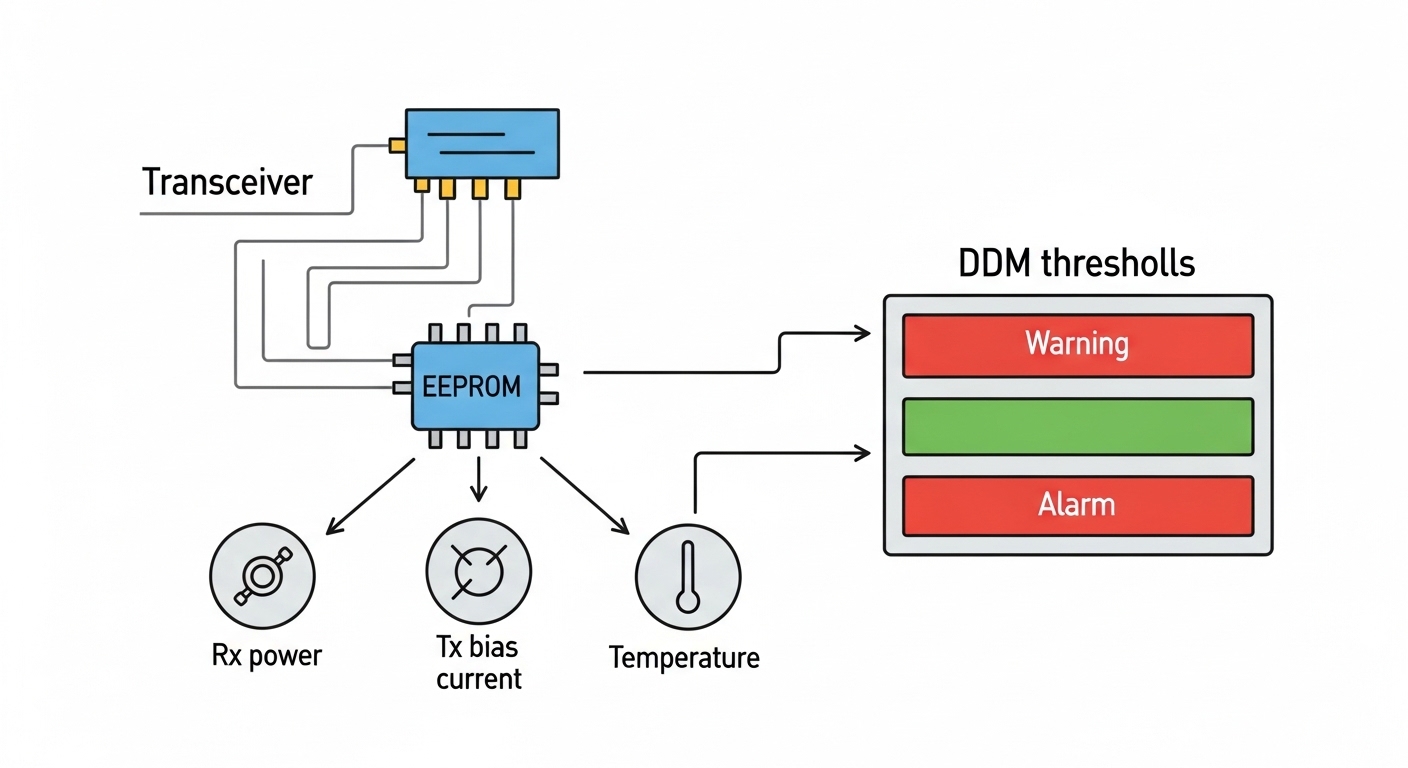
In urban networking solutions, optics are often deployed across streets, rooftops, and utility rooms where temperature swings, vibration, dust, and connector wear are routine. Field techs typically see failures as link flaps, CRC bursts, or complete link loss after patch panel rework. In my deployments, the most time-consuming issues came from mismatched optics (wrong fiber type or wavelength), marginal optical power budgets, and missing diagnostics support during remote troubleshooting.
Smart city networks also tend to mix vendor platforms: traffic management systems, CCTV backhaul, Wi-Fi AP clusters, and SCADA gateways. That mix makes compatibility and DOM behavior critical, because some switches enforce strict transceiver ID checks while others only validate link training. The selection must therefore account for both optical layer requirements and switch behavior at Layer 1.
Quick mapping: use-case to module class
- 10G metro backhaul: SFP+ or SFP28 for shorter spans, QSFP+ / QSFP28 for higher port density.
- 25G aggregation: SFP28 or QSFP28 depending on switch port type and licensing model.
- 40G/100G spine or core: QSFP+ (40G) and QSFP28 / CFP2-like options (100G) with careful budget planning.
- Outdoor cabinets: consider modules rated for extended temperature and robust connector cleanliness practices.
Core selection parameters for optical modules in urban fiber
Start with the physical plant, then align with the switch and optics. The goal is to ensure the module meets the IEEE link requirements for the data rate while staying within the deployed fiber’s attenuation and connector losses. For Ethernet optics, engineering teams typically reference IEEE 802.3 for electrical/optical reach classes and signaling behavior, then validate against vendor datasheets for actual optical power and sensitivity.
Technical specifications table (what to compare)
Use this table as a baseline for common smart-city module choices. Real values vary by vendor part number, but these ranges reflect typical datasheet characteristics.
| Parameter | 10G SR (SFP+) | 10G LR (SFP+) | 25G SR (SFP28) | 25G LR (SFP28) | 40G LR4 (QSFP+) |
|---|---|---|---|---|---|
| Nominal wavelength | 850 nm | 1310 nm | 850 nm | 1310 nm | 1310 nm (4 lanes) |
| Typical reach (MM/SM) | Up to 300 m (OM3) / 400 m (OM4) | Up to 10 km on SMF | Up to 100 m (OM3) / 150 m (OM4) | Up to 10 km on SMF | Up to 10 km on SMF |
| Connector type | LC | LC | LC | LC | LC |
| DOM / diagnostics | Often supported (I2C) | Often supported (I2C) | Often supported (I2C) | Often supported (I2C) | Often supported (I2C) |
| Power consumption | ~0.8–1.5 W | ~1.0–2.0 W | ~1.0–2.0 W | ~1.2–2.5 W | ~3–4 W |
| Operating temperature | ~0 to 70 C typical / extended variants exist | ~0 to 70 C typical / extended variants exist | ~0 to 70 C typical / extended variants exist | ~0 to 70 C typical / extended variants exist | ~0 to 70 C typical / extended variants exist |
| Common module examples | Cisco SFP-10G-SR, FS.com SFP-10GSR-85 | Cisco SFP-10G-LR, Finisar FTLX8571D3BCL | Cisco SFP-25G-SR, FS.com SFP-25GSR-85 | Cisco SFP-25G-LR, Finisar FTLX8571D3BCL class (25G variants) | Cisco QSFP-40G-LR4, Finisar 40G LR4 class |
Authority references: IEEE reach classes and link behavior are defined by IEEE 802.3 for Ethernet PHYs, while module optical power and receiver sensitivity are documented in vendor datasheets. [Source: IEEE 802.3] [Source: Cisco SFP and QSFP datasheets] [Source: Finisar and FS.com transceiver datasheets]
Decision checklist: selecting the right optics for smart-city fiber
Engineers should treat optics selection like a budget exercise: budget the link, then confirm switch compatibility. Below is the ordered checklist I use during field rollouts because it prevents rework and reduces truck-rolls.
- Distance and fiber type: confirm MMF vs SMF, and fiber grading (OM3, OM4, or specific SMF attenuation). Avoid “it should work” estimates.
- Data rate and form factor: match SFP+, SFP28, QSFP+, QSFP28 to the switch port and firmware expectations.
- Wavelength and reach class: SR is for MMF (typically 850 nm), LR is for SMF (typically 1310 nm). LR4 uses multiple lanes for 40G class.
- Optical power budget: use vendor Tx power and Rx sensitivity plus actual fiber attenuation and connector/splice losses. Include worst-case margin for aging.
- Connector cleanliness and patching plan: LC geometry requires strict cleaning and inspection; dirty endfaces are a top cause of “works on bench, fails in cabinet.”
- DOM and telemetry needs: confirm DOM availability, and verify that your switch actually reads DOM fields without alarms.
- Operating temperature rating: outdoor cabinets can exceed 70 C locally; pick extended-temperature modules when warranted.
- Switch compatibility and lock-in risk: check vendor compatibility lists, but also test at least one transceiver per model family to validate link training and alarm behavior.
- Field spares strategy: standardize module part numbers across zones to simplify maintenance and reduce wrong-module insert events.
Pro Tip: If your smart-city switches support DOM thresholds, set receiver power and temperature alarms based on your measured baseline after installation. In practice, this turns “intermittent link flaps” into an early warning system for connector contamination or fiber damage, often before BER counters spike.
Urban networking solutions in the field: a realistic deployment scenario
In a 3-tier data center plus metro edge setup supporting urban networking solutions, a municipality deployed 48-port 10G ToR switches in 12 neighborhood cabinets, each cabinet aggregating CCTV backhaul and Wi-Fi controllers. Each cabinet used 10G SR optics over OM4 MMF from the cabinet switch to a nearby splice vault: average span was 180 m with two LC connectors and one fusion splice per path. Over a quarter of the links were re-terminated during installation to correct alignment, so engineers validated power budgets with conservative margins.
During acceptance testing, we measured link stability by monitoring interface counters for CRC and FCS errors over 24 hours while cycling patch cords for cleaning validation. After a rework event, several ports showed high RX power alarms and intermittent link loss; root cause was contaminated LC endfaces, not a failed transceiver. The presence of DOM in the chosen optics allowed remote identification of out-of-family receiver power levels and reduced time-to-fix.
Common pitfalls and troubleshooting that actually save time
Even when optics are “the right type,” field conditions introduce failure modes. Below are the most common mistakes I see, with root cause and a practical fix.
Pitfall 1: Wrong fiber type or wrong reach assumption
Symptom: link negotiates briefly, then flaps; or link never comes up. Root cause: using SR optics on fiber that is effectively closer to OM1/OM2 performance, or overestimating OM4 reach. Fix: verify fiber grade labels and measure with an OTDR or certified attenuation test; then recalculate the optical budget and swap to LR (SMF) where needed.
Pitfall 2: Power budget too tight after patch panel rework
Symptom: errors increase after a maintenance window; BER-related counters climb. Root cause: extra connectors/splices or slightly higher-than-expected attenuation from re-terminated jumpers. Fix: include connector loss (and conversion losses if applicable) in the budget; standardize patch cord lengths and reduce intermediate patching for critical links.
Pitfall 3: Dirty connectors causing apparent optical “hardware failure”
Symptom: sudden link loss, sometimes correlated with human activity near cabinets. Root cause: contaminated LC endfaces leading to excess insertion loss. Fix: clean with proper fiber cleaning tools and inspect with a microscope/inspection scope; replace jumpers if scratches are detected.
Pitfall 4: Transceiver compatibility mismatch or DOM alarm behavior
Symptom: module is detected but ports show amber alarms or refuse service. Root cause: switch firmware enforcing transceiver vendor IDs or specific DOM data formats. Fix: validate against the switch’s supported optics matrix; if using third-party optics, test in a staging rack and confirm DOM fields and threshold reporting.
Cost and ROI considerations: OEM vs third-party optics
In urban networking solutions, optics are small individually but large in total cost due to quantity and spares. Typical street pricing varies by data rate and vendor, but engineers often see modules in these rough ranges: 10G SR SFP+ commonly in the tens of dollars; 25G SFP28 typically higher; 40G/100G QSFP class optics can be several hundred dollars each depending on reach and vendor. Extended-temperature variants and modules with robust DOM behavior cost more.
TCO is not just purchase price. Third-party optics can reduce upfront CAPEX, but the ROI depends on compatibility risk, stocking strategy, and mean time to repair. If your operations team relies on DOM telemetry for predictive maintenance, you must ensure the chosen optics provide consistent DOM support; otherwise, you lose the operational savings and spend more time on truck rolls. For budget planning, treat compatibility testing as part of ROI, not an optional step.
FAQ: choosing optics for urban networking solutions
Q1: Should we standardize on SR or LR for smart-city cabinets?
If most spans are within MMF distance and the fiber is verified OM3/OM4, SR (850 nm) is usually cost-effective and simplifies patching. If you have uncertain distances, long street crossings, or mixed routes, LR (1310 nm on SMF) can reduce “reach surprises,” but requires SMF and compatible plant.
Q2: How important is DOM for operational maintenance?
DOM is valuable in urban deployments because it enables remote visibility into optical power, temperature, and sometimes bias current. If your switches and monitoring tools ingest DOM reliably, DOM helps detect contamination or aging early. If DOM is inconsistent, you may still get links up, but troubleshooting becomes reactive.
Q3: Can we use third-party optics to reduce costs?
Yes, but only after compatibility validation with your exact switch models and firmware. Some platforms enforce transceiver identification or behave differently with DOM alarms. Run a staging test that includes link stability monitoring and alarm verification before broad rollout.
Q4: What is the fastest way to troubleshoot a link that is down?
First, confirm fiber type and connector hygiene, then verify Tx/Rx power alarms and DOM readings if available. Next, check that the module type matches the switch speed and form factor, and confirm that patch cords are not swapped between SR and LR optics. If counters are available, look for CRC/FCS spikes to distinguish optics budget issues from physical layer mismatch.
Q5: Do temperature swings in outdoor cabinets require special optics?
They can. Many “standard” modules are rated for roughly 0 to 70 C, while outdoor hotspots may exceed that locally. If your cabinet environment can run hot, select extended-temperature optics and confirm with vendor specs and field measurements.
Q6: Which standards should we cite in procurement and acceptance tests?
For Ethernet PHY behavior, cite IEEE 802.3 and the specific transceiver reach class relevant to your data rate. For module performance, use vendor datasheets for Tx power, Rx sensitivity, and DOM support. For fiber plant testing, use your organization’s OTDR and connector inspection procedures aligned to recognized telecom practices.
If you want the next step, use this checklist to build a module compatibility matrix and validate it in staging before citywide rollout: urban fiber transceiver compatibility matrix.
Author bio: Field-focused sales engineer who has supported smart-city fiber rollouts, including optics power-budget validation and DOM-based troubleshooting in cabinets and aggregation closets. Regularly works with IEEE 802.3 PHY requirements and vendor datasheets to prevent rework and reduce truck-roll time.
