
AI clusters live or die by link stability, latency, and predictable optics behavior. This SFP module selection guide helps data center and network engineers choose the right transceiver for AI workloads, comparing SR versus LR, 10G versus 25G, and key compatibility constraints with real operational details. You will also get a decision checklist, common failure modes, and a practical recommendation by reader type.
SR vs LR for AI workloads: performance trade-offs that matter
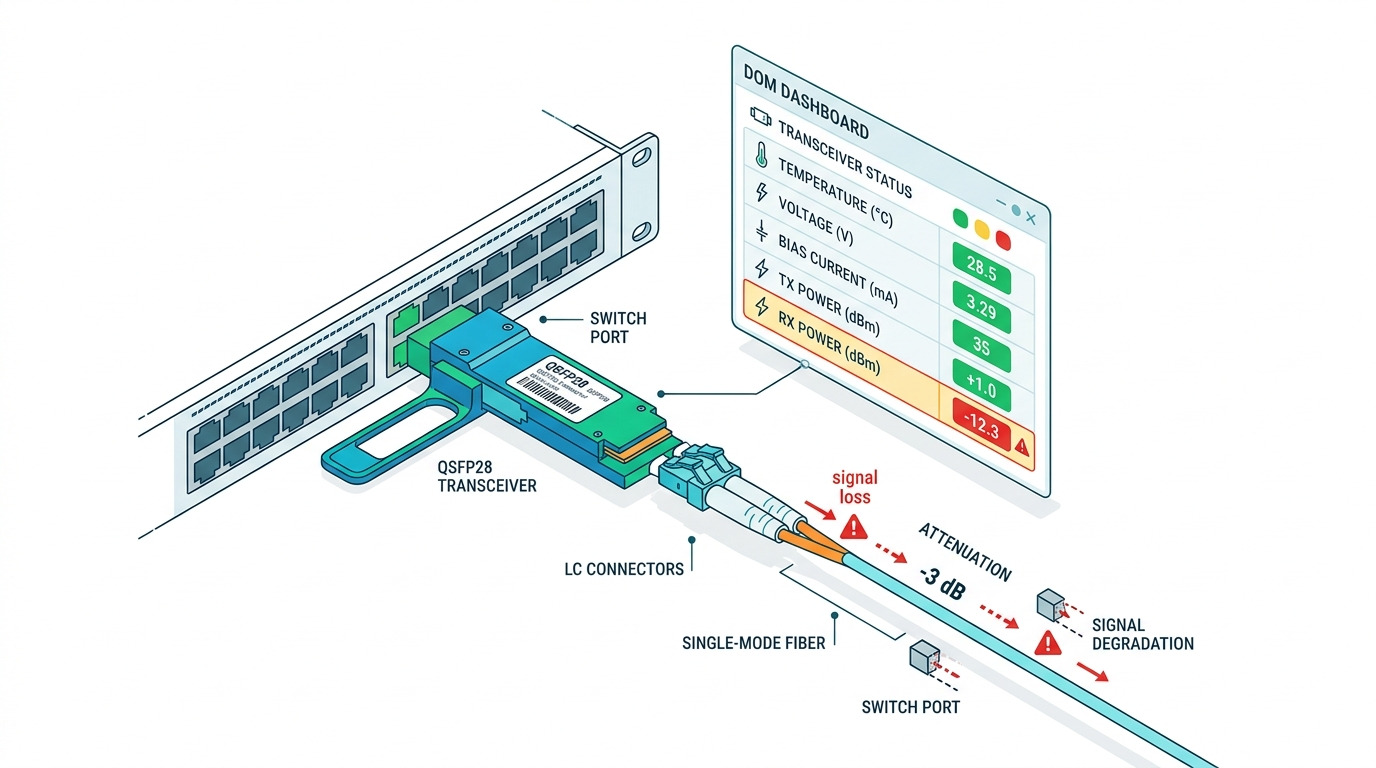
For AI traffic, most topologies use short-reach links inside racks and rows, but training and storage networks often require longer reach. 10GBASE-SR optics typically target 300 m over OM3 and 400 m over OM4 multimode fiber, while 10GBASE-LR targets 10 km over single-mode fiber (SMF). As you move to higher port speeds, SFP+ and SFP28 modules still follow the same reach logic, but the fiber type and budget become more sensitive.
When SR wins
SR modules are usually the best fit for leaf-spine or ToR uplinks within a row where you can control patch cords and keep optical power budgets healthy. In practice, teams pick SR to reduce cost per port and simplify cabling. The operational upside is faster spares management: fewer SKU types and typically higher availability of OM3/OM4 cabling in modern racks.
When LR is unavoidable
LR is the safer choice when you must span across buildings, meet structured cabling distance limits, or connect to remote storage. The trade-off is cost and operational risk: SMF handling is stricter, connectors must be cleaner, and transceivers can be more sensitive to end-face contamination. For AI, this matters because a marginal link can trigger retransmits that inflate training time and degrade throughput.
Pro Tip: In AI cluster deployments, engineers often discover that “it works on the bench” optics fail after patching because the optical budget is consumed by a few extra connectors and dirty end faces. Build your acceptance test around measured receive power and error counters after every cabling change, not just initial link-up.
Core spec comparison: wavelength, reach, power, connector, and temperature
AI workloads require more than “it matches the switch.” You must align wavelength, fiber type, connector style, and temperature range with your environment. SFP modules vary widely in wavelength and optical class, and a mismatch can lead to link flaps even if the connector physically fits.
Below is a head-to-head comparison of common SFP-class options used in 10G and 25G AI fabrics. Always verify the switch vendor’s compatibility list and the module’s electrical interface requirements.
| Module Type | Typical Data Rate | Wavelength | Reach (Typical) | Fiber Type | Connector | Operating Temp | Typical Power |
|---|---|---|---|---|---|---|---|
| 10GBASE-SR (SFP+) | 10 Gbps | ~850 nm | 300 m (OM3), 400 m (OM4) | Multimode | LC | 0 to 70 C (varies by vendor) | ~0.8 to 1.5 W |
| 10GBASE-LR (SFP+) | 10 Gbps | ~1310 nm | 10 km | Single-mode | LC | -5 to 70 C or 0 to 70 C | ~1.0 to 2.0 W |
| 25GBASE-SR (SFP28) | 25 Gbps | ~850 nm | 70 m (typical OM4), higher with newer specs | Multimode | LC | 0 to 70 C (varies) | ~1.5 to 2.5 W |
| 25GBASE-LR (SFP28) | 25 Gbps | ~1310 nm | 10 km | Single-mode | LC | -5 to 70 C or 0 to 70 C | ~2.0 to 3.5 W |
IEEE alignment matters: 10GBASE-SR and LR are defined under IEEE 802.3 for Ethernet optical PHY behavior, including modulation and link requirements. For electrical and management interface behavior, transceivers implement SFF specifications and are commonly managed via I2C/MDIO-like management interfaces.
Reference points: [Source: IEEE 802.3] IEEE 802.3 and vendor datasheets for specific optical budget and interface limits, such as temperature and received power thresholds. Example models you may encounter in AI-ready networks include Cisco SFP-10G-SR, Finisar FTLX8571D3BCL, and FS.com SFP-10GSR-85 (always confirm exact reach and DOM behavior for your SKU).
Switch compatibility and DOM: how to avoid silent link instability
In AI fabrics, compatibility failures often show up as link drops, CRC errors, or high retransmit counts rather than obvious “module not supported” messages. Most modern switches support digital optical monitoring (DOM), but the specifics vary: supported DOM thresholds, alarm behavior, and how the switch reads vendor-specific fields.
What engineers check before install
- Switch transceiver support matrix: confirm the exact module type (SFP, SFP+, SFP28) and speed mode.
- DOM capability: ensure the switch can read temperatures, bias current, optical power, and alarms without forcing the port into a degraded state.
- Speed and FEC mode (where applicable): some platforms negotiate or require specific forward error correction settings at higher speeds.
- Vendor optics policy: some environments restrict third-party modules; others allow them but require specific firmware versions.
Operational example: measured stability after rollout
In a 3-tier data center leaf-spine topology with 48-port 10G ToR switches, one team replaced mixed OEM optics with a standardized third-party set across 20 racks. They staged the rollout in two waves, then monitored interface CRC errors, optics receive power, and link flaps for 72 hours. After aligning connector cleanliness and verifying measured receive power remained within the module’s specified range, they observed a reduction in CRC spikes and stabilized training throughput during peak job bursts.
Pro Tip: If your platform supports it, alert on DOM “high/low” thresholds rather than raw link state. A link can stay up while optical power drifts toward the module’s sensitivity edge, and that drift is visible in DOM before performance counters explode.
Cost and ROI: OEM vs third-party SFP modules for AI clusters
Cost is not only purchase price; it is also downtime risk, compatibility friction, and spares strategy. OEM modules usually cost more but often reduce integration risk with strict compatibility policies. Third-party modules can be cost-effective if you verify compliance, DOM behavior, and vendor documentation.
Typical price and TCO ranges
Realistic market ranges vary by speed, reach, and volume, but engineers commonly see:
- 10GBASE-SR SFP+: often a mid-range per-port cost; OEM typically higher than third-party.
- 10GBASE-LR SFP+ and 25GBASE-LR SFP28: higher cost due to SMF optics and certification overhead.
TCO considerations include:
- Failure rate and warranty terms: compare replacement policies and RMA turnaround.
- Rework cost: cleaning and patch rework can dominate if connectors are managed poorly.
- Power and cooling impact: module power differences are usually small per link, but at scale (thousands of ports) they matter for power budgeting.
- Operational overhead: third-party compatibility issues can consume engineer time during critical AI training windows.
For standards and interoperability, IEEE 802.3 defines Ethernet PHY requirements, while SFF transceiver management behavior is standardized through vendor and industry conventions. Always validate with your switch model and firmware version, because “standards compliant” does not guarantee identical DOM alarm handling.
Decision checklist and matrix: the selection guide you can run in minutes
Use this ordered checklist like a field workflow. It is designed to reduce re-cabling and to prevent “link up but unstable” outcomes.
- Distance and fiber type: pick SR on OM3/OM4 when within reach; pick LR on SMF when you need kilometers.
- Speed and transceiver form factor: ensure SFP vs SFP+ vs SFP28 matches the switch port.
- Budget and optics margin: include patch cords, splices, and connector loss; verify measured receive power after install.
- Switch compatibility: confirm the exact switch model and firmware support matrix.
- DOM support and monitoring: confirm alarms, thresholds, and what telemetry fields the switch exposes.
- Operating temperature: verify your aisle or rack ambient conditions; choose modules rated for your environment.
- Vendor lock-in risk: if you anticipate future refresh cycles, standardize SKUs and document compatibility approvals.
| Your constraint | Best default option | Why | Watch-outs |
|---|---|---|---|
| Short intra-rack distances | 10GBASE-SR (SFP+), or 25GBASE-SR (SFP28) | Lowest cost per port and common OM cabling | Confirm OM3 vs OM4 reach for your exact link length |
| Cross-row or campus reach | 10GBASE-LR (SFP+), or 25GBASE-LR (SFP28) | SMF supports long distances with stable optics | More expensive; connector cleanliness is critical |
| Strict change control | OEM modules | Highest likelihood of immediate compatibility | Higher upfront cost; plan spares accordingly |
| Budget-sensitive scaling | Third-party with verified DOM behavior | Lower procurement cost at high port counts | Validate in a pilot rack; document acceptance criteria |
| Thermally constrained racks | Modules rated for your ambient range | Prevents drift toward sensitivity limits | Check vendor temperature specs and derating guidance |
Common mistakes and troubleshooting for SFP module installs
Most SFP failures in AI networks are preventable. Here are concrete pitfalls, their likely root causes, and what to do next.
Link comes up but performance degrades
Root cause: Optical budget is too tight due to excessive patch cords, dirty connectors, or unaccounted splice loss. Solution: Clean every LC end face, verify receive power against the module’s specified operating range, and check CRC and FCS error counters over a controlled test window.
Port flaps or negotiates unexpectedly
Root cause: Speed mode mismatch (SFP vs SFP+ vs SFP28) or switch firmware policy interacting with module management. Solution: Confirm the switch port supports the exact transceiver type, update switch firmware if your vendor recommends it, and log link event history during install.
DOM telemetry shows alarms while link seems stable
Root cause: DOM thresholds or vendor-specific calibration differences; sometimes also thermal drift in warm aisles. Solution: Compare DOM readings to vendor datasheet thresholds, verify module temperature rating, and improve airflow if bias current or temperature alarms persist.
Wrong fiber type used in the patch panel
Root cause: OM3/OM4 multimode installed where SMF LR was expected, or vice versa. Solution: Label and verify fiber type at the patch panel using test equipment and documentation; then re-terminate or re-route to the correct fiber class.
Which Option Should You Choose?
If you run an AI workload inside a modern rack with controlled cabling, choose SR (SFP+ or SFP28) for best cost and operational simplicity. If your architecture requires long reach to storage or remote compute, choose LR (SFP+ or SFP28) with SMF and invest in cleanliness and optical margin validation.
- Budget-first scaling teams: start with a third-party pilot, but only after validating DOM telemetry and stability metrics for at least 72 hours in a representative workload window.
- Change-control heavy enterprises: favor OEM for initial deployments, then standardize third-party only after your compatibility testing is complete.
- Thermally constrained environments: prioritize temperature-rated modules and verify airflow; optics reliability often hinges more on thermal stability than on nominal reach.
For the next step, align your optics decision with your broader network performance plan using AI network cabling and link budget best practices.
FAQ
What does “SFP module selection guide” mean in practice?
It means you choose modules based on reach, fiber type, speed, and switch compatibility, then verify with acceptance tests. For AI workloads, you should also monitor DOM and error counters after every cabling change.
Should I choose SR or LR for AI training racks?
Most training racks use SR because distances are typically within OM3/OM4 reach limits. Choose LR when you must span kilometers or when your structured cabling uses SMF for long runs.
Do third-party SFP modules work reliably with enterprise switches?
They can, but reliability depends on switch firmware compatibility and DOM behavior. Run a pilot in at least one representative rack, then validate link stability, CRC/FCS errors, and DOM thresholds for several days.
How do I validate optical budget after installing optics?
Measure receive power using the module’s DOM readings or an approved optical measurement workflow supported by your environment. Then confirm that the value stays within the module’s specified operating range across temperature and after patching.
What are the first troubleshooting steps when a link flaps?
Confirm the transceiver type and speed support, check switch logs for module-related events, and inspect and clean connector end faces. If flapping persists, compare DOM alarms and review whether the fiber path matches the module’s expected fiber type and reach.
Where can I find authoritative standards for optical Ethernet?
IEEE 802.3 is the primary reference for Ethernet PHY requirements. For module behavior specifics, use the exact vendor datasheet for wavelength, reach, temperature range, and DOM thresholds.
Author bio: I work with network teams to deploy and validate high-density optical links for AI clusters, using DOM telemetry and error-counter baselining to prevent training slowdowns. My approach blends standards-based selection with field-tested compatibility and acceptance testing workflows.
