
When you are planning new fiber runs or swapping transceivers, the multi-mode versus single-mode decision can quietly lock you into the wrong optics, patching workflow, and long-term cost. This buying guide helps network builders and field engineers choose the right fiber type for specific link distances, transceiver families, and connector/termination realities. You will also get a practical selection checklist, common failure modes, and a short ROI model so you can justify the choice to operations.
Why this buying guide decision matters in day to day installs
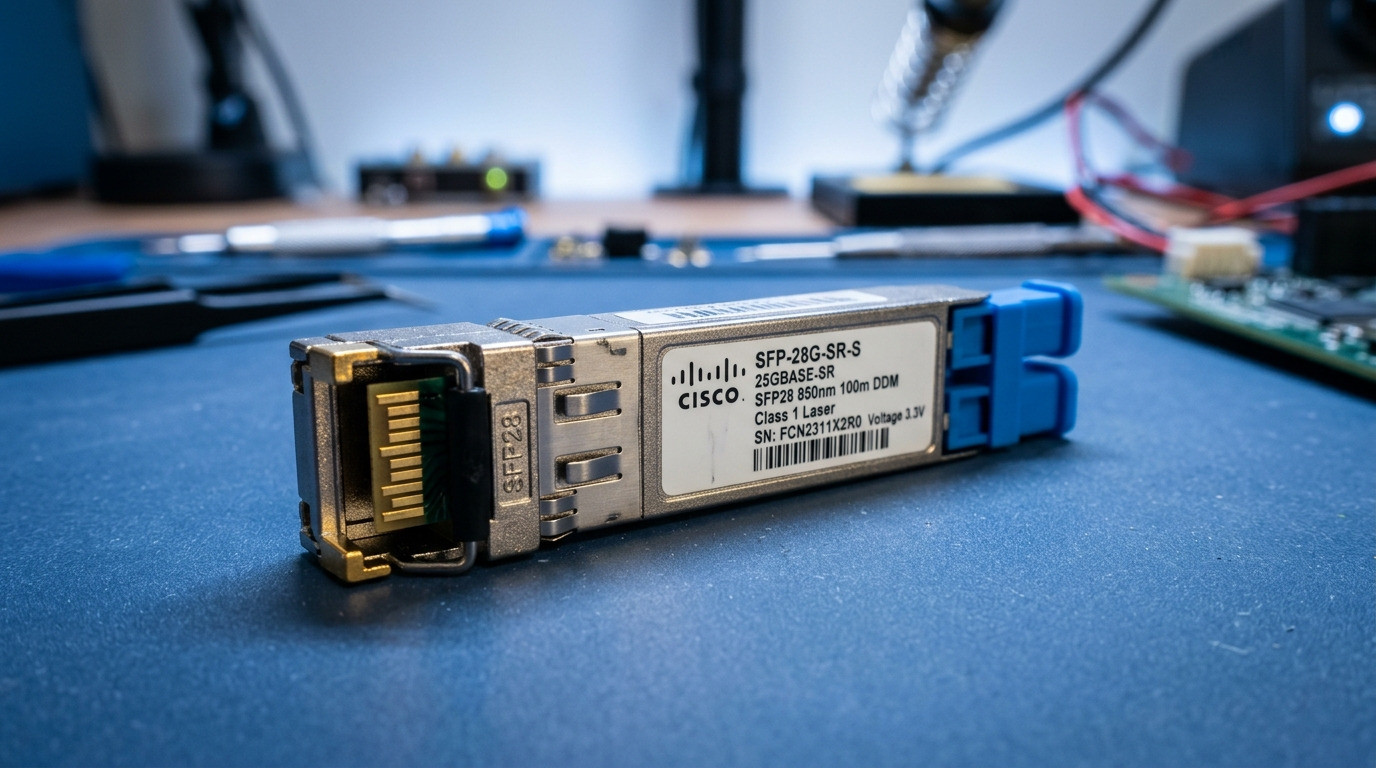
In real sites, the multi-mode versus single-mode choice shows up in patch panel design, transceiver SKU selection, and troubleshooting time when link budgets drift. Multi-mode is often used for shorter runs in buildings and campuses, while single-mode is the default when you need long reach or future-proofing for higher-speed optics. The tricky part is that “faster” or “cheaper” claims rarely match your actual optics compatibility and installed fiber plant.
From my field logs: one enterprise customer installed OM3/OM4 cabling for 10G SR but later tried to extend reach to an aggregation room across a longer run. They ended up re-terminating and replacing optics because their switch ports and optics (and the link budget) were not aligned with the fiber type. The cost was not just the optics; it was the labor for fiber tracing, patching, and end-to-end verification.
Quick spec anchor: OM vs OSO categories engineers reference
- Multi-mode: OM1 (legacy), OM2, OM3, OM4, typically used with short-reach Ethernet optics.
- Single-mode: OS1/OS2, typically used for long-reach Ethernet optics.
- Most buying decisions ultimately map to IEEE 802.3 link types and vendor transceiver reach specs.
Reference standards and vendor datasheets are your “truth source” for reach and optical budgets. For the Ethernet PHY framing and optics mapping, see IEEE 802.3“>IEEE 802.3 and typical module datasheets from Cisco, Finisar/II-VI, and FS. [Source: IEEE 802.3, vendor datasheets]
Multi-mode vs single-mode: the buying specs that actually decide compatibility
To compare properly, you need to align three layers: the fiber plant class (OM/OS), the transceiver wavelength and reach, and the connector/termination style at both ends. Multi-mode is usually paired with 850 nm optics (for many short-reach profiles), while single-mode commonly uses 1310 nm or 1550 nm depending on the speed and reach.
Also watch for system-level parameters that do not appear on the box label: launch conditions, modal bandwidth claims (for OM), and the module’s optical power and receiver sensitivity. These determine whether your link will pass under worst-case conditions.
| Spec area | Multi-mode (OM) | Single-mode (OS) |
|---|---|---|
| Typical fiber core | ~50/62.5 micron (depends on OM type) | ~9 micron core |
| Common wavelengths | 850 nm (many SR profiles) | 1310 nm / 1550 nm (LR/ER/ZR families) |
| Typical use case | Same building, short horizontal runs, ToR to aggregation | Campus backbone, long haul, easier future expansion |
| Connector/termination | Often LC; confirm polarity and cleaning method | Often LC; confirm polarity and cleaning method |
| Link budget sensitivity | More sensitive to patch/jumpers quality and modal effects | More tolerant of distance; still sensitive to bad connectors |
| Temperature range | Check module spec (commercial vs industrial) | Check module spec; many are 0 to 70 C or wider |
Concrete transceiver examples you can map to your decision
If you are buying optics today, your “fiber type” decision often becomes “which transceiver SKU can we deploy safely.” Here are common examples that show the split:
- Multi-mode 10G SR: Cisco SFP-10G-SR, Finisar FTLX8571D3BCL, or FS.com SFP-10GSR-85 (these are typically 850 nm SR-class modules; validate exact reach and DOM support).
- Single-mode 10G LR: Many vendors sell 10G SFP+ LR modules at 1310 nm for longer distances; verify reach vs your fiber class (OS1/OS2) and link budget.
Always verify the specific module datasheet for wavelength, reach, and whether the module supports Digital Optical Monitoring (DOM). DOM matters because you will later use it for threshold alarms and proactive maintenance. [Source: Cisco, Finisar/II-VI, FS.com transceiver datasheets]
Pro Tip: If you see a planned upgrade path (for example, 10G now, 25G/40G later), leaning toward single-mode OS2 often reduces “optics churn.” Multi-mode can be fine, but you must confirm that your future transceiver family is explicitly supported for your OM type and that your patch loss and connector quality stay within budget.
How to choose fiber type during a build: a field-ready checklist
This is the selection checklist I use when I am advising a team on a buying guide decision. It is ordered from most critical to least disruptive later.
- Distance and margin: Measure end-to-end run distance including slack loops, patch cords, and expected worst-case loss. Keep a margin (commonly 3 to 6 dB design headroom depending on your measurement method and patching strategy).
- Speed and transceiver family: Map your switch/SFP/QSFP port speed to the intended module type (SR vs LR vs ER). Use IEEE 802.3 references and the exact vendor datasheet for that optics family.
- Fiber plant class: Confirm the installed cable is truly OM3/OM4 (multi-mode) or OS1/OS2 (single-mode) via documentation and test records. Don’t rely on color alone.
- Switch compatibility and optics validation: Some platforms have strict compatibility lists or require specific optics behavior. Check vendor compatibility guidance and DOM requirements.
- DOM and monitoring: If you want link diagnostics, ensure the transceiver supports DOM and that your switch surfaces those alarms. Without DOM, you will rely on link up/down and logs.
- Operating temperature and deployment environment: Verify module temperature range for your site (0 to 70 C is common for many optics, but industrial modules exist). Consider hot aisles and enclosed cabinets.
- Vendor lock-in risk: Decide whether you will use OEM modules only or third-party. For third-party optics, confirm they are compatible with your platform and that the vendor provides measured compliance and warranty terms.
Real-world deployment scenario with numbers
In a 3-tier data center leaf-spine topology with 48-port 10G ToR switches and a dedicated aggregation row, a team planned horizontal runs of 65 m from ToR to patch closets. They were using OM4 multi-mode for the horizontal layer and single-mode OS2 for the spine uplinks, which ran about 420 m across two rooms with multiple patch points. For the ToR layer they deployed 10G SR-class optics (850 nm) and for the spine they deployed 10G LR-class optics (1310 nm), each validated against the vendor reach spec and a measured link budget from OTDR and insertion loss tests. The key operational win was that their monitoring showed stable optical power and low error counts from day one, avoiding a mid-quarter re-cabling event.
Common mistakes and how to troubleshoot them fast
Most multi-mode versus single-mode issues are not “mystery optical failures.” They are usually measurable errors: wrong fiber class, dirty connectors, polarity mistakes, or insufficient link budget due to patching.
Mistaking OM4 for OS2 during labeling or procurement
- Root cause: Cable reel labels or as-builts are wrong, or someone substituted a similar-looking part number during procurement.
- Symptoms: Link never comes up, or it comes up intermittently with high error counters.
- Solution: Verify fiber type using documentation plus field testing (insertion loss and OTDR where appropriate). Confirm you are using the correct transceiver wavelength for the fiber class.
Polarity mismatch with LC connectors (A to B confusion)
- Root cause: Wrong polarity mapping across patch cords or using mismatched polarity adapters.
- Symptoms: One direction fails, or all links are down until you swap patch cords.
- Solution: Follow a polarity standard consistently (for example, use a labeled polarity scheme and pre-made polarity jumpers). Verify by swapping the jumpers at the patch panel and re-checking link status.
Dirty endfaces causing optical power penalty
- Root cause: Fibers or transceiver endfaces were inserted without cleaning, or cleaning tools were not maintained.
- Symptoms: Works briefly then degrades, or shows low optical power/receiver margin and rising CRC/FEC errors depending on speed.
- Solution: Use a fiber inspection scope, clean with validated procedures, and re-test. Make endface inspection part of the install checklist, not an afterthought.
Exceeding link budget due to extra patch points and long jumpers
- Root cause: Teams underestimate patch cord length and connector count. Each connector and splice adds loss.
- Symptoms: Multi-mode links may be near the edge and fail under temperature or after maintenance moves.
- Solution: Recalculate the link budget using measured insertion loss per jumper/patch and confirm your transceiver reach is not just nominal. Reduce patch cord lengths and consolidate splices where possible.
Cost and ROI: what you pay now versus what you avoid later
In most builds, multi-mode OM4 is usually cheaper per cable length than single-mode OS2, and multi-mode optics (especially 850 nm SR) can also be less expensive upfront. However, the ROI depends on your expected growth and the likelihood of needing higher-speed optics or longer reach later. Single-mode often costs more for the cable plant, but it can reduce re-cabling and transceiver rework when you expand the network.
Typical market pricing varies by region and volume, but as a planning baseline: OEM optics are often priced higher than third-party modules, while third-party can be significantly cheaper but may involve compatibility testing and a higher failure-rate risk if quality is inconsistent. In my experience, the hidden TCO driver is not the optics unit price; it is the labor cost of troubleshooting (connector cleaning, polarity corrections, and re-termination) and downtime during change windows. [Source: common market pricing patterns reported by integrators; vendor warranty terms]
FAQ: multi-mode versus single-mode buying guide questions
How do I know whether my existing fiber is OM4 or OS2?
Start with as-builts and reel documentation, then verify with test records from installation (insertion loss and OTDR where applicable). If records are missing, you can still test and identify behavior, but the most reliable method is to confirm cable markings and run appropriate characterization for the fiber type.
Can I use single-mode optics on multi-mode fiber?
Sometimes you might see a link, but you should treat it as unsupported and unpredictable. The optical launch and modal behavior of multi-mode can cause severe penalties with single-mode optics, and vendor datasheets typically do not guarantee operation in that scenario.
Which is better for short runs inside a building?
Multi-mode is often the pragmatic choice for short horizontal runs when distances are within SR reach and your patching is clean and well-managed. If you expect future expansion that increases reach or speed, single-mode OS2 can be the safer long-term plant decision.
What should I check in a transceiver datasheet before buying?
Verify wavelength, reach, optical power range, receiver sensitivity, DOM support, and temperature range. Also confirm the module is validated for your switch model and that you understand the connector type and polarity expectations.
Why do multi-mode links fail more often after moves or maintenance?
Because multi-mode budgets can be tighter when patch cords change and connector cleanliness varies. If someone swaps jumpers, adds extra patch points, or skips inspection/cleaning, the link margin can collapse quickly.
Is third-party optics a good idea for this fiber buying guide decision?
It can be cost-effective, but you should plan for compatibility testing and strict validation. Prefer vendors that provide clear DOM behavior, warranty terms, and consistent optical specs; then validate with your specific switch and measured link budget.
Choosing between multi-mode and single-mode is less about “which is newer” and more about matching fiber class, optics wavelength/reach, and your measured link budget. If you want the next step, use buying fiber patch cords and cleaners to standardize jumpers, polarity, and cleaning so your links stay stable after every change.
Author bio: I have deployed fiber networks across data centers and enterprise campuses, including transceiver validation, OTDR troubleshooting, and patch panel rework under tight change windows. I write hands-on buying guides that prioritize measurable specs and field-tested failure patterns over marketing claims.
