
When optical components vanish from the market, IoT integrators feel it first at the rack edge and last in the ticket queue. This article helps you compare transceiver options and ordering strategies so your field deployments keep speaking Ethernet while supply chains catch their breath. You will get practical spec checks, compatibility cautions, and a decision matrix for choosing fast, reliable paths under shortage conditions.
Why optical shortages hit IoT first: performance and supply chain reality
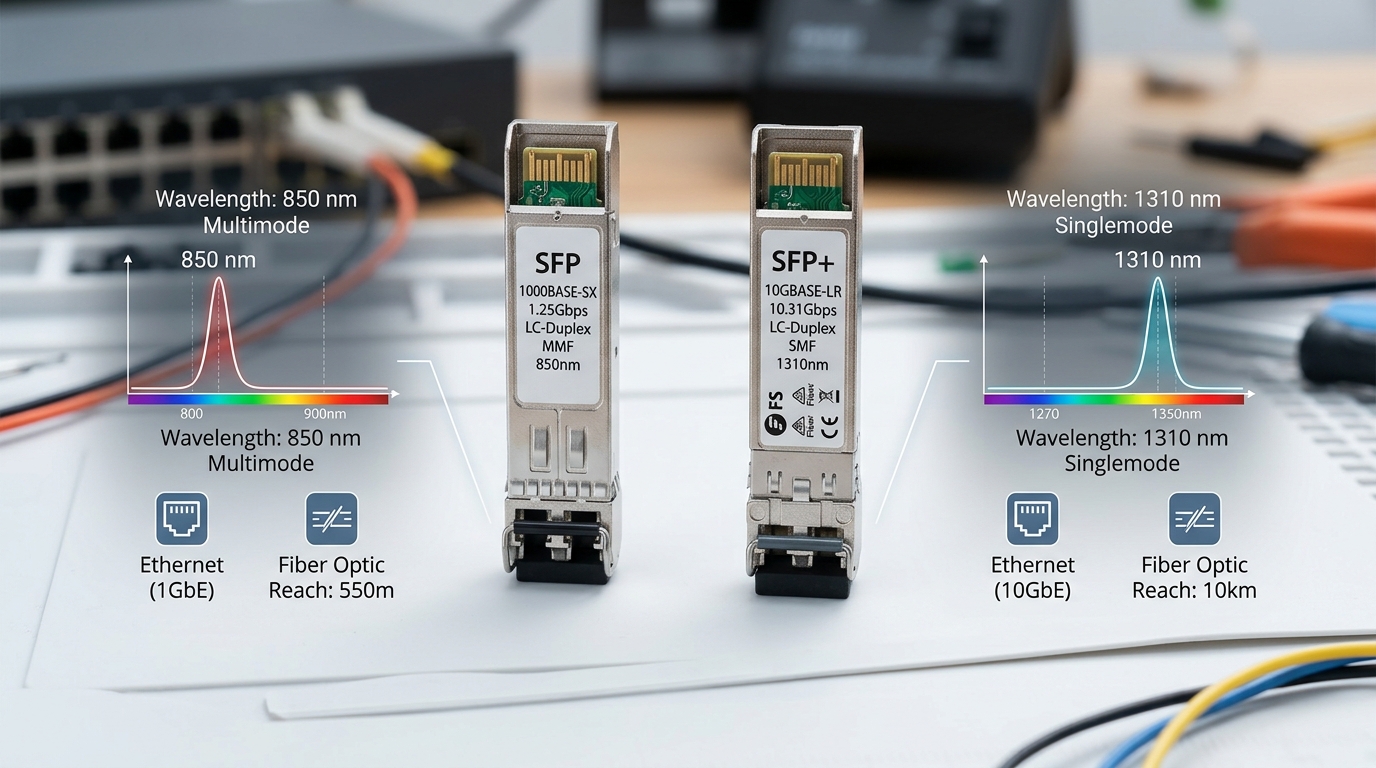
In many IoT deployments, the “optics layer” is not a luxury; it is the only bridge between sensor sites and the aggregation fabric. A leaf-spine data center, an industrial edge gateway cluster, or a campus core can all hinge on 10G, 25G, or 100G
From an operations perspective, the risk is not just “can we get something.” It is whether the substitute module will train links reliably, negotiate correctly, and survive temperature swings without degrading optical power. IEEE Ethernet PHY behavior matters: for example, 10GBASE-SR (IEEE 802.3) expects specific transmitter output power and receiver sensitivity characteristics over multimode fiber. Meanwhile, procurement reality matters too: OEM stock may evaporate, while third-party modules can remain available—yet DOM support and vendor compatibility can still bite.
Head-to-head: transceiver options under shortage constraints
When supply is tight, you need a head-to-head comparison that treats optics as a system. The key parameters are data rate, reach (OM3 vs OM4 vs OS2), wavelength (850 nm vs 1310/1550 nm), connector type (LC), and optical class. You also need to verify electrical compatibility with the switch or router platform, including whether it tolerates third-party modules and whether it expects specific DOM fields.
Core spec comparison: 10G SR multimode vs 1310 nm LR over singlemode
The table below compares common module families engineers use to keep IoT aggregation links alive when inventory is scarce. Values are representative of typical datasheet ranges; always confirm against the exact module part number and your switch vendor’s compatibility list.
| Option | Typical data rate | Wavelength | Target fiber | Reach (typical) | Connector | DOM support | Operating temperature |
|---|---|---|---|---|---|---|---|
| SFP+ 10GBASE-SR (multimode) | 10G | 850 nm | OM3 or OM4 | ~300 m (OM3), ~400 m (OM4) | LC | Often available (check vendor) | 0 to 70 C (typical), some -40 to 85 C |
| SFP+ 10GBASE-LR (singlemode) | 10G | 1310 nm | OS2 | ~10 km | LC | Often available (check vendor) | -5 to 70 C typical; extended options exist |
| SFP28 25GBASE-SR (multimode) | 25G | 850 nm | OM4/OM5 | ~100 m to 150 m (varies by spec) | LC | Common | 0 to 70 C typical; extended options exist |
| QSFP28 100GBASE-SR4 (multimode) | 100G | 850 nm | OM4/OM5 | ~100 m to 150 m (varies) | MPO/MTP | Common | 0 to 70 C typical |
In practice, IoT integrators often choose SR for short-reach aggregation because multimode fiber is already deployed in many facilities. When the distance grows—like connecting remote edge sites—LR becomes the lifeline. In shortage periods, the availability of specific optics can flip week to week, but the physics does not: the module must match fiber type and reach budget, and the switch must accept it.
Real part examples you may see on RFQs
Common references include OEM and compatible modules such as Cisco SFP-10G-SR and Finisar FTLX8571D3BCL, plus third-party equivalents like FS.com SFP-10GSR-85. Use these only as anchors for your search; the exact DOM behavior, vendor acceptance, and optical power class still depend on the precise part number and revision.
Pro Tip: During optical shortages, do not compare only “reach.” Compare launch power and receiver sensitivity from the datasheet, then map them to your installed fiber loss. A module that “meets spec on paper” can still fail in the field if connector cleanliness, aging, or patch panel loss trims your optical budget.
Compatibility and link stability: what procurement must verify before shipping
Compatibility failures are the most expensive kind of shortage: you receive modules quickly, but links refuse to come up, or they flap under load. Switch vendors implement transceiver qualification checks. Some require specific DOM thresholds, some reject unknown module vendors, and some have temperature or optical power expectations that differ between revisions.
For IEEE alignment, remember that optics are standardized at the Ethernet PHY layer (for example, 10GBASE-SR and 10GBASE-LR). However, vendors still differ in how they validate optics parameters through the management interface. Before you commit, check your switch/router model’s optics compatibility list and confirm whether third-party modules are supported for your exact platform.
Checklist: integration-grade verification
- Switch compatibility: validate the transceiver model against the platform compatibility matrix published by the vendor. If no matrix exists, plan a lab test with the exact firmware version.
- DOM behavior: confirm whether DOM is required by monitoring systems (SNMP, telemetry agents, or NMS). Verify that key fields like Tx power, Rx power, and temperature are exposed.
- Fiber type and reach budget: SR requires correct multimode grade (OM3 vs OM4 vs OM5), while LR requires OS2 singlemode. Use connector and splice loss assumptions from your site documentation.
- Connector interfaces: LC vs MPO/MTP is not interchangeable. Mis-mating can cause immediate physical incompatibility and hidden insertion loss.
- Operating temperature: IoT enclosures can run hot. Ensure the module’s temperature range matches your worst-case ambient, not the office baseline.
- Transceiver format and lane mapping: for SR4 and similar multi-lane optics, confirm correct MPO polarity handling and lane ordering requirements.
For authority, the Ethernet PHY foundation comes from IEEE 802.3 documents, while connector and fiber loss practices are often aligned with ANSI/TIA cabling guidance. For procurement and validation, follow vendor datasheets and platform notes as the final word. [[EXT:https://standards.ieee.org/standard/802_3 IEEE 802.3 Standards]] [[EXT:https://www.tiaonline.org/standards/ ANSI/TIA Cabling Standards]]
Cost and ROI: balancing OEM premiums against downtime risk
In shortage seasons, OEM modules often cost more but arrive with fewer surprises. Third-party modules can be cheaper and more available, yet the ROI depends on whether they reduce downtime risk or increase it. For IoT integrators, downtime cost is not abstract: it is lost telemetry, delayed commissioning, and additional truck rolls.
Typical street pricing varies by region and volume, but you can expect rough ranges like $60 to $150 for common 10G SR SFP+ modules, $120 to $300 for 10G LR singlemode SFP+ modules, and $350 to $900+ for 100G QSFP28 SR4 MPO optics, depending on OEM vs third-party and whether you need extended temperature. DOM-enabled modules sometimes cost more, yet they can reduce operational blindness.
TCO math that field teams actually feel
- Procurement cost: OEM premium versus third-party discount.
- Lead time: if you miss a commissioning window, the cost may dwarf the per-module price difference.
- Failure rate and RMA friction: a cheaper module that fails under thermal stress can trigger higher logistics costs.
- Power and monitoring: DOM visibility can improve maintenance planning, reducing repeat failures.
In a real deployment, a single failed edge link can stall device onboarding. If you are running a pilot with 500 IoT endpoints and the telemetry path is partially down, you may lose days of data validation. The “cheapest” module becomes expensive when it extends troubleshooting cycles.
Decision matrix: pick the option that survives both budget and backlog
Use the matrix below to choose between OEM, authorized compatible, and third-party optics during shortages. The weights reflect what procurement and field engineers usually optimize: link reliability, speed to deploy, and operational risk.
| Criteria | OEM module | Authorized compatible | Third-party compatible |
|---|---|---|---|
| Lead time in shortage | Often slower or uncertain | Usually better | Best availability potential |
| Compatibility with switch DOM checks | Highest confidence | Good if validated | Variable; must test |
| Optical budget predictability | Strong datasheet alignment | Often strong | Depends on vendor quality control |
| Total cost over lifecycle | Often lowest regret | Balanced | Can be lowest up front, risky if untested |
| RMA and traceability | Clear paths | Moderate | Varies; confirm warranty terms |
Now, map this matrix to your network needs. If your IoT integrator role demands near-zero commissioning risk, prioritize compatibility and DOM behavior. If your schedule is collapsing, you may accept third-party modules—but only after lab validation with the exact switch firmware and the exact fiber path.
Common mistakes and troubleshooting tips during IoT optics swaps
In shortage conditions, teams hurry. That haste creates predictable failure modes. Below are concrete pitfalls, their likely root causes, and what to do next.
Pitfall 1: “It should work” after swapping SR modules across different fiber grades
Root cause: Using an OM3-optimized assumption on OM4 or OM5, or vice versa, can skew the optical budget. Even when reach is “close,” patch panel loss and connector contamination can push you below receiver sensitivity.
Fix: Verify the installed fiber grade in documentation, then measure link loss with a proper light source and meter if possible. Clean connectors with approved procedures and re-seat the optics.
Pitfall 2: DOM mismatch triggers monitoring alarms or link instability
Root cause: Some third-party modules expose DOM fields differently, or the switch checks thresholds in a way that causes warnings or refusal to bring links up.
Fix: Confirm DOM requirement by your NMS. If needed, test the module in a staging rack running the same switch firmware, and confirm telemetry fields and link stability under load.
Pitfall 3: MPO polarity and lane mapping errors in 100G SR4
Root cause: MPO/MTP polarity mistakes cause lane swapping, leading to high BER, link flaps, or a “up but unusable” state.
Fix: Use correct polarity adapters and confirm the polarity standard used in your cabling plan. Validate with link error counters and optical power readings after each change.
Pitfall 4: Thermal surprises in IoT enclosures
Root cause: Modules rated for 0 to 70 C can be stressed by hot aisles, sealed cabinets, or sun-heated outdoor nodes.
Fix: Confirm enclosure ambient at peak conditions. If needed, source extended temperature optics and add airflow or thermal management before scaling.
Real-world IoT deployment scenario: keeping edge telemetry alive
Consider a 3-tier IoT architecture in a manufacturing campus: 48-port 10G ToR switches at the edge, aggregation at 2 distribution switches, and a central core connecting to a cloud gateway. Each edge row uses 10GBASE-SR over OM4 for patch-to-switch links at about 60 to 120 m. In a shortage week, your OEM SR spares arrive 3 weeks late, so you deploy a validated third-party SFP+ LR only where the fiber run is ~2 km over OS2 and you can re-map to the correct ports.
Field reality: the first batch works, but one link flaps during peak EMI periods. The root cause is not the module optics; it is connector contamination introduced during a rushed re-termination. After cleaning LC ends and re-seating, the link stabilizes and BER counters drop to baseline. The procurement lesson is sharp: optics availability is necessary, but field discipline determines whether the network stays quiet.
Which Option Should You Choose?
If you are an IoT integrator with strict commissioning deadlines and limited lab time, choose the option that minimizes rework: validated OEM or authorized compatible modules for the majority of links, and carefully tested third-party spares for emergency swaps. If your build is already late and you must keep telemetry flowing, prioritize availability but require staging validation with the exact switch models and firmware you run.
For new designs, design for supply resilience: standardize fiber types (OM4 for SR where feasible, OS2 for longer runs), keep a small pool of spares with matched part numbers, and confirm DOM/compatibility expectations during acceptance testing. Next step: review your cabling and optical budget assumptions with fiber-optic-budget-and-connector-cleanliness-checks so procurement decisions do not fight physics.
FAQ
Q: For IoT links, should I standardize on SR or LR optics?
A: Standardize based on distance and installed fiber. SR over OM4 typically fits patch-to-switch and intra-building links, while LR over OS2 supports remote edge nodes. During shortages, the best standard is the one you already have documented and tested end-to-end.
Q: Are third-party transceivers safe to use in production IoT networks?
A: They can be, but only after validation. Confirm switch compatibility, DOM behavior, and optical budget with the same firmware and installed fiber path. If you cannot test, prefer OEM or authorized compatible modules for critical links.
Q: What should I check first when a link does not come up after replacing optics?
A: Start with physical connector mating and fiber polarity, then verify reach and fiber grade. Next, check DOM/telemetry expectations and confirm the switch port is enabled for that transceiver type. Finally, inspect and clean connectors—contamination is a frequent root cause.
Q: How do I estimate whether a replacement module will meet the optical budget?
A: Use datasheet transmitter and receiver parameters to compute margin against your measured or documented link loss. Include patch panels, splices, and connector insertion loss. If you are close to the threshold, treat the plan as fragile and plan either shorter paths, cleaner connectors, or a different wavelength/reach option.
Q: What lead time strategy reduces risk during optical shortages?
A: Split orders: keep OEM or authorized modules for baseline links, and hold validated compatible spares for emergency use. For long runs, pre-approve alternate part numbers that match fiber type and DOM expectations, so you can pivot quickly without re-qualification delays.
Q: How can I reduce troubleshooting time in the field for IoT optics?
A: Standardize your optics part numbers, keep a known-good test module, and maintain a checklist that includes cleaning steps and link counter checks. Also, ensure your monitoring captures DOM fields like Tx/Rx power so you can distinguish optical budget issues from configuration errors.
Author Bio: I have deployed Ethernet optics for IoT edge aggregation, validating transceivers against switch firmware and real fiber loss budgets in staged racks. I write procurement-ready guidance that field engineers can execute when lead times collapse and uptime must stay intact.
