
Edge computing deployments live or die by the fiber link you choose. This article helps network and field teams understand the practical fiber needs behind edge computing—including optics reach, link budgets, connector realities, and switch compatibility—so you can avoid “it worked in the lab” surprises. If you are planning 10G or 25G runs from a site closet to an on-prem edge server or micro data center, you will get a clear comparison framework and a checklist.
Edge computing fiber needs: what actually limits reach
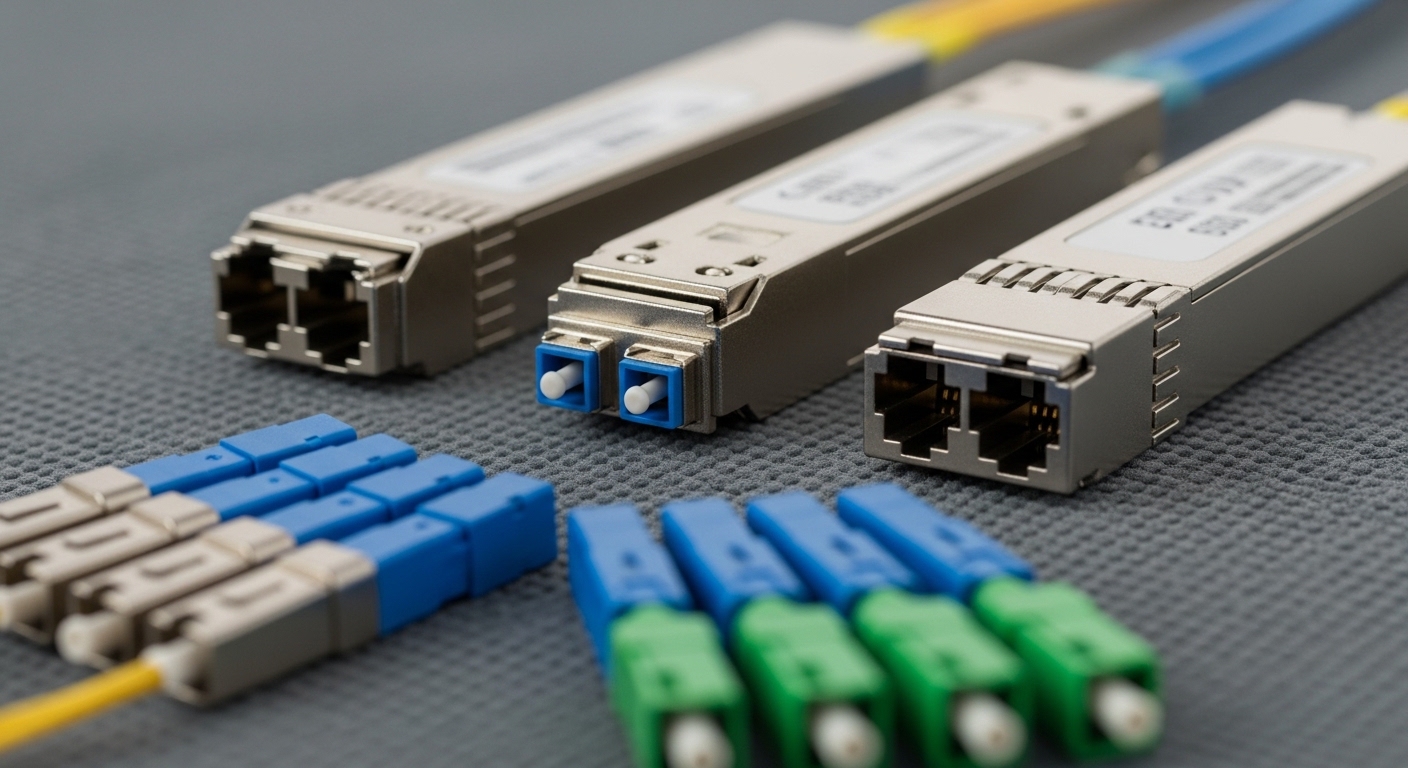
In edge computing, the limiting factors are usually not the transceiver headline spec; they are the end-to-end optical budget and the installed plant losses. IEEE Ethernet optics are typically specified for a nominal reach under controlled conditions, but your real link includes splice loss, connector insertion loss, patch cord attenuation, and sometimes dirty ferrules. For multimode links (OM3/OM4), modal bandwidth and launch conditions matter; for single-mode, connector cleanliness and reflectance control dominate.
From a field perspective, engineers often measure the installed loss using an OTDR for single-mode and a light source plus power meter for both types. You then compare the measured total attenuation against the optics’ receiver sensitivity and the vendor’s recommended link budget. If you cannot measure, you must conservatively estimate losses and add margin for future rework.
Key optical parameters you should verify
- Wavelength and fiber type: 850 nm for common multimode SR optics; 1310 nm for some SM variants; 1550 nm for longer SM reaches.
- Connector and splice loss: assume typical connector insertion loss and splice loss, then add margin for re-terminations.
- Power budget: compare transmitter power minus receiver sensitivity against your estimated plant loss.
- Temperature range: edge cabinets can run hot; optics may derate outside vendor-qualified ranges.
Pro Tip: If your site uses pre-terminated trunks plus patch panels, the “extra” connectors often consume the margin faster than the fiber attenuation itself. Plan a buffer for at least one future re-patch cycle, especially where ferrules are handled repeatedly during commissioning.
Head-to-head: multimode SR vs single-mode LR for edge computing
Below is a comparison of common optics classes used in edge computing. Multimode SR transceivers (typically 850 nm) can be cost-effective for shorter runs within a metro or campus footprint. Single-mode LR optics (often 1310 nm) cost more per module but offer longer reach and simpler bandwidth planning over mixed distances.
| Spec | 10G Multimode SR (850 nm) | 10G Single-Mode LR (1310 nm) | 25G Single-Mode LR (1310 nm) |
|---|---|---|---|
| Typical data rate | 10G Ethernet | 10G Ethernet | 25G Ethernet |
| Fiber type | OM3 or OM4 multimode | OS2 single-mode | OS2 single-mode |
| Wavelength | 850 nm | 1310 nm | 1310 nm |
| Connector | LC (typical) | LC (typical) | LC (typical) |
| Typical reach (vendor class) | ~300 m on OM3 / ~400 m on OM4 | ~10 km | ~10 km (varies by module) |
| Operating temperature | Commonly 0 to 70 C or broader options | Commonly 0 to 70 C or broader options | Commonly 0 to 70 C or broader options |
| Power budget (planning) | Limited; margin matters on installed links | More forgiving for longer runs | Varies; confirm exact sensitivity |
Concrete optics examples you may see in the field include Cisco SFP-10G-SR, Finisar FTLX8571D3BCL, and FS.com SFP-10GSR-85. For standards context, Ethernet optical transceiver behavior aligns with IEEE 802.3 requirements for 10GBASE-SR and 10GBASE-LR optics. See [Source: IEEE 802.3] and vendor datasheets for exact receiver sensitivity and link budget. IEEE 802.3 standards
Selection checklist: choosing fiber and optics that survive site reality
When teams specify fiber for edge computing, they often start with “planned distance,” then lose the plot on connectorization, splice quality, and thermal environment. Use this decision checklist in order; it prevents rework during acceptance testing.
- Distance and topology: trunk length, patch panel hops, and any intermediate splices. Include slack loops and planned reroutes.
- Fiber plant type: confirm OM3 vs OM4 for multimode, and verify OS2 with cable markings for single-mode. Do not assume.
- Budget and optics class: choose SR for shorter runs when multimode bandwidth is sufficient; choose LR/longer SM when distance or growth is likely.
- Switch compatibility: validate that your switch supports the transceiver type and that optics are within the vendor’s compatibility list. Some platforms enforce stricter DOM or EEPROM behavior.
- DOM and monitoring: confirm if your operations model needs Digital Optical Monitoring (DOM) telemetry for alarms and trending. Many modern switches can ingest it, but older gear may not.
- Operating temperature and airflow: check the optics temperature range and verify rack fan curves. Hotter cabinets may trigger link instability or module throttling.
- Vendor lock-in risk: consider third-party optics policies and replacement lead times. Prefer vendors who publish detailed link budgets and DOM behavior.
Cost and ROI: what to expect over a typical edge lifecycle
In many deployments, optics are a small line item compared with field labor, fiber termination, and downtime during cutover. Typical module pricing depends on speed and brand, but as a realistic planning range, 10G SR modules from mainstream suppliers often cost less than single-mode LR modules; 25G single-mode modules usually cost more and can be more sensitive to compatibility. OEM modules may carry higher upfront cost, but they can reduce commissioning friction and warranty disputes.
Total cost of ownership (TCO) should include: labor for termination, spare optics inventory, expected failure rates, and the cost of troubleshooting time when a link fails after fiber is already buried or routed. If you expect future scaling from 10G to 25G at the edge, single-mode may reduce future re-cabling costs even if the optics price is higher today.
Common pitfalls and troubleshooting for edge computing fiber links
Fiber issues often present as link flaps, intermittent packet loss, or total link down after a seemingly minor change. Below are frequent failure modes with root causes and practical fixes.
“Works on the bench, fails on site” after patch panel changes
Root cause: connector insertion loss spikes due to dirty ferrules or mismatched polish types; additional connectors consume the margin on SR links. Solution: clean connectors with approved methods, re-terminate if needed, and re-measure with power meter. For multimode, verify launch conditions and patch cord quality.
Wrong fiber type assumption (OM3 vs OM4, or MM vs SM)
Root cause: cable markings are missing or labels were swapped during construction; the optics may still “see” light but fail the required link budget under temperature and aging. Solution: verify fiber type using documentation and physical inspection, then confirm with OTDR or a wavelength-specific test setup.
DOM or transceiver compatibility mismatch causing alarms
Root cause: the module’s EEPROM/DOM implementation does not match what the switch expects, or the switch uses an allowlist. Solution: confirm compatibility using the switch vendor’s optics guidance, and if needed, switch to modules with verified DOM behavior. If alarms persist, capture syslog timestamps and compare to optical power telemetry.
Temperature-driven instability in sealed edge cabinets
Root cause: optics or switch ports exceed their qualified operating envelope due to poor airflow, causing receiver sensitivity degradation and link resets. Solution: improve airflow, verify rack inlet temps, and choose modules with a wider operating temperature range.
Which option should you choose?
Choose multimode SR when your edge computing run is short, your plant is verified OM3/OM4, and your budget favors lower per-port optics cost. Choose single-mode LR when distance is longer, you want a bigger growth margin, or you are integrating multiple sites where fiber type uncertainty is higher.
Decision matrix (quick scoring):
| Scenario | Distance | Fiber certainty | Speed | Best fit | Why |
|---|---|---|---|---|---|
| Micro edge server closet to ToR switch | 50 to 400 m | High (verified OM4) | 10G | Multimode SR | Lower optics cost and sufficient reach |
| Edge site backhaul across a campus | 1 to 10 km | Medium | 10G | Single-mode LR | More forgiving link budget and simpler planning |
| Edge scaling to higher throughput | 2 to 10 km | High (OS2 available) | 25G | Single-mode LR (25G) | Future-proofing without re-cabling |
For most edge computing deployments that involve multiple sites, changing contractors, or uncertain fiber documentation, single-mode optics usually reduce commissioning risk. For verified short runs inside a single facility, multimode SR can be the most economical path.
FAQ
What fiber type is most common for edge computing?
Multimode OM3/OM4 is common for short intra-building runs, while OS2 single-mode is common for longer backhaul between edge sites and aggregation points. The right choice depends on distance, installed fiber quality, and how much margin you need for splices and connectors.
How do I confirm the link budget without expensive lab gear?
Use an approved light source and power meter for quick attenuation checks, and OTDR for single-mode troubleshooting when available. Then compare measured loss to the vendor link budget and ensure you keep a practical margin for connector cleaning and rework. [Source: vendor transceiver datasheets]
Do I need DOM support for edge computing monitoring?
DOM is strongly helpful if your operations platform needs optical power and alarm telemetry for proactive maintenance. However, some older switches may not fully support DOM ingestion, so confirm compatibility before standardizing.
Can I mix third-party optics with OEM switches in edge sites?
Sometimes yes, but it is not guaranteed. Compatibility varies by platform and firmware, especially around EEPROM behavior and DOM expectations, so validate with the switch vendor guidance and do a pilot test before scaling.
Why do multimode links fail after a move or patch change?
Connector contamination and added insertion loss are the most frequent causes. Cleaning connectors, verifying patch cord quality, and re-measuring optical power typically resolves the issue quickly.
What temperature range should I plan for at the edge?
Plan based on measured rack inlet temperatures and vendor-qualified optics operating ranges. If your cabinet can exceed typical indoor limits during peak loads, select optics rated for the wider temperature envelope and improve airflow.
Expert bio: I have deployed and troubleshot fiber and Ethernet optics for distributed edge sites, including link budget validation, DOM telemetry integration, and OTDR-driven fault isolation. I write from field experience with vendor datasheets and IEEE Ethernet requirements to help teams specify links that pass acceptance tests.
Next step: If you are mapping ports, power, and optics across your edge racks, review edge computing network design for transceiver planning.
