
AI and ML deployments make fiber connectivity failures feel sudden: a training job stalls, a storage pool flaps, or a high-rate inference path drops packets. This article helps network and data center engineers quickly isolate whether the fault is optical, switching, or configuration-related. You will get a field-style troubleshooting workflow, a head-to-head comparison of common transceiver and cabling options, and a decision checklist you can reuse under outage pressure.
Fiber connectivity failure patterns in AI/ML workloads
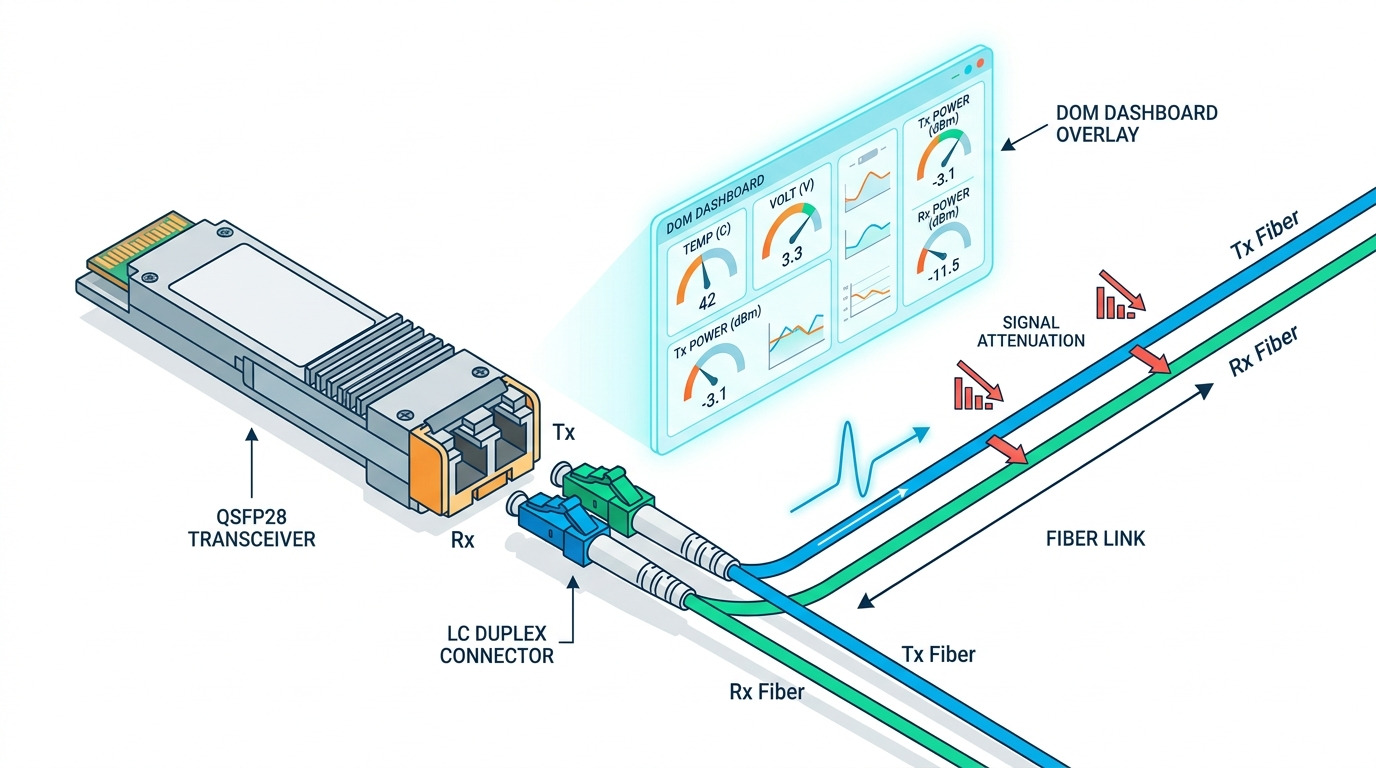
In GPU clusters, the most expensive symptom is often not the outage itself but the time lost to re-converge. I typically see fiber connectivity issues show up as link down/up cycles, CRC or FCS errors climbing on a specific port, or intermittent packet loss that only appears under peak load. For leaf-spine fabrics, a single bad patch cord can create a “hot island” where east-west traffic between certain racks degrades while other paths look fine.
Before touching optics, capture three signals: switch interface counters, optical diagnostics from the transceiver, and the physical topology. If you are using vendor-supported optics, the switch will often report received power (Rx), laser bias/current, and temperature via DOM. When the DOM values are stable but the link still flaps, you should suspect connector cleanliness, insufficient bend radius, or a marginal transceiver-to-port compatibility issue. For authoritative link behavior, keep IEEE 802.3 Ethernet physical layer expectations in mind, especially around PCS/FEC and optical power margins. anchor-text: IEEE 802.3 physical layer background
Head-to-head: optics and fiber choices that affect troubleshooting
Not all fiber connectivity problems are cabling problems. In practice, transceiver type, wavelength, encoding, and connector cleanliness determine how quickly you can narrow the root cause. The fastest triage path is to compare the “expected” optical budget and diagnostics behavior versus what you observe in the switch.
Quick spec comparison for common AI/ML optics
The table below compares typical short-reach and intermediate-reach optics used in modern clusters. Exact part numbers vary by switch vendor, but these ranges reflect common deployments and optical safety margins. For standards context on 10G/25G/40G/100G Ethernet over fiber, consult IEEE 802.3 and vendor datasheets. anchor-text: Finisar transceiver product documentation
| Option | Data rate | Wavelength | Typical reach | Fiber type / core | Connector | DOM / diagnostics | Operating temperature |
|---|---|---|---|---|---|---|---|
| 10G SR optics | 10G | 850 nm | Up to 300 m (OM3) / 400 m (OM4) | MMF (OM3/OM4) | LC | Usually supported (SFP+ MSA) | 0 to 70 C typical |
| 25G SR optics | 25G | 850 nm | Up to 100 m (OM3) / 150 m (OM4) | MMF (OM3/OM4) | LC | Often supported (SFP28 MSA) | -5 to 70 C typical |
| 100G SR4 optics | 100G | 850 nm | Up to 100 m (OM4 typical) | MMF (OM4) | LC (4-lane) | Usually supported (QSFP28 MSA) | 0 to 70 C typical |
| 10G LR optics | 10G | 1310 nm | Up to 10 km | SMF | LC | Usually supported | 0 to 70 C typical |
Why this matters for fiber connectivity troubleshooting: MMF SR links are sensitive to link budget shrinkage from dirty connectors and excessive patch cord loss. SMF LR links can tolerate more loss, but are less forgiving about wavelength mismatch and wrong fiber mapping in dense patch panels. In both cases, DOM helps you spot whether the transceiver is “struggling” (high laser bias, low Rx power) versus failing at the physical layer.
Which pairing is easiest to troubleshoot?
From the field, SR optics over OM4 with LC connectors are common in leaf-spine top-of-rack designs and have rich DOM telemetry. LR optics over SMF can be more stable when cabling is clean, but the debugging effort shifts toward mapping accuracy and verifying that you are not mixing strands or using the wrong duplex polarity. If your organization standardizes on a small set of verified transceiver SKUs, you will reduce the odds of “works in one slot, fails in another” compatibility edge cases.
Pro Tip: If a link shows stable DOM values but still flaps, prioritize connector inspection and patch cord swap tests before assuming the optics are defective. In many AI/ML outages, the root cause is a contaminated LC ferrule that intermittently passes enough signal for the link to train, then fails during higher stress or slight connector movement.
Step-by-step: triage workflow for fiber connectivity in AI/ML
Use a repeatable sequence so you do not burn time swapping components blindly. I recommend a “divide and conquer” method: confirm the physical link state, verify optics health, then validate switching and VLAN/MTU side effects that can masquerade as “optical” symptoms.
Confirm the symptom and scope
Start with the switch port state and counters. Look for link down/up events, FEC status changes (if applicable), and bursts in CRC/FCS or symbol errors. If only one GPU node shows loss while other nodes on the same leaf behave normally, the fault may be node-side optics, a single patch cord, or a specific NIC/driver issue rather than the fabric.
Read DOM and compare against vendor thresholds
From the switch CLI or GUI, pull DOM for Tx/Rx power, temperature, and laser bias/current. A common pattern: Rx power is below the vendor’s “minimum receive” threshold, or it is drifting quickly. If Tx bias is elevated while Rx power is low, the optics may be aging or the fiber path loss is too high. If Tx/Rx values look normal but the interface still errors, suspect connector contamination, polarity swap, or a mismatch in expected lane mapping (especially with multi-lane optics like 100G SR4).
Validate fiber path and connector cleanliness
Perform a structured patch cord test: swap the patch cord at the patch panel end first, then at the switch end. Clean LC/SC connectors using approved cleaning tools and verify with a fiber inspection microscope. Per industry practice, dust and micro-scratches can cause sudden link training failures; cleaning is often the fastest fix compared to replacing transceivers. For inspection guidance, follow vendor and industry best practices for ferrule inspection and cleaning. anchor-text: Corning cleaning and inspection guidance
Check switch-side configuration that can look like physical issues
In AI/ML environments, you may run multiple VLANs for management, storage (e.g., RoCEv2), and data-plane traffic. Misconfigured MTU, disabled PFC/ECN behavior, or incorrect QoS can produce drops and retransmits that resemble a “bad link.” Ensure the interface MTU matches end-to-end requirements, verify VLAN tagging mode (access vs trunk), and confirm that any RoCEv2-related features align with the storage and NIC configuration. While these are not optical faults, they can dominate the symptom you see during training.
Common mistakes and troubleshooting tips for fiber connectivity
This section is where outages are usually won or lost. These are recurring failure modes I have seen during AI cluster bring-up and during “mystery performance” incidents.
Mistake 1: Assuming a down link means bad optics
Root cause: Dirty or damaged connectors can cause intermittent link training and “link flaps” even when the transceiver itself is healthy. Solution: Inspect and clean both ends of the link, then swap patch cords before replacing optics. If you have spare known-good optics, test with the same fiber patch cord to isolate the failing component.
Mistake 2: Ignoring optical power drift and threshold meaning
Root cause: Engineers sometimes treat “DOM present” as “optics are fine,” but low Rx power or high Tx bias can indicate a shrinking margin due to added loss or aging. Solution: Compare DOM values to the vendor’s datasheet thresholds for the exact module. Re-measure after cleaning and after any cable rework to confirm margin recovery.
Mistake 3: Mixing fiber polarity or lane mapping on multi-lane links
Root cause: For 100G SR4 and similar multi-lane optics, an incorrect mapping can create errors that look like random packet loss under load. Solution: Verify duplex polarity and lane mapping using the labeling at both ends of the MPO/LC breakout or the transceiver-to-cable assembly. Re-terminate or re-map strands systematically rather than “trying until it works.”
Mistake 4: Chasing VLAN/MTU issues while the physical layer is failing
Root cause: CRC errors and link flaps can trigger control-plane resets, which then expose configuration problems. Solution: First stabilize the physical link: ensure error counters are clean and link state is stable. Only then validate VLAN trunking, MTU, and QoS/PFC settings for the AI traffic profile.
Cost and ROI: OEM vs third-party optics for fiber connectivity
Budget pressure is real in AI/ML deployments where you might populate hundreds or thousands of ports. OEM optics are usually more expensive but often come with tighter integration to specific switch firmware, better compatibility validation, and consistent DOM behavior. Third-party optics can reduce upfront cost, but the total cost of ownership depends on your return rate, compatibility issues, and time spent in troubleshooting.
In typical procurement cycles, OEM 25G SR modules might land in the mid to high price range per unit, while third-party equivalents often cost less but vary widely by vendor and quality tier. For 100G SR4, pricing is higher and the risk of lane mapping or firmware quirks increases. If you standardize and validate a small set of third-party SKUs with your exact switch models, you can capture ROI while keeping troubleshooting predictable.
TCO is also influenced by power and cooling. Optics that run hotter can accelerate failure; keeping temperatures within the module’s specified operating range helps reliability. For ROI math, include labor time during incidents and the cost of downtime for training jobs, not just the purchase price. A single day of degraded performance in a large training run can outweigh the savings from cheaper optics.
Decision matrix: pick the right fiber connectivity approach for your scenario
Use this matrix to decide not only what to deploy, but how you will troubleshoot it when it fails. The best choice is the one that aligns with your distance, optics ecosystem, and operational maturity.
| Factor | MMF SR (850 nm) | SMF LR (1310 nm) | What to prioritize during troubleshooting |
|---|---|---|---|
| Distance | Best for short intra-row and pod links | Best for longer runs and cross-building | Link budget and connector cleanliness for MMF; mapping and polarity for SMF |
| Connector sensitivity | High sensitivity to dust and patch cord loss | Lower sensitivity to small loss changes | Inspect and clean first; then evaluate Rx power margin |
| DOM visibility | Often strong telemetry | Often strong telemetry | Check Rx power, Tx bias, temperature drift |
| Compatibility risk | Moderate, especially with third-party optics | Moderate, plus fiber mapping errors | Validate with switch model and firmware; standardize SKU list |
| Operational effort | Higher chance of “cleanliness” incidents | Higher chance of “wrong strand” incidents | Use inspection microscopes and strict labeling processes |
Selection criteria / decision checklist (ordered)
- Distance and link budget: Confirm reach based on OM type and expected patch cord count, splitters, and measured loss.
- Switch compatibility: Verify transceiver support for your exact switch model and firmware release; avoid surprise “unsupported optics” behavior.
- DOM support and thresholds: Prefer modules that report DOM reliably and align with vendor receive power thresholds.
- Operating temperature and airflow: Ensure module temperature stays within spec; check port-side airflow in dense GPU racks.
- Connector type and cleaning discipline: LC is common; enforce inspection and cleaning SOP to protect fiber connectivity margins.
- Vendor lock-in risk: If using third-party optics, validate a small set of SKUs and keep spares ready for fast swaps.
- Failure domain and spares strategy: Stock known-good optics and patch cords for rapid isolation during AI training windows.
Which option should you choose?
If you run an AI/ML leaf-spine fabric inside one pod with predictable short distances, choose MMF SR optics with disciplined cleaning and strict patch panel labeling; this typically minimizes operational friction when fiber connectivity issues occur. If your AI workload spans longer runs, cross-floor links, or separate rooms, SMF LR optics can reduce margin sensitivity to small connector issues, but you must invest in mapping accuracy and polarity verification. For teams optimizing cost, third-party optics can work well, but only after you validate compatibility, DOM behavior, and error-free operation under your actual switch firmware.
When in doubt, optimize for debuggability: optics that provide consistent DOM readings, connectors that are easy to inspect, and a cabling standard that makes polarity and lane mapping deterministic. Next, align your physical-layer fixes with higher-layer checks by reviewing troubleshooting VLAN and MTU in AI networks.
FAQ
How do I tell if fiber connectivity issues are optical versus configuration?
Check link state stability and interface error counters first. If link flaps or CRC/FCS errors rise immediately after a physical change, focus on optics, DOM thresholds, and connector cleanliness. If the link is stable but packets still drop, then validate VLAN tagging, MTU, and QoS/PFC settings for the AI traffic profile.
What DOM values matter most during troubleshooting?
Focus on Rx optical power, Tx bias/current, and module temperature. Low Rx power or high Tx bias can indicate high loss or aging optics. Always compare against the exact module vendor’s thresholds rather than generic assumptions.
Can a dirty connector cause intermittent link up/down in an AI cluster?
Yes. Dust on LC ferrules can create marginal optical coupling that sometimes passes during link training but fails under load or minor movement. Clean and inspect both ends, then retest with a known-good patch cord to confirm the fix.
How do I avoid wrong-strand problems with SMF links?
Use strict duplex polarity labeling, document patch panel mappings, and verify polarity end-to-end during installation. During troubleshooting, test with a known-good fiber and verify that the correct strands are connected to the correct transceiver lanes.
Are third-party optics safe for fiber connectivity in production?
They can be, but safety depends on compatibility with your switch model and firmware and on validated DOM behavior. If you cannot validate, you risk higher failure rates and longer incidents. The safest approach is to pre-qualify a small SKU list and keep spares for rapid isolation.
What is the fastest way to isolate a bad path during an outage?
Swap one variable at a time: replace the patch cord first, then test with spare optics in the same port. If the error follows the patch cord, you have a physical path problem; if it follows the optics, replace the module. Keep a simple change log so you do not lose track during high-pressure troubleshooting.
Author bio: I am a veteran network administrator focused on routing, switching, and high-speed fiber connectivity in data centers and AI clusters. I have spent years troubleshooting optics, VLAN and MTU interactions, and cabling issues under production constraints.
