
Edge sites are where networks go to get interesting: dusty cabinets, tight power budgets, and fiber runs that were measured once and then “forgotten.” This guide helps field engineers and IT managers pick the right optical modules for edge computing deployments—so your links stay up, your cooling stays calm, and your support tickets stop multiplying.
Edge reality check: what optical modules must survive
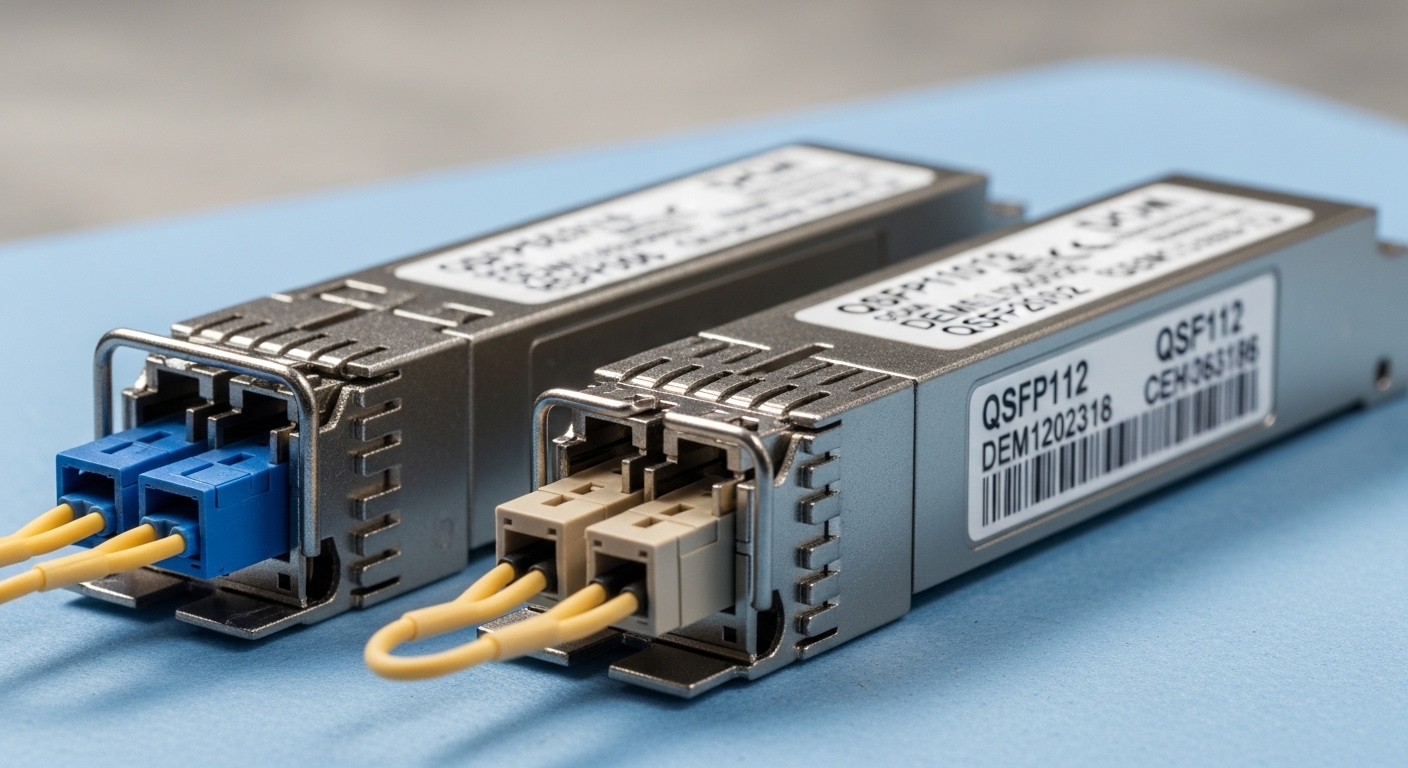
At the edge, the spec sheet is only half the story. You also deal with cabinet airflow, transceiver temperature limits, and optics that must tolerate variable link budgets. Many edge failures trace back to mismatched optics (wrong wavelength or connector), marginal fiber quality, or operating conditions outside the module’s validated range. Before buying, confirm the physical layer: fiber type, connector style, and expected distance.
Common edge module targets (practical ranges)
Most edge deployments cluster around 1G/10G and 25G optics, with occasional 40G/100G for aggregation. Typical use cases include uplinking to a regional PoP, connecting to on-prem compute racks, and linking micro data halls. You will usually choose between short-reach multimode (SR) and long-reach single-mode (LR/ER) depending on the installed fiber.
- 10G SR: commonly OM3/OM4 multimode, ~300 m to ~400 m depending on optics and link budget.
- 10G LR: single-mode, ~10 km class reach.
- 25G SR: OM4-focused, often ~70 m typical SR; longer depends on module class and fiber.
- 25G LR: single-mode, ~10 km class reach.
Pro Tip: In edge cabinets, the limiting factor is often not the nominal reach—it is the power budget margin after connector losses, patch cords, and aging. If you only validate “it worked once,” you are gambling with future link degradation.
Choosing the right optical modules: specs that actually matter
Start with what your switch expects, then match optics to distance and fiber. Most edge vendors support standard optics, but compatibility varies by transceiver vendor and firmware. Verify that the switch model supports the optical module type (SFP/SFP+/SFP28/QSFP+/QSFP28/QSFP-DD) and that the module is compliant with the relevant standard.
Technical specifications comparison (quick selection)
Below is a field-friendly comparison of common module classes. Exact reach depends on the specific transceiver, fiber plant, and link budget.
| Optical module type | Data rate | Wavelength | Connector | Typical reach class | Operating temp range | Power (typical) |
|---|---|---|---|---|---|---|
| SFP+ SR | 10G | 850 nm | LC | ~300 m (OM3) / ~400 m (OM4) | 0 to 70 C (standard) or wider for extended | ~1W to 1.5W |
| SFP+ LR | 10G | 1310 nm | LC | ~10 km (single-mode) | 0 to 70 C (standard) or wider for extended | ~1.5W to 2.5W |
| SFP28 SR | 25G | 850 nm | LC | ~70 m (OM4 typical) | 0 to 70 C (standard) or wider for extended | ~1.2W to 2W |
| SFP28 LR | 25G | 1310 nm | LC | ~10 km (single-mode) | 0 to 70 C (standard) or wider for extended | ~1.5W to 2.5W |
Standards and form factors you will see referenced in vendor datasheets include IEEE 802.3 and pluggable interface specifications like SFF-8431/8432 for electrical and optical monitoring behavior. For edge procurement, the key is that the switch and optics agree on the electrical interface and supported diagnostics. [Source: IEEE 802.3 Ethernet specifications] [[EXT:https://standards.ieee.org/standard/802_3]]
Verify compatibility beyond “it fits”
Two transceivers can both be “SFP+ LC” and still behave differently. Confirm: (1) wavelength (850 vs 1310), (2) fiber type (multimode vs single-mode), (3) transceiver class (standard vs extended temp), and (4) DOM support (Digital Optical Monitoring). Many switches can read DOM, but only some vendors validate third-party optics reliably.
- DOM/MDIO behavior: check if your switch reads temperature, Tx/Rx power, and alarm thresholds.
- DDM/DOM thresholds: mismatched thresholds can cause false alarms.
- Connector polish: ensure the correct APC/UPC style for single-mode where required.
Real deployment scenario: pick optics for a leaf-spine edge uplink
In a typical edge deployment, you might run a leaf-spine style under a regional aggregator. Imagine a site with two 48-port 10G ToR switches feeding a local compute cluster and uplinking to a regional pair of spine switches. Each ToR uses 4x 10G uplinks over single-mode fiber at 6 km distance, with patching losses around 2 dB per direction from connectors and patch cords.
In this scenario, you would likely choose 10G SFP+ LR (1310 nm) optics with DOM. You would validate the link budget using vendor-reported transmit power and receiver sensitivity, then confirm that the cabinet ambient temperature stays within the module’s rated operating range. If the cabinet sits in a poorly ventilated enclosure that routinely reaches 55 C, you should prefer modules sold for extended temperature operation rather than “it works on the bench” parts.
Finally, you plan for maintainability: label both ends, standardize patch cord lengths, and keep a matched spare optics pair with the same vendor model so DOM baselines remain consistent during replacement.
Decision checklist for edge optical modules (the order matters)
Use this ordered checklist like a field engineer’s pre-flight routine. It reduces “surprise incompatibility” and keeps downtime boring.
- Distance and fiber type: confirm multimode OM3/OM4 vs single-mode OS2; measure or verify run length.
- Wavelength and reach class: 850 nm (SR) vs 1310 nm (LR); ensure reach margin after worst-case losses.
- Switch port and transceiver form factor: SFP, SFP+, SFP28, QSFP+; confirm lane speed and optics type.
- Vendor and compatibility validation: check switch vendor compatibility lists where available; test with one optics pair first.
- DOM/diagnostics support: confirm the switch can read and interpret DOM; prefer optics with stable thresholds.
- Operating temperature and thermal headroom: prefer extended temp modules for hot cabinets and blocked airflow.
- Power and cooling impact: estimate module power draw and ensure rack airflow can remove the added thermal load.
- Lock-in and spares strategy: weigh OEM vs third-party; standardize spare SKUs per site type.
Common mistakes and troubleshooting tips (where edge links go to die)
Here are real failure modes I have seen in the wild, with root cause and what to do next. If you fix these early, you will save time, fiber, and sanity.
Wrong fiber type or wavelength mismatch
Symptom: Link never comes up; sometimes it flaps during warm-up. Root cause: 850 nm SR optics installed on single-mode fiber, or 1310 nm optics paired with multimode plant. Solution: verify fiber type at the patch panel (OM3/OM4 vs OS2), confirm wavelength label on the transceiver, and re-terminate or swap optics accordingly.
Marginal link budget from patching losses
Symptom: Link comes up but degrades with temperature, or errors spike at higher ambient. Root cause: too much insertion loss from connectors, dirty endfaces, or “extra” patch cords. Solution: clean connectors, inspect with microscope, replace questionable patch cords, and re-check the budget using worst-case numbers from datasheets.
Temperature out of spec due to poor airflow
Symptom: DOM reports high Tx temp; alarms trigger; link drops during peak heat hours. Root cause: blocked vents, fan failure, or extended run time in a hot enclosure. Solution: fix airflow first (fan tray, baffles, clearance), then switch to extended temperature optics where needed; verify ambient at the transceiver level.
Third-party optics compatibility quirks
Symptom: Works in one switch but not another; alarms show “unsupported transceiver.” Root cause: DOM interpretation differences, vendor-specific calibration, or switch firmware restrictions. Solution: test in a controlled port, use a known-compatible optics model, and keep a spare that matches the validated SKU.
Cost and ROI note: OEM vs third-party optics at the edge
Edge sites are small, so the optics bill may look manageable—until you multiply it by spares and replacement cycles. Typical street pricing varies, but many engineers see OEM optics in the $80 to $250 range per transceiver, while third-party options may land around $30 to $120 depending on speed and reach. Over a 3 to 5 year lifecycle, ROI depends on failure rates, compatibility testing time, and the cost of truck rolls.
TCO also includes power and cooling impact: higher-power modules slightly increase thermal load, which can raise fan speed and power draw. If your edge cabinet runs hot already, selecting an optics family with stable DOM and predictable thermal behavior can reduce “mystery downtime,” which is the most expensive line item in any budget.
FAQ: edge buyers ask the questions that save weekends
Which optical modules are best for edge uplinks: SR or LR?
Choose SR for short runs within the validated reach for your multimode fiber, and LR for single-mode runs typically used for uplinks. If you are unsure about fiber type or patching losses, LR on single-mode usually gives more margin, assuming the fiber plant is OS2.
Do optical modules with DOM matter at the edge?
Yes, especially when you have limited on-site access. DOM helps you detect aging optics by tracking Tx power and temperature trends before the link fails, which improves maintenance planning and reduces surprise outages.
Can I mix optical modules from different vendors in the same edge site?
It is possible, but not always wise. DOM thresholds and calibration can differ, and some switches enforce compatibility checks; standardize on a validated SKU per switch model to avoid inconsistent alarm behavior.
What temperature range should I plan for when buying optical modules?
At minimum, match the module’s rated operating temperature to your measured cabinet ambient. If the rack sees sustained high temps, prioritize extended temperature optics and verify airflow with a simple temp probe near the transceivers.
Are there specific models I should look at?
Common examples include Cisco-compatible SFP-10G-SR and Finisar/FiberMall style optics for 10G SR, plus third-party SFP-10GSR-85 class parts. For 25G, look for SFP28 SR/LR models explicitly listed for your switch platform and DOM behavior; always confirm with the switch vendor’s compatibility guidance.
How do I troubleshoot a link that is “up but erroring”?
Start with cleaning and inspecting connectors, then re-check the fiber attenuation and patch cord lengths. Next, compare DOM readings between working and failing optics; if Tx power or temperature is drifting, swap optics with a known-good spare and validate.
Picking the right optical modules for edge computing is mostly about disciplined matching: distance, fiber type, switch compatibility, and thermal reality. If you want to go one step further, review your rack airflow and power plan alongside your optics strategy using rack cooling and power planning for transceivers.
Author bio: I have hands-on experience deploying and troubleshooting pluggable optics in edge and small PoP environments, including DOM monitoring and thermal fault isolation. I write from the perspective of the engineer who has cleaned more LC connectors than anyone should be proud of.
