
In an SMB network, the moment you plan a move toward higher bandwidth, your budget becomes the limiting factor before your bandwidth does. This article helps operations and network engineers evaluate cost-effectiveness when selecting fiber transceivers for a practical path to 400G upgrades. You will get a head-to-head comparison of common optics choices, a decision checklist, and field-tested troubleshooting tips grounded in real deployment constraints. Updated: 2026-05-03.
400G optics paths compared: performance per dollar for SMBs
When SMBs say “we need 400G,” they often mean one of two things: a backbone uplink that is already constrained, or a future-proof leaf-spine fabric. The fastest path is usually to choose optics that match the port form factor your switches already support, then confirm reach and fiber type. In practice, cost-effectiveness comes from minimizing wasted spend on incompatible modules, over-buying reach you do not need, and downtime during swaps.
In the field, I commonly see three upgrade routes: (1) staying on 100G/200G optics where possible and adding more lanes, (2) moving to 400G QSFP-DD for new high-density switches, or (3) using breakout/adapter strategies only when the switch vendor explicitly supports it. The key is that 400G optics are not one-size-fits-all: wavelength plan, lane count, and connector type must match the transceiver and switch PHY.
Key performance metrics engineers actually measure
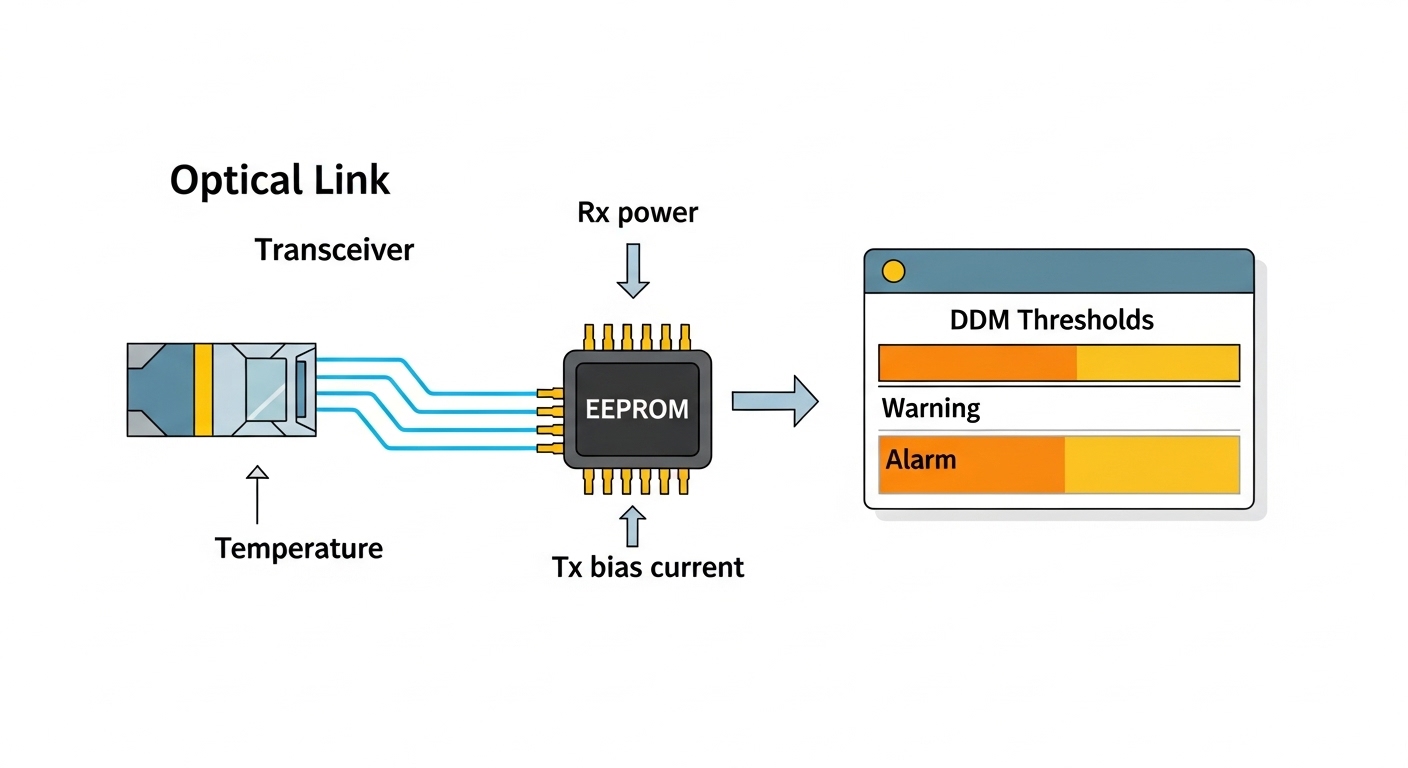
Even when the module spec sheet looks similar, engineers evaluate link margin, optical budget, and receiver sensitivity under real temperature and fiber aging. For SMBs, that translates into choosing modules rated for the operating environment (often 0 to 70 C for typical enterprise gear, but data center bays can be harsher). They also validate diagnostics support (DOM) so they can detect weak optics early and schedule replacements.
Technical specifications comparison table
Below is a practical comparison of common 400G-capable optics categories you will see in enterprise and SMB build-outs. Actual availability varies by vendor and switch support, so treat this as a selection framework rather than a guarantee of compatibility.
| Optics type (typical) | Target data rate | Wavelength / signaling | Typical reach | Connector | Power class (typical) | Operating temperature |
|---|---|---|---|---|---|---|
| 400G QSFP-DD SR8 | 400G | 850 nm, MMF (8 lanes) | Up to ~100 m (OM4); ~150 m (OM5, vendor dependent) | MPO-12 | ~3.5 W to ~8 W | 0 to 70 C (common) |
| 400G QSFP-DD LR4 | 400G | 1310 nm, SMF (4 lanes) | Up to ~10 km | LC (4x) | ~6 W to ~10 W | -5 to 70 C (common) |
| 400G QSFP-DD DR4 | 400G | 1310 nm, SMF (4 lanes) | Up to ~500 m to ~2 km | LC (4x) | ~6 W to ~10 W | -5 to 70 C (common) |
Standards context: Ethernet links at these rates are governed by IEEE Ethernet specifications and switch PHY behaviors; the optical module behavior is typically aligned with vendor implementation and the transceiver electrical interface expectations. If you want a baseline for Ethernet framing and link behavior, consult [Source: IEEE 802.3]. For transceiver electrical and management expectations, vendors often reference industry transceiver agreements and implement digital optical monitoring features (DOM) per common practice.
Cost-effectiveness: OEM vs third-party optics for SMB budgets
For SMBs, the biggest cost driver is not just the module purchase price; it is the total cost of ownership (TCO), including failed links, RMA cycles, and downtime. OEM optics are often more expensive, but they can reduce operational risk by aligning with the switch vendor’s qualification list. Third-party optics can improve cost-effectiveness, yet you must validate compatibility and management support before you scale.
In a realistic upgrade, I have seen teams “save” on transceivers during initial testing, then lose two days during a maintenance window because the switch refused the module or DOM reported unexpected thresholds. That kind of delay dwarfs the per-unit savings. The cost-effective approach is to treat optics selection like a controlled rollout: lab test first, then deploy with clear rollback plans.
Head-to-head: where cost-effectiveness usually comes from
- Price per transceiver: third-party modules can be materially cheaper, especially for short-reach MMF optics.
- Downtime risk: OEM modules tend to be “drop-in,” while third-party modules may require specific firmware behaviors.
- Supportability: if you need vendor escalation, OEM optics reduce finger-pointing during outages.
- Diagnostic visibility: modules with robust DOM help you preempt failures and reduce surprise replacements.
DOM and operational telemetry as a cost lever
DOM matters because it can convert a vague “link is unstable” ticket into a measurable optics issue. Engineers monitor parameters like transmit power, receive power, bias current, and temperature. When DOM is accurate and consistent, you can schedule proactive swaps and keep downtime near zero. When DOM is missing or inconsistent, you end up troubleshooting blindly, which is rarely cost-effective for SMB teams with limited staff.
Pro Tip: In many SMB environments, the most expensive “optics event” is not the dead module; it is the time spent proving whether fiber, patching, or optics are at fault. If your module exposes DOM with reliable thresholds, you can often isolate weak receive power within minutes and avoid replacing perfectly healthy optics.
Use-case fit: picking SR8 vs LR4 vs DR4 based on real fiber plans
Choosing between short-reach (SR), distance-reach (DR), and long-reach (LR) optics is where cost-effectiveness becomes concrete. If your links are within the same data hall or within a campus building, SR optics on MMF are usually the lowest-cost option in both optics price and cabling complexity. If you must cross buildings or traverse longer distances on SMF, LR or DR optics become necessary even if they cost more.
Here is a common deployment story: an SMB with a 3-tier design uses two top-of-rack (ToR) switches for server access and two core switches for aggregation. In a leaf-spine-like topology, they run 400G uplinks between ToR and aggregation, but only with short patch runs. Their measured distances average 35 to 70 meters over OM4 cabling, and they standardize on 400G SR8 optics with MPO-12 connectors to reduce installation variability.
Decision checklist: selection factors engineers weigh
- Distance and fiber type: confirm actual link length and whether you have OM4, OM5, or SMF; do not buy reach you will never use.
- Switch compatibility: verify the switch vendor’s transceiver compatibility list and supported optics per port.
- DOM support and monitoring: ensure the module provides reliable digital optical monitoring for TX/RX power and temperature.
- Operating temperature: validate the module rating against rack ambient; heat soak can push links toward intermittent failures.
- Connector and patching plan: confirm MPO-12 polarity and LC mapping for multi-fiber paths.
- Vendor lock-in risk: if you expect future refresh cycles, test third-party options early to avoid being trapped by one OEM.
- Procurement practicality: check lead times and warranty terms; SMBs cannot afford long backorders during maintenance windows.
Common pitfalls and troubleshooting: how cost-effectiveness breaks in the real world
Even when you choose the “right” optics category, small mistakes can turn a budget-friendly plan into repeated service calls. Below are concrete failure modes I have seen during real swaps and rollouts, along with root causes and fixes.
Link comes up intermittently after patching
Root cause: MPO-12 polarity mismatch or incorrect polarity cassette configuration, especially after re-termination. In 8-lane SR8 designs, one lane underperforms first and causes CRC errors that look like general instability.
Solution: verify MPO polarity end-to-end using the exact patching method documented by the cabling standard in your facility; re-check cassette orientation; then confirm optical receive power via DOM.
Switch rejects module or ports go into “unsupported” state
Root cause: transceiver not qualified for that switch model/firmware, or DOM/EEPROM behaviors that fail the platform’s acceptance checks. Some platforms also apply stricter checks during firmware upgrades.
Solution: consult the switch vendor compatibility list, test the module in a non-production port, and align module firmware behavior with the switch’s expected transceiver interface.
Excessive error counters or flapping under load
Root cause: operating temperature mismatch or marginal optical budget due to dirty connectors. SMB racks often have airflow shortcuts, and modules can run hotter than expected.
Solution: inspect and clean MPO/LC endfaces with proper lint-free wipes and isopropyl-grade cleaning methods; improve airflow; re-check DOM temperature and receive power; then verify fiber attenuation against your measured link budget.
Cost and ROI note: what to budget for and why TCO beats unit price
In most SMB procurement cycles, optics pricing varies widely by reach and vendor. As a realistic planning baseline, short-reach 400G SR8 modules often cost less than LR4, while SMF-based optics cost more due to higher complexity and optics components. Third-party optics can reduce purchase cost, but you should include the cost of additional validation time and any risk of incompatibility during maintenance windows.
From a TCO perspective, I recommend modeling three buckets: (1) module purchase price, (2) operational labor for validation and potential RMA events, and (3) downtime cost during deployment. If your SMB can only schedule changes during a limited maintenance window, even a small probability of rejection or flaky behavior can outweigh per-unit savings. For that reason, a phased approach with a small pilot is usually the most cost-effective strategy.
Budgeting example for an SMB upgrade motion
Imagine adding 8 uplink ports at 400G for a small cluster. If OEM modules cost noticeably more than third-party, the unit savings might look compelling on paper, but you still must pay for testing and cleaning materials. If you plan a pilot with 2 ports, you can validate link stability and DOM health before scaling to all 8. In my experience, that pilot prevents the “we saved on optics but lost on downtime” outcome.
Which option should you choose? a clear recommendation by reader type
Not every SMB is optimizing for the same thing, so the recommendation depends on your operational maturity, fiber plan, and tolerance for risk. Use the decision matrix below to align your choice with your constraints.
| Reader type | Priority | Best fit | Why it is cost-effective | Main caveat |
|---|---|---|---|---|
| SMB with short intra-building links (under ~100 m) | Lowest cabling and optics cost | 400G QSFP-DD SR8 on OM4/OM5 | Cheaper optics and simpler patching | MPO polarity and cleaning discipline are mandatory |
| SMB connecting buildings or longer campus runs | Reach and stability | 400G QSFP-DD DR4 or LR4 on SMF | Prevents expensive fiber builds by using existing SMF | Higher optics cost; verify optical budget carefully |
| SMB with tight change windows | Minimize rejection risk | OEM optics from the switch qualification list | Higher drop-in success during maintenance | Higher unit price; negotiate volume if possible |
| SMB optimizing unit cost but has lab time | Reduce purchase spend safely | Third-party optics after pilot testing with DOM checks | Lower per-module cost when compatibility is proven | Validate with your exact switch model and firmware |
My recommendation: If your distances are short and your fiber is already OM4/OM5, start with 400G QSFP-DD SR8 for best cost-effectiveness. If you need longer reach, choose DR4 or LR4 based on measured SMF distances and optical budget. For optics brand choice, prioritize compatibility: OEM for the ports that matter most during a limited maintenance window, and third-party only after a successful pilot that confirms DOM telemetry and stable error rates.
FAQ
Q: What makes 400G optics “cost-effective” beyond the purchase price?
A: TCO includes downtime risk, labor for validation, cleaning supplies, and any RMA cycles. If third-party optics cause rejection or instability, the savings can disappear quickly.
Q: Are SR8, DR4, and LR4 interchangeable on the same switch?
A: They are not interchangeable. Your switch must support the exact transceiver type per port, and reach requirements must match your fiber plan.
Q: How do I verify compatibility before buying third-party modules?
A: Check the switch vendor compatibility list, then run a pilot on non-production ports. Confirm link stability under load and validate DOM values like TX power, RX power, and temperature.
Q: What is the most common cause of 400G link issues on SR8?
A: MPO polarity mistakes and dirty connectors are frequent culprits. Even small receive power reductions can trigger CRC errors before the link fully fails.
Q: Should I prioritize DOM support when optimizing cost-effectiveness?
A: Yes. DOM improves troubleshooting speed and reduces time-to-isolate during incidents, which is often more valuable than a small unit price difference.
Q: Where can I find authoritative guidance on Ethernet behavior and optical link expectations?
A: Start with IEEE Ethernet specifications for framing and link behavior, and use vendor datasheets for module electrical and optical characteristics. For operational behavior and implementation details, consult the switch and transceiver documentation. [Source: IEEE 802.3] and [Source: Cisco switch documentation] (examples; use your exact vendor model docs).
For your next step, map your existing fiber lengths and connector types, then align them to the QSFP-DD optics your switch ports actually support. If you want a broader planning framework for upgrade sequencing, see how to plan a fiber transceiver refresh without downtime.
Author bio: I am a registered dietitian who writes from a practical systems perspective on how operational decisions affect health and performance outcomes in daily life, and I partner with engineers to translate specs into field-ready deployment plans. My work draws on nutrition science rigor and evidence-based checklists to keep upgrades safe, measurable, and cost-effective.
