
On a wind-swept bridge deck, a single dropped optical link can turn hours of strain, vibration, and temperature data into silence. This article helps field engineers and network owners choose and deploy a bridge monitoring SFP for structural monitoring fiber networks, with practical steps, measured limits, and post-install verification habits. You will also get a decision checklist, real failure modes, and an ROI lens so the optics match both the physics and the maintenance budget.
Prerequisites for a reliable bridge monitoring fiber link
Before you touch the fiber, confirm the monitoring architecture and the physical constraints. Bridge projects often combine fiber backbones with remote sensor nodes, environmental enclosures, and sometimes long copper runs inside a cabinet; the bridge monitoring SFP typically sits at the fiber demarcation between the control cabinet and the sensor ring.
What to verify on site
- Topology and rate: Confirm whether your network is Ethernet (often 1G or 10G) and whether the transceivers must support duplex link negotiation. If you are using IEEE 802.3 Ethernet optics, align your switch port type and speed.
- Distance budget: Measure or pull the as-built fiber length. Include splices, connectors, and patch cords; a field estimate should budget additional loss beyond the OTDR reading.
- Environmental limits: Check cabinet temperature range, sun exposure, and condensation risk. Many SFPs are rated for 0 to 70 C, while some industrial models extend to -40 to 85 C.
- Optical power and budget: Ensure the transmitter power and receiver sensitivity meet your link budget. Use vendor datasheets for the SFP and your OTDR/OLTS results for the fiber.
Expected outcome: A confirmed network rate and a distance plus loss budget that can be matched to the SFP wavelength and reach class.
Step-by-step: choose and deploy bridge monitoring SFPs
Think like a photographer: you do not start by framing the subject; you start by choosing the lens that matches the scene. In optics, that means wavelength, reach, and connector type first, then compatibility and monitoring features.
Match wavelength to fiber type and link length
Most structural monitoring fiber networks use single-mode fiber (SMF) for long runs. For SMF, common SFP wavelength options include 1310 nm (often for longer reach due to chromatic dispersion behavior) and 1550 nm (often for extended reach classes). If your link is short to moderate (typical in localized cabinets), 850 nm is sometimes used with multimode fiber, but bridge projects frequently favor SMF to reduce attenuation and future-proof expansion.
Expected outcome: A wavelength plan aligned with your fiber type and conservative distance budget.
Select connector and transceiver family
Confirm whether your fiber termination is LC, SC, or another format. For LC, you will commonly see SFP modules like 10GBASE-SR or 10GBASE-LR style optics. For SMF long-haul, you will often see 10GBASE-LR (1310 nm) or vendor-specific LR variants. If you are working with 1G Ethernet, you may choose 1000BASE-LX style optics. Always check that the switch supports the transceiver type and speed.
Verify switch compatibility and DOM support
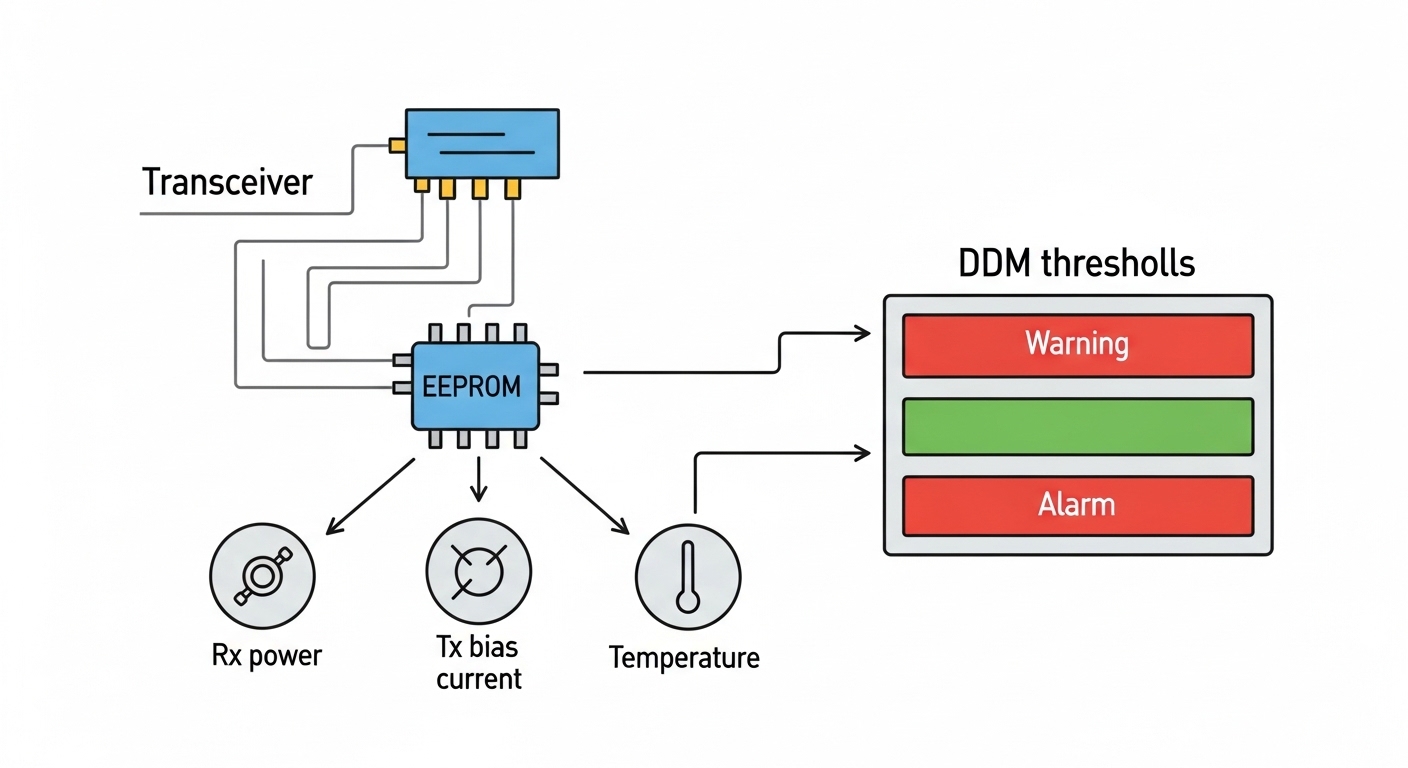
Bridge monitoring systems benefit from digital diagnostics because they let you detect degradation before failure. Look for DOM (Digital Optical Monitoring) support for transmit power, receive power, temperature, and bias current. Many modern switches accept standard MSA-compliant SFP modules, but some deployments enforce vendor allowlists.
Expected outcome: A transceiver that negotiates correctly and exposes real-time optical health metrics for maintenance workflows.
Build the fiber link budget with measured loss
Use OTDR or an OLTS meter to quantify attenuation across the run. Then compare to the SFP manufacturer’s optical budget (transmit power, receiver sensitivity, and any minimum/maximum requirements). For example, if you choose an LR-class module, you still must account for splice loss and connector cleanliness. In field practice, I budget an additional margin for aging and future patching, because bridges do not stay “as-built” forever.
Expected outcome: A link that meets spec now and tolerates future maintenance changes.
Install with connector hygiene and strain relief
Cleanliness is the silent killer of fiber links. Use lint-free wipes and isopropyl alcohol designed for fiber cleaning, and verify with a fiber inspection scope when possible. Apply proper strain relief so the connector does not flex under cable vibration from wind or maintenance traffic.
Expected outcome: Low insertion loss and stable optical receive power after installation.
Validate link and monitor DOM thresholds
After power-up, confirm link state and negotiated speed/duplex. Then pull DOM values and record baseline transmit power and receive power. Set alerts for threshold crossings in your monitoring system. If you are using a switch with standard CLI support, you typically can read DOM via vendor commands; if you do not have a convenient interface, you may poll the transceiver through your management stack.
Expected outcome: Documented baseline optics and an alerting plan aligned to the bridge’s maintenance cadence.
Key bridge monitoring SFP specifications to compare
Choosing a bridge monitoring SFP is not only about reach; it is about the full stack: wavelength, optical power class, connector type, temperature rating, and whether the module includes DOM. Below is a practical comparison framework using common 10G and 1G optics families you may encounter in field upgrades.
| Module example (type) | Wavelength | Typical reach class | Connector | Power / diagnostics | Operating temperature | Data rate |
|---|---|---|---|---|---|---|
| Cisco SFP-10G-SR or equivalent (10GBASE-SR) | 850 nm | ~300 m over OM3 (varies by spec) | LC | DOM supported on many models | 0 to 70 C (check exact part) | 10G Ethernet |
| Finisar FTLX8571D3BCL or equivalent (10GBASE-SR) | 850 nm | ~300 m (OM3) / less on lower OM | LC | DOM / DDM commonly available | -40 to 85 C on many industrial SKUs | 10G Ethernet |
| FS.com SFP-10GSR-85 or equivalent (10GBASE-SR, industrial variants) | 850 nm | ~300 m class | LC | DOM typically supported | -40 to 85 C (model dependent) | 10G Ethernet |
| 10GBASE-LR style SFP (common 1310 nm) | 1310 nm | ~10 km class (varies) | LC | DOM typically supported | 0 to 70 C or industrial variants | 10G Ethernet |
| 1000BASE-LX style SFP (common 1310 nm) | 1310 nm | ~10 km class (varies) | LC | DOM often supported | 0 to 70 C or industrial variants | 1G Ethernet |
Notes from the field: Verify exact specs per part number because “SR” and “LR” labels hide differences in link budget, DOM granularity, and temperature class. For standards alignment, consult IEEE 802.3 for Ethernet optical interfaces and vendor MSA documentation for SFP behavior. IEEE 802.3 standard [Source: IEEE Standards Association]
Pro Tip: In bridge cabinets, I have seen “mystery” link flaps that traced back to sun-heated connectors causing micro-bending. The fix was not changing the SFP at all; it was improving strain relief and re-cleaning the LC ends, then setting conservative DOM thresholds so the system alerted before total loss. Treat DOM baselines as a living calibration, not a one-time record.
Real-world deployment scenario: sensor ring over a bridge span
In a 3-tier structural monitoring network on a coastal bridge, the design used a leaf cabinet architecture: 48 port 10G ToR switches in the main control building uplink to a fiber aggregation switch, while remote sensor nodes connected via a ring of fiber runs. Each remote node had a small unmanaged or managed Ethernet device aggregating strain gauge telemetry at 1G, then uplinked to the ring at 10G through a local gateway. The total ring length between cabinets was 6.5 km with approximately 0.3 dB per splice and multiple patch points during maintenance.
Engineers selected 1310 nm LR-class SFPs for SMF, ensured DOM support for optical health, and set alerts when receive power dropped more than 3 dB below baseline. After installation, they ran a scheduled loopback test and validated CRC error counters stayed at 0 during peak wind events. The result was not only stable links, but earlier detection of connector contamination after routine site cleaning.
Selection criteria checklist for bridge monitoring SFP
- Distance and fiber type: Choose the reach class for SMF or OM fiber and verify with OTDR/OLTS. Do not rely on “typical” reach numbers.
- Budget and procurement policy: Compare OEM pricing versus third-party modules, but include expected failure rates and warranty terms in TCO.
- Switch compatibility: Confirm vendor support or compatibility lists. Some switches enforce transceiver vendor allowlists.
- DOM support: Prefer modules with DOM/DDM that expose temperature, bias current, transmit power, and receive power. This is vital for predictive maintenance.
- Operating temperature: Match the cabinet’s worst-case. If the enclosure can exceed 70 C under sun load, plan for industrial temperature SFP variants.
- Connector and cleaning ecosystem: Ensure LC/SC compatibility with existing patch panels and that your site has inspection scopes and cleaning supplies.
- Vendor lock-in risk: If your monitoring platform is used across multiple bridges, standardize part numbers and keep a cross-vendor sourcing plan.
Expected outcome: A selection that survives both the physics of optics and the politics of maintenance procurement.
Common pitfalls and troubleshooting for bridge monitoring SFP
When a bridge link fails, the optics are often blamed first. In practice, the root cause is frequently physical: cleanliness, bending, wrong wavelength, or incompatible transceiver settings.
Failure mode 1: Link up/down flaps after installation
Root cause: LC connector contamination or micro-bending from poor strain relief under vibration. The optical receive power hovers near the receiver sensitivity threshold.
Solution: Re-clean connectors using proper fiber cleaning tools; inspect with a scope. Add strain relief and cable management to eliminate flex points near the transceiver.
Failure mode 2: “No signal” despite correct wavelength label
Root cause: Transmit and receive polarity swapped, or using the wrong fiber pair in a ribbon/multi-fiber splice tray. Many deployments assume polarity is consistent, but bridge rework breaks that assumption.
Solution: Verify polarity end-to-end using a continuity test and, if needed, repatch using a known polarity method. Confirm that transmit goes to receive and vice versa.
Failure mode 3: DOM reads but thresholds never trigger, or alerts are noisy
Root cause: Thresholds set too tight for your baseline variation, or DOM values are not normalized to expected units. Some switches expose DOM differently across firmware revisions.
Solution: Capture a baseline during stable conditions, then set alert thresholds with margin (commonly a few dB below baseline) and verify the alert logic after firmware updates. Cross-check with vendor documentation for DOM interpretation. IEEE 802 working groups [Source: IEEE 802 reference pages]
Cost and ROI note for bridge monitoring SFP
In typical procurement, OEM SFP modules often cost more per unit than third-party equivalents, but they may reduce commissioning time and compatibility risk. For many 1G/10G classes, real-world street prices can vary widely by temperature rating and brand; as a rough planning range, an OEM 10G LR-class SFP might land in the tens to low hundreds of dollars, while third-party modules can be meaningfully cheaper. The ROI comes from fewer truck rolls: if a module fails in a remote bridge cabinet, the labor cost and closure delays dominate the optics cost.
TCO reality: Include warranty length, return logistics, and the probability of site rework due to compatibility. Also account for the value of DOM-driven early warnings: avoiding one emergency maintenance event can outweigh the price gap between OEM and third-party optics.
FAQ
What exactly is a bridge monitoring SFP?
A bridge monitoring SFP is an SFP optical transceiver used in structural monitoring networks to carry Ethernet data over fiber to sensor nodes and control cabinets. It is selected for the bridge environment, including temperature range, link distance, connector type, and ideally DOM/DD
