
If your factory network still relies on “we think the fiber is fine,” congratulations: you have reinvented the art of downtime. This article gives a practical use case analysis for choosing optical transceivers in manufacturing automation, aimed at OT/IT engineers, integrators, and plant network teams planning reliable fiber links. You will get a step-by-step implementation guide, a spec comparison table, and field-tested troubleshooting for the top failure modes.
Prerequisites: what you must measure before the transceiver shopping spree
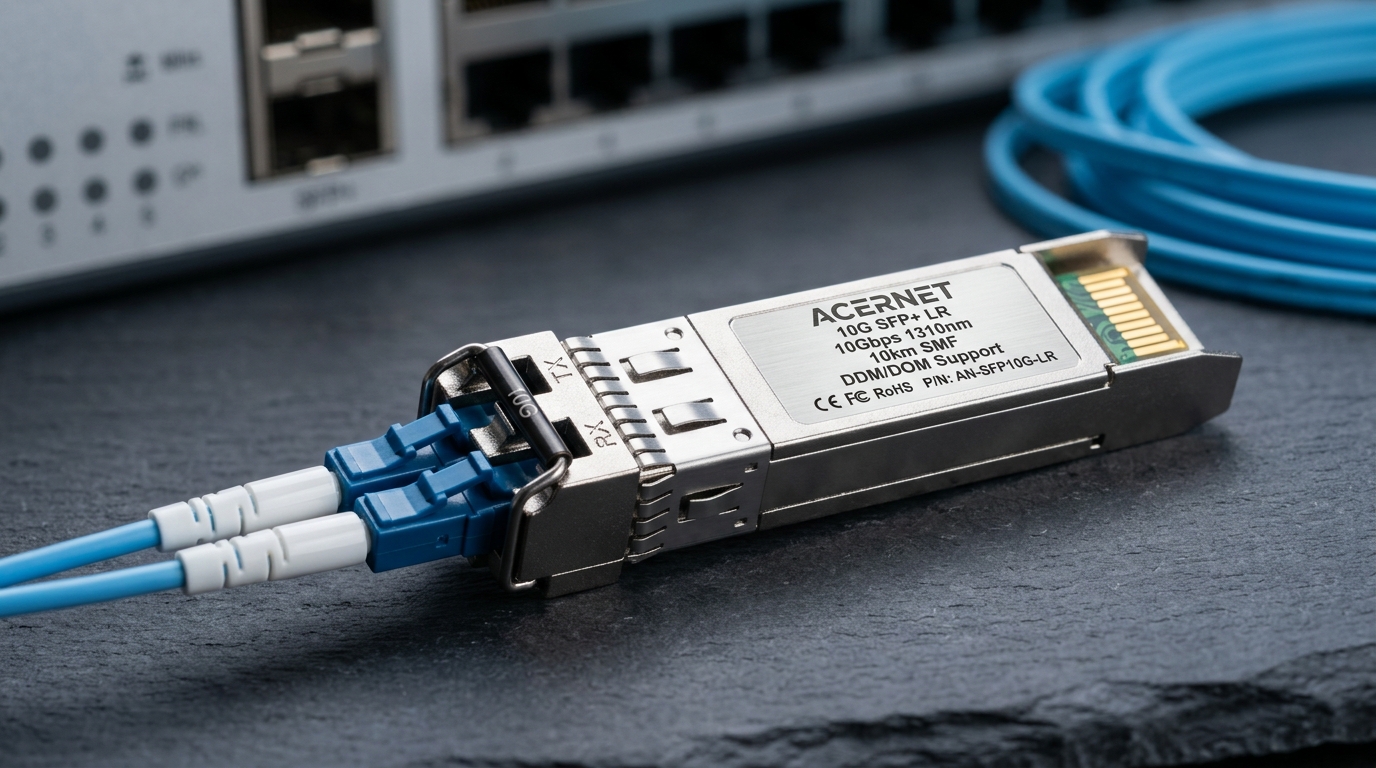
Before you pick an optical module, confirm your cabling plant reality: fiber type, link distance, connector polarity, and the switch optics you must interoperate with. Most “mystery link flaps” come from assumptions that never survived the walk from control cabinet to machine. Gather link budgets and operational constraints, including temperature ranges inside the cabinet.
Collect link and plant constraints
Expected outcome: a one-page sheet that prevents wrong-part purchases and saves your weekend.
- Record distance in meters from switch to device, including patch cords and slack routing.
- Identify fiber type: OM3, OM4, or OS2. If unknown, test with an OTDR and confirm core diameter and attenuation.
- Confirm connector style: LC duplex is common for SFP/SFP+; MTP/MPO appears in high-density trunks.
- Note temperature at the cabinet location (industrial enclosures can exceed 60 C during summer peaks).
Inventory switch and transceiver requirements
Expected outcome: compatibility constraints you can defend to procurement.
- Check switch model and supported optics. For example, Cisco-class behavior may require optics within the supported vendor list, while many modern switches support third-party optics with DOM.
- Verify data rate and lane mapping: 10G/25G/40G/100G optics must match the port speed and encoding.
- Confirm whether you need Digital Optical Monitoring (DOM) for maintenance alarms.
use case analysis: mapping automation traffic to optical performance
In manufacturing, “traffic” is not just throughput; it is determinism, visibility, and resilience. Your optical transceiver choice depends on whether you carry real-time control, machine vision, historian replication, or remote maintenance VPN traffic. Treat each segment like a separate use case, not one big flat Ethernet cloud.
Define the use cases in your plant
Expected outcome: a list of segments with distance, required bandwidth, and tolerance to errors.
- Use case A: PLC and safety control links — typically low bandwidth but high availability requirements; prioritize stable optics and clean fiber.
- Use case B: machine vision and inspection — often 10G/25G; prioritize reach margin and low BER performance.
- Use case C: historian and SCADA aggregation — moderate bandwidth; can tolerate brief error recovery if your network design includes redundancy.
- Use case D: robotics cell uplinks — medium to high bandwidth; plan for cable management and temperature swings.
Match transceiver type to distance and fiber class
Expected outcome: a short list of optics that fit your reach and connector reality.
For short-reach links in cabinets and rows, multimode optics are common. For long runs or high-attenuation environments, single-mode is often the grown-up option. Use the IEEE 802.3 family for link behavior and vendor datasheets for actual reach and power budgets. Reference: IEEE 802.3 standard overview and vendor optic datasheets such as Finisar and Cisco compatibility notes.
Key specs comparison: OM3/OM4 vs OS2 with real module examples
This table focuses on practical parameters engineers care about: wavelength, reach class, connector type, DOM availability, and temperature behavior. Actual reach depends on patch loss, number of connectors, and launch conditions, so treat values as targets, not guarantees.
| Example Transceiver | Data Rate | Wavelength | Target Reach | Fiber Type | Connector | DOM | Operating Temp (typ.) |
|---|---|---|---|---|---|---|---|
| Cisco SFP-10G-SR | 10G | 850 nm | Up to ~300 m (OM3 class) | OM3/OM4 | LC duplex | Usually supported in compatible platforms | Often industrial ranges depending on SKU |
| Finisar FTLX8571D3BCL | 10G | 850 nm | Up to ~300 m (OM3 class) | OM3/OM4 | LC duplex | Yes (DOM) | Varies by datasheet revision |
| FS.com SFP-10GSR-85 | 10G | 850 nm | Up to ~400 m (OM4 class) | OM4 | LC duplex | Yes (DOM on many models) | Typically includes extended ranges on industrial SKUs |
| Single-mode 10G SFP+ (typ. 1310 nm) | 10G | 1310 nm | Several km (depends on module) | OS2 | LC duplex | Commonly yes | Module-specific extended ranges available |
Pro Tip: In factory installs, the biggest reach killer is not the transceiver spec; it is patch panel loss plus connector contamination. If you can measure and clean connectors and keep total insertion loss inside the vendor’s budget, you often get an extra 20 to 30 percent margin without changing hardware.
Step-by-step implementation guide for a factory segment
Let’s turn theory into a deployable plan for a common scenario: a 10G uplink from a cell-level switch to a plant aggregation switch. This is where use case analysis saves you from buying “close enough” optics that fail only under the summer heat and vibration profile.
Pilot in a controlled cabinet row
Expected outcome: you validate optics behavior before scaling to 50+ ports.
- Select one representative link length (for example, 220 m including patch cords) in the same fiber backbone category (OM3 or OM4).
- Use the same transceiver family on both ends (e.g., SR multimode 850 nm for multimode fiber).
- Enable port logging for link up/down, CRC errors, and optical DOM alarms if supported.
Validate signal quality and monitoring
Expected outcome: you prove the link is stable, not just “it came up once.”
- Confirm negotiated speed (10G vs fallback). Many switches will auto-negotiate incorrectly only if optics are mismatched.
- Check DOM values: optical receive power should sit within the module’s recommended range; watch for drift.
- Run a traffic soak test that matches your use case (for vision: sustained streams; for control: continuous small packets).
Roll out with operational safeguards
Expected outcome: fewer surprises during maintenance windows.
- Label fibers and transceivers with port IDs and DOM serials.
- Schedule periodic cleaning and inspection for connector pairs, especially in dusty machine areas.
- Document compatibility constraints from your switch vendor; keep a spare tested optic per critical rack.
Common mistakes and troubleshooting tips (the stuff that bites)
Here are the top failure modes I have seen in the field, with root causes and practical fixes. If your team does nothing else, do the connector hygiene and verify DOM alarms before blaming the optics.
Failure point 1: Link comes up then flaps every few minutes
Root cause: marginal optical power due to patch loss, dirty connectors, or excessive bend radius that increases attenuation over time.
Solution: clean LC/MPO ends with proper wipes and inspect with an optical microscope; verify bend radius during cable routing; re-test with OTDR and connector loss measurements.
Failure point 2: High error counters (CRC, FCS) under machine load
Root cause: oversubscription or a wrong-speed optics mismatch causing retransmits; sometimes also a damaged transceiver or marginal receive power.
Solution: confirm port speed and optics type; review switch logs; compare DOM RX power against datasheet thresholds; swap with a known-good module for A/B testing.
Failure point 3: “Unsupported transceiver” alarms or ports disabled
Root cause: switch compatibility checks (vendor-specific IDs) or DOM format differences with certain third-party optics.
Solution: use vendor-approved optics lists when required; otherwise select third-party modules that explicitly support DOM and your platform; validate in a pilot before scaling.
Selection criteria checklist for use case analysis
When procurement asks for a spreadsheet, engineers need a decision checklist that ties directly to uptime and maintenance cost. Use this ordered list to justify selections with measurable criteria.
- Distance and fiber class: OM3 vs OM4 vs OS2; confirm actual measured loss, not just cable labels.
- Budget and reach margin: include patch cords, connectors, and expected aging; aim for conservative margin.
- Switch compatibility: supported optics, speed modes, and any vendor lock behavior.
- DOM support: plan for monitoring RX power and temperature in OT environments.
- Operating temperature: pick extended-range industrial optics for hot cabinets.
- Vendor lock-in risk: validate third-party options early to avoid a future “only OEM fits” surprise.
Cost and ROI note: what you will actually pay
Typical street prices for 10G SR optics vary widely by brand and whether you buy OEM or third-party. As a rough planning range, expect approximately $50 to $150 per module for common 10G 850 nm SR variants, with OEM often higher. TCO usually dominates: consider downtime risk, spare inventory, cleaning supplies, and labor for connector maintenance. In plants with frequent service calls, the ROI often comes from better monitoring (DOM) and predictable compatibility rather than chasing the cheapest module.
