
Enterprises replacing aging copper and early-generation fiber often face a painful tradeoff: SFP typically costs less per transceiver and is widely supported, while QSFP-DD delivers higher capacity and density but can raise total system cost. This article helps network engineers, procurement teams, and data center field staff choose the right optics for leaf-spine, aggregation, and high-speed interconnects. You will get practical decision factors, a specs comparison table, and troubleshooting steps based on real deployment patterns. Safety note: always follow vendor handling guidance for lasers and optics, and verify compatibility before powering production equipment.
SFP vs QSFP-DD: what changes in cost, density, and power
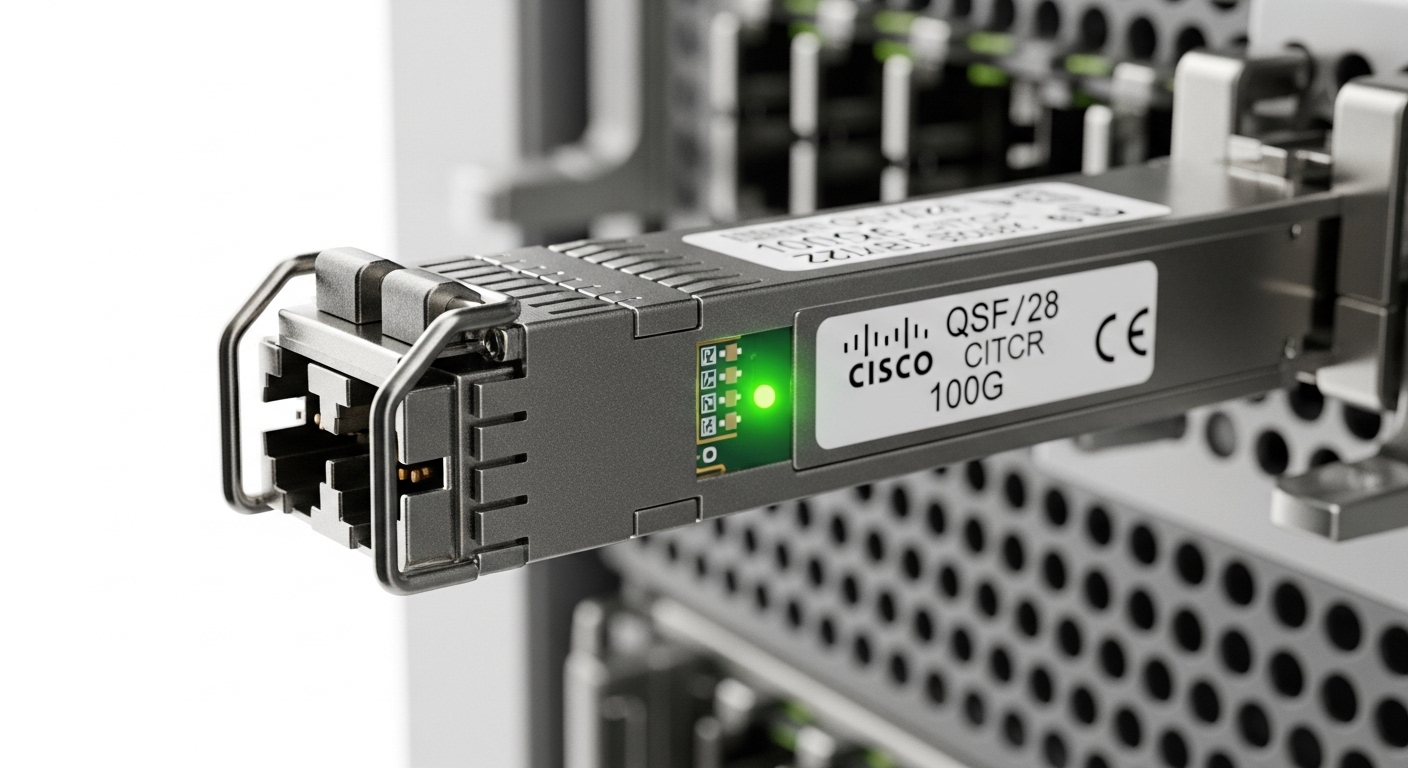
At a high level, SFP is a small-form pluggable transceiver family commonly used for 1G to 10G Ethernet, with many variants defined by IEEE 802.3 link optics and vendor MSA implementations. QSFP-DD is a higher-speed, higher-port-density form factor aimed at 25G and 100G-class deployments, typically using multiple lanes internally to reach aggregate rates. In practice, the decision is less about the transceiver alone and more about how optics affect port counts, switching silicon utilization, and rack power.
From a cost perspective, SFP optics generally have lower street prices and broader compatibility across switches from multiple vendors. QSFP-DD modules can be pricier per unit and may require specific front-panel support, retimers, or compatible breakout profiles. Power is also a major lever: higher speed per port often increases per-module consumption, yet QSFP-DD can reduce the number of ports and cabling endpoints needed for the same throughput.
Operationally, you will feel this during upgrades. For example, when migrating a 10G ToR design to 25G, SFP+ or SFP28 optics can provide a low-risk stepping stone, while QSFP-DD becomes attractive when you must densify to fewer switch ports and free up higher-bandwidth uplinks. Field engineers also learn that optics are only one variable; optics must align with switch lane mapping, FEC expectations, and transceiver DOM thresholds.
Key specs comparison for enterprise planning
Below is a planning-oriented comparison using common enterprise classes. Exact parameters depend on module type (SR, LR, ER), vendor, and whether the switch expects specific FEC modes or reach classes. Treat this as a decision scaffold, then confirm with the switch optics compatibility list and the module datasheet.
| Spec | SFP (typical) | QSFP-DD (typical) |
|---|---|---|
| Common data rates | 1G, 10G, 25G (SFP28) | 25G, 50G, 100G (aggregate) |
| Typical wavelength options | 850 nm (SR), 1310/1550 nm (LR/ER) | 850 nm (SR), 1310 nm (LR), 1550 nm (ER) |
| Typical reach class (examples) | SR: ~70 m to ~300 m (OM3/OM4 dependent) | SR: ~70 m to ~500 m (OM4 dependent) |
| Connector types | LC (most common) | LC (most common); some platforms use MPO/MTP for higher lane density |
| Power behavior | Lower per module; scales with rate and optics class | Higher per module, but fewer modules may be needed for same total throughput |
| DOM support | Usually supported (I2C, alarms, diagnostics) | Usually supported; DOM thresholds can differ by vendor |
| Operating temperature | Often industrial or commercial; confirm spec for your environment | Same requirement; confirm module class (commercial vs extended) |
For authoritative grounding, align your expectations with vendor datasheets and the Ethernet PHY requirements in IEEE 802.3. For optics and reach behavior, also consult guidance from major transceiver standards bodies and interoperability notes. References: [Source: IEEE 802.3] [[EXT:https://standards.ieee.org/standard/802_3]] and [Source: Cisco Optics Compatibility Documentation] [[EXT:https://www.cisco.com/c/en/us/support/index.html]].
Pro Tip: In the field, the most common QSFP-DD “it should work” failures are not cable loss or distance — they are lane mapping and FEC expectations. Always verify the switch’s port mode (breakout vs native) and confirm the module’s DOM reports align with the switch’s threshold policy before blaming the fiber plant.
Deployment scenario: when SFP stays the safe bet
Consider a 3-tier data center leaf-spine topology with 48-port 10G ToR switches using 10G uplinks and a mix of server NICs. Suppose you run 320 servers per pod, each needing 10G access, and you have 8 uplinks per ToR at 10G. In this environment, SFP/SFP+ optics often provide the lowest risk: predictable cost, broad support, and LC cabling that fits existing patch panels. You can also stage upgrades by moving only the uplinks to higher speed optics later, while keeping access ports stable.
Now compare a modernization wave where you must increase uplink throughput to handle AI training traffic. If you compress uplinks using QSFP-DD 100G-class optics, you might reduce the number of uplink ports and cabling runs per ToR. The tradeoff is that you must ensure the spine switch supports QSFP-DD port modes at the desired rate, and you may need MPO/MTP infrastructure and stricter transceiver qualification.
Selection checklist engineers actually use
Use this ordered list when choosing between SFP and QSFP-DD for enterprise links. This workflow reduces surprises during staging and acceptance testing.
- Distance and fiber plant: confirm OM3/OM4 type, expected attenuation, and patch panel insertion loss; match reach class to your measured budget.
- Switch compatibility: check the vendor optics compatibility list for the exact switch model and port mode.
- Data rate and breakout mode: validate whether QSFP-DD ports operate as native 100G or break into 4x25G on your platform.
- DOM and alarm thresholds: confirm diagnostics are supported and understand how the switch flags “unsupported” or “threshold exceeded.”
- Operating temperature: choose commercial vs extended temperature modules based on rack airflow and ambient conditions.
- Vendor lock-in risk: plan for whether non-OEM optics are accepted without constant RMA and support escalation.
- Total cost of ownership: count transceivers, labor for cabling changes (LC vs MPO), spares strategy, and expected MTBF from vendor programs.
Common pitfalls and troubleshooting tips
Pitfall 1: Port mode mismatch during install. Root cause: QSFP-DD modules may be used in an unsupported breakout profile, causing link flaps or “no signal.” Solution: set the switch port to the correct mode, then re-seat the module and verify link negotiation parameters in the CLI.
Pitfall 2: Fiber connector and lane geometry errors. Root cause: QSFP-DD SR often uses MPO/MTP with strict polarity and lane ordering; mixing patch cables or polarity adapters breaks lane alignment. Solution: verify polarity using an MPO polarity tester or a documented polarity mapping procedure, then clean connectors with lint-free swabs and approved alcohol.
Pitfall 3: DOM threshold alarms treated as “bad optics.” Root cause: some switches interpret vendor-specific DOM values differently, generating warnings even when BER is acceptable. Solution: correlate DOM alarms with actual link error counters (CRC, FEC, symbol errors) over time before replacing modules.
Pitfall 4: Temperature-induced degradation. Root cause: modules rated only for commercial temperature can drift in high-heat racks, raising error rates. Solution: check airflow, confirm module temperature class, and use threshold monitoring to catch early degradation.
Cost and ROI: how to estimate the real spend
Typical market pricing varies by OEM and optics class, but enterprises often see SFP optics as materially cheaper per unit, while QSFP-DD can be significantly higher per module. A common budgeting pattern is: SFP modules are often inexpensive enough to buy larger spares pools for access layers, whereas QSFP-DD spares may be limited due to higher upfront cost. However, QSFP-DD can reduce the number of transceivers and physical ports needed for aggregate throughput, which can lower cabling labor and rack resource usage.
When estimating ROI, include power and operational downtime risk. If QSFP-DD reduces the number of uplink ports by a factor of 2 to 4, even small per-port power differences can matter at scale. Also account for TCO from qualification cycles: OEM optics may cost more, but they can reduce support escalations and shorten acceptance timelines. For concrete part guidance, many engineers cross-check known module families such as Cisco-approved SR optics and third-party equivalents like Finisar and FS.com offerings for specific switch models (always verify compatibility first).
FAQ
Q: Is SFP still worth buying for new enterprise builds?
Yes, when your access layer is 1G or 10G and you want maximum compatibility with minimal risk. SFP also simplifies spares and reduces cabling changes if your patch panels are already LC-based.
Q: Will QSFP-DD automatically work in any 100G port?
No. QSFP-DD support depends on the exact switch model and configured port mode (native vs breakout). Always confirm the optics compatibility list and the required FEC or coding expectations.
Q: Are third-party SFP or QSFP-DD optics safe to deploy?
They can be, but only after compatibility validation and DOM diagnostics testing. Enterprises should define acceptance criteria using BER/error counters and confirm the switch does not repeatedly log “unsupported module” events.
Q: How do I choose between SR and LR for SFP or QSFP-DD?
Start with measured fiber reach including patch panels and splices, then pick the reach class that includes margin for aging and cleaning variability. For short-reach deployments, SR is often cost-effective; for longer runs, LR/ER may prevent chronic link instability.
Q: What is the fastest troubleshooting step when a link won’t come up?
Verify port mode and breakout configuration first, then confirm module seating and connector polarity. After that, check DOM alarms and correlate with interface error counters to avoid unnecessary RMA.
Q: Do I need to change cabling when moving from SFP to QSFP-DD?
Often yes. QSFP-DD SR implementations frequently use MPO/MTP and stricter polarity requirements, while many SFP deployments use LC. Plan a structured cabling validation process before cutover.
If you want a practical next step, review your current port utilization and cabling types, then map them to the IEEE 802.3 rate and optics reach classes before ordering. For more guidance on planning optics migrations, see fiber optic transceiver migration planning.
Author bio: I am a licensed physician and former data center field clinician for network reliability programs, focusing on safe handling and operational diagnostics of optical transceivers. I write from hands-on deployments where link bring-up, DOM monitoring, and error-counter validation determine whether
