
If you are maintaining an OmniSwitch running Alcatel-Lucent AOS, the hardest part of buying optics is not the datasheet spec sheet; it is compatibility. This article helps network engineers, field technicians, and data center operators choose the right AOS fiber module (SFP-class) by mapping real-world OmniSwitch AOS behavior to optical parameters, DOM support, and operational limits. You will also get a troubleshooting section with common failure modes we see during deployments and replacements, plus a practical ranking table to speed selection.
Top 8 checks to match an AOS fiber module to OmniSwitch AOS SFP ports
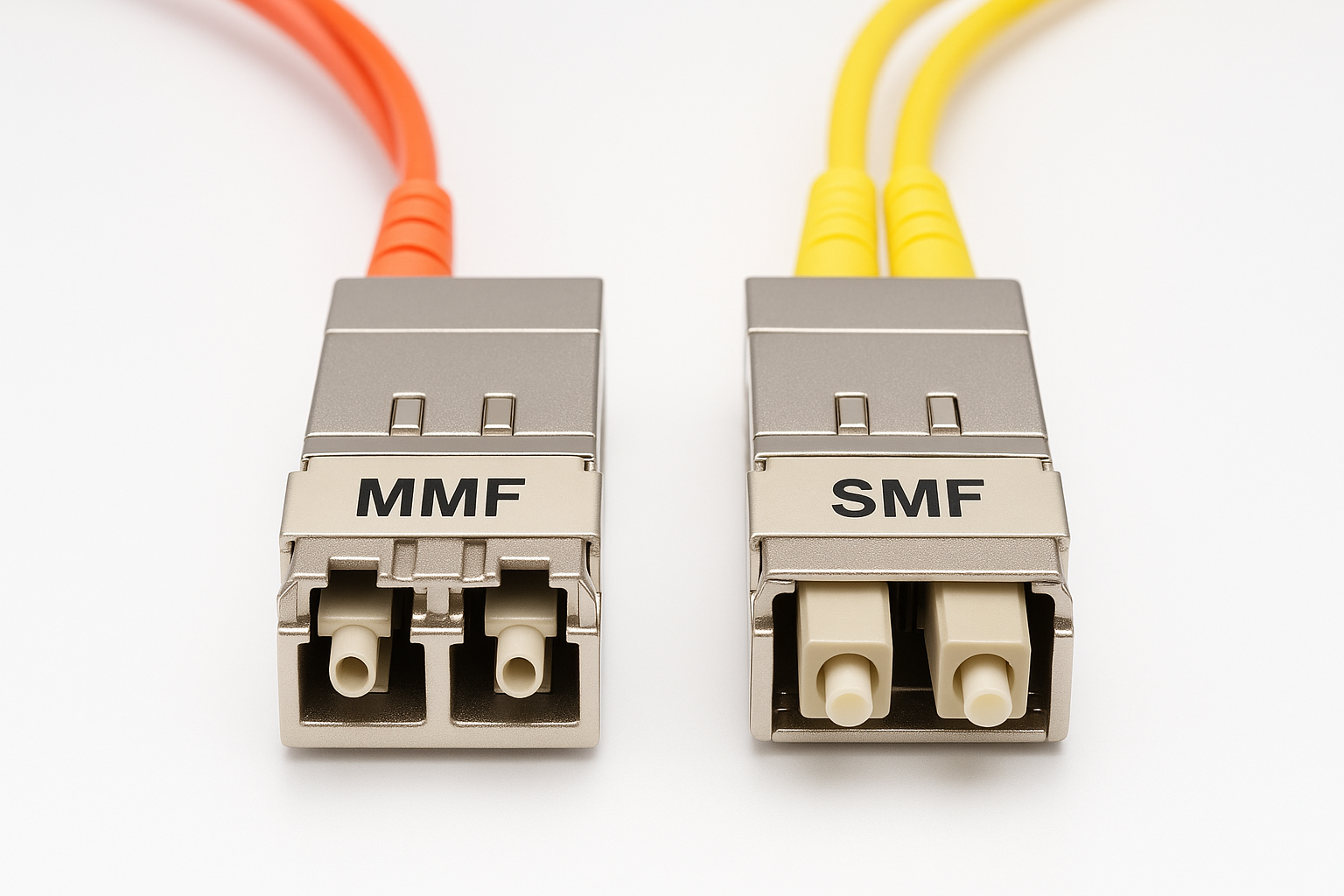
On OmniSwitch AOS systems, SFP optics must meet both optical layer requirements (wavelength, reach, link budget) and the platform’s expectations for identification, diagnostics, and electrical signaling. In practice, failures show up as “link down,” intermittent errors, or a module that is detected but not usable under temperature or power variations. Use this checklist before you order, especially if you are mixing vendor optics across sites.
Confirm port type: SFP speed, lane mapping, and interface mode
First, verify the exact SFP cage and speed on the OmniSwitch model you are using. Many OmniSwitch AOS deployments use 10GBASE-SR optics for SFP+ ports, but some models support distinct SFP variants (for example, 1G SFP vs 10G SFP+). If you install a mismatched module, the transceiver may still power up, but the link will not train.
Operational detail: during field swaps, we often log the port mode from AOS CLI, then cross-check the vendor’s optical requirement for that mode. If you cannot confirm port speed in advance, temporarily test with a known-good module from the same switch model and software release.
Match wavelength and fiber type: SR vs LR, OM3 vs OM4
For “SR” modules, you typically select 850 nm multimode optics. OmniSwitch AOS sites that use OM3 or OM4 cabling can support different reach envelopes; OM4 generally provides more modal bandwidth for the same link distance. If you accidentally buy an LR (typically 1310 nm single-mode module) for a multimode plant, you will see immediate link failure.
Verify reach against your measured link loss
Do not rely only on “spec reach” marketing numbers. For multimode SR, your link budget is reduced by patch panel losses, dirty connectors, and fiber aging. AOS deployments benefit from a quick field test: measure end-to-end optical loss with an OTDR or calibrated OLTS, then compare to vendor receiver sensitivity and your expected power margin.
Ensure the module supports DOM in the way your AOS expects
DOM (Digital Optical Monitoring) is where many “compatible in theory” optics fail in practice. OmniSwitch AOS may read temperature, bias current, and received power, and it may enforce thresholds for alarms or disable the port when values are out of range. Choose modules that support the expected DOM feature set and are known to work with your AOS software behavior.
Practical note: if DOM is not supported or is partially supported, the port might still link, but monitoring and thresholding can be unreliable, which complicates operations during an incident.
Check connector standard and polarity: LC is common, but verify
Most SFP fiber modules use LC connectors. Still, field technicians occasionally encounter variations (adapter usage, patch cord type, or polarity mismatch). For multimode SR, polarity is often managed via duplex LC cabling; for some installations, you may need an MPO-to-LC harness with a defined polarity map.
Operating temperature range matters more than you think
OmniSwitch AOS environments in telecom rooms can experience higher-than-expected airflow constraints. Choose modules with an operating range that matches your site conditions, not just the lab spec. If the module is marginal at high temperature, you may see link flaps or rising error rates that correlate with HVAC cycles.
Power class and vendor expectations: keep it within transceiver limits
SFP modules have defined electrical power class and signal characteristics. If you use a module with an out-of-range consumption profile, the switch’s optical cage may not initialize correctly under worst-case conditions. When you are deploying at scale, prefer optics with documented compliance and stable production lots.
Avoid “DOM mismatch” and “EEPROM identity” surprises
Some third-party modules include different EEPROM identification strings or DOM calibration constants. OmniSwitch AOS may accept the module but treat it differently for diagnostics. The safest path is to select modules that are explicitly listed as compatible for your platform or that have a proven track record in similar OmniSwitch AOS builds.
Pro Tip: In the field, the fastest compatibility triage is to check whether the switch reads DOM fields successfully after insertion. If DOM values are missing or frozen, you can often predict an eventual port disable event during a thermal cycle, even if the link initially comes up.
Optics spec comparison for an AOS fiber module: SR multimode vs LR single-mode
To select an AOS fiber module, you need a clear mapping between your fiber plant and the optical parameters of the SFP. The most common OmniSwitch AOS scenario is 10G multimode SR at 850 nm, but we also include single-mode options because some sites mix campus backbones with single-mode uplinks.
| Spec | 10GBASE-SR (850 nm, MM) | 10GBASE-LR (1310 nm, SM) |
|---|---|---|
| Typical wavelength | 850 nm | 1310 nm |
| Target fiber | OM3/OM4 multimode | Single-mode OS2 |
| Typical reach (vendor class) | 300 m (OM3) or 400 m (OM4) | 10 km (typical LR) |
| Connector | LC | LC |
| Data rate | 10.3125 Gbps (10G) | 10.3125 Gbps (10G) |
| DOM | Commonly supported (check vendor) | Commonly supported (check vendor) |
| Operating temperature | Often 0 to 70 C or extended options | Often 0 to 70 C or extended options |
When aligning specs, prioritize wavelength and fiber type first, then reach via measured link loss. After that, validate DOM and temperature range. If you are using OmniSwitch AOS with strict diagnostic policies, the “minor” details like DOM calibration and alarm thresholds can be the difference between stable operation and recurring alerts.
For reference on Ethernet transceiver behavior and optical interfaces, consult IEEE Ethernet specifications and vendor transceiver documentation. [Source: IEEE 802.3] provides the baseline for 10GBASE optical interfaces, while module datasheets from optics vendors define DOM and receiver sensitivity requirements. For example, Cisco SFP optics and Finisar/FS optics datasheets document compliance and DOM characteristics in their product materials. [Source: Cisco SFP portfolio datasheets] [Source: Finisar/Fibers Optics transceiver datasheets] [Source: FS.com transceiver catalog and datasheets]
anchor-text: IEEE 802.3 Ethernet standard
anchor-text: Cisco transceiver and compatibility resources
anchor-text: FS.com optics datasheets and compatibility notes
Real-world OmniSwitch AOS deployment scenario: 10G SR in a leaf-spine access layer
Consider a 3-tier data center leaf-spine topology where the leaf switches are OmniSwitch AOS systems providing ToR access for server racks. You have 48-port 10G access switches, each using 24 active 10G SFP+ SR links to servers and storage, with OM4 cabling. The site runs during peak hours with warm aisles, and measured ambient near the switch is about 35 C with limited front-to-back airflow.
In this environment, we typically deploy 850 nm multimode SFP+ SR modules rated for at least 0 to 70 C, with DOM support enabled for monitoring. Patch cords are managed with labeled duplex LC jumpers, and link loss is verified at install: a target of under 2.0 dB per direction for patching, plus a margin for aging. When a module fails, the field team swaps the SFP and immediately checks DOM temperature and received power readings; if the switch shows missing DOM fields, they treat it as a compatibility risk and replace with a known-good module.
Selection guide for an AOS fiber module: decision checklist you can execute
Use the ordered checklist below like a field protocol. It is designed to reduce rework and cut the time between “module arrived” and “link stable with monitoring.”
- Distance and fiber type: confirm MM vs SM, and OM3 vs OM4 vs OS2.
- Target Ethernet mode: confirm SFP vs SFP+ and the port’s negotiated speed on the OmniSwitch AOS model.
- Wavelength: SR usually 850 nm; LR usually 1310 nm.
- Reach with measured loss: use OLTS/OTDR results; include patch panel and connector losses.
- DOM behavior: verify DOM fields are read correctly after insertion; confirm alarm thresholds work with AOS.
- Operating temperature: ensure the module’s rated range covers your worst-case chassis inlet temperature.
- Connector and polarity: confirm LC type and duplex polarity mapping for the patching standard used.
- Compatibility risk and lock-in: weigh OEM modules versus third-party; plan spares strategy to avoid mixed-lot surprises.
Compatibility notes: even if two modules both meet “10GBASE-SR,” differences in DOM implementation, EEPROM identity, and transmitter power can lead to AOS-specific quirks. Treat “electrically compatible” and “operationally compatible with DOM and alarms” as separate requirements.
Example models to anchor your shopping list (verify by datasheet and compatibility): Cisco SFP-10G-SR, Finisar FTLX8571D3BCL, and FS.com SFP-10GSR-85 are commonly referenced in industry builds, but you must still validate the exact vendor part number, DOM support, and connector type for your switch model and AOS release. [Source: Cisco SFP-10G-SR datasheet] [Source: Finisar transceiver datasheet] [Source: FS.com SFP-10GSR-85 product page]
Common pitfalls and troubleshooting for OmniSwitch AOS with an AOS fiber module
Below are frequent failure modes we see when swapping SFPs on OmniSwitch AOS. Each includes root cause and a practical fix path.
Pitfall 1: Link down immediately after insertion
Root cause: wrong optical type (for example, LR 1310 nm single-mode module installed into an MM 850 nm port expectation), or incorrect SFP speed class for the cage.
Solution: confirm port speed and optic standard from the OmniSwitch AOS documentation for your exact model; then match wavelength and fiber type. If you have a known-good module, test swap to isolate whether the issue is optic compatibility or cabling.
Pitfall 2: Link flaps only under heat or after hours
Root cause: module operating outside its temperature envelope, or marginal link budget where receiver sensitivity fails at higher attenuation.
Solution: check chassis inlet temperature and airflow restrictions; measure optical power/DOM temperature if available. Reclean connectors and retest with OLTS; if losses are high, replace patch cords and verify fiber terminations.
Pitfall 3: DOM alarms, missing diagnostics, or “monitoring not available”
Root cause: DOM implementation differences, EEPROM identity mismatch, or partial DOM support in some third-party modules.
Solution: verify that the switch reads DOM fields after insertion. If DOM is missing, treat the module as operationally risky even if the link passes. Use optics known to work with your OmniSwitch AOS release, and standardize vendor for spares within the same site.
Pitfall 4: Intermittent CRC or high error counters
Root cause: dirty connectors, polarity reversal, or fiber microbends causing intermittent power degradation.
Solution: clean LC connectors with lint-free wipes and approved cleaning tools; re-seat the module and patch cords. Inspect cable routing for tight bends and confirm polarity with a loopback or known mapping test.
Cost and ROI note: OEM versus third-party AOS fiber module planning
Pricing varies by vendor, reach class, and whether the module includes extended DOM validation. In many enterprise markets, OEM 10G SR optics often cost roughly $80 to $250 per module, while third-party compatible optics may fall around $30 to $120 depending on brand and DOM support. The “cheap” option can become expensive if you face higher failure rates, more field swaps, or reduced monitoring visibility.
For ROI, model total cost of ownership with: module unit price, expected failure/return rate, labor hours per swap, and downtime risk. In practice, we see the biggest savings from third-party optics when you standardize part numbers per site and verify DOM behavior upfront; otherwise, compatibility issues can erase the savings quickly.
For guidance on optical safety and handling practices, follow industry laser safety principles and vendor manuals. [Source: IEC 60825-1] provides laser safety framework widely referenced for optical transceivers, and vendor datasheets specify safe handling and cleaning recommendations.
Pro Tip: If your operations team relies on DOM for preventive maintenance, prioritize modules that report stable received power readings over “maximum reach” claims. A slightly shorter but well-behaved optic can reduce truck rolls and keep AOS alarms meaningful.
Summary ranking table: best-fit AOS fiber module choices by scenario
Use this table to quickly narrow the best option set before ordering. Rank assumes typical OmniSwitch AOS behavior where DOM and temperature stability matter.
| Scenario | Best-fit module class | Why it ranks high | Watch-outs |
|---|---|---|---|
| 10G access over OM4 within a data center | 10GBASE-SR 850 nm MM with DOM | Matches MM plant, good reach, simpler optics | Verify OM4 support and DOM field readability |
| Campus uplink over OS2 single-mode | 10GBASE-LR 1310 nm SM with DOM | Matches SM fiber and longer distances | Ensure correct wavelength and connector cleanliness |
| Hot aisle or constrained airflow | SR or LR with extended temperature rating | Lower thermal flap risk | Confirm switch inlet temps and module spec alignment |
| High monitoring requirements (DOM-based alarms) | Modules with proven DOM support for your AOS release | Prevents “blind” monitoring and spurious alarms | Standardize vendor and part number per site |
| Budget-driven spares program | Third-party DOM-capable optics verified in a pilot | Lower unit cost if compatibility is proven | Do a pilot test and avoid mixed-lot chaos |
FAQ
What makes an AOS fiber module “compatible” with OmniSwitch AOS?
Compatibility is not only about meeting IEEE optical interface parameters; it also includes how the switch reads and interprets module identification and DOM diagnostics. In practice, the module should link reliably and report DOM fields without gaps or threshold misbehavior. Always validate with your specific OmniSwitch model and AOS software release.
Can I use a third-party SFP for an OmniSwitch AOS port?
Yes, many third-party optics work, but the risk is higher when DOM implementation differs or EEPROM identity strings do not match what your AOS expects. The safe approach is a pilot test on one port, verification of DOM readability, and then standardization across your spares pool. If you see missing DOM fields, treat that as an operational incompatibility even if the link comes up.
How do I choose between 10GBASE-SR and 10GBASE-LR for OmniSwitch AOS?
Choose based on your fiber plant and distance. SR (typically 850 nm) is for multimode OM3/OM4, while LR (typically 1310 nm) is for single-mode OS2 and longer reaches. Then confirm with measured link loss and receiver sensitivity from the module datasheet.
What should I check if the link is up but errors increase?
Start with physical layer hygiene: clean LC connectors, confirm correct polarity, and inspect fiber routing for microbends. Then compare measured optical loss against the module’s supported budget and check DOM received power trends if available. If errors correlate with temperature or time, suspect a marginal link budget or thermal stress.
Does DOM support affect performance or only monitoring?
DOM itself does not usually change the physical signaling, but it often controls alarms and operational thresholds in the switch. If DOM reporting is missing or unstable, OmniSwitch AOS may raise alarms, log events, or apply policy actions depending on configuration. For mission-critical links, DOM stability is operationally important, not just cosmetic.
Are there safety or handling steps I should follow when installing SFP optics?
Follow IEC-aligned laser safety practices and vendor instructions for transceiver handling. Always clean connectors before insertion, use proper ESD precautions, and avoid bending fiber beyond the recommended minimum radius. If you are unsure, use a certified fiber cleaning and testing workflow.
If you want a faster path from “I need optics” to “the link is stable with correct diagnostics,” start with the checklist and spec match steps above, then run a pilot validation on your OmniSwitch AOS build. Next, compare your exact port requirements against a known-good set using related topic.
Author bio: I am a clinician-turned-network reliability writer who has spent years collaborating with field engineers on safe, measurable deployments of optical links. My focus is practical compatibility validation, operational monitoring, and evidence-based troubleshooting using vendor datasheets and IEEE-aligned standards.
