
If you are building or upgrading a telecom transport or access network, the wrong transceiver can silently throttle throughput or trigger link instability. This guide helps network engineers and field techs map QSFP applications to real port speeds, fiber plant constraints, and switch/optics compatibility. You will also get a step-by-step selection workflow that contrasts SFP vs QSFP, plus troubleshooting for the top failure modes seen in operations.
Prerequisites: what you must measure before touching optics
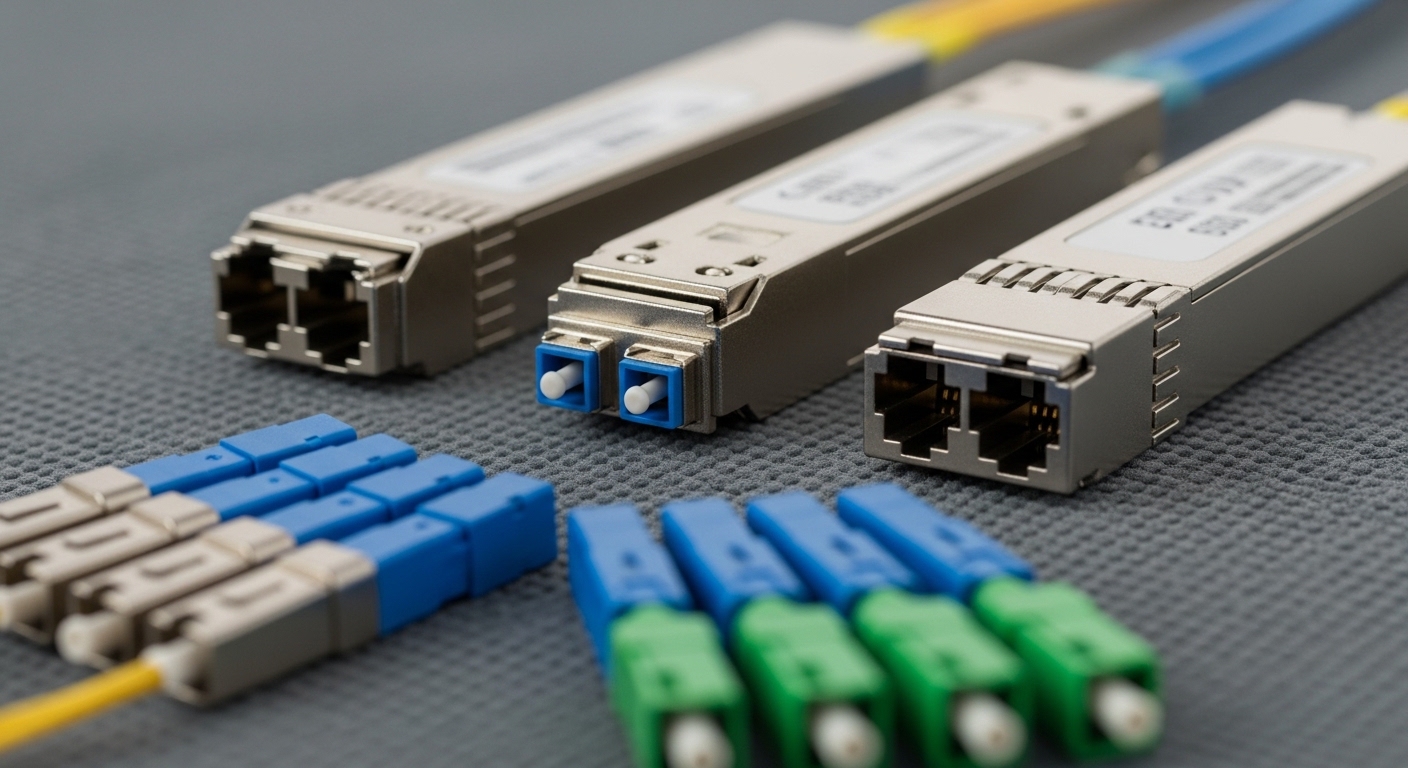
Before ordering QSFP optics, capture the physical and electrical constraints so you do not waste cycles on incompatible modules. For telecom deployments, I recommend logging both the switch transceiver capability and the fiber plant characteristics. Vendors often support multiple electrical interfaces, but the optics still must match the transceiver cage wiring and lane mapping.
- Switch model and port speed (example: Cisco NCS/ASR line cards, or a vendor leaf/spine fabric)
- QSFP form factor generation: QSFP, QSFP28, QSFP+; confirm lane rate and encoding
- Fiber type and link budget: OM3/OM4/OS2, measured attenuation, expected span length
- Connector standard: LC duplex for most pluggables; confirm MPO/MTP usage for high-density
- DOM support if your NMS requires telemetry (temperature, bias current, laser power)
Reference points: IEEE 802.3 defines physical layer behavior for Ethernet over fiber, while vendor datasheets define the exact transceiver reach and electrical requirements. See [Source: IEEE 802.3] and [Source: vendor optical module datasheets].
Step-by-step implementation: choose SFP vs QSFP for telecom links
Follow this workflow to pick the correct transceiver class for your QSFP applications without guessing. The key is matching port speed and optics reach to the fiber plant while respecting switch compatibility rules.
Identify the target line rate and encoding constraints
Start with the switch port speed and the expected Ethernet service rate. QSFP optics are commonly used for higher aggregate bandwidth per slot (for example, 25G per lane aggregated to 100G, or 10G per lane aggregated to 40G). Confirm whether your platform expects QSFP28 (25G lanes) or QSFP+ (10G lanes) and whether the module must support specific FEC modes.
Expected outcome: You can label each port as “SFP acceptable” or “QSFP required” based on lane rate and slot wiring.
Map fiber plant type to reach class
For metro and access networks, you usually deal with shorter distances (multimode) or long-haul single-mode spans. If your plant is OM4, typical QSFP SR variants are used for short-reach. If you are on OS2 for longer distances, you will likely choose LR/ER or coherent-capable optics depending on your architecture and vendor support.
Expected outcome: You shortlist optics by fiber type and reach, not just by “speed.”
Confirm connector and polarity conventions
For LC duplex, polarity issues are straightforward: match transmit to receive and verify patching. For MPO/MTP high-density links, polarity and ribbon orientation can dominate failure rates during cutover. If your telecom team uses MPO cassettes, validate the cassette polarity type and confirm the module’s expected polarity scheme.
Expected outcome: Your patch panel plan matches the connector standard for the chosen QSFP application.
Validate switch compatibility and DOM requirements
Some telecom platforms enforce strict transceiver compatibility checks, including vendor OUI allowlists and diagnostic feature requirements. If your NMS depends on DOM telemetry, ensure the module supports the required digital diagnostics interface and reports standard thresholds. If you operate in a harsh environment, also check the module temperature range for your site.
Expected outcome: You avoid “link up then flaps” events caused by unsupported diagnostics or strict compatibility policies.
Deploy with measured acceptance tests
After installation, verify link establishment, forward error correction status (if applicable), and optical power levels. In a field workflow, I typically capture: interface counters (CRC/alignment), optical receive power, and temperature/bias from DOM, then compare against vendor safe operating ranges.
Expected outcome: A documented acceptance record that proves optical and Ethernet layer stability.
SFP vs QSFP in telecom: practical specs comparison
QSFP modules package multiple lanes in a single connector, reducing slot count for higher aggregate bandwidth. SFP is still common for lower-rate uplinks and legacy ports. Use the table below as a starting point when selecting optics for telecom QSFP applications.
| Parameter | SFP / SFP+ | QSFP+ / QSFP28 |
|---|---|---|
| Common data rates | 1G, 10G | 40G (QSFP+), 100G (QSFP28) |
| Lane aggregation | Single lane (10G) | Multiple lanes (example: 4x25G for 100G QSFP28) |
| Typical wavelength bands | 850nm (SR), 1310nm (LR) | 850nm (SR), 1310nm/1550nm (LR/ER) |
| Typical reach | Multi-mode SR: ~300m-400m (depends on OM) | Multi-mode SR: ~100m-400m (depends on OM and generation) |
| Connector styles | LC duplex (common) | LC duplex or MPO/MTP (common for high density) |
| Diagnostics | Often DOM for vendor modules | Often DOM for vendor modules; verify platform support |
| Operating temperature | Commonly commercial or industrial variants | Verify module temperature grade for telecom sites |
Example part families you may see in real installs include Cisco SFP-10G-SR optics for SFP+ and 10G/100G QSFP transceivers like Finisar FTLX8571D3BCL (100G-class optics family varies by exact suffix) or FS.com QSFP28 SR variants. Always match the exact wavelength, reach, and connector type to your plant.
Selection criteria checklist for QSFP applications
When you are choosing QSFP optics for telecom links, treat selection as an engineering acceptance problem, not a shopping task. The ordered checklist below reflects what I see matter during cutover and post-install monitoring.
- Distance and fiber type: OM3/OM4 vs OS2; confirm vendor reach at your measured attenuation
- Port speed and lane rate: ensure QSFP generation matches the platform expectations
- Switch compatibility: verify transceiver support matrices and any allowlist policies
- DOM / telemetry support: confirm the platform can read diagnostics if your NMS relies on them
- Operating temperature grade: telecom rooms can run hot near line cards; verify module specs
- Connector and polarity: LC duplex vs MPO/MTP; validate patching scheme before first power-on
- Vendor lock-in risk: OEM vs third-party; plan for RMA and firmware/compatibility drift
Pro Tip: In MPO-based QSFP high-density deployments, most “mysterious” link failures are not optics defects; they are patch-panel polarity and ribbon orientation mismatches. Treat polarity verification as a pre-flight step, and you will cut troubleshooting time dramatically.
Common mistakes and troubleshooting in the field
Even experienced teams hit predictable failure modes. Here are the top issues I have debugged in telecom environments, with root cause and fixes.
Failure mode 1: Link never comes up after optics swap
Root cause: Wrong QSFP generation (for example, QSFP28 expected but QSFP+ installed) or unsupported module type by the platform. Some systems silently reject modules based on EEPROM fields.
Solution: Verify the switch port transceiver spec and compare the module’s exact ordering code and DOM capabilities. Update compatibility documentation references and test with a known-good module.
Failure mode 2: Link comes up but CRC errors spike
Root cause: Exceeding optical budget (dirty connectors, over-length fiber, or underestimated attenuation) or using mismatched fiber type for SR optics.
Solution: Clean connectors with approved cleaning tools, re-seat, then measure receive optical power via DOM. Replace patch cords if attenuation or bend radius is out of spec.
Failure mode 3: Intermittent flaps during temperature swings
Root cause: Module operating outside its temperature range or inadequate airflow/thermal design near the line card. Some third-party modules run hotter under sustained load.
Solution: Check site airflow, validate module temperature telemetry, and compare against datasheet limits. If needed, improve fan tray settings or reposition cables to reduce thermal coupling.
Cost and ROI note: what actually drives total cost
In many telecom projects, OEM QSFP optics cost more upfront but often reduce integration risk due to tighter compatibility validation and predictable RMA handling. Third-party optics can be cheaper, but you must budget time for qualification testing, especially for MPO polarity and DOM telemetry behavior. Typical street pricing varies widely by wavelength and reach; as a rough planning range, QSFP28 optics often cost more per port than SFP+ but enable higher bandwidth density, which can reduce switch port count and cabling costs. TCO usually hinges on failure rate, warranty terms, and field labor hours during replacements.
FAQ
Q: What are the most common QSFP applications in telecom networks?
A: QSFP is widely used for 40G and 100G Ethernet uplinks and leaf-spine aggregation where higher port density matters. It is also used in
