
Industrial IoT gateways live where failures are expensive: vibration, heat, and inconsistent fiber plants. This article helps field engineers and reliability owners choose the right industrial IoT SFP transceiver for gateway uplinks and sensor networks, with compatibility and troubleshooting details you can apply on-site. You will compare optics options, learn what to verify in switch/router DOM behavior, and avoid the most common “it should work” mistakes.
In the field, the “right” industrial IoT SFP is rarely the one with the highest headline reach. It is the one that matches your fiber type, link budget, switch optics expectations, and environmental limits, while maintaining stable optical power and signal quality over temperature swings. The IEEE 802.3 physical layer defines electrical and optical behaviors, but gateway vendors and managed switches often add practical constraints like DOM polling and alarm thresholds. If you skip those checks, you may see intermittent link drops that only appear during hot afternoons or after maintenance in the wiring room.
Industrial IoT SFP optics: SR, LR, and what your fiber plant actually supports
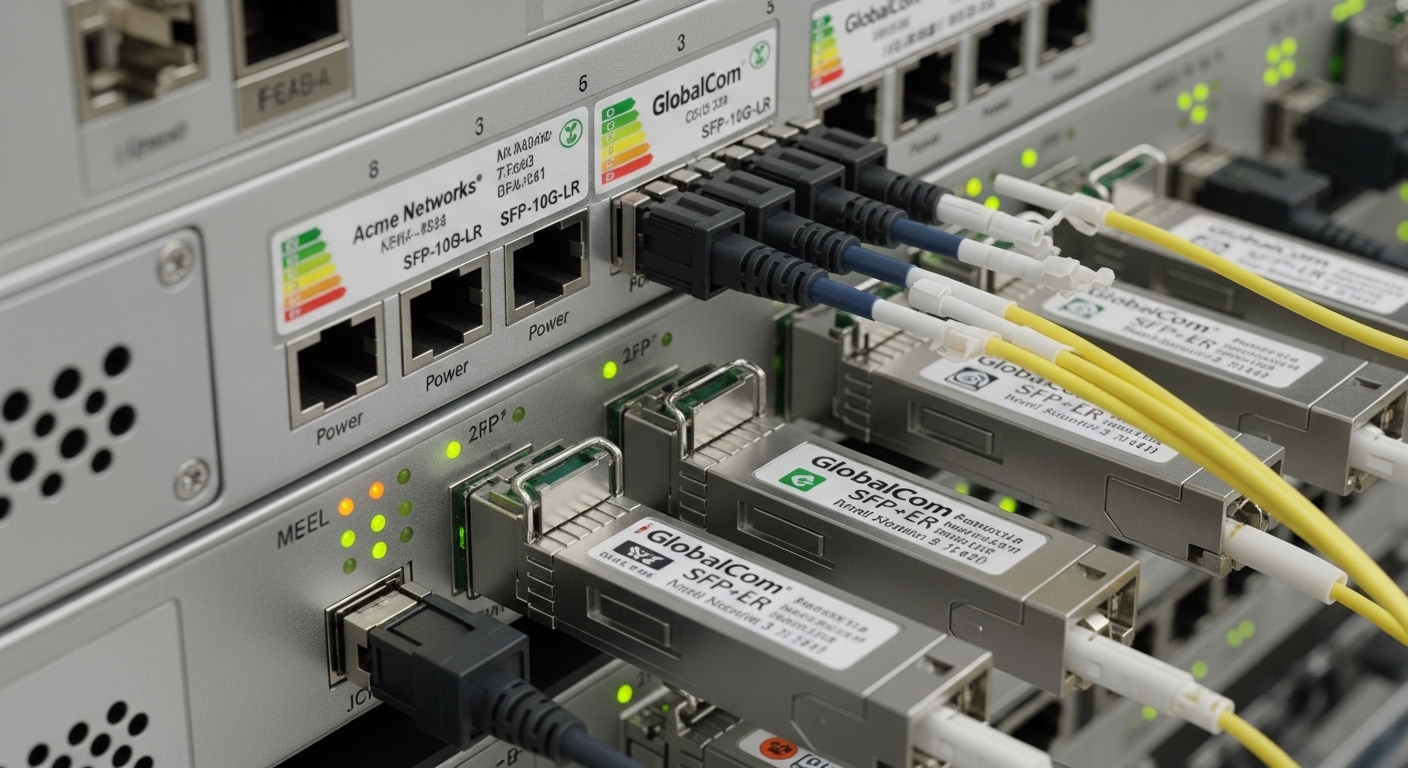
SFP is a form factor; the performance comes from the optical technology inside. For industrial IoT gateways, the most common choices are 10GBASE-SR (short reach, typically multimode), and 10GBASE-LR or longer-wavelength variants (single-mode, longer reach). These map to IEEE 802.3 specifications for wavelength, encoding, and receiver sensitivity, but your installation still depends on connector cleanliness, fiber grading, and patch panel loss.
Quick spec grounding for engineers
Before buying, confirm the gateway uplink speed (for example 1G vs 10G), the switch/router port type, and whether you are using multimode or single-mode fiber end-to-end. If you inherit an older multimode plant, you may be dealing with OM1 or OM2 rather than OM3/OM4, which changes feasible reach and margin. For single-mode, confirm whether your plant is truly single-mode and whether there are inline splitters that add loss.
Typical modules you will see in gateway inventories
Common real-world examples include 10G SR modules such as Cisco SFP-10G-SR and compatible optics like Finisar FTLX8571D3BCL or FS.com SFP-10GSR-85 (naming varies by vendor and reach). For LR-class single-mode, you might see 10GBASE-LR modules at 1310 nm. Always validate that the module is rated for the host environment and that the host supports the module type you plan to insert.
Performance and environmental limits: choosing for uptime, not just reach
Industrial IoT deployments usually fail under the conditions your lab never reproduces: temperature cycling, dust ingress, and intermittent fiber stress. A transceiver may still meet sensitivity at room temperature but drift enough at extremes to trigger link renegotiations or CRC errors. Look for modules with specified operating temperature ranges and stable optical output power across that range.
| Industrial IoT SFP option | Typical standard | Wavelength | Reach class (typical) | Fiber type | Connector | Operating temperature (example spec) | DOM support |
|---|---|---|---|---|---|---|---|
| 10GBASE-SR SFP+ | IEEE 802.3ae | ~850 nm | ~300 m (OM3/OM4 class) | Multimode | LC | -10 to +70 C (varies by vendor) | Often supported |
| 10GBASE-LR SFP+ | IEEE 802.3ae | ~1310 nm | ~10 km | Single-mode | LC | -10 to +70 C (varies by vendor) | Often supported |
| Industrial-rated SFP+ | Vendor-specific | Depends on optics | Depends on optics | Depends on optics | LC or other | -40 to +85 C (common for industrial lines) | Often supported |
Safety and compatibility note: Verify that your gateway and switch support the exact transceiver type and speed. DOM presence does not guarantee identical alarm thresholds, and some hosts enforce vendor checks that can block third-party optics.
Pro Tip: In many industrial deployments, the first field symptom is not a total link outage. It is a rise in CRC or FEC-like error counters during temperature peaks, which then causes link flaps. Capture optical DOM readings (TX power, RX power, temperature) at boot and again after a controlled heat soak; if the delta narrows your margin, you likely have a fiber cleaning or link budget issue rather than a “bad port.”
Compatibility and DOM behavior: how hosts react to “non-identical” optics
Most SFP hosts support the standardized electrical interface, but they are not required to behave identically with every vendor’s implementation of DOM. Many managed switches and industrial routers poll DOM over the I2C management interface and may trigger alarms based on vendor-specific thresholds. If your host expects certain warning levels, a compatible module can still be “treated as abnormal,” even if link training succeeds.
What to verify before rollout
- Port type and speed: Confirm whether the host port is truly SFP (1G) or SFP+ (10G) and whether auto-negotiation is supported for the optical link.
- DOM polling and alarms: Check whether the host shows “DOM present,” whether it reads temperature and optical power, and what events it logs on warning thresholds.
- Vendor lock-in risk: Some OEM gateway platforms enforce optics vendor whitelists. Test with a small batch before scaling.
- Connector and cage tolerances: Rugged gateway cages may tolerate dust caps poorly; confirm the module seats fully without mechanical stress on the PCB.
For authority, use the optical and link behavior definitions in IEEE 802.3 and vendor DOM and SFP electrical interface notes in the host and module datasheets. For practical cabling and connector handling, follow guidance from ANSI/TIA cabling standards and related resources and your organization’s fiber cleaning procedures.
On-site, engineers often discover that the “module problem” is actually a mismatched patch cord type or a connector contamination issue. However, compatibility issues can be real: some optical modules report DOM values with different scaling or calibration assumptions, and some industrial hosts respond by lowering link margin or flagging port health alarms. That is why you should treat DOM behavior as part of acceptance testing, not a bonus feature.
Head-to-head: SR vs LR for industrial IoT gateway uplinks
SR and LR are not just different distances; they imply different fiber plant assumptions, maintenance patterns, and failure modes. SR over multimode is common in buildings and campuses with shorter runs, while LR over single-mode is common for longer campus links or when the fiber plant is already single-mode. Your choice affects how sensitive you are to fiber type mismatches and how often you must manage connector cleaning across patch panels.
Decision matrix (engineers actually use)
| Criterion | SR (multimode) | LR (single-mode) |
|---|---|---|
| Distance to gateway | Best for short runs (hundreds of meters) | Best for long runs (kilometers) |
| Fiber inventory accuracy | More sensitive to OM grade and patch cord mix-ups | More forgiving if plant is truly single-mode |
| Cost per link (module + cabling) | Often lower optics cost; multimode cabling may be cheaper or already installed | Often higher optics cost; single-mode cabling may already exist |
| Field troubleshooting speed | Common issues: wrong fiber grade, dirty LC ends, modal mismatch | Common issues: wrong fiber type, connector contamination, unexpected splitters |
| Operating temperature headroom | Varies; choose industrial-rated where possible | Varies; choose industrial-rated where possible |
| DOM/host acceptance risk | Similar risk; depends on host whitelist and thresholds | Similar risk; depends on host whitelist and thresholds |
Which option fits which network shape?
In a 3-tier data center leaf-spine topology with 48-port 10G ToR switches feeding industrial IoT gateways at the access layer, SR is often used for in-building patch runs of 100 to 300 m over OM3/OM4. In contrast, if your gateways aggregate from remote substations across a campus where fiber runs exceed 2 km, LR modules reduce the need to re-engineer the fiber plant. In both cases, acceptance testing should include DOM polling and error counter baselining.
Common mistakes and troubleshooting tips (with root cause)
Most field failures trace back to a handful of repeatable causes. The list below focuses on actionable checks you can perform with common tools: link LEDs, switch port diagnostics, DOM reads, and an optical inspection scope.
-
Mistake: Mixing multimode and single-mode fibers with the “same-looking” LC connectors.
Root cause: The connector matches mechanically, but the fiber core and modal behavior do not. SR optics will fail or show high errors on single-mode, and LR optics may fail on multimode depending on plant and patch cord mix.
Solution: Label fiber runs, verify with OTDR or certified test results, and confirm the transceiver type matches the fiber type end-to-end. -
Mistake: Skipping connector cleaning before inserting a replacement module.
Root cause: Dust and micro-scratches increase attenuation and can cause RX power to fall below sensitivity during temperature swings.
Solution: Clean with approved procedures (lint-free wipes, proper alcohol, and inspection), then inspect with a scope before reconnecting. -
Mistake: Assuming “it links up” means the link budget is healthy.
Root cause: A link may train but still operate near margin, leading to CRC errors and intermittent drops under thermal load.
Solution: Record baseline error counters and DOM values at install; re-check after heat soak. If RX power is near warning thresholds, fix the optical path first. -
Mistake: Buying third-party optics without host compatibility testing.
Root cause: Some hosts enforce vendor or calibration expectations via DOM alarm behavior or whitelist checks.
Solution: Test the exact module part number with the exact host firmware version; verify DOM readouts and alarm events.
Cost and ROI: balancing OEM reliability with operational TCO
Transceiver pricing varies widely by wavelength, reach, DOM support, and industrial temperature rating. In many markets, OEM-branded 10G SR/SFP+ modules can cost roughly $80 to $250 each, while reputable third-party equivalents may be $40 to $150 depending on lead time and industrial rating. TCO includes not only the optics purchase but also labor for swaps, downtime, and the testing time required to confirm compatibility.
From a reliability perspective, industrial-rated modules with wider temperature ranges can reduce field replacements when gateways operate near the edge of environmental specs. However, the ROI depends on your failure history: if most downtime is driven by connector contamination, spending more on optics will not fix the root cause. Consider stocking a small set of “golden” tested optics per gateway model and firmware revision to shorten MTTR.
Which option should you choose?
If your gateway uplinks are within a few hundred meters inside a facility and you already have OM3/OM4 multimode, choose SR industrial IoT SFP for lower cabling and typically simpler installs. If your links cross longer distances, traverse remote sites, or you need to rely on a single-mode plant, choose LR for better distance headroom and fewer fiber-type surprises.
For most buyers, the decisive factor is not SR versus LR alone; it is whether the module passes acceptance testing on your exact host with DOM alarm behavior and stable error counters. Start with the internal compatibility checklist, test with a small batch, and then scale to your maintenance plan using an internal link reference for your organization’s fiber transceiver standards: industrial fiber transceiver compatibility checklist.
FAQ
What does “industrial IoT SFP” mean compared with standard SFP?
It usually refers to an SFP/SFP+ module that is rated for wider operating temperature and harsher environments, plus stable optical output under those conditions. Always confirm the exact temperature range and whether it is validated for your gateway enclosure.
Can I use a third-party industrial IoT SFP if the switch is picky?
Sometimes, but not automatically. Some hosts enforce vendor whitelists or react differently to DOM alarm thresholds, even when the link trains. Test the exact module part number with your host firmware and verify DOM reads and port alarms.
How do I decide between SR and LR for a gateway uplink?
Use distance and fiber type first: SR for multimode short runs, LR for single-mode longer runs. Then validate the link budget with your certified fiber loss results and confirm connector and patch panel cleanliness.
What DOM readings should I watch during commissioning?
Track TX power, RX power, and module temperature at boot, then after a thermal cycle. If RX power is close to warning thresholds or drifts significantly with temperature, investigate optics cleanliness and path loss before assuming the module is defective.
Why does the link flap only in hot weather?
Near-margin optical links can pass training at room temperature but fail under thermal drift. Common causes include dirty connectors, higher-than-expected attenuation, or a marginal link budget that collapses when components warm up.
