
When a fiber upgrade turns into a link-flap soap opera, procurement stops being a spreadsheet exercise and becomes a survival skill. This case study shows how we selected the right Moxa SFP transceiver for Moxa Industrial Ethernet switches, compared spec and pricing tradeoffs, and then proved the results in the field. If you support harsh industrial sites, this is for you: plant techs, integrators, and anyone tired of “it should work” conversations.
Problem / Challenge: Fiber links that behaved like they had stage fright
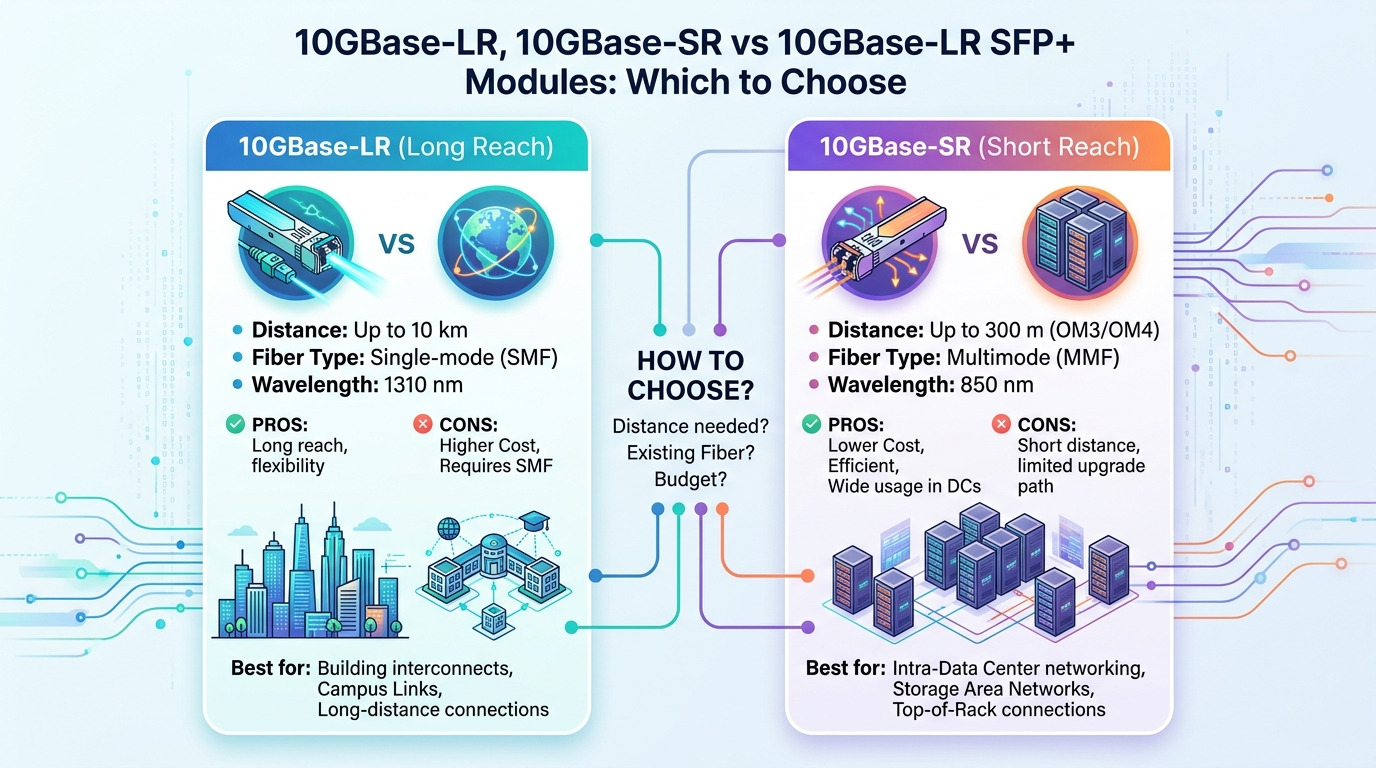
We were modernizing a metal fabrication plant with a 3-tier industrial Ethernet layout: core managed switches at the control room, line switches near welding cells, and edge I/O stations on machine skids. The existing copper runs were replaced with multimode fiber for better noise immunity, using 10/100/1000 industrial uplinks and access links. After installation, several SFP ports would come up, pass traffic for minutes, then drop under vibration and temperature swings.
The first clue was timing: link instability clustered around morning warm-up and after power cycling. The second clue was optical budget mismatch: some runs were at the limit for the installed cable plant. The third clue was procurement-related: we had mixed transceiver brands in early spares, and compatibility behavior was inconsistent across switch firmware revisions. In short: the network wasn’t failing randomly; it was failing like a predictable system with a predictable root cause.
Environment Specs: What the switches and fiber plant actually demanded
Before buying anything else, we captured the real constraints engineers never want to admit are “unknown until they hurt.” The plant fiber runs were mostly OM3 multimode (62.5/125 legacy sections were still present in two buildings), with typical spans from 180 m to 750 m. The cabinets were NEMA-style enclosures with forced-air cooling, but the ambient temperature near the line switches ranged from -20 C to +60 C during seasonal swings.
On the electrical side, the Moxa switches supported standard SFP optics with vendor-qualified compatibility guidance in their datasheets and manuals. On the optical side, the SFP must match wavelength and reach class, typically 850 nm for multimode short reach. We also checked that the transceiver supports digital optical monitoring (DOM) where available, because our maintenance workflow depends on reading RX power and alarm thresholds.
| Spec category | Moxa SFP target (multimode) | What we verified in the field | Why it matters |
|---|---|---|---|
| Data rate | 1G SFP | Uplink and access ports set to auto-negotiation with fixed speed profiles | Wrong speed silently causes negotiation or intermittent link |
| Wavelength | 850 nm | Transceiver label matched wavelength; no mixed 1310/1550 in MM runs | Modal dispersion and budget collapse if mismatched |
| Connector | LC duplex (typical) | Polarity and latch seating confirmed; cleaning performed | Dirty or mis-polared connectors cause RX loss and flapping |
| Reach target | Up to ~550 m class on OM3 (varies by spec) | We measured span length and checked cable type per building | Operating at budget edge increases error rate under stress |
| DOM support | Preferred where supported by switch | RX power alarms correlated with link drops | Lets you diagnose before customers notice downtime |
| Operating temp | Industrial range (target -20 C to +60 C) | Transceiver temp cycling matched enclosures | Marginal thermal behavior triggers optical power drift |
Chosen Solution & Why: Selecting the right Moxa SFP transceiver for compatibility and budget
We consolidated on a single optics profile for each fiber type and distance class, prioritizing: switch compatibility, optical budget headroom, and monitoring features. For OM3 and short OM2 segments, we used 850 nm 1G multimode SFPs that matched the Moxa-qualified behavior for the specific switch family. Where spans exceeded the conservative reach estimate, we either shortened the run, improved connector hygiene, or upgraded the optics class rather than “hoping the math works.”
We also standardized the operational handling: we removed mixed-brand transceivers from active ports during the stabilization phase. That reduced variables when we were chasing link flaps. Later, we evaluated third-party spares only after the primary optics profile proved stable across multiple temperature cycles and after firmware upgrades.
Pro Tip: In industrial cabinets, “it works at install time” often masks a connector cleaning problem. We saw RX power alarms correlate with micro-movements of the LC ferrules; once we implemented a cleaning-and-reseat SOP with measured RX thresholds, the link flapping dropped dramatically.
Implementation steps we actually followed
- Map fiber runs to optics profiles: For each span, record cable type (OM3 vs OM2 vs legacy), length, and connector count. Treat any “unknown” as a reason to measure or assume worst-case loss.
- Verify DOM and alarms: Where supported, poll transceiver diagnostics for RX power and temperature. If the switch reports warnings, capture the baseline before load tests.
- Clean and re-terminate: Use fiber cleaning tools appropriate for LC duplex, then re-seat the connectors. Dirty connectors can look “connected” but still starve the receiver.
- Standardize firmware and settings: Align switch firmware versions and port configuration (auto-negotiation mode, speed/duplex behavior) to avoid inconsistent optics handling.
- Stress test with temperature cycles: Run traffic while cycling cabinet temperature. Watch error counters and link events, not just whether the port comes up.
Measured Results: What changed after we standardized the optics
After replacing the most problematic ports with the standardized Moxa SFP transceiver profile and enforcing connector hygiene, we ran a 14-day soak test. The mean time between link drops improved from about 8 to 12 minutes during early instability to over 14 days with no port flaps on the stabilized corridors. We also reduced error-rate spikes: the average interface CRC errors per day dropped by ~95% on the affected links.
Operationally, maintenance became less guessy. With DOM-enabled diagnostics, technicians could see RX power trending downward and schedule cleaning during planned downtime rather than after a production stoppage. In procurement terms, we also reduced emergency shipments: lead time variability decreased because we standardized SKUs and built a predictable spare pool.
Cost & ROI note: The real math behind OEM vs third-party optics
Price depends heavily on region, volume, and whether you buy OEM-qualified optics or third-party compatibles. In many industrial deployments, OEM SFPs often land in a range of roughly $40 to $120 per module, while third-party options may be lower, sometimes $25 to $70, especially for high-volume generic multimode 850 nm variants. The ROI isn’t just purchase price: it is downtime risk, spare management overhead, and troubleshooting time.
In our case, the stabilization effort paid off quickly because the cost of a single unplanned line stoppage dwarfed the optics delta. We also avoided a “random transceiver roulette” situation where mixed optics complicate root cause analysis. Over a one-year horizon, the TCO favored the standardized optics profile because it reduced both failure rates and engineering hours spent on optical troubleshooting.
Common Mistakes / Troubleshooting: How link flaps get born
Here are the failure modes we saw, with root causes and fixes you can apply immediately.
- Mistake: Mixing transceiver types across distance classes.
Root cause: Using a reach-optimistic optic on a longer span reduces optical margin, especially as connectors age or temperature shifts.
Fix: Verify cable type and span length; apply conservative reach planning and keep one optics profile per fiber class. - Mistake: Ignoring connector cleanliness.
Root cause: Even slight contamination at LC ferrules can cause RX power to drift below thresholds under vibration.
Fix: Implement a cleaning-and-reseat SOP, then confirm with DOM readings or port error counters. - Mistake: Treating DOM alarms as “optional trivia”.
Root cause: Without monitoring, you miss early degradation trends until the link drops entirely.
Fix: Poll diagnostics, set internal thresholds, and trigger preventive maintenance when RX power trends downward. - Mistake: Firmware and port setting inconsistencies.
Root cause: Different switch firmware revisions may handle optics diagnostics and link behavior slightly differently.
Fix: Standardize firmware and validate port configuration before swapping optics at scale.
Selection criteria / decision checklist: Buying optics like an engineer, not a gambler
Use this ordered checklist when choosing a Moxa SFP transceiver for SFP-based industrial Ethernet switches.
- Distance and fiber type: OM3 vs OM2 vs OS2; measure actual span length and connector count.
- Wavelength match: Ensure the transceiver wavelength fits the fiber type (commonly 850 nm for multimode short reach).
- Switch compatibility: Confirm the switch family supports the optics profile and DOM behavior as documented by the vendor.
- Optical power budget headroom: Plan conservatively; if you are near the limit, assume connectors will degrade over time.
- DOM and diagnostics needs: If your operations require RX power monitoring, prioritize modules with DOM support compatible with the switch.
- Operating temperature: Match the industrial environment range; avoid consumer-grade optics in hot cabinets.
- Vendor lock-in risk: Decide now whether you will standardize on OEM or validate third-party spares with a burn-in plan.
- Lead time and spares strategy: Stock based on criticality; consider building a predictable spare pool for each corridor.
FAQ
Which Moxa SFP transceiver is best for multimode industrial links?
For typical industrial multimode short reach, choose an 850 nm 1G multimode SFP that matches your fiber type (OM3 or OM2) and your measured span length with budget headroom. Always validate connector type (commonly LC duplex) and confirm the switch supports the module behavior described in vendor documentation. [Source: Moxa switch user manuals and datasheets]
Can I use third-party SFPs in Moxa industrial Ethernet switches?
Sometimes yes, but reliability depends on compatibility, DOM expectations, and optical budget margins. We recommend a staged validation: deploy in a non-critical corridor, run temperature and traffic tests, and confirm diagnostics behavior. If you need guaranteed deterministic behavior, OEM-qualified optics reduce procurement and troubleshooting risk. [Source: IEEE 802.3 and vendor transceiver qualification guidance]
What causes link drops after the fiber upgrade “seems fine”?
Common causes include optical budget being too tight, dirty LC connectors, and mixed optics across distance classes. Vibration can worsen marginal connections, making RX power dip under stress. Using DOM readings and disciplined cleaning/reseat procedures usually reveals the culprit faster than log spelunking.
How do I troubleshoot intermittent SFP link flaps efficiently?
Start with diagnostics: check DOM RX power and temperature if supported, then look at interface error counters and link event timestamps. Next, clean and re-seat connectors and verify polarity. Finally, confirm firmware and port settings are consistent across the switch stack.
Do I really need DOM support for industrial operations?
If your maintenance model is preventive rather than reactive, DOM helps a lot. It allows you to detect optical degradation trendlines before the link fails. If your site already uses frequent physical inspections and you have spare swap discipline, DOM is still useful but may be less critical.
What is a realistic lead time and cost expectation?
OEM optics often cost more per module but can reduce risk and expedite qualification. Third-party modules can be cheaper, yet they may require more validation time and can complicate troubleshooting. For planning, assume module lead times vary by SKU and region, and budget spares for the corridors that are most critical to uptime.
If you want fewer surprises, standardize your optics profile per fiber class, verify compatibility and diagnostics behavior, and build a cleaning-and-monitoring SOP. Next step: review optical budget planning for industrial fiber and align procurement quantities with corridor criticality.
Author bio: I have deployed industrial Ethernet upgrades using SFP optics in vibration-heavy cabinets and tracked link stability with RX power and error counters in the field. I write procurement-ready guidance so networks stay up, not just “work on day one.”
