
You can build a reliable lab network without overspending, but picking the right home lab SFP often breaks on compatibility, DOM quirks, and wrong fiber type. This guide helps home engineers and small-office admins select budget SFP transceivers, validate optics, and deploy them safely in a real prosumer setup. You will get a step-by-step implementation plan, a specs comparison table, troubleshooting for the top failures, and a short FAQ for common buying questions.
Prerequisites before you buy a home lab SFP
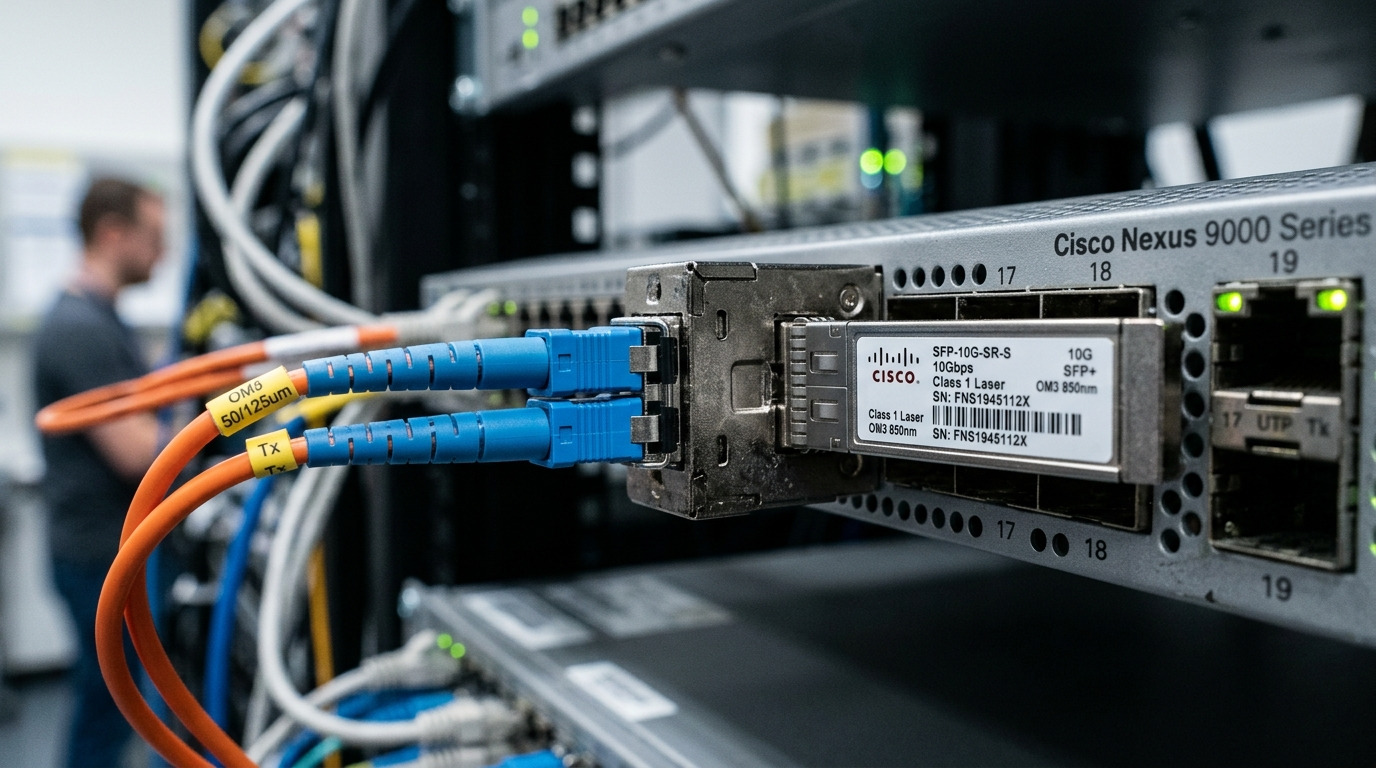
Before ordering, confirm what your switch and cabling actually support. In practice, most “it does not link” issues come from mismatched optics (SR vs LR), incorrect connector type, or a switch that rejects third-party DOM. Also gather environmental details: heat matters in small racks.
- Switch model and its documented SFP/SFP+ compatibility list
- Data rate: 1G (SFP), 10G (SFP+), or similar
- Fiber type: OM3/OM4 multimode or OS2 single-mode
- Connector: LC is typical for fiber; verify your patch panel
- DOM expectations: whether your switch requires Digital Optical Monitoring
- Temperature constraints: small enclosures can exceed 40 C
For authority, validate behavior against IEEE physical-layer expectations and vendor optics guidance; relevant baseline includes IEEE 802.3 for Ethernet PHY operation and vendor datasheets for transceiver parameters. [Source: IEEE 802.3] [Source: Cisco SFP documentation]
Step-by-step: Deploy a budget home lab SFP that actually links
Follow these steps like you would in a small operations window. Each step includes an expected outcome so you can stop early when something is wrong.
Match the SFP type to your switch port speed
Check whether the cage is SFP (commonly 1G) or SFP+ (10G). Then confirm the transceiver wavelength and signaling standard. For example, 10G SR typically uses 850 nm multimode optics, while 10G LR uses 1310 nm single-mode.
Expected outcome: The switch recognizes the transceiver in the correct speed mode without errors.
Choose fiber reach and budget realistically
For multimode, SR modules are designed for short reach over OM3/OM4. For single-mode, LR modules cover longer runs but require OS2 cabling. Budget selections should account for patch cords, splices, and aging.
Expected outcome: Your planned link distance plus margin is within the module spec for your fiber grade and connector loss.
Verify optics compatibility and connector type
Confirm you will connect LC to LC (or adapt correctly) and that transmit/receive pairs align. In labs, mispairing fiber is common because patch panels are labeled informally. If you use a bidirectional pair, still follow the module vendor’s polarity guidance.
Expected outcome: Link comes up with stable signal quality (no intermittent flaps).
Confirm DOM behavior and switch policy
Some switches accept third-party optics only when DOM fields are within tolerance. If your switch shows “unsupported transceiver” messages, you may need a vendor-approved module or a compatible third-party that explicitly supports DOM. Many OS and switch platforms expose logs that reveal whether the optics are blocked by policy.
Expected outcome: DOM reads successfully, or the switch continues operating without rejecting the module.
Validate link with measurements, not vibes
Use the switch CLI or UI to verify link state and counters. If your platform offers optical diagnostics, record Tx bias, Rx power, and temperature; compare them to the vendor’s typical ranges. Keep a baseline so you can detect drift later.
Expected outcome: Clean link with no CRC storms, stable interface counters, and reasonable optical readings.
Budget home lab SFP spec comparison: SR vs LR and what to buy
Budget does not mean “random.” Choose modules that align with your fiber plant and target reach. Below is a practical comparison using common, field-tested part families.
| Use case | Typical wavelength | Fiber type | Connector | Data rate | Typical reach | Operating temperature | Example part numbers |
|---|---|---|---|---|---|---|---|
| 10G short reach (ToR to server, rack runs) | 850 nm | OM3/OM4 multimode | LC | 10G (SFP+) | Up to ~300 m on OM3; up to ~400 m on OM4 (depends on vendor) | Often 0 C to 70 C | Cisco SFP-10G-SR, Finisar FTLX8571D3BCL, FS.com SFP-10GSR-85 |
| 10G long reach (inter-rack, single-mode backbone) | 1310 nm | OS2 single-mode | LC | 10G (SFP+) | Up to ~10 km (depends on vendor) | Often -5 C to 70 C | Finisar 10G LR families, common OS2 10G LR SFP+ modules |
| 1G copper-like replacement (short distances) | Varies by model | Multimode or single-mode | Varies (often LC) | 1G (SFP) | Varies by optics | Varies | Common 1G SFP multimode and OS2 models |
Note: exact reach depends on link budget, fiber attenuation, and connector/splice losses. Always confirm with the manufacturer’s datasheet for the specific model.
Pro Tip: In home labs, the biggest “budget killer” is not the SFP price; it is marginal fiber cleaning. Use lint-free wipes and isopropyl alcohol (or approved cleaning kits) before blaming optics. A single dirty LC face can drop Rx power enough to cause intermittent link flaps that look like firmware or DOM problems.
Selection checklist engineers use for a home lab SFP
- Distance: pick SR for OM3/OM4 within spec, or LR for OS2 when you exceed multimode reach.
- Switch compatibility: confirm SFP vs SFP+ and any vendor validation requirements.
- Budget vs reliability: prefer reputable module families with published datasheets and consistent DOM support.
- DOM support: verify your switch reads DOM without blocking; check for “unsupported transceiver” messages in logs.
- Operating temperature: small racks can trap heat; ensure the module spec covers your ambient.
- Vendor lock-in risk: if the switch enforces allowlists, third-party optics may be risky even if they meet optical specs.
Common mistakes and troubleshooting for budget SFP issues
When a link fails, isolate the cause quickly. Below are three frequent failure modes field engineers see in small deployments.
Troubleshooting 1: “Unsupported transceiver” or no link on insertion
Root cause: DOM fields or vendor policy mismatch, or wrong SFP type (SFP vs SFP+). Solution: verify the port cage supports your module; try a known-compatible part number from the switch vendor documentation or a third-party model explicitly tested for that platform.
Troubleshooting 2: Link comes up then flaps every few minutes
Root cause: dirty connectors, poor fiber polarity, or marginal Rx power from excess loss. Solution: clean LC ends, re-seat fibers, and measure optical diagnostics if available; repatch to ensure Tx goes to Rx.
Troubleshooting 3: High CRC errors or throughput below expectation
Root cause: wrong fiber grade for SR, excessive patch cord length, or a failing patch panel/splice. Solution: confirm OM3 vs OM
