
When a telecom aggregation site starts dropping flows during peak hours, the culprit is often not routing but oversubscribed, aging optical interfaces. This article follows a real rollout where engineers replaced mixed optics with consistent high-speed links across access and aggregation. It helps network architects, field engineers, and procurement teams choose the right transceivers and avoid compatibility traps.
Problem and challenge: high-speed links that still fail in production
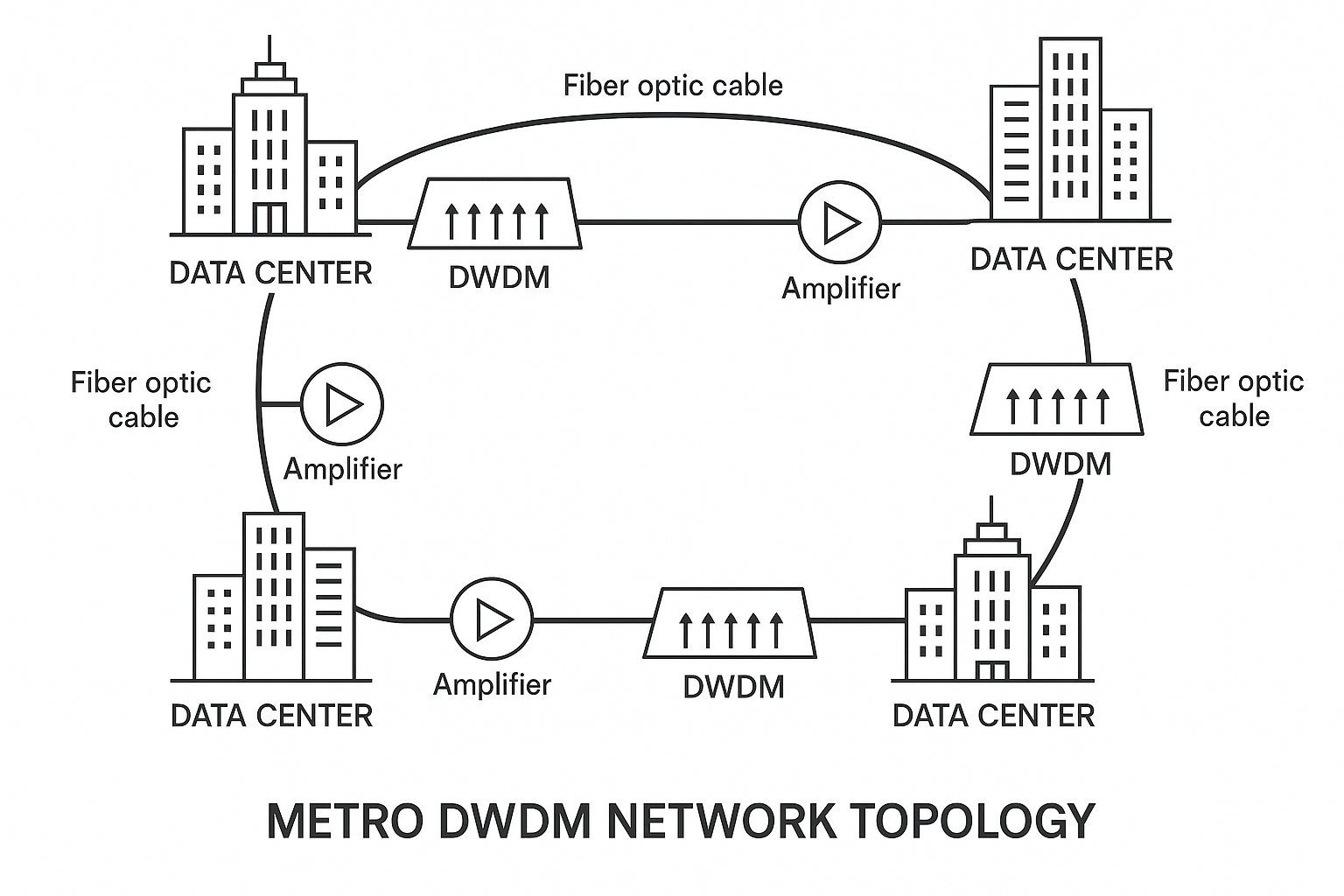
In a regional telecom network, the team supported a 3-tier topology: customer edge to aggregation, then aggregation to metro core. The first symptom was intermittent CRC errors and rising link flaps on selected 10G uplinks, which correlated with temperature swings and maintenance windows. Traffic graphs showed microbursts that stressed buffering, and the switch logs pointed to optical receive power drifting near thresholds. Vendor optics were a mix of OEM and third-party modules, and DOM telemetry availability was inconsistent.
The challenge was to deliver stable high-speed links without forcing a full switch refresh. The constraints were strict: limited downtime, existing fiber plant with known loss budgets, and optics that had to interoperate across multiple switch models. The team also needed predictable thermal behavior in a cabinet where ambient temperature regularly exceeded 35 C during summer.
Environment specs: fiber distances, optics targets, and link budgets
The rollout covered two distance classes and two interface speeds. Short runs connected aggregation to TOR-style aggregation switches over 120 to 220 m of OM3 multimode fiber; longer runs used 2.2 to 3.1 km of OS2 single-mode fiber between aggregation and metro edge. They aimed to standardize on 10G for legacy paths and 25G for new capacity, keeping optics within the same cabinet power and thermal envelope.
Operational targets were defined up front using the switch vendor recommended thresholds and link margin practice. Engineers required that received optical power stay within the transceiver’s specified receive sensitivity and that average transmit power plus fiber attenuation leave at least 3 dB of margin for connector aging. They also verified that the optics supported the required interface standard for electrical signaling (SFP+ for 10G; SFP28 for 25G) and that the switch would accept the module vendor’s EEPROM programming.
| Parameter | 10G MMF (SFP+) | 25G SMF (SFP28) |
|---|---|---|
| Typical wavelength | 850 nm | 1310 nm |
| Target data rate | 10.3125 Gb/s | 25.78125 Gb/s |
| Reach class used | OM3, up to ~300 m class | OS2, up to ~10 km class |
| Connector type | LC duplex | LC duplex |
| Operating temperature | 0 to 70 C (typical) | -5 to 70 C or 0 to 70 C (selected) |
| DOM telemetry | Required: yes on aggregation switches | Required: yes for proactive monitoring |
| Typical measured power budget need | Keep RX power within spec with 3 dB margin | Keep RX power within spec with 3 dB margin |
Chosen solution and why: consistent optics for high-speed links
The team selected two transceiver families to match distance and speed, emphasizing compatibility with switch DOM and predictable thermal behavior. For 10G short MMF links, they used SFP+ transceivers rated for 850 nm over OM3 with LC duplex. For 25G longer SMF links, they selected SFP28 optics for 1310 nm over OS2 with a long-reach class.
In practice, they standardized on widely deployed part numbers to reduce unknowns. Examples included Cisco-compatible SFP-10G-SR class optics and Finisar-class 25G SFP28 long-reach optics such as FTLX8571D3BCL (exact ordering varies by region and switch SKU). For third-party procurement, they required that the module provide DOM and that it pass the switch vendor’s optics compatibility guidance. For reference on physical and electrical layers, they aligned expectations to IEEE Ethernet specifications for 10G and 25G operation and to vendor datasheet parameters for optical ranges and safety.
Authority sources used during validation included [Source: IEEE 802.3] for Ethernet PHY framing and [Source: vendor transceiver datasheets] for optical power ranges, DOM behavior, and temperature ratings. They also referenced optics selection guidance from major switching vendors where available, since acceptance can depend on EEPROM fields and vendor-specific compliance lists. For additional background on optical link behavior, see [Source: ANSI/TIA-568.3-D] for cabling considerations and connector performance concepts.
Pro Tip: In telecom cabinets, the biggest “gotcha” is not raw reach but reach plus margin over time. Aging patch cords and dust contamination shift connector loss upward, so selecting a module with extra optical headroom and requiring DOM-based RX power alarms often prevents the slow drift that causes CRC spikes weeks later.
Implementation steps: how the team deployed with minimal downtime
The rollout followed a controlled migration plan across maintenance windows. Engineers first collected baseline telemetry: per-port error counters, link state history, and DOM values (TX bias, TX power, RX power) where supported. They then ran a fiber inspection workflow: visual checks, cleaning, and OTDR or at least certified loss testing where documentation existed.
Pre-qualify optics with switch acceptance tests
Before touching production, they tested candidate optics in a staging rack with the same switch models and firmware versions. They verified link training success, DOM visibility, and that alarms triggered correctly when they temporarily reduced RX power using controlled attenuation. This step caught EEPROM field mismatches and “works but no DOM” scenarios that later complicate troubleshooting.
Validate link budget against measured fiber loss
For each link, they used measured attenuation and connector loss assumptions to compute expected RX power. They targeted staying within the datasheet RX sensitivity range under worst-case conditions and preserving at least 3 dB headroom. Where documentation showed older patch cords, they treated connector loss as variable and replaced them during the same window.
Perform hot-swap replacement with monitoring
During the window, they replaced one port at a time and watched link flaps, CRC counts, and DOM telemetry for at least 30 minutes. They also monitored cabinet temperature and correlated it with RX power drift to ensure the module thermal performance matched the environment. If any port showed marginal RX power, they cleaned connectors again and adjusted patch cord routing.
Set proactive thresholds for high-speed links
They configured switch alarms based on DOM RX power and error-rate trends. Instead of waiting for link down events, they triggered notifications when RX power approached a defined “yellow zone” and when CRC rate exceeded a low baseline. This reduced mean time to detect during the next heat wave.
Measured results: uptime, error rates, and operational load
After the replacement, the team compared 30-day KPIs to the prior period. Across migrated interfaces, CRC errors dropped sharply, and the number of link flaps fell from frequent intermittent events to rare, isolated incidents tied to maintenance rather than optics. In ports where DOM telemetry was available, the team observed stable RX power over time, with fewer oscillations during temperature peaks.
Operationally, they reduced troubleshooting time because DOM made it clear whether problems were optical (RX power low) or electrical/configuration (link training issues). The measured improvement included fewer truck rolls and faster isolation when errors did occur. While exact figures vary by site, their internal report showed a meaningful reduction in “unknown cause” tickets and a lower average time to resolution for optical-related incidents.
They also tracked power and inventory risk. Standardizing optics reduced the number of SKUs on-hand and improved failure attribution. Third-party modules were only used when they met DOM and acceptance criteria, which reduced the hidden TCO cost of rework during future maintenance cycles.
Lessons learned: what to check before you buy optics for high-speed links
Selection criteria determine whether high-speed links stay stable under real-world fiber and thermal stress. The team used a short checklist that engineers could apply per link and per switch model.
- Distance and fiber type: confirm OM3 vs OS2, then match wavelength and reach class to measured loss.
- Switch compatibility: verify SFP+ vs SFP28 support and confirm optics acceptance for your exact switch model and firmware.
- DOM support and telemetry: require visibility of RX power and alarm thresholds where your operations depend on it.
- Operating temperature: select temperature-rated modules that cover cabinet ambient and airflow conditions.
- Optical power budget: preserve at least 3 dB margin and plan for connector aging.
- Vendor lock-in risk: if using third-party optics, require acceptance testing and keep a compatibility record for future swaps.
- Connector hygiene and fiber quality: clean LC connectors and replace degraded patch cords to avoid “mystery” RX power loss.
Common mistakes and troubleshooting tips for high-speed links
Even with correct part numbers, high-speed links fail for predictable reasons. Below are concrete failure modes the team encountered or validated during staging.
- Mistake: Installing optics that link up but do not expose DOM telemetry.
Root cause: EEPROM fields or DOM implementation differences that your switch expects.
Fix: pre-test in staging with the same switch SKU and confirm DOM RX power readings before deployment. - Mistake: Assuming reach specs alone guarantee stability.
Root cause: connector contamination and patch cord aging increase insertion loss over time, shrinking link margin.
Fix: require certified loss testing or OTDR checks, and keep 3 dB margin. - Mistake: Ignoring temperature rise in dense telecom cabinets.
Root cause: thermal stress can shift bias and reduce RX margin, causing CRC bursts at peak heat.
Fix: validate optics temperature rating for your ambient, improve airflow, and monitor DOM RX power during heat conditions. - Mistake: Mixing fiber polarity or incorrect duplex mapping on LC links.
Root cause: transceiver Tx/Rx pairing mismatch leads to low RX power and intermittent link training.
Fix: verify polarity method (MTP/LC polarity scheme) and confirm Tx-to-Rx mapping during install.
Cost and ROI note: balancing OEM pricing with real TCO
In many deployments, OEM optics cost more upfront but can reduce acceptance and warranty friction. Typical street pricing in the market (varies by region and volume) might place 10G SR-class SFP+ modules in the broad range of tens of dollars each, while 25G SFP28 long-reach optics often cost more due to higher performance and lower-volume sourcing. Third-party optics can reduce unit cost, but ROI must include the cost of staging tests, potential rework, and the operational overhead of troubleshooting without reliable DOM.
ROI improves when you standardize optics and reduce truck rolls. The team’s measurable gains came from fewer error incidents, faster isolation using DOM, and lower inventory complexity. If you can’t pre-qualify optics in your lab, OEM-only procurement may be the safer path for high-speed links that carry critical traffic.
FAQ
How do I choose between 10G and 25G optics for high-speed links?
Start with your switch port capability and planned oversubscription targets. If you need immediate capacity growth and your switching fabric supports SFP28, 25G can reduce congestion. Otherwise, use 10G for stable legacy paths and standardize optics to simplify operations.
What DOM telemetry should I require for operational monitoring?
At minimum, require readable RX power and temperature via DOM where your monitoring stack can ingest it. If you rely on proactive alarms, confirm that your switch supports DOM thresholds and that the optics reports stable values under load.
Can third-party transceivers work reliably for high-speed links?
They can, but only when they pass acceptance testing on your exact switch model and firmware. Require DOM visibility, validate link training, and document compatibility outcomes so future swaps do not repeat lab work.
Why do links flap only during peak hours?
Peak hours often correlate with higher cabinet temperatures and higher traffic-induced optics stress. Check DOM temperature and RX power trends, then verify airflow and connector cleanliness before assuming a firmware issue.
How much optical margin should I plan for?
A common field practice is to keep at least 3 dB margin beyond the nominal link budget, especially when connector aging is uncertain. Use measured fiber loss and connector estimates rather than relying only on published reach.
What is the fastest troubleshooting path when errors start?
Check DOM RX power first, then confirm connector hygiene and polarity mapping. If RX power is normal, move to switch counters and link training logs to isolate electrical or configuration issues.
High-speed links succeed when optics selection is tied to measured fiber loss, thermal reality, and switch compatibility testing. If you are planning your next upgrade, start by mapping your distances and margins to a standardized optics bill of materials using optical transceiver selection checklist.
Author bio: I have deployed fiber transceiver upgrades in telecom aggregation rooms, validating DOM telemetry, link budgets, and acceptance testing against switch firmware. I write from field experience and reference IEEE and vendor datasheets to emphasize safe, measurable outcomes.
