
When a telecom provider sees a link flap, rising bit error rate, or sudden loss of signal, the root cause is often hidden inside the fiber path, optics, or timing of diagnostics. This article helps field engineers and NOC teams perform reliable fiber troubleshooting from the alarm dashboard down to connector inspection and optical power verification. You will get a hands-on checklist, realistic compatibility cautions, and troubleshooting patterns that match what vendors document in their transceiver and test procedures.
From alarms to optics: how telecom networks fail in real life
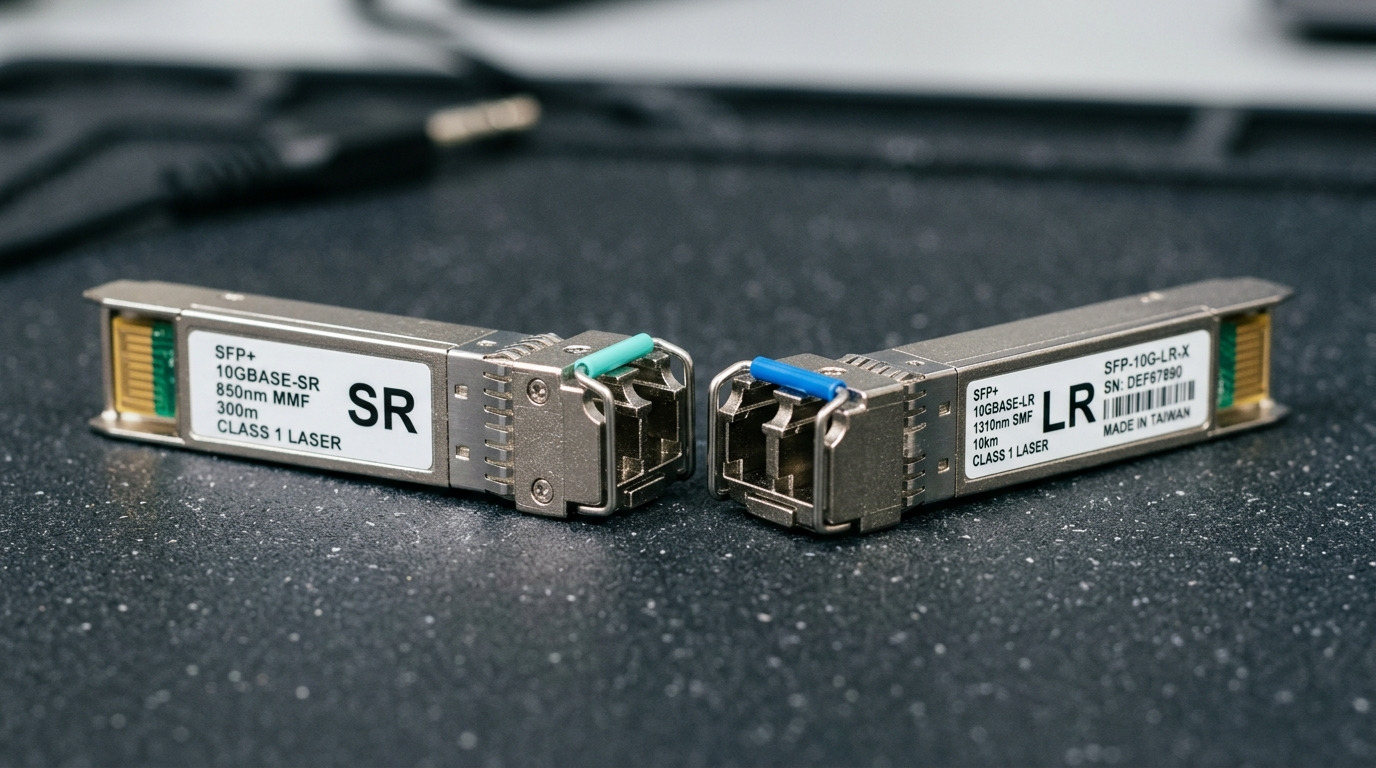
In production telecom environments, failures rarely look “random” once you correlate alarms with physical layer changes. Common signals include LOS (loss of signal) on coherent or pluggable optics, LR / SD error counters increasing on Ethernet interfaces, and optical transceiver diagnostics showing drifting receive power. I have seen a typical pattern in metro aggregation: a link that passes overnight tests begins flapping during morning temperature swings, then clears after a short reseat—usually pointing to connector contamination or marginal optical budget rather than a full fiber cut.
Start by mapping symptoms to the OSI layer. If the interface reports carrier loss or LOS, focus on light path continuity, transceiver compatibility, and optical power margin. If the link stays up but error counters climb, focus on receive signal quality: end-to-end dispersion, patch cord quality, and whether the optics are within their specified operating temperature and lane rates. For telecom providers, keep one principle in mind: diagnostics tell you what is happening, but only measurements confirm why.
Key measurements for fiber troubleshooting: power, cleanliness, and budget
Fiber troubleshooting works best when you treat it like an electrical test: define the expected ranges, measure, then decide. For pluggable optics, verify both ends support the same standard and that the receive power is inside the vendor’s recommended range. For example, 10G SR modules such as Cisco SFP-10G-SR or Finisar FTLX8571D3BCL are typically specified for 850 nm multimode operation over short distances, and their optical budget assumes controlled cabling and connector loss.
Beyond raw power, cleanliness often dominates outcomes. A single fingerprint on an APC or UPC connector can add enough loss to trigger LOS, especially when the link margin is tight. Use an end-face inspection scope and document the findings: scratches, haze, debris, and fiber “spread” are all visible indicators. Then re-measure optical receive power and confirm that the error counters stabilize at a low steady state.
| Parameter | 10G SR (850 nm MMF) | 10G LR (1310 nm SMF) | What it impacts in fiber troubleshooting |
|---|---|---|---|
| Wavelength | 850 nm | 1310 nm | Determines dispersion behavior and which test gear/filters apply |
| Typical reach | ~300 m (OM3/OM4 typical) | ~10 km (SMF typical) | Distance affects loss budget and allowable connector/patch loss |
| Fiber type | MMF (OM3/OM4) | SMF (OS2) | Wrong fiber type is a fast failure mode for link bring-up |
| Connector commonality | LC duplex (often) | LC/SC depending on plant | Mis-matched connector geometry causes poor mating and extra loss |
| Power diagnostic relevance | RX power in-range; check drift | RX power in-range; check aging | Low RX power or drift suggests budget loss or contamination |
| Operating temperature range | Typically industrial/transceiver spec dependent | Typically industrial/transceiver spec dependent | Temperature swings can worsen alignment or trigger threshold behavior |
| Primary failure symptoms | LOS, link flap, high error rate | LOS, intermittent errors, sudden dropouts | Helps narrow root cause before you touch the fiber |
For authority on Ethernet physical layer behavior, align your expectations with IEEE 802.3 optical PHY requirements and vendor transceiver datasheets. For practical testing workflows, consult vendor guidance on optical diagnostic parameters and safe cleaning procedures. If you need standards grounding for the Ethernet layer, see [Source: IEEE 802.3] and for module behavior and diagnostics, use the specific vendor’s datasheets such as Cisco SFP-10G-SR documentation and Finisar transceiver guides.
External references you can use during audits: IEEE 802.3 overview and Cisco transceiver documentation portal.
Cleanliness workflow that actually resolves telecom outages
In field work, “clean it and reseat it” can sound too simple, but a disciplined cleanliness workflow prevents repeat outages. Follow a consistent order: inspect first, clean second, verify third. If you clean without inspection, you may grind debris deeper into the ferrule or damage the end face.
Step-by-step: scope, clean, then confirm with measurements
- Inspect the transmit and receive connector end faces using a fiber inspection scope at the correct magnification for your connector type (LC, SC, MPO). Look for contamination, scratches, and cleave quality.
- Clean using approved wipes, gel cleaners, or cleaning cartridges that match your connector geometry and ferrule type. Avoid improvised alcohol swabs that leave residue.
- Re-seat connectors with consistent insertion force, then inspect again to confirm the end face is truly clean.
- Measure RX optical power and interface error counters. A successful cleanup usually produces a stable RX power increase and a drop in CRC or symbol errors.
Pro Tip: In many metro deployments, the fastest signal recovery happens after cleaning only one side of a duplex link, not both. If your inspection shows heavy debris on the transmit-side connector end face, the receiver often “looks bad” because it never gets enough photons—so focus cleaning where the end face is worst, then validate with RX power and error counters.
Compatibility checks: preventing “it should work” failures
Telecom providers often standardize on transceiver families, but exceptions happen during upgrades, vendor swaps, or temporary spares. A common fiber troubleshooting trap is assuming that “same speed” means “same optics behavior.” In reality, you must confirm lane mapping, diagnostic support (DOM), and optical standard compatibility, especially when mixing OEM and third-party modules.
Start with the switch or router port capabilities and the transceiver identification. Many enterprise and telecom platforms enforce strict compatibility rules: vendor-specific EEPROM fields, DOM thresholds, and sometimes even optical safety class requirements. If you must use third-party optics, select models explicitly validated for your platform and operating temperature class, and verify that the DOM data format is supported by your monitoring system.
Decision checklist engineers use on call
- Distance and fiber type: confirm MMF vs SMF and the expected reach for your optical standard.
- Optical budget margin: include connector loss, patch cord loss, and splice loss; verify RX power stays within vendor thresholds.
- Switch compatibility: confirm the port supports the transceiver type and speed; check for lane mapping and breakout constraints.
- DOM support: ensure monitoring reads temperature, laser bias/current, and optical power without triggering false alarms.
- Operating temperature: compare transceiver spec temperature range to the cabinet’s measured ambient; consider sun load and HVAC cycles.
- Vendor lock-in risk: evaluate TCO for OEM modules versus third-party; plan spares that remain compatible across planned upgrades.
For concrete examples, 10G SR optics like FS.com SFP-10GSR-85 and Cisco SFP-10G-SR typically target 850 nm multimode and assume OM3/OM4 cabling. For long-haul, 10G LR optics target 1310 nm single-mode and different budgets. Mixing these standards can lead to LOS, persistent errors, or unstable links even if connectors mate correctly.
Common mistakes and troubleshooting tips for fiber links
Even experienced teams repeat predictable errors under time pressure. The key to faster fiber troubleshooting is recognizing failure modes and applying targeted corrections rather than random reseating.
Failure mode 1: “Cleaned the wrong connector”
Root cause: The connector with debris is on the transmit side, but the team only cleans the receive-side connector because it “looks” accessible. RX power remains low because the receiver never receives enough light.
Solution: Inspect both ends before cleaning. Clean the worst end face first, then re-measure RX power and CRC/bit error counters.
Failure mode 2: Wrong fiber type or patch cord mismatch
Root cause: A multimode patch cord is used in a single-mode plant, or OS2/OM3 labeling is incorrect in a cabinet. The link may partially train or fail intermittently, especially with higher loss and temperature variation.
Solution: Verify fiber type at the patch panel and trace back to the nearest MPO/LC fan-out. Confirm wavelengths expected by the optics: 850 nm for SR vs 1310 nm for LR.
Failure mode 3: Overlooking optical budget drift over time
Root cause: Aging optics and micro-movements in connectors increase loss gradually. The interface stays up until a threshold is crossed, then it flaps or drops.
Solution: Use DOM trend data: track RX power and laser bias/current over weeks. Schedule proactive maintenance when drift reaches a vendor-defined safety margin.
Failure mode 4: Reseating without verification
Root cause: Teams reseat optics or connectors and assume the issue is resolved, without checking RX power or error counters. The link may appear stable while errors quietly increase.
Solution: After any physical change, always verify: optical power in-range, interface error counters stable, and DOM values consistent with normal operation.
Cost and ROI: choosing optics and test approach without surprises
Optics costs vary widely by standard and vendor. In many telecom spares programs, OEM transceivers can cost meaningfully more than third-party equivalents, but OEMs often reduce compatibility risk and simplify warranty handling. A realistic approach is to compare total cost of ownership (TCO): purchase price plus installation labor, expected failure rates, and the time to recover from incompatibility events.
As a practical range, 10G SR modules from OEM vendors may be priced several times higher than third-party options, while still staying within the same general optical class for 850 nm multimode. If you reduce downtime by even a single truck roll per month, the ROI can justify higher-quality optics and better inspection tools. For test gear, investing in a reliable optical power meter and fiber inspection scope is often cheaper than repeated emergency dispatches.
When you plan upgrades, avoid “mixed generations” in critical paths. Maintain a spares matrix that lists transceiver part numbers, supported standards, expected RX power ranges, and DOM behavior for each switch model to minimize downtime during maintenance windows.
FAQ: fiber troubleshooting questions telecom teams ask first
Why does my interface show LOS even after reseating the transceiver?
LOS usually means the receiver is not seeing enough light. Reseating can help if the connector end face is dirty or the mating was poor, but if RX power stays below threshold, you likely have contamination, wrong fiber type, or an optical budget issue.
What numbers should I check on the transceiver diagnostics?
Check receive optical power, transmit laser bias/current trends, module temperature, and any vendor-specific alarm flags. In fiber troubleshooting, the most actionable step is correlating a change in RX power with the exact time you cleaned, reseated, or moved patch cords.
Can third-party optics cause fiber troubleshooting issues?
They can, mainly through compatibility constraints, DOM interpretation differences, or threshold tuning. If you use third-party modules, validate them on the same switch model and confirm DOM monitoring works as expected before rolling them into live links.
How do I confirm whether the problem is in the patch panel versus the field fiber?
Use a structured isolation approach: test with a known-good patch cord, then re-test at each segment boundary. If the link fails only after you connect the suspect segment, the issue is likely in that segment’s loss or end-face cleanliness.
What is the fastest way to prevent repeat connector-related outages?
Implement an inspection-first policy and standardize your cleaning consumables. Add a short post-clean verification step: inspect end faces again and confirm RX power and error counters return to baseline.
When should I suspect dispersion or signal quality instead of power loss?
Suspect signal quality issues when RX power is within range but error counters remain elevated or increase under temperature/load changes. Then review whether the fiber type, patch cord quality, and link standard match the optics’ intended operating conditions.
Effective fiber troubleshooting for telecom links is a blend of measurement discipline, cleanliness control, and compatibility verification. If you want a broader view of operational best practices across the optical layer, explore optical transceiver diagnostics.
Author bio: I am a UI/UX-minded network specialist who designs operational workflows for field technicians and NOC teams, with a focus on turning alarms into clear next actions. I have deployed fiber test and inspection processes in metro and access networks, optimizing reliability through measurable checks and human-centered troubleshooting interfaces.
