
Edge computing deployments live or die by latency budgets, jitter control, and operational uptime. This article helps network and reliability engineers select optical transceivers—SFP, SFP+, QSFP, and QSFP-DD—so low-latency traffic from sites like factories, retail, and telco edge can move reliably. You will also get a practical selection checklist, troubleshooting patterns, and a cost-aware decision approach.
Top 7 optical-module choices that work for edge computing
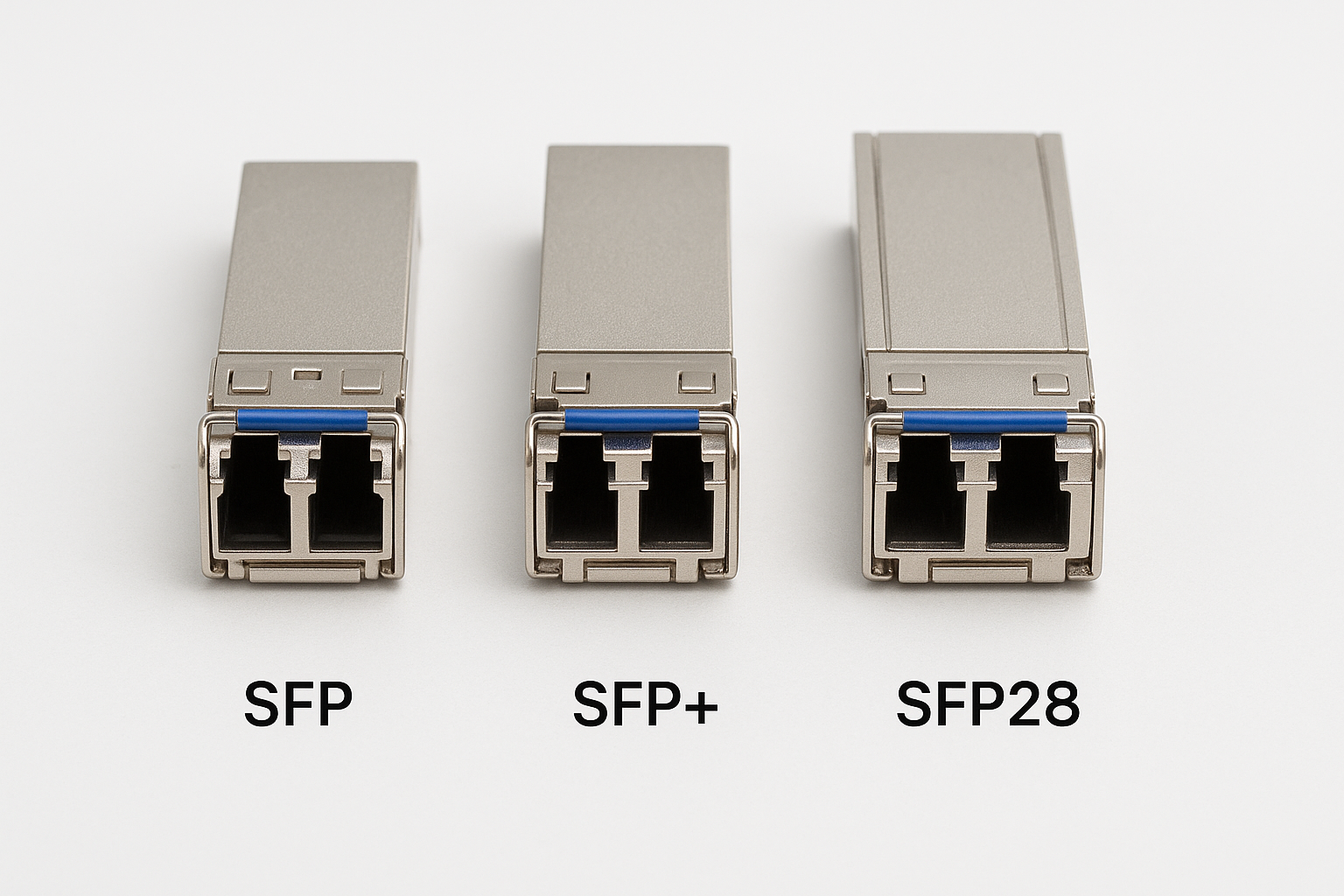
In edge computing, the “right” module is rarely only about reach. Engineers typically optimize for link stability, deterministic behavior under load, and fast troubleshooting in the field. Below are seven top choices, each mapped to common low-latency use cases and real deployment constraints.
10G SFP+ SR for metro edge and short-reach aggregation
For many edge computing sites, the first bottleneck is the short-reach hop between a server rack and an aggregation switch. 10G SFP+ SR is a common fit because it supports cost-effective multimode fiber runs while keeping optics and cabling straightforward. In practice, teams often use it for leaf-to-spine-lite designs or for connecting edge compute nodes to a nearby PoP.
Key specs to look for
- Data rate: 10.3125 Gb/s (10G class)
- Typical wavelength: 850 nm (multimode)
- Connector: LC duplex
- Reach (rule of thumb): up to ~300 m on OM3; ~400 m on OM4 for many vendor implementations
- Form factor: SFP+
- Operating temperature: often 0 to 70 C (commercial) or -40 to 85 C (extended)
Best-fit scenario
In a regional retail edge buildout, a distribution cabinet hosts a small compute cluster with 24 servers and a 48-port 10G ToR switch. The servers connect to the ToR using 10G SFP+ SR over OM4 LC duplex patch panels. Typical run lengths are 30 to 120 m across cable trays, leaving margin for patching and future re-cabling.
- Pros: strong ecosystem compatibility; low cost per port; easy field replacement
- Cons: limited to multimode distances; bandwidth efficiency depends on oversubscription design
25G SFP28 SR for tighter latency budgets and higher density
As edge computing grows, traffic patterns shift from “bursty updates” to sustained streams such as video analytics and sensor fusion. 25G SFP28 SR helps reduce queueing and improves headroom without immediately moving to 100G. It is also popular when you need more ports per rack but still want manageable cabling and optics costs.
Key specs to look for
- Data rate: 25.78125 Gb/s (25G class)
- Typical wavelength: 850 nm
- Connector: LC duplex
- Form factor: SFP28
- Reach: commonly designed for multimode; exact distance depends on OM type and vendor link budget
- Compatibility: must match switch vendor optics and supported transceiver list
Best-fit scenario
In a smart warehouse edge, an analytics node streams object detection results to a local control system. A leaf-to-top-of-rack switch pair provides 25G uplinks, with compute nodes using 25G SFP28 SR to keep latency stable during peak activity. Field engineers target sub-millisecond switching latency and focus on minimizing buffer-induced jitter by keeping utilization below 60 to 70 percent.
- Pros: better scaling than 10G; good balance of cost and density
- Cons: multimode distance limits; strict optics compatibility checks required
40G QSFP+ SR for cost-effective 2-lane aggregation
When you need to aggregate multiple flows but do not require 100G, 40G QSFP+ SR can be a practical bridge. It often maps to two-lane or four-lane internal architectures depending on the transceiver design, and it can reduce the number of physical ports consumed on edge switches.
Key specs to look for
- Data rate: 40G (40.3 Gb/s class)
- Typical wavelength: 850 nm
- Connector: LC duplex (often using MPO/MTP in higher-density variants)
- Form factor: QSFP+
- Reach: multimode dependent; validated by vendor link budgets
Best-fit scenario
A telco edge site with constrained space uses 40G uplinks to connect an edge compute cluster to a nearby aggregation router. Engineers run multimode fiber within the same building, with typical patching distances around 80 to 200 m. The design goal is predictable latency for control-plane signaling and high-throughput telemetry without upgrading every upstream port to 100G.
- Pros: fewer ports; efficient aggregation for mid-tier uplinks
- Cons: can complicate optics compatibility; multimode distance must be validated
100G QSFP28 SR4 for high-throughput edge backhaul
Some edge computing sites are effectively micro data centers, especially where video, LIDAR, or large-scale inference requires aggressive backhaul. 100G QSFP28 SR4 provides high throughput while remaining suitable for short-reach multimode deployments. The SR4 architecture uses four lanes, reducing per-lane speed while keeping a manageable optics footprint.
Key specs to look for
- Data rate: 100G (103.1 Gb/s class)
- Typical wavelength: 850 nm
- Connector: MPO/MTP or LC depending on variant; validate exact interface
- Form factor: QSFP28
- Power: varies by vendor and cooling design; confirm switch thermal capability
Best-fit scenario
In a regional disaster recovery edge facility, a pair of aggregation switches supports two 100G uplinks to a provider network. The cabling is within a controlled rack row and a nearby patch room, with multimode runs around 150 to 250 m. Field testing focuses on verifying link margin after connector cleaning, since dust-related penalties can show up as intermittent errors under load.
- Pros: strong throughput for backhaul; reduces oversubscription pressure
- Cons: higher cost than 10G/25G; MPO handling and cleaning discipline required
100G QSFP28 LR4 for longer edge-to-hub links
When edge computing sites extend beyond a building or campus, multimode may not be enough. 100G QSFP28 LR4 is commonly used for longer reach over single-mode fiber, allowing stable low-latency transport across metro distances. LR4 typically leverages four wavelengths in a WDM-like scheme, which increases complexity but expands reach substantially.
Key specs to look for
- Data rate: 100G
- Wavelength: 1310 nm class (LR4)
- Connector: LC duplex for most implementations
- Reach: often designed for tens of kilometers (validate against link budget)
- Fiber: single-mode (SMF)
Best-fit scenario
In an industrial edge network spanning multiple substations, a compute cabinet at each site connects to a central hub. Engineers use 100G QSFP28 LR4 over SMF with distances around 10 to 25 km. The latency target is driven by application requirements on event processing, so the network is built to avoid unnecessary hops and to keep utilization consistent across the day.
- Pros: large reach; predictable link behavior over SMF
- Cons: higher optics cost; careful budget planning for splitters and aging fiber
10G/25G CWDM and DWDM optics for multi-tenant edge aggregation
Some edge computing environments are shared between tenants or require multiple logical channels over the same fiber. CWDM/DWDM optics can support wavelength multiplexing so you can scale without laying new fiber. This is especially relevant when real estate and right-of-way constraints make new cabling expensive or slow.
Key specs to look for
- Channel spacing: CWDM typically wider than DWDM
- Reach: depends on platform and modulation; validate with vendor link tables
- Connector: often LC, but confirm patching and mux/demux interfaces
- Compatibility: must match transceiver type with the mux/demux plan
Best-fit scenario
A carrier-managed edge PoP hosts multiple customer VLANs and dedicated compute clusters. Instead of building separate fiber routes, engineers deploy wavelength plans so each customer gets an allocated optical channel. The operational goal is to keep low latency paths isolated while using shared physical infrastructure, which is common in dense urban deployments.
- Pros: better fiber utilization; supports scaling in constrained areas
- Cons: higher operational complexity; misalignment in wavelength plans can break service
Third-party optics with DOM validation for operational resilience
Optics procurement can become a bottleneck during edge computing rollouts. Many teams use third-party transceivers but require strict verification: Digital Optical Monitoring (DOM) must report expected values, and the module must pass switch compatibility checks. A resilient approach reduces lead time without sacrificing observability.
Key specs to look for
- DOM support: vendor-specific thresholds for Tx bias, Tx power, Rx power
- Standards: compliance with optics programming interfaces expected by the switch
- Temperature range: confirm extended grade for outdoor or unconditioned cabinets
- Vendor data: link budget and expected sensitivity
Best-fit scenario
During a staged rollout of edge computing in unconditioned retail back rooms, engineers stock spares for 25G SFP28 and 10G SFP+. They select modules that expose consistent DOM readings and that have documented switch compatibility. In field practice, this reduces mean time to repair because technicians can compare DOM trends before swapping optics.
- Pros: faster procurement; improved spare availability
- Cons: compatibility caveats; DOM thresholds must be validated
Pro Tip: In low-latency edge networks, “it links up” is not the same as “it is stable.” During acceptance testing, record DOM Rx power and Tx bias at multiple load points, then repeat after connector cleaning. Teams that do this catch marginal link budgets before they turn into intermittent CRC drops under peak traffic.
Optical module spec comparison for edge computing links
Engineers typically compare reach, wavelength band, connector type, and environmental grade before selecting a transceiver. The table below summarizes common module families used in edge computing low-latency designs. Always confirm the exact part numbers supported by your switch vendor and the optics you plan to deploy.
| Module type | Data rate | Wavelength / band | Fiber | Connector | Typical reach class | Temperature range (typical) |
|---|---|---|---|---|---|---|
| SFP+ SR | 10G | 850 nm | OM3/OM4 multimode | LC duplex | Up to ~300-400 m | 0 to 70 C or -40 to 85 C |
| SFP28 SR | 25G | 850 nm | OM3/OM4 multimode | LC duplex | Multimode validated by vendor | 0 to 70 C or -40 to 85 C |
| QSFP+ SR | 40G | 850 nm | Multimode | LC or MPO/MTP (variant) | Multimode validated by vendor | 0 to 70 C or -40 to 85 C |
| QSFP28 SR4 | 100G | 850 nm | Multimode | MPO/MTP (often) | Multimode validated by vendor | 0 to 70 C or -40 to 85 C |
| QSFP28 LR4 | 100G | 1310 nm class | Single-mode | LC duplex | Tens of km (budget dependent) | -5 to 85 C or similar (confirm) |
For authoritative baseline behavior, engineers often reference IEEE Ethernet physical layer expectations such as IEEE 802.3 for 10G/25G/40G/100G families, plus vendor datasheets for exact link budgets and monitoring behavior. [Source: IEEE 802.3] [[EXT:https://standards.ieee.org/standard/]]
Selection criteria checklist for edge computing low-latency optics
Choosing optics for edge computing is a risk-management exercise, not a spec-sheet exercise. Use the ordered checklist below so field teams can reproduce decisions across sites.
- Distance and fiber type: measure actual patch lengths and confirm OM grade or SMF type.
- Latency and congestion strategy: ensure link speed supports your oversubscription plan; avoid oversubscribing critical paths beyond what the application can tolerate.
- Switch compatibility: verify transceiver support, including DOM handling and lane mapping.
- DOM and monitoring: confirm the switch can read DOM and that thresholds are reasonable for your environment.
- Operating temperature and enclosure: extended-grade optics may be required for outdoor cabinets or poorly cooled edge closets.
- Connector and cleaning plan: MPO/MTP requires disciplined cleaning and inspection to prevent intermittent errors.
- Vendor lock-in risk: assess third-party options, but demand documented compatibility testing and consistent DOM ranges.
- Spare strategy: stock optics by site risk class, not only by speed; plan for rapid swaps and standardized labeling.
Common mistakes and troubleshooting tips in edge computing
Low-latency networks often fail in ways that look “rare” until you observe counters during peak load. Here are concrete failure modes seen in the field, with root causes and practical solutions.
Intermittent CRC or FCS errors after deployment
Root cause: dirty connectors, especially MPO/MTP or LC patch cords, causing Rx power penalties and burst errors. Solution: clean connectors using lint-free wipes and approved cleaning tools, then inspect with a fiber microscope. Re-test while monitoring interface error counters and DOM Rx power.
“Link up” but high latency spikes during traffic bursts
Root cause: bufferbloat or queueing caused by oversubscription, not optics failure. Engineers sometimes misattribute jitter to transceiver instability. Solution: check switch queue behavior, verify QoS policies, and confirm utilization targets. Then correlate optics DOM trends with latency graphs to separate transport issues from congestion.
Module not recognized or flapping after thermal cycling
Root cause: marginal optics grade for the enclosure temperature range or a compatibility quirk between switch firmware and third-party optics. Solution: confirm the transceiver temperature rating (extended grade if needed), update switch firmware within your change-control window, and test with known-good optics for A/B comparison.
Reach failures that appear only on certain ports
Root cause: uneven patch panel loss, incorrect fiber type (OM3 vs OM4), or damaged jumpers. Solution: validate fiber records, measure end-to-end loss
