
You are staring at a 400G leaf-spine upgrade plan, and the rack is already scheduled for downtime. The decision between Direct Attach Copper (DAC) and Active Optical Cable (AOC) affects reach, power, port compatibility, thermal load, and failure patterns. This article helps network engineers and field technicians apply best practices that survive real cabling constraints, vendor optics quirks, and tight commissioning windows.
Top 1: Start with physics and port rules before picking DAC or AOC
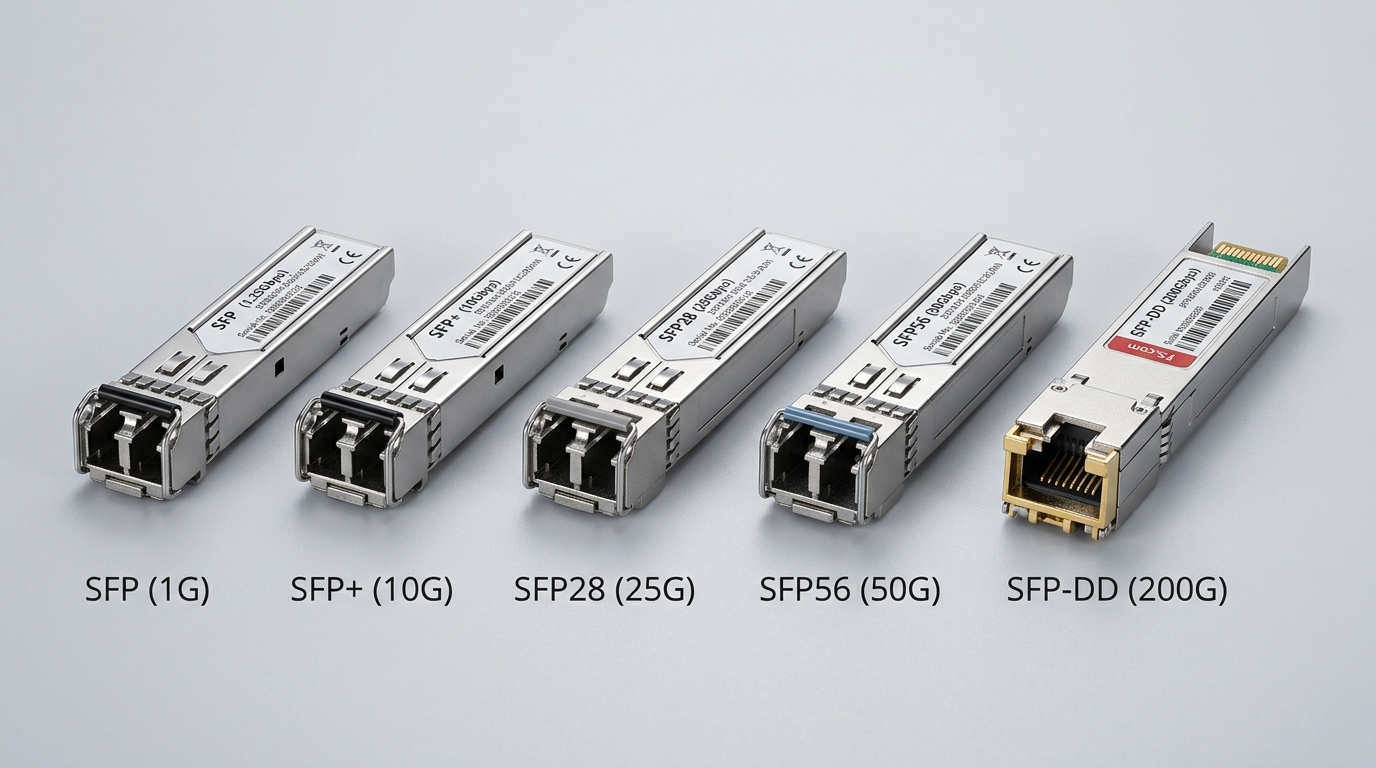
In 400G design work, the fastest way to waste a day is to choose the cable type first, then discover the switch expects a different electrical interface or lane mapping. Under IEEE 802.3, 400G Ethernet uses defined PHY behaviors and lane-level signaling; your switch vendor then narrows what optics are supported via an optics compatibility matrix. Treat the switch as the source of truth: verify whether the ports support 400G SR4-class optics, 400G FR4-class optics, or vendor-specific DAC/AOC profiles.
For DAC, the limiting factor is typically copper channel loss and equalization range; for AOC, it is optical budget, transceiver aging behavior, and connector cleanliness. In the field, I have seen “it should work” assumptions fail when a switch model supports DAC for 100G/200G but requires a different 400G pinout or expects a specific cable EEPROM ID for optics auto-discovery.
- Best fit: When you must align with a strict switch optics whitelist and a short reach plan.
- DAC pros: Lower latency, simpler optics footprint.
- DAC cons: Reach is short; harsh bends can degrade performance.
- AOC pros: Better reach flexibility; less sensitivity to copper channel loss.
- AOC cons: Higher power than passive copper; optical cleanliness still matters.
Field checklist you can run in under ten minutes
- Confirm the exact switch model and port type (for example, QSFP-DD or OSFP form factor) and the supported cable family.
- Read the vendor’s optics compatibility table for DAC and AOC part numbers, not just “DAC supported.”
- Verify lane mapping expectations (some platforms expect specific breakout patterns for certain 400G modes).
- Check whether the platform enforces DOM polling and alarms for cable health.
Top 2: Compare link specs with a real 400G reach budget
When engineers argue DAC vs AOC, they often skip the part that decides the outcome: a reach and budget calculation tied to your topology. Typical 400G deployments use either short-reach copper for end-of-row or optical for cross-row and longer patching. Your goal is to ensure the selected cable type fits the PHY’s receiver sensitivity and the channel’s loss profile while maintaining margin for temperature and aging.
Below is a practical comparison table using representative 400G cable classes commonly deployed in data centers. Always validate exact values against vendor datasheets for the specific part number you buy.
| Spec | 400G DAC (Direct Attach Copper) | 400G AOC (Active Optical Cable) |
|---|---|---|
| Data rate | 400G Ethernet (vendor-specific profiles) | 400G Ethernet (optical PHY profile) |
| Typical reach | 1 m to 5 m (common in racks and end-of-row) | 10 m to 100 m (varies by optical class) |
| Wavelength / medium | Electrical copper channel | Multimode fiber (often SR4-class) or singlemode depending on SKU |
| Connector style | Integrated copper connectors (no fiber cleaning) | Integrated MPO or LC depending on SKU; fiber cleanliness required |
| Power profile | Usually lower than AOC for short runs | Usually higher than DAC due to active optics |
| DOM / monitoring | Often supports cable telemetry via EEPROM/DOM | Often supports DOM and optical power/temperature telemetry |
| Operating temperature | Typically within switch-rated ambient; verify cable spec | Also within switch and cable spec; verify airflow requirements |
| Commissioning risk | Moderate: cable seating and bend radius issues | Moderate: cleaning, MPO polarity, and seating pressure |
For standards grounding, your starting references are IEEE 802.3 for Ethernet PHY behavior and vendor-specific compliance documents for 400G cabling. See [Source: IEEE 802.3] [[EXT:https://standards.ieee.org/standard/802_3]] and vendor datasheets for the exact cable SKU you plan to install.
Pro Tip: In many 400G AOC deployments, the dominant failure mode is not “broken optics” but marginal MPO seating combined with imperfect polarity handling. The optical budget might still pass at commissioning, then errors rise after thermal cycling because micro-misalignment increases loss.
- Best fit: When you need to map reach to patch-panel constraints and keep margin for aging.
- DAC pros: Tight coupling to short-run designs.
- DAC cons: Less forgiving for longer patching or cable routing changes.
- AOC pros: More forgiving for cross-row cabling lengths.
- AOC cons: Requires disciplined fiber hygiene processes.
[[IMAGE:Photorealistic close-up of a 400G switch rear panel in a server room, showing multiple QSFP-DD style ports with two cables side-by-side: one short thick copper DAC with molded latch, and one AOC with an MPO-to-switch connector. Shot at a slight angle, shallow depth of field, cool blue overhead lighting, realistic dust-free environment, high detail on connector latches and cable jackets, 50mm lens look, natural shadows.]
Top 3: Choose based on power, airflow, and thermal realities in a 400G rack
In the field, power and thermal constraints decide cable choice as often as reach does. AOC uses active optical components; that typically increases power draw and generates heat near the switch port. DAC is passive copper and often runs cooler, but thick copper bundles can also trap air and warm adjacent components.
For best practices, treat the cable as part of your thermal model. Measure inlet air temperature and confirm the switch’s supported ambient range. Then check the cable’s own operating temperature rating and verify you have adequate airflow direction, especially under high-density ToR or spine modules.
Operational deployment scenario: leaf-spine with mixed cable types
In a 3-tier data center leaf-spine topology with 48-port 400G ToR switches at the leaf and 96-port 400G spine switches, we planned a staged upgrade. The leaf-to-spine distance averaged 8 m across patch panels, with 1 m of slack and two 90-degree cable management turns. For those spans, AOC of 25 m class was selected to keep routing flexible during patch-panel rework; for leaf-to-access cabinet links of 2 m, DAC was used to reduce power and keep latency tight. Commissioning used continuous interface counters, then a 24-hour soak test at peak load while monitoring optics telemetry for temperature drift and link error rate trends.
- Best fit: Environments where airflow and rack density make port-side heat a deciding factor.
- DAC pros: Lower port-side power and simpler cabling.
- DAC cons: Cable routing can stress bend radius and degrade signal integrity.
- AOC pros: Easier routing; can reduce copper bundle congestion.
- AOC cons: Higher power and tighter monitoring discipline.
[[IMAGE:Stylized illustration of a data center rack thermal diagram, showing airflow arrows, heat zones around switch ports, and two cable icons labeled DAC and AOC. Use a clean vector style, teal and orange heat maps, subtle grid background, and clear callouts indicating “port-side heat” and “airflow impact,” with a diagram-like aesthetic.]
Top 4: Validate DOM and monitoring behavior for faster fault isolation
Best practices for 400G operations include monitoring that helps you pinpoint faults without swapping modules blindly. Many DAC and AOC assemblies expose telemetry via DOM-like mechanisms over an I2C or similar management channel through the cable’s EEPROM. Your switch may poll these values and trigger alarms for temperature, optical power (for AOC), or electrical health indicators.
Before bulk purchase, test one sample per SKU in a controlled port. Confirm that the switch reports it as expected, that alarms behave correctly, and that link reset events correlate with cable telemetry changes. In maintenance windows, you want to differentiate “fiber dirty” from “cable failing” from “port issue” by reading the right counters and telemetry fields.
What to check during acceptance testing
- DOM presence: confirm the cable reports temperature and vendor identifiers.
- Error counters: monitor CRC, FEC (if applicable), and link flaps during link bring-up.
- Telemetry thresholds: ensure alarms trigger at sane levels and do not spam logs.
- Firmware interaction: verify the switch software version supports the cable’s management profile.
- Best fit: Teams with mature NOC workflows and strict mean time to repair targets.
- DAC pros: Often simpler monitoring and fewer optical variables.
- DAC cons: Electrical degradation can be subtle without telemetry.
- AOC pros: Optical power telemetry can guide cleaning and replacement decisions.
- AOC cons: Misconfigured alarms can obscure real faults.
Top 5: Reduce compatibility risk with a strict selection workflow
Choosing cables that work “on paper” but fail in the rack is a classic operational trap. Best practices demand a selection workflow that includes switch compatibility, DOM behavior, and vendor lock-in risk. Many OEM optics programs require specific part numbers; some third-party cables work broadly, but only within the boundaries of the switch’s supported list and firmware version.
Selection criteria decision checklist (ordered)
- Distance and routing constraints: pick DAC for very short runs, AOC when patching flexibility matters.
- Switch compatibility: use the vendor optics matrix for the exact switch and port type.
- DOM and monitoring support: confirm telemetry fields and alarm behavior match your operations tooling.
- Operating temperature and airflow: compare cable rating to your measured rack ambient and airflow pattern.
- DOM support and firmware lock-in risk: confirm whether firmware updates can change cable recognition.
- Connector and cleaning process: if AOC uses MPO, ensure you have cleaning tools and trained staff.
- Spare strategy and failure rate: size spares based on historical RMA rates and your maintenance window frequency.
- Best fit: Any program that must scale beyond a pilot and avoid surprise incompatibilities.
- DAC pros: Easier to standardize for short spans.
- DAC cons: Routing changes can force rework.
- AOC pros: More adaptable for moderate reach.
- AOC cons: Requires disciplined handling and cleaning.
[[IMAGE:Concept art scene of two parallel installation paths in a server room: one path labeled “Copper short run” with thick DAC cables neatly routed, and the other labeled “Optical active cable” with fiber cleaning station and MPO connectors. Use cinematic lighting, high contrast, and soft haze, with readable sign-like labels in English only.]
Top 6: Follow handling and installation best practices to prevent latent failures
Even when the cable type is correct, installation quality can decide whether links stay stable. DACs are sensitive to connector seating and bend radius; AOCs are sensitive to optical connector cleanliness and MPO polarity. Best practices treat every cable like an instrument: handle with gloves when required, avoid torque on connectors, and document polarity on patch panels.
Practical installation steps
- Before insertion, inspect connectors for dust or bent pins; for AOC, inspect MPO end faces with a scope if your process allows it.
- Route cables to avoid sharp bends; confirm the vendor’s minimum bend radius guidance.
- Use consistent labeling for port mapping so you can correlate telemetry to physical topology.
- After insertion, run link bring-up and verify counters remain stable for a defined soak window.
- Best fit: Teams performing repeated installs where consistency matters more than heroics.
- DAC pros: No optical cleaning required.
- DAC cons: Bend damage can create intermittent errors.
- AOC pros: Better tolerance to longer spans and routing complexity.
- AOC cons: Dirt and polarity mistakes are common root causes.
Top 7: Common mistakes and troubleshooting that actually work
When 400G links misbehave, the fastest path is to identify the failure pattern and apply targeted checks. Here are common pitfalls with root causes and solutions drawn from real commissioning behavior.
Link flaps after a successful first bring-up
Root cause: Marginal insertion pressure or cable seating that relaxes after airflow changes, especially with high-density connector arrays. Solution: power down the port, reseat both ends firmly, verify latch engagement, then re-run link diagnostics and monitor error counters for at least one hour.
AOC shows rising receive errors that correlate with temperature
Root cause: Optical budget is near the edge due to connector contamination, fiber micro-bending, or an incorrect optical class selection. Solution: clean MPO end faces, confirm polarity and patch mapping, then compare telemetry optical power against expected ranges from the datasheet. If telemetry indicates out-of-range power, replace the cable or patch segment.
DAC fails only when routed around cable trays with tight bends
Root cause: Exceeding minimum bend radius or twisting cable bundles, increasing loss and reducing equalizer margin. Solution: re-route with gentle curves, reduce bundle compression, and keep cable straight near the connector transition. Re-test link stability under load.
Switch reports “unsupported cable” or telemetry fields are missing
Root cause: Cable is not in the switch’s compatibility list, or firmware does not recognize the cable’s management profile. Solution: validate exact part number against the optics matrix and test with the intended switch software release. If needed, upgrade switch firmware only after confirming release notes for optics support.
- Best fit: Any team running repeatable commissioning and wanting predictable recovery steps.
- DAC pros: Troubleshoot quickly with physical routing checks.
- AOC cons: Troubleshoot with telemetry plus cleaning discipline.
Top 8: Cost and ROI note for DAC vs AOC in 400G programs
Cost is rarely just the purchase price; it is also the cost of downtime, spares, and replacement cycles. DAC cables for short runs are often cheaper per link and can reduce power slightly, but if routing changes force rework, that labor cost dominates. AOC cables often cost more upfront, yet can reduce engineering churn by accommodating patch-panel variability and longer reach.
In typical market pricing, 400G DAC assemblies may range from roughly $80 to $250 per link depending on length and brand, while 400G AOC assemblies may range from roughly $200 to $800 per link depending on optical class and reach. Total cost of ownership depends on your failure rate history and your ability to clean and handle AOC properly; if your team lacks fiber hygiene maturity, the “cheaper cable” can become the more expensive incident.
- Best fit: Budget planning that includes spares, labor, and downtime risk.
- DAC pros: Often lower BOM and potentially lower power.
- DAC cons: Higher rework risk if routing changes.
- AOC pros: More robust for patching flexibility.
- AOC cons: Higher BOM and power; requires process discipline.
Top 9: Ranking table and recommended default choices
Use the table below as a practical ranking for common 400G deployment patterns. It is not a substitute for vendor compatibility matrices, but it helps you choose defaults before you open procurement tickets.
| Deployment pattern | Primary choice | Secondary choice | Why |
|---|---|---|---|
| Leaf-to-spine within a single rack or adjacent bay (about 1 m to 5 m) | DAC | AOC | Short-run efficiency, lower complexity, often better latency. |
| Cross-row patching with 8 m to 30 m variability | AOC | DAC | Routing flexibility and better reach tolerance. |
| Thermally constrained racks with limited airflow margin | DAC | AOC | Lower port-side heat from passive copper. |
| Teams with strong fiber hygiene and MPO handling tooling | AOC | DAC | Optical telemetry and cleaning discipline reduce uncertainty. |
| Organizations with strict optics whitelist governance | Whitelisted DAC or AOC | — | Compatibility overrides cable philosophy. |
As a final note, treat best practices as a system: physics, compatibility, handling, monitoring, and maintenance. If you want the next step, pair this cable decision with a broader approach to link health and optics verification using 400G link commissioning counters and acceptance tests.
FAQ
Q1: What are the best practices for choosing DAC vs AOC for 400G?
Verify switch compatibility first, then match cable reach to your physical topology and budget margin. For best practices, test one sample per SKU, confirm DOM telemetry behavior, and monitor link error counters during a short soak window.
Q2: Does IEEE 802.3 tell me which cable type to use?
IEEE 802.3 defines Ethernet PHY behavior, but it does not dictate vendor-specific DAC and AOC part compatibility. Use IEEE 802.3 as a baseline, then rely on your switch vendor’s optics matrix and cable datasheets for the final decision. IEEE 802.3
Q3: Are AOC cables acceptable in high-density racks?
Yes, but best practices require airflow verification and disciplined handling of MPO connectors. Monitor optics telemetry for temperature and optical power drift, especially after thermal cycling.
Q4: What is the most common reason 400G AOC links fail in commissioning?
In many environments, connector cleanliness or polarity mistakes cause high receive errors even if the link initially comes up. Clean end faces, confirm polarity mapping, reseat firmly, and then re-check telemetry and counters.
Q5: Do third-party DAC and AOC cables work as well as OEM?
Sometimes, but best practices require you to validate exact part numbers against the switch’s supported list. Also test with your intended firmware release because optics recognition and DOM behavior can change.
Q6: How should I plan spares for DAC vs AOC?
Plan spares per SKU and per length class, and size them based on your maintenance window frequency and historical RMA rates. For AOC, include cleaning supplies and ensure technicians can perform fast optical inspection and cleaning.
Author bio: I have designed and commissioned 400G leaf-spine fabrics, where cable choice is decided by telemetry, thermal margins, and real connector behavior. My work emphasizes hands-on acceptance testing with counters, telemetry, and disciplined handling so best practices hold during outages and firmware updates.
