
When an 800G link drops, engineers often chase firmware and optics first, but the fastest wins come from a disciplined isolation workflow across optics, cabling, switch configuration, and transport timing. This reference is written for data center operations teams running 800G Ethernet over coherent or PAM4 optics, where outages show up as flaps, CRC bursts, or loss of signal. Use it during the first 30 minutes of an incident to reduce mean time to repair while staying aligned with switch vendor requirements.
Start with the incident timeline and what the alarms actually mean
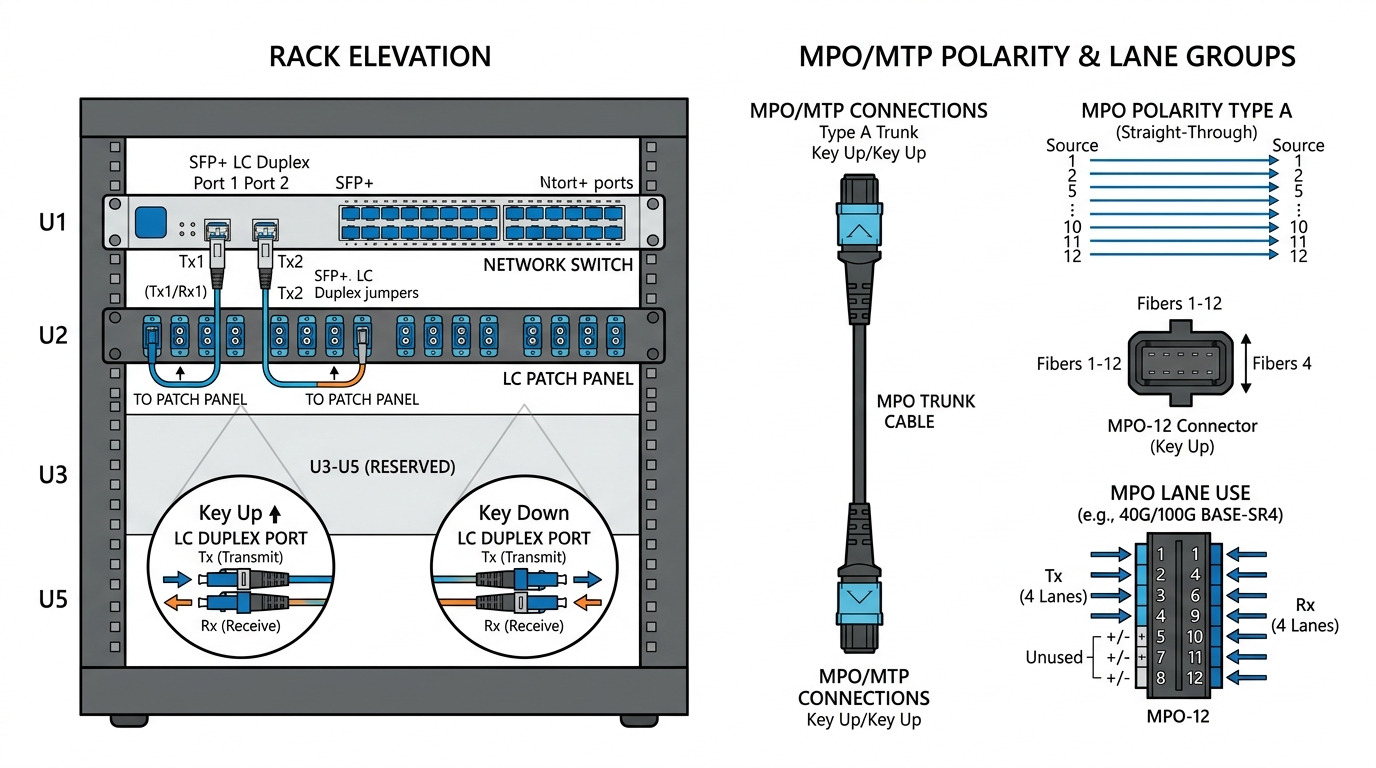
Before touching optics, capture a timeline: link down/up events, error counters rate, and whether the failure is deterministic (always after a reload) or random (temperature or fiber stress). In practice, I start with the switch CLI and export the last 24 hours of interface telemetry: LOS/LOF (optical), BER/CRC counters (data integrity), and FEC status if available. If you see flapping with no CRC growth, suspect power cycling, connector intermittency, or optics power budget drift rather than pure signal quality.
For 800G troubleshooting, also note whether the failure correlates with a specific action: patch panel rework, moving a cable bundle, airflow changes, or a top-of-rack (ToR) reload. A common pattern is a correct-looking link that fails only under load because the system crosses an optical power threshold or because one lane group has higher loss. That distinction determines whether you should focus on optical budget and lane mapping or on switch side configuration and breakout settings.
Field checklist: what to record in the first 10 minutes
- Interface state: administratively up, operationally up, flap count.
- Optics indicators: RX power, TX power, LOS, alarm flags.
- Data integrity: CRC/FCS increments, symbol errors, FEC locked/unlocked.
- Traffic pattern: does it fail at line rate or only during burst traffic?
- Recent changes: patch moves, switch reloads, firmware updates, cable management adjustments.
Optics and transport layer checks that usually fix 800G outages
Most 800G troubleshooting incidents reduce to one of four physical causes: wrong transceiver type, insufficient optical power, connector contamination, or lane mapping/cabling mismatch. Even when link comes up, marginal optical conditions can trigger FEC instability and CRC bursts. Start by validating the transceiver inventory and DOM readings against the vendor’s recommended operating points.
For Ethernet 800G, common physical implementations include QSFP-DD, OSFP, and pluggable coherent variants depending on vendor and reach. Regardless of format, you should verify that the optics are rated for the target wavelength and reach, and that the patch cords and jumpers match the fiber type (OM4/OM5 for short reach, single-mode for longer reach). When a link flaps immediately after insertion, I suspect a power/compatibility mismatch or an optics control-plane issue rather than fiber loss.
Technical specifications comparison: typical 800G optics you might mix up
The table below is a pragmatic comparison of the parameters engineers routinely check during 800G troubleshooting. Exact reach and power vary by vendor and part number, so always confirm against the specific datasheet for the exact SKU in your chassis.
| Parameter | 800G SR8 (multimode, typical) | 800G LR8 (single-mode, typical) | 800G coherent (single-mode, typical) |
|---|---|---|---|
| Primary wavelength | ~850 nm (MMF) | ~1310 nm (SMF) | 1550 nm band (SMF) |
| Connector | LC (duplex) or MPO/MTP variants depending on platform | LC or MPO/MTP depending on SKU | LC/SC depending on coherent module design |
| Reach (order of magnitude) | Up to a few hundred meters over OM4/OM5 | Several kilometers with SMF | 10s to 100s of kilometers with coherent optics and amplification |
| Key risk during failures | Over-loss in MMF, dirty connectors, wrong fiber type | Budget mismatch, bad patch cords, incorrect mode/fiber type | Laser drift, polarization/OSNR issues, dispersion/impairments |
| DOM support | Usually present; verify RX/TX power and alarms | Usually present; verify RX power and FEC status | Usually present; verify OSNR/monitoring if supported |
| Operating temperature | Typically 0 to 70 C for many pluggables | Typically 0 to 70 C | Varies; often wider industrial ranges |
Sources: [Source: IEEE 802.3 Ethernet physical layer families], [Source: vendor transceiver datasheets for QSFP-DD and OSFP 800G optics], [Source: Finisar and Cisco transceiver documentation for DOM and optical monitoring]. For standards context, also see IEEE 802.3 for Ethernet PHY alignment.
Pro Tip: If the link is “up” but traffic shows intermittent drops, do not rely solely on link state. Pull DOM metrics and error counters simultaneously; a lane group can be within spec for average power yet exceed per-lane error thresholds, causing FEC instability and CRC bursts that only appear under sustained load.
Selection criteria for fast replacement: avoid compounding the outage
During 800G troubleshooting, the fastest path is often a like-for-like swap, but engineers can accidentally make the situation worse by mixing module types or unsupported optics. Use this decision checklist before inserting a replacement transceiver into a live chassis.
- Distance vs optics reach rating: confirm the path loss budget for the exact fiber type and jumper lengths.
- Wavelength and fiber type match: MMF vs SMF is a frequent root cause; verify OM4/OM5 vs OS2.
- Connector and MPO polarity/lane mapping: ensure the patch cords match the expected polarity scheme and lane order.
- Switch compatibility: confirm the module is supported for the specific switch model and port type (no “works in lab” assumptions).
- DOM support and alarm behavior: verify that DOM fields map correctly and alarms clear as expected.
- Operating temperature and airflow: check that the optics are not in a hot spot after a fan or baffle change.
- Vendor lock-in risk: if the platform restricts optics via vendor tables, plan spares from the approved list.
Practical “like-for-like” swap rules
- Replace optics with the same part number, not just the same form factor.
- Move one thing at a time: swap module A, observe counters; then revert if the problem shifts.
- Inspect and clean every connector pair using a microscope and approved cleaning method before inserting.
Common mistakes and troubleshooting tips that cut failure time
Below are concrete failure modes I have seen repeatedly in data center operations. Each includes the root cause and what to do next during 800G troubleshooting.
Pitfall 1: Cleaning skipped because “the link came up”
Root cause: Connector contamination can still pass initial power enough to light the link, but it increases error rates during higher optical stress or thermal cycling. You may see CRC/FCS growth without LOS.
Solution: Use a fiber inspection scope on both ends, clean with the correct solvent-free method or approved cleaning wipes, then re-check DOM RX power and error counters under load.
Pitfall 2: Wrong fiber type or patch cord selection
Root cause: A multimode-rated optic inserted into a single-mode path (or vice versa) can produce weak or unstable signals. In mixed cabinets, it often happens after maintenance when patch cords are re-labeled incorrectly.
Solution: Verify OM4/OM5 vs OS2 on the patch panel labels and trace back to the cable plant. Confirm with a test kit if labels are suspect, then re-terminate or re-route to the correct fiber.
Pitfall 3: Lane mapping/polarity mismatch on MPO/MTP links
Root cause: For lane-based 800G optics, incorrect polarity or lane order can cause partial reception. The link may train, yet you get periodic drops or high error bursts when traffic patterns stress specific lanes.
Solution: Confirm the polarity method used in your plant (for example, MPO polarity conventions) and validate with a known-good patch configuration. If your system supports a polarity swap, apply it systematically rather than “trying cables.”
Pitfall 4: Thermal or airflow changes after a hardware swap
Root cause: A fan tray change, blocked baffle, or higher ambient temperature can push optics beyond safe operating conditions. Symptoms include gradual BER degradation, then sudden link loss.
Solution: Measure inlet and outlet temps at the rack, verify fan speed profiles, and check optics temperature DOM fields if exposed. Restore airflow pathing and retest.
Pitfall 5: Firmware or port profile mismatch
Root cause: Some platforms require specific port modes, breakout profiles, or FEC settings aligned with the optics type. A reload can revert profiles and break compatibility.
Solution: Compare the running config of the affected port to a known-good neighbor, and ensure the port profile matches the optics reach and FEC expectation.
Cost and ROI: what to budget for 800G spares and reduced downtime
800G troubleshooting costs come from two places: spares inventory and downtime. In many facilities, a single prolonged outage can cost more than the entire year of optics spares because it impacts replication, backup windows, and application SLAs. For budgeting, third-party optics can be cheaper upfront, but you must account for higher failure rates, possible compatibility restrictions, and longer validation cycles.
Typical street pricing varies widely by vendor and reach. As a rough planning range, OEM 800G optics often cost several hundred to a few thousand currency units per module, while third-party equivalents may be meaningfully lower but require rigorous compatibility testing. TCO should include: labor hours for validation, cleaning/inspection supplies, and the probability of repeat incidents due to connector contamination or marginal optics performance.
Operationally, I recommend stocking at least: one spare per critical reach type, one spare per transceiver vendor family if your platform enforces allowlists, and a cleaning kit plus inspection scope as “always-on” assets. That approach tends to reduce mean time to repair more than chasing cheaper optics alone.
FAQ: 800G troubleshooting questions from data center operators
How do I tell whether the problem is optics or the fiber path?
Check DOM RX power and optical alarms first, then compare error counters under a controlled traffic load. If swapping the module with a known-good unit moves the symptoms with the optics, suspect the module; if symptoms remain, suspect fiber loss, polarity, or connector contamination.
Why does a link sometimes come up but still drop traffic?
“Link up” does not guarantee stable per-lane signal quality. If you see CRC/FEC instability or intermittent bursts, focus on optical budget margins, per-lane errors, and polarity correctness rather than only LOS indicators.
What is the fastest connector check during 800G troubleshooting?
Use an inspection scope at both ends of the connection, then clean before re-insertion. Do not skip cleaning if you suspect intermittent errors; contamination can be invisible at a casual glance and still degrade performance.
Can third-party 800G optics reduce downtime and cost?
They can reduce cost, but only if they are validated for your exact switch model and port profile and pass your acceptance tests. If your platform uses strict compatibility tables, third-party modules may train poorly or trigger alarm behavior that wastes time.
What should I log for post-incident analysis?
Capture DOM snapshots (RX/TX power, temperature, alarm flags), interface error counters over time, and the exact optic part numbers. Include the connector cleaning and inspection results, plus any configuration changes and firmware versions at the time of failure.
When is it worth involving optics vendor support?
If you have a reproducible failure with a known-good fiber path and confirmed polarity, or if alarms indicate internal module faults, escalation saves time. Provide the DOM logs, timestamps, and whether symptoms follow the optics during swaps.
Use this workflow to isolate 800G troubleshooting issues quickly: confirm the timeline, validate optics and DOM metrics, verify fiber type and polarity, and eliminate connector and thermal causes before deeper configuration changes. Next, align your spares and acceptance testing with optical transceiver compatibility checklist to prevent repeat outages.
Author bio: I am a telecom engineer focused on 5G fronthaul/backhaul and data center transport, with hands-on experience troubleshooting DWDM, SDH/packet gateways, and high-speed Ethernet optics in live racks. I write incident-driven guides based on field measurements, vendor DOM behaviors, and operational runbooks.
