
If your enterprise core or aggregation layer is approaching capacity, the transceiver choice can quietly decide whether you hit your upgrade timeline or face costly re-cabling. This guide helps network engineers and field deployment teams compare 50G transceivers against 100G options using real compatibility and optics constraints, including reach, power, connector type, and DOM-based operations. You will leave with a selection checklist, troubleshooting patterns, and a cost-aware approach to port planning.
Why 50G transceivers are showing up in enterprise upgrades
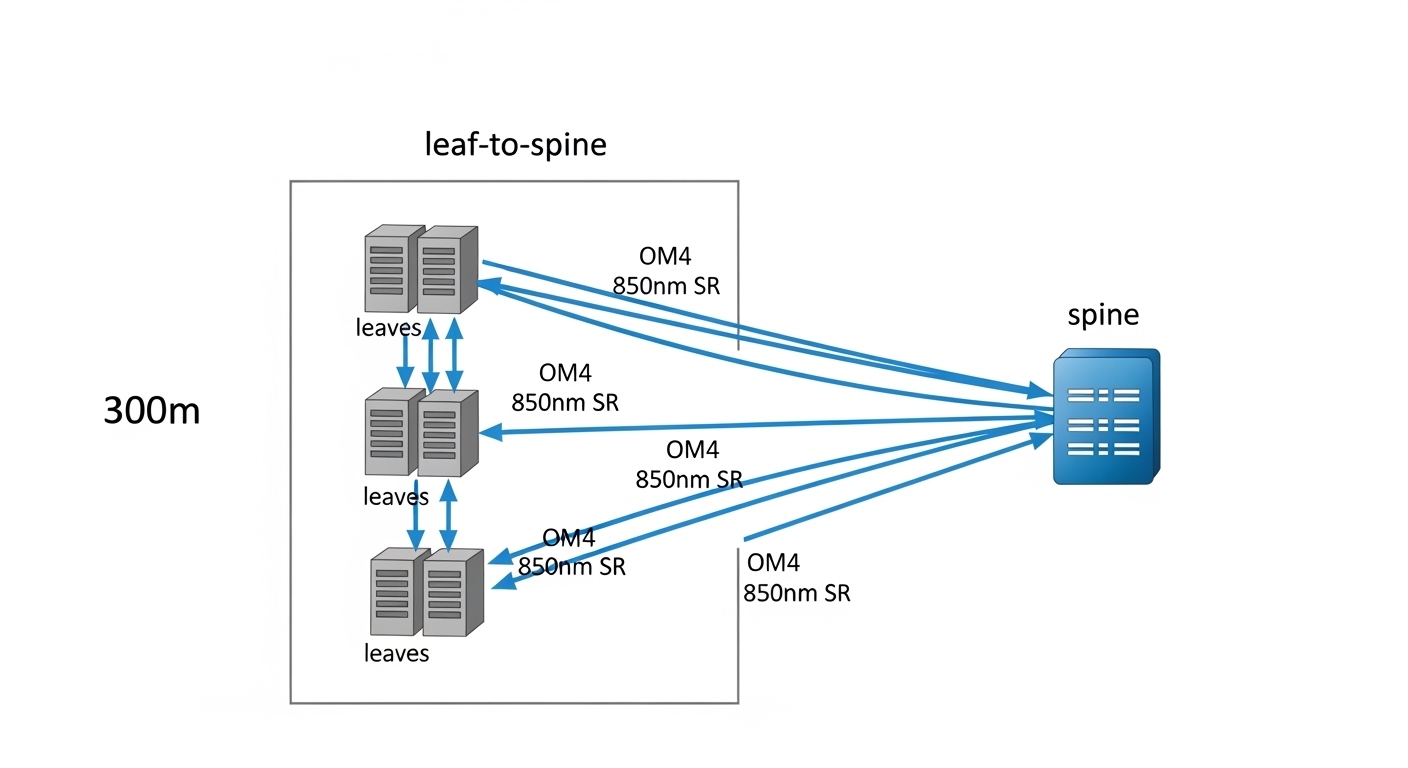
In many leaf-spine and collapsed-core designs, 50G optics sit in a practical middle ground: they improve throughput density compared to 25G, while avoiding some of the port-count pressure of 100G. On the hardware side, the key driver is that modern switches often support breakout or flexible line rates, but not every SKU supports the same optics matrix. In field deployments, I typically see 50G adopted where teams want a measurable step-up from 25G without jumping to full 100G per link everywhere.
From an optics standpoint, 50G transceivers commonly map to QSFP56 form factor and run on IEEE-aligned 50G Ethernet PHY profiles (vendor implementations vary). The operational reality is DOM telemetry: most enterprise deployments depend on temperature, supply voltage, and laser bias/tx power readings to catch aging optics early. If your NOC is already wired around DOM alarms, selecting a transceiver that matches your switch vendor’s DOM expectations can reduce “unknown optics” events.
50G vs 100G transceivers: specs that actually change link behavior
The biggest differences between 50G and 100G are reach class, optical power budget requirements, and how many ports you can populate per chassis. Even when both products use the same connector family (LC/UPC is common), their lane rate, modulation, and FEC profile can differ, affecting interoperability.
Below is a practical comparison of common enterprise optics classes you will encounter when planning upgrades. Always verify exact vendor part numbers and compliance with your switch’s optics support list.
| Category | 50G transceivers (typical) | 100G transceivers (typical) |
|---|---|---|
| Form factor | QSFP56 or SFP56 (varies by vendor) | QSFP28 / QSFP56 (varies by vendor) |
| Data rate | 50 Gbps per port | 100 Gbps per port |
| Typical short-reach reach | Often 100 m to 150 m over OM3/OM4 (exact depends on model) | Often 100 m to 150 m over OM3/OM4 (exact depends on model) |
| Wavelength | 850 nm (MMF) for SR-class; varies for LR/ZR-class | 850 nm (MMF) for SR-class; varies for LR/ZR-class |
| Connector | LC/UPC (typical for MMF SR) | LC/UPC (typical for MMF SR) |
| Power/heat | Generally lower per port than 100G, but depends on vendor and temperature class | Higher per port than 50G in many deployments |
| DOM support | Common: temperature, supply voltage, tx bias, tx power | Common: temperature, supply voltage, tx bias, tx power |
| Operating temperature | Usually commercial or industrial: confirm 0 to 70 C or extended ranges | Usually commercial or industrial: confirm 0 to 70 C or extended ranges |
| Interoperability risk | Medium: depends on switch optics matrix and FEC profile | Medium to higher: depends on lane mapping and vendor-specific settings |
For enterprise IT networks, the “gotcha” is not the nominal data rate; it is the optical budget and the switch-side receive configuration that must match the transceiver’s PHY and FEC behavior. IEEE 802.3 documents the Ethernet physical-layer intent for various rates, but vendor implementations still require matching optics support. [Source: IEEE 802.3 Working Group]
Deployment math: when 50G beats 100G in real port planning
In a real deployment, the decision often comes down to how many physical ports you can spare and how quickly you need to grow. Suppose you run a 3-tier data center leaf-spine topology with 48-port 10G on top-of-rack switches today, and you plan an incremental uplift over 2 quarters. If your spine has spare QSFP cages and your workload requires additional east-west throughput, converting some uplinks from 25G to 50G transceivers can deliver faster per-rack capacity expansion without forcing a “rip and replace” of all uplink gear.
Here is a concrete example I have seen in the field: leaf switches with 8 uplinks each. If you move from 25G to 50G, you double uplink bandwidth while keeping the number of uplinks constant, and you avoid needing twice the number of 100G ports for the same aggregate throughput. In contrast, if you move every uplink to 100G, you may run into chassis port limits, higher cooling load, or optics cost spikes at the exact time you are also buying additional line cards.
That said, 100G can be superior when you have fewer uplink endpoints, a stable traffic matrix, and you want to reduce the number of routing adjacencies and port-level overhead. The best approach is to model your traffic growth curve and map it to the actual switch port availability constraints, not just theoretical throughput.
Selection criteria checklist for engineers
- Distance and fiber type: confirm OM3 vs OM4, patch length, and worst-case link loss; do not assume “SR-class” equals your installed run. Measure with an OTDR or certified loss testing.
- Switch compatibility matrix: verify exact transceiver part numbers on the switch vendor’s supported optics list; mismatch can cause link flaps or “unsupported module” alarms.
- FEC and PHY profile: ensure the switch can negotiate the same FEC mode and lane mapping for that optics type.
- DOM telemetry behavior: validate that your NMS interprets DOM thresholds correctly; confirm tx power and temperature readouts match expected ranges.
- Operating temperature: match the environment (hot aisle, industrial cabinets, direct airflow). Extended temperature optics cost more but reduce field returns.
- Budget and TCO: include transceiver price, expected failure rates, and the cost of troubleshooting time during rollouts.
- Vendor lock-in risk: decide how much you trust third-party optics in your specific switch model; keep a plan for spares and RMA workflows.
Pro Tip: Before ordering hundreds of optics, validate DOM alarm thresholds on a single switch line card. I have repeatedly seen “perfect optics” still trigger nuisance alerts because the transceiver reports tx power in a scale your monitoring stack interprets incorrectly, leading to unnecessary rollbacks and delays.
50G and 100G interoperability: what breaks first
Interoperability failures are usually not random; they correlate with specific configuration mismatches. Common triggers include auto-negotiation differences, unsupported optics speed profiles, and inconsistent admin settings (for example, forcing a speed without confirming the optics profile). Even when the transceiver is electrically compatible, the switch may reject it or treat it as a degraded link if the FEC settings do not align.
When comparing 50G to 100G, also consider power and thermal headroom. In dense deployments, 100G optics can increase local module temperature, and that can push you closer to vendor-defined thermal limits during sustained traffic. If your chassis already runs warm, 50G may reduce thermal stress and improve long-term stability.
Common mistakes and troubleshooting patterns
Field failures often trace back to repeatable mistakes. Below are the ones I would check first during a rollout or a post-change incident.
“Link up, but errors climb” due to fiber quality mismatch
Root cause: Installed fiber run loss or connector contamination is near the optics budget, and higher-rate links (or specific lane profiles) expose marginal conditions. Dust on LC ends can produce intermittent receive power drops.
Solution: Clean LC connectors with lint-free wipes and verified cleaning tools, then run certified link tests (end-to-end loss, polarity verification). If possible, swap to a known-good patch cord and compare DOM rx power and alarm events.
“Unsupported module” or flapping link from optics matrix mismatch
Root cause: The transceiver is not in the exact vendor supported list for that switch model and firmware. Some switches also require a specific transceiver speed profile or FEC mode.
Solution: Confirm the switch software version, then use the vendor optics compatibility list for the exact transceiver SKU. Temporarily test with one known-supported module, capture syslog events, and only then scale the rollout.
DOM telemetry alarms that do not reflect real failure
Root cause: Monitoring interprets DOM thresholds incorrectly (unit mismatch, sensor mapping differences, or stale threshold profiles). This can cause false positives during normal temperature variation.
Solution: Compare raw DOM readings directly from the switch CLI or NMS against vendor datasheet expected ranges. Adjust monitoring thresholds per module type, and document the baseline values after 24 hours of stable traffic.
Thermal overstress in dense cabinets
Root cause: Insufficient airflow or blocked intake raises module temperature, which can reduce optical output margin and increase errors.
Solution: Check cabinet airflow direction, verify fan tray health, and measure temperature at the optics cage area. If you see high sustained module temperatures, consider airflow remediation or selecting a transceiver model with a higher temperature rating.
Cost and ROI: choosing the cheaper optics that stay installed
In most enterprise procurement cycles, 50G transceivers are priced below 100G per port, but the real ROI comes from how many ports you need and how many maintenance hours you will spend during stabilization. Typical street pricing varies widely by vendor, but many teams see third-party 50G optics in the same order-of-magnitude band as other compatible QSFP56 SR modules, while 100G optics often cost more per port and can drive higher cooling and power budgets.
For TCO, include: (1) transceiver unit cost, (2) downtime risk during staged migrations, (3) spares strategy, and (4) labor time for cleaning, validation, and firmware alignment. I generally recommend buying a small pilot batch first, then scaling only after you confirm stable DOM baselines and error-free operation across representative fiber runs.
If you want anchor examples for part selection, you may see models like Cisco-branded or compatible QSFP56 optics and third-party equivalents such as Finisar or FS.com SR modules, but always validate exact compatibility with your switch model and firmware. [Source: vendor datasheets and switch optics support pages]
FAQ
Are 50G transceivers compatible with 100G-capable switches?
Often yes at the hardware level, but not always at the firmware and optics-profile level. The switch must support the transceiver speed and negotiate the correct PHY/FEC settings. Always confirm the exact optics SKU appears in the switch’s supported transceiver list for your firmware version.
Which is better for short-reach enterprise links: 50G or 100G?
For many OM3/OM4 deployments, both can work within similar reach classes, but 50G can be more cost-effective per port and can reduce thermal pressure in dense cages. Choose based on your uplink port availability and the actual installed fiber loss margin, not only the datasheet “max reach.”
Do I need DOM telemetry for 50G transceivers?
Most enterprise operators rely on DOM for proactive monitoring and faster incident response. Even if your NOC does not currently alert on DOM, having reliable telemetry helps during troubleshooting by revealing tx power, temperature, and bias trends.
What should I check first when a new transceiver fails to link?
Start with optics support compatibility (exact SKU), connector cleaning and polarity, and then check switch logs for negotiation or FEC mismatches. After that, compare DOM rx/tx power readings against baseline values from a known-good transceiver.
Should I standardize on one rate (all 50G or all 100G)?
Not necessarily. Many teams standardize by layer: 50G for dense aggregation where port count matters, and 100G for specific high-throughput spine uplinks. The key is to keep an inventory strategy and monitoring baselines per transceiver type to avoid operational surprises.
How do I minimize vendor lock-in risk?
Use a pilot-and-validate approach with third-party optics, document compatibility outcomes per switch model and firmware, and keep a controlled spares plan. If you cannot validate performance and DOM behavior, restrict third-party purchases to a limited set of SKUs.
Choosing between 50G transceivers and 100G is less about “maximum speed” and more about port density, optics compatibility, thermal headroom, and measurable fiber margin. Next, review your upgrade constraints using transceiver compatibility and optics matrix to ensure every transceiver you deploy matches your switch firmware expectations.
Author bio: I am a field-deployment engineer with 10+ years designing and troubleshooting Ethernet optical links in enterprise and data center environments. I focus on optics compatibility, DOM telemetry validation, and real-world rollout stability from lab to rack.
