
Many data centers start with stable 10G links, then hit a growth wall: storage traffic rises, east-west flows multiply, and every new server rack increases oversubscription. This article helps network and IT leaders estimate the cost to upgrade from 10G to 25G with a focus on optics, switch compatibility, and operational risk. It is written for architects and field engineers who need measurable assumptions, not vendor slogans.
Where the 10G to 25G budget really goes
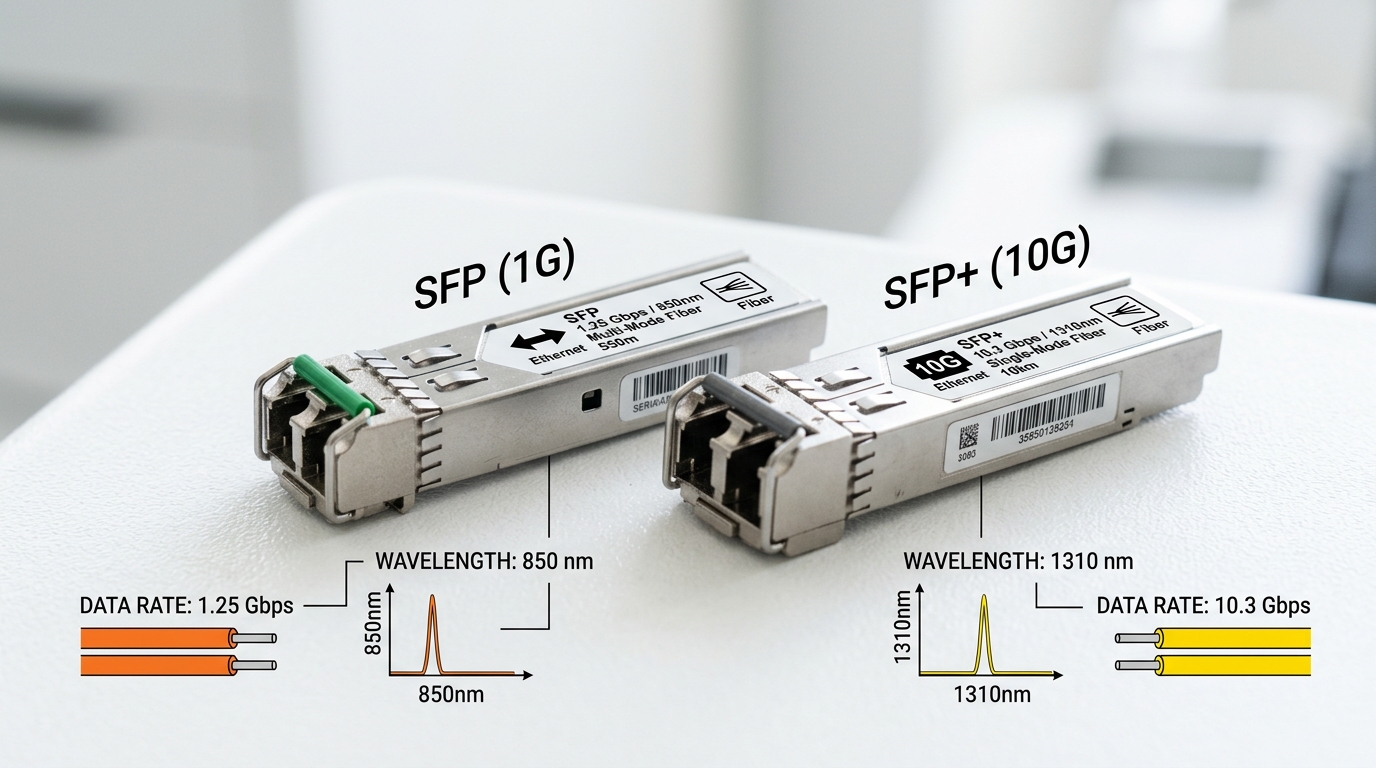
The upgrade cost is usually not only transceivers. In most leaf-spine or collapsed core designs, the dominant line items are: (1) optics for new 25G links, (2) switch port licensing or hardware variants that actually support 25G, (3) patch panel and cabling changes when channel loss budgets are exceeded, and (4) downtime and testing labor. Even when you can reuse the same fiber (single-mode or OM4/OM5), you often must re-validate link margins against IEEE lane and vendor-recommended reach.
From an enterprise architecture lens, you also need governance: define which optics are approved, how DOM telemetry is monitored, and what the rollback plan is. In a typical 3-tier environment, a “small” expansion (for example, adding 24 ToR ports per rack) becomes a multi-quarter program because you coordinate switch inventory, spares, patching windows, and monitoring baselines.
25G optics options when your current baseline is 10G
At 10G, many teams run SFP+ (10GBASE-SR) on OM3/OM4 multimode or SFP+ LR on single-mode. Moving to 25G commonly shifts to SFP28 (25GBASE-SR) for multimode and to SFP28 LR for single-mode. The key economic impact is whether your existing fiber plant supports the new reach targets without re-cabling.
For multimode, the practical question is whether OM4 or OM5 can meet the link budget for 25GBASE-SR across your installed channel lengths and patching pattern. For single-mode, you often keep the same fiber but switch optics types (wavelength and module family), which changes unit cost but avoids re-termination.
| Parameter | 10GBASE-SR (SFP+) | 25GBASE-SR (SFP28) | 25GBASE-LR (SFP28) |
|---|---|---|---|
| Standard | IEEE 802.3ae / 10GBASE-SR | IEEE 802.3by / 25GBASE-SR | IEEE 802.3by / 25GBASE-LR |
| Typical wavelength | ~850 nm (850 nm class) | ~850 nm (850 nm class) | ~1310 nm |
| Connector | LC duplex | LC duplex | LC duplex |
| Reach (typical) | ~300 m on OM3/OM4 (varies by vendor) | ~100 m on OM4 (typical installed limit) | ~10 km on single-mode (typical) |
| Module form factor | SFP+ | SFP28 | SFP28 |
| Operating temperature | Commercial or Industrial variants (commonly 0 to 70 C) | Commercial or Industrial variants | Commercial or Industrial variants |
| Telemetry | Commonly supports Digital Optical Monitoring (DOM) | Commonly supports DOM | Commonly supports DOM |
In the field, module compatibility is the first “hidden tax.” A switch that supports 25G on paper may require specific transceiver EEPROM profiles or firmware settings to enable DOM, alarm thresholds, or vendor-specific optics validation. When you plan procurement, treat optics as part of the enterprise architecture, not as interchangeable hardware.
Cost model: a practical TCO approach for the upgrade
To estimate ROI, build a link-level and port-level model. Start with port counts, oversubscription assumptions, and traffic growth projections. Then attach costs: optics unit price, expected failure rate over your replacement cycle, labor for install and testing, and power draw differences.
Example assumption set for a leaf-spine cluster: you upgrade 200 server-facing ports from 10G to 25G (200 links). Multimode is preferred where channel loss allows, using 25GBASE-SR optics. For budgeting, teams often see OEM 25G SFP28 SR modules in the approximate range of $60 to $150 per module, while third-party options vary widely (commonly $30 to $90) depending on vendor validation, DOM behavior, and compliance.
Power is commonly underestimated. Typical transceiver power for 25G optics is often in the ~1 to 2.5 W class, while 10G SFP+ modules may be lower. Even if the delta is only 1 W per link, 200 links can add 200 W at steady state; over a year that is roughly 1.75 MWh before considering your data center PUE. That is not the biggest cost, but it matters for long-lived deployments and for procurement decisions across multiple clusters.
Selection criteria checklist for engineers and IT directors
Use this ordered checklist to reduce surprises during procurement and change windows:
- Distance and channel loss: confirm installed fiber type (OM3, OM4, OM5, single-mode) and measure/estimate end-to-end loss including patch cords and splices.
- Switch compatibility: verify the exact switch model and software release support for 25G on the relevant ports; confirm whether it accepts SFP28 optics without port-profile changes.
- Optics family and wavelength: map your topology to 25GBASE-SR (850 nm) vs 25GBASE-LR (1310 nm) based on reach and cost of single-mode vs multimode optics.
- DOM support and monitoring governance: ensure DOM is enabled and that your NMS can alert on thresholds consistently across module vendors.
- Operating temperature and reliability class: choose commercial vs industrial-rated modules aligned to rack inlet temps and airflow patterns.
- Vendor lock-in risk: evaluate third-party optics acceptance and your fallback plan if a module batch shows abnormal DOM readings or link flaps.
- Spare strategy: stock at least a minimal pool of known-good modules for each optics type to shorten MTTR during incidents.
Pro Tip: In many environments, the biggest “upgrade blocker” is not the transceiver reach spec; it is the patching pattern. A link that meets reach on a spreadsheet can fail after you add extra patch panels, adapters, or a re-terminated run that increases insertion loss beyond the vendor’s recommended channel budget. Validate with real OTDR measurements and your patch layout before you order optics.
Common mistakes and troubleshooting patterns during the upgrade
1) Misreading multimode reach for 25GBASE-SR
Root cause: teams assume OM4 will always support their full installed length, but patch cords, connector cleanliness, and additional adapters increase loss and degrade the effective link budget.
Solution: run a loss audit (including patch cords) and verify with vendor channel requirements; clean connectors and confirm fiber polarity before blaming the optics.
2) Port mode mismatch or unsupported optics profile
Root cause: switch firmware may require a specific breakout mode, lane assignment, or transceiver profile; some platforms silently downshift or disable DOM, causing link instability.
Solution: confirm software version, apply the documented transceiver compatibility matrix, and test with one known-good module pair before scaling to all ports.
3) DOM alarms and inconsistent telemetry from third-party modules
Root cause: DOM implementation differences can trigger thresholds that your monitoring system treats as critical, leading to unnecessary incident tickets or, worse, automated actions like port resets.
Solution: pilot third-party modules, compare DOM readings against OEM baselines, tune alert thresholds, and standardize on an approved vendor list with documented behavior.
4) Connector contamination after repeated moves
Root cause: frequent rack changes introduce dust and micro-scratches; with higher modulation sensitivity at 25G, marginal cleanliness becomes a hard failure.
Solution: enforce a cleaning workflow (caps on every transceiver, lint-free wipes, validated cleaning tools) and use an optical inspection microscope during rollout.
Budget guidance: OEM vs third-party optics and ROI reality
For a 200-link upgrade, optics are often the majority of direct spend. OEM modules provide predictability in compatibility and telemetry behavior, but third-party modules can reduce unit cost. A realistic budget range for optics-only at $30 to $150 per module means that the optics line could land anywhere from $12,000 (aggressive third-party) to $30,000 (OEM-heavy), excluding labor and any cabling work.
TCO should include spares and failure handling. If your operational data shows that failed transceivers are a top driver of short outages, the ROI shifts toward optics with tighter quality controls and better warranty terms. Also factor that switch vendors sometimes update firmware to improve optics compatibility; a third-party optics choice should be compatible with your planned upgrade cadence.
FAQ
How do I know if my current fiber plant supports 25G after upgrading from 10G?
Start with fiber type (OM3, OM4, OM5, single-mode) and measured loss across your channel, including patch panels and connectors. Then compare your measured channel to the vendor’s 25GBASE-SR or 25GBASE-LR requirements for the exact optics family you plan to deploy. If you cannot measure loss, treat the safest assumption as shorter practical reach and run a limited pilot.
Should I upgrade switches or only optics to move from 10G to 25G?
You typically need switch hardware and software that explicitly supports 25G on the target ports. Some switches only support 25G with specific port profiles or require a different line card. Verify the exact model and firmware release notes before purchasing optics.
Are third-party 25G SFP28 modules safe to deploy at scale?
