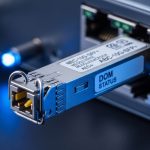
When the optical module shortage hits, network teams feel it first as longer lead times, delayed RMA replacements, and stalled cabling projects. This article helps data center, campus, and industrial network engineers plan for extended lead times for optical transceivers so critical links stay operational. You will get practical procurement and engineering checks, plus troubleshooting patterns that reduce downtime while supply normalizes.
Why extended lead times appear during an optical module shortage
Optical transceivers depend on tightly coupled supply chains: laser/photodiode sourcing, optical subassembly testing, laser safety compliance, and packaging for SFP, SFP28, QSFP+, or QSFP28 form factors. During demand spikes or component constraints, vendors allocate production by bill of materials and test capacity, not by your ticket priority. The result is a gap between ordering and shipment that can stretch from weeks to multiple quarters, especially for legacy speeds or niche reach grades.
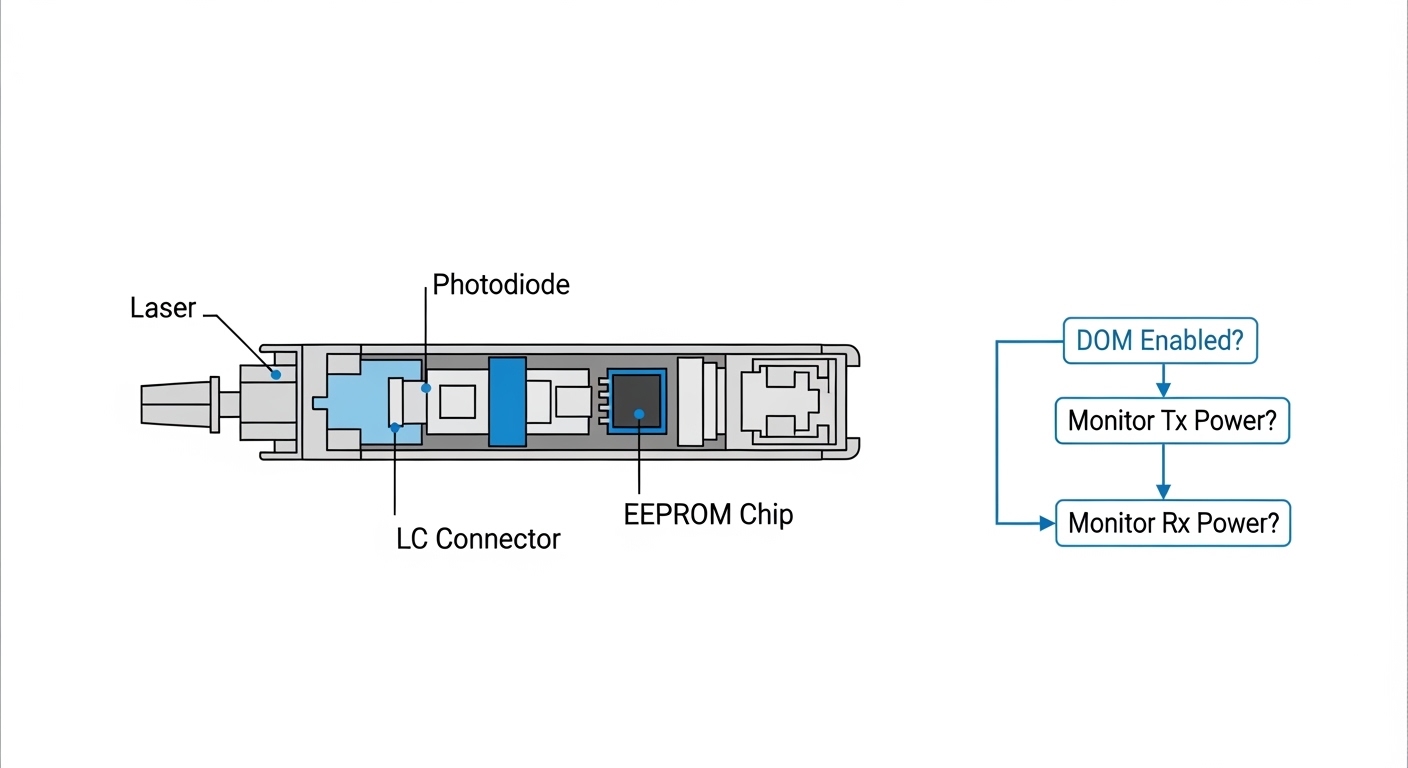
In parallel, compatibility complexity increases risk. A “works on my switch” module can fail later due to DOM (digital optical monitoring) behavior, EEPROM provisioning, or vendor-specific transmit power defaults. IEEE Ethernet PHY requirements still matter, but the practical interoperability layer is often vendor firmware and vendor-qualified optics lists. For planning, treat lead time as a system variable, not only a procurement variable.
For standards context, Ethernet optics are specified across the IEEE 802.3 family, while electrical/optical signaling characteristics and link budgets vary by speed and reach. For example, 10GBASE-SR/SW and 10GBASE-LR/LW are defined in IEEE 802.3ae, and 25G/40G/100G variants appear in later amendments. Use vendor datasheets for exact transmitter launch power, receiver sensitivity, and supported temperature ranges. IEEE Standards
Lead-time planning model: convert uncertainty into actionable buffers
Field teams typically discover too late that “in stock” inventory at the distributor does not reflect real availability at the module level, especially when a switch vendor requires a specific part number. A planning model should separate demand into categories (planned build, planned refresh, and unplanned replacement) and apply different safety factors. Then you can decide whether to dual-source, pre-stage spares, or redesign the optics choice to a more available reach.
Steps to build a lead-time plan that survives an optical module shortage
- Classify demand by risk: For each link, tag it as “must not fail” (core uplinks, storage networks) or “can degrade” (non-critical access). Unplanned replacement should get a higher safety stock multiplier.
- Estimate procurement lead time distribution: Use your last 6 to 12 months of purchase order history by module type and reach. Track both vendor ship date and actual receiving date, because logistics can add 3 to 21 days.
- Model safety stock: A common engineering approach is safety stock = (average daily demand × lead time) + (service-level buffer). For critical spares, many teams use a 95% or 99% target service level.
- Pre-approve alternates: Create an “approved alternate optics” list per switch model and per fiber plant type (OM3, OM4, OS2). This reduces re-qualification delays when the optical module shortage changes availability.
- Align with maintenance windows: If you must swap optics during a shortage, schedule in windows that match change control and rollback capability.
Pro Tip: In outages tied to an optical module shortage, the slowest step is often not “getting the module,” but proving it is safe for your switch. Pre-validate alternates in a lab or staging stack, then record DOM readouts and link negotiation behavior so production swaps do not become ad-hoc experiments.
Where practical, include DOM polling and optical power checks in your acceptance routine. Many platforms expose received power, transmit bias current, and temperature via SNMP or a CLI. Capture baseline thresholds so you can detect marginal optics before a link becomes unstable.
Core compatibility checks: form factor, reach, DOM, and switch behavior
Engineers often assume that “same speed and same fiber type” guarantees interoperability. In reality, optics compatibility hinges on a stack of details: form factor (SFP vs SFP28 vs QSFP+ vs QSFP28), wavelength (850 nm for SR on multimode, 1310/1550 nm for LR/ER), reach grade, and DOM support. Temperature range also matters; a module rated for 0 to 70 C may not be appropriate for high-heat cabinets without airflow verification.
For example, 10G SR optics typically use 850 nm multimode transmission over OM3 or OM4 fiber, while 10G LR optics use 1310 nm single-mode fiber. For 25G and 40G, the reach and lane mapping can differ, even if the connector and nominal wavelength look familiar. Always confirm the exact data rate and lane configuration supported by the switch ports.
DOM behavior is another common failure mode. If a platform expects a specific DOM threshold set or if an optics vendor’s EEPROM fields differ from the switch vendor’s tests, the port may refuse to bring up the link or may negotiate at reduced performance. Vendors publish “compatibility lists,” but those lists can lag behind market availability during an optical module shortage. Treat them as guidance, not a guarantee.
Quick specification comparison you can use in planning
The table below compares representative optics families that teams frequently substitute when lead time becomes unpredictable. Verify the exact part numbers against your switch compatibility matrix and your fiber plant characteristics.
| Module type | Typical wavelength | Target reach (typical) | Connector | Data rate | Operating temp (typical) | Key planning note |
|---|---|---|---|---|---|---|
| 10GBASE-SR SFP+ | 850 nm | ~300 m OM3 / ~400 m OM4 | LC | 10.3125 Gbps | 0 to 70 C | Most common for ToR uplinks; availability varies by reach grade. |
| 10GBASE-LR SFP+ | 1310 nm | ~10 km OS2 | LC | 10.3125 Gbps | 0 to 70 C | Single-mode planning must account for fiber attenuation budget. |
| 25GBASE-SR SFP28 | 850 nm | ~100 m OM4 (varies by spec) | LC | 25.78125 Gbps | -5 to 70 C (common) | Short reach; great for dense racks but sensitive to power and fiber quality. |
| 100GBASE-SR4 QSFP28 | 850 nm | ~100 m OM4 (varies by spec) | LC | 103.125 Gbps | 0 to 70 C | Lane mapping and fanout cables are frequent sources of install errors. |
When you compare options during the optical module shortage, prioritize modules that match your existing optical budget and connector standard, then validate DOM and switch compatibility. If you must change reach grade, recalculate link budget using measured fiber attenuation and connector loss rather than relying on “typical” values.
Procurement strategy: dual-source, pre-stage spares, and design for substitutability
A shortage is a forcing function: you either reduce dependency on a single part number or you accept that some links will wait. Procurement strategies that work in the field usually combine three actions: dual-source, pre-stage spares, and design choices that preserve substitutability. “Dual-source” should mean dual part numbers and dual vendors, not merely multiple distributors for the same OEM module.
In practice, teams pre-stage spares by port criticality. A common pattern is to stock 1 to 2 spares per switch model per critical speed class, then add additional spares for modules that are historically prone to failure (for example, optics installed in high-vibration environments or where patch cords are frequently reworked). For large fleets, some teams calculate spares using historical failure rates, adjusted for exposure.
If you are planning new deployments, consider choosing optics families with higher market depth and broader qualification coverage. For instance, 10G and 25G multimode SR variants often have more supply options than niche long-reach variants, depending on current manufacturing cycles. Still, do not compromise on link budget just to chase availability.
Real-world deployment scenario (how teams apply the plan)
In a 3-tier data center leaf-spine topology with 48-port 10G ToR switches and 12-port 40G spine uplinks, the team faced an optical module shortage when a vendor delayed QSFP+ SR modules for a forklift refresh. They paused 6 racks of patching scheduled for the next maintenance window and instead shifted to pre-approved alternates for 10GBASE-SR SFP+ on the ToR-to-aggregation layer, keeping the spine side on the existing QSFP+ ports. Using measured OM4 link attenuation (averaging 1.8 dB/km and verified end-to-end splice/connector loss), they confirmed the alternate optics would meet sensitivity margins. They also staged 8 spare optics per critical switch model before the window, so any failed ports could be restored within the same day.

Cost and ROI: how to budget during an optical module shortage
During shortages, module pricing can spike and lead times can force expedited shipping. Budgeting should include both purchase price and operational cost: downtime risk, labor time for swaps, and the cost of rework if an alternative optics choice fails qualification. OEM modules can reduce compatibility risk, but third-party modules sometimes provide workable performance at lower unit cost if they match DOM behavior and are included in your approved list.
Typical street pricing ranges vary by region, speed, and reach grade, but teams often see meaningful differences between OEM and third-party optics. As a planning heuristic, treat third-party optics as a lower unit cost option with higher validation effort, while OEM optics are higher unit cost with lower integration risk. Total cost of ownership (TCO) should include spares holding cost and the cost of storage for parts that may become obsolete after an architecture refresh.
From an ROI perspective, the biggest savings often come from avoiding prolonged downtime and avoiding repeated maintenance windows. If a shortage threatens a critical link, the cost of a failure event can exceed the price delta between vendors. For risk-managed planning, many organizations reserve expedited procurement for the smallest set of modules that protect the highest-impact paths.
Common pitfalls and troubleshooting during an optical module shortage
When supply is constrained, teams move faster and may skip checks that normally catch issues in staging. The result is a higher rate of “module present but link down” events, intermittent errors, or links that come up at reduced speed. Below are concrete failure modes seen in the field, with root causes and practical fixes.
Pitfall 1: Buying the right speed but wrong reach grade or fiber type
Root cause: The module matches data rate and wavelength class on paper, but the fiber plant does not meet the reach assumptions (for example, OM3 vs OM4, or OS2 attenuation higher than expected). Connectors and splices can add loss beyond “typical” values.
Solution: Use measured link attenuation from OTDR or certified test results, then compare to vendor receiver sensitivity and transmitter launch power. If you only have estimates, schedule a fiber verification test before swapping optics.
Pitfall 2: DOM or EEPROM incompatibility causing link refusal
Root cause: Some platforms enforce DOM thresholds or specific EEPROM fields. Third-party or alternate OEM modules may present different optical power calibration values, causing the port to disable or negotiate incorrectly.
Solution: Validate alternates in a staging stack with the same switch model and firmware version. Record DOM readings (temperature, bias current, received power) and confirm link up behavior. If the port refuses to bring up, revert to a known-qualified part number and escalate compatibility to the vendor.
Pitfall 3: Lane mapping and polarity errors in high-speed multi-lane optics
Root cause: QSFP28 and similar multi-lane optics depend on correct polarity, correct fanout cabling, and consistent mapping between transmit and receive fibers. A polarity flip can cause one or more lanes to fail while the others appear marginal.
Solution: Follow the vendor polarity diagram and verify using a fiber polarity tester where available. After installation, check error counters and confirm lane-by-lane health if your switch supports it.
Pitfall 4: Thermal mismatch in dense cabinets
Root cause: Modules rated for 0 to 70 C can still fail early if the cage or airflow pattern pushes real module temperature above spec. During a shortage, teams sometimes accept modules from different vendors with different thermal margins.
Solution: Measure cabinet airflow and module temperature via DOM. If temperatures are high, improve airflow, confirm fan module operation, and consider modules with appropriate extended temperature ratings where your switch supports them.
FAQ: optical module shortage planning for engineers and buyers
Q1: How do I estimate lead time risk for a specific switch model?
Start with your purchase order history for that exact form factor and part number, then separate vendor ship date from your receiving date. Apply a service-level buffer for critical links, and pre-approve alternates per switch model and firmware version. If you lack history, request vendor ETAs with a ship window and confirm the logistics timeline.
Q2: Are third-party optics safe during an optical module shortage?
They can be safe if they are validated for your exact switch model and port type, including DOM behavior and temperature performance. Maintain an approved alternate list and validate in staging before broad deployment. Without validation, you risk link refusal, intermittent errors, or higher error rates.
Q3: What fiber testing should I do before swapping modules?
Use certified test results for loss and, when possible, OTDR verification for splice and connector hotspots. Confirm both end-to-end attenuation and patch cord quality, not just the cable label. Then compare the measured margin to the vendor’s receiver sensitivity and link budget assumptions.
Q4: Can I substitute SR with LR to bypass shortages?
Sometimes, but only if your fiber plant supports the required wavelength and reach and the connector and cabling plan can support it. SR uses multimode at 850 nm, while LR uses single-mode at 1310 nm. If your site was built for multimode only, the substitution can require cabling changes.
Q5: What are the fastest troubleshooting steps when a link stays down?
First confirm the module is seated, the connector polarity is correct, and the switch port is administratively enabled. Then check DOM readings for temperature and received power, and review switch logs for negotiation failures. If the port refuses to bring up, test a known-qualified optics part number to isolate compatibility issues.
Q6: How many spares should we stock?
A common approach is to stock 1 to 2 spares per critical switch model per speed class, then add extra spares for high-risk environments or historically failure-prone setups. Use historical failure rates where available and adjust for exposure (cabinet temperature, vibration, frequent patching). For ultra-critical paths, consider higher service-level targets.
Optical module shortages are not just a procurement problem; they are a reliability planning problem that spans fiber verification, switch compatibility, and spares strategy. If you want the next step, build an approved alternate optics matrix and run a staged validation plan, starting with your highest-impact ports via optics compatibility validation checklist.
Attorney note: This article is general information, not legal advice. For legal requirements around procurement, warranties, and vendor terms, consult qualified counsel and review your contracts and applicable standards.
Expert bio: I have worked with field teams deploying SFP28, QSFP28, and QSFP+ optics in live data center and campus networks under tight change windows. I focus on compatibility validation, link-budget verification, and operational playbooks that reduce downtime during supply constraints.