Multi-core fiber tradeoffs vs single-core for real business ops
When you plan fiber links for enterprise and campus networks, the choice between single-core and multi-core fiber can quietly determine install cost, troubleshooting time, and long-term scalability. This article helps network leaders, field engineers, and procurement teams compare operational differences that matter in day-to-day business operations, not just datasheet theory. You will get practical selection criteria, a deployment scenario with real numbers, and failure modes you can prevent during commissioning. Update date: 2026-05-01.
How single-core and multi-core fiber behave in production networks
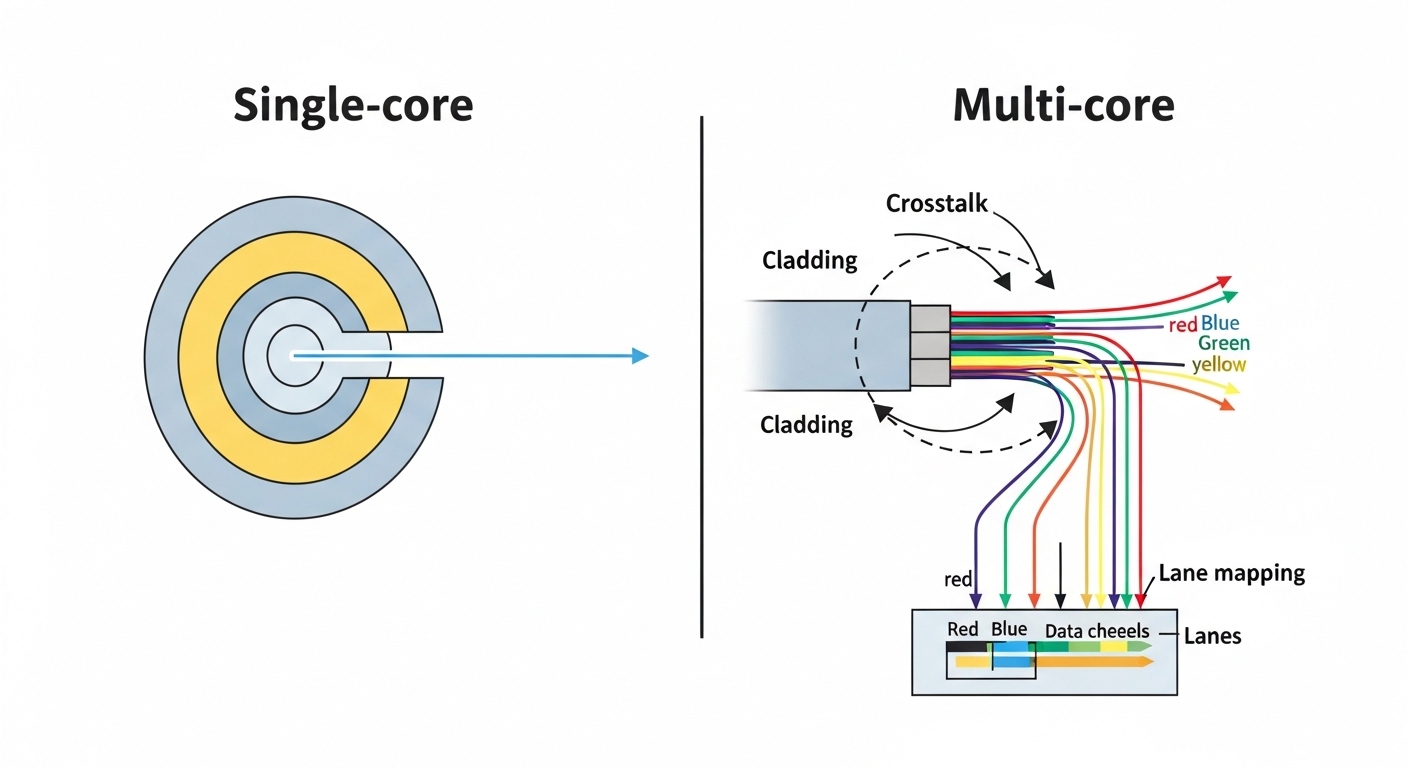
Single-core fiber carries one optical path per strand, typically using a single-mode design for long reach or a multimode design for short reach. Multi-core fiber packs multiple cores into one cladding, enabling higher aggregate capacity per fiber count. In business operations, this affects trenching and cable management, splicing workflows, and how transceivers map to lanes.
From a physics standpoint, the key operational concern is inter-core crosstalk in multi-core fiber, which can degrade signal quality as you increase reach or add connectors and splices. Vendor implementations often target specific lane layouts and require matching transceiver optics and patch cord assemblies. For standards alignment, engineers still design links around IEEE 802.3 Ethernet reach classes and optical budgets, even when the physical fiber is multi-core. [Source: IEEE 802.3 Working Group]
Pro Tip: In the field, many “mysterious” link flaps on multi-core runs are not caused by the transceiver at all; they come from mismatched lane mapping between the MPO/MTP harness and the fiber core order. Label both ends during install, then verify using OTDR plus a lane-aware test procedure before you cut over.
Business-relevant specs that decide between single-core and multi-core
Specifications for multi-core deployments vary by vendor, but the operational comparators are consistent: wavelengths, reach, connector type, optical budget margin, and temperature range. For single-core, you typically choose between single-mode (for longer reach) and multimode (for shorter reach). For multi-core, you also account for crosstalk limits and the lane-to-transceiver pairing required by the system design.
The table below compares representative link characteristics you might see when building 10G to 100G Ethernet services. Always confirm the exact optical parameters from your transceiver and fiber vendor datasheets because multi-core systems can be implemented with different core counts, lane ordering, and crosstalk budgets. [Source: vendor transceiver datasheets; [Source: ANSI/TIA-568.3]]
| Parameter | Single-core (Single-mode) | Single-core (Multimode) | Multi-core (Representative business use) |
|---|---|---|---|
| Typical core count | 1 core per strand | 1 core per strand | Multiple cores per strand (e.g., 4, 8, 12+) |
| Common wavelengths | 1310 nm / 1550 nm | 850 nm (short reach) | Often 850 nm or 1310 nm depending on vendor system |
| Typical reach (Ethernet classes) | Up to tens of km (with appropriate optics and budget) | Up to a few hundred meters to ~1 km class depending on OM type | Designed for enterprise short-to-mid reach; reach depends on crosstalk budget |
| Connector style | LC/SC (common), MPO possible for high density | LC/SC; MPO commonly used for high port density | Often MPO/MTP or custom lane-mapped harnesses |
| Primary performance risk | Attenuation and dispersion mismatch | Modal bandwidth and bend sensitivity | Inter-core crosstalk and lane mapping errors |
| Operating temperature range | Typically -5 C to +70 C for plant components; transceivers vary | Similar; multimode patch cords can be bend-sensitive | Varies by cable and transceiver; confirm splice/connector limits |
| Field testing complexity | Standard OTDR plus loss testing | Standard link loss testing; validate modal compliance | Lane-aware verification; crosstalk-focused test steps required |
In terms of transceiver fit, multi-core deployments often require optics that are explicitly supported by the fiber system and patch harness. For example, enterprise switch vendors may support specific SR-style optics for single-core multimode, while multi-core solutions may require a vendor-specific mapping and may not be drop-in compatible with every third-party QSFP/SFP optic. As a reference for single-core optics behavior, common modules include Cisco SFP-10G-SR and Finisar FTLX8571D3BCL, which are evaluated for specific fiber types and link budgets. [Source: Cisco datasheets; Source: Finisar datasheets]

Deployment scenario: where multi-core can reduce cost and time
Consider a 3-tier data center leaf-spine topology in a mid-sized enterprise: 48-port ToR switches connect to two spine switches using 10G-25G uplinks. The cabling team has limited conduit capacity and must relocate an MDF-to-IDF run during a renovation. Instead of adding new single-core strands, they deploy multi-core fiber in existing pathways with a higher lane density per cable, cutting the required conduit fill.
In this scenario, the team provisions 96 lanes worth of capacity for uplinks by using multi-core fiber trunks with MPO/MTP harnessing and lane-mapped patch panels. They still follow IEEE 802.3 reach classes for the Ethernet services and compute link budgets including splice loss, connector loss, and margin for aging. Field acceptance uses OTDR for fault localization and a loss meter for each lane group; they schedule cutover only after lane mapping verification. The operational payoff is fewer cable pulls and fewer termination points, which reduces the outage window during maintenance.
However, they also discover that any later expansion requires the same lane ordering conventions, otherwise ports may light up with unacceptable BER. That is why many operations teams keep a “lane map” asset register and store test results per lane group, not just per cable. This is the difference between a one-time install and a maintainable business network.
Selection criteria checklist: deciding with engineering discipline
Use the checklist below to ensure your choice between single-core and multi-core fiber aligns with both technical performance and operational maintainability. The order reflects what typically breaks first in real deployments.
- Distance and link budget: Compare attenuation targets and connector/splice counts against the transceiver reach class per IEEE 802.3.
- Fiber type maturity: For single-core, confirm OM type for multimode or OS2 for single-mode; for multi-core, confirm vendor system crosstalk budget and supported wavelengths.
- Switch and transceiver compatibility: Validate optics support and lane mapping requirements; avoid assuming third-party optics are drop-in.
- Connector and harness strategy: Multi-core often uses MPO/MTP and lane-mapped harnesses; ensure your patch panels and breakouts match the core order.
- DOM and diagnostics support: If you rely on Digital Optical Monitoring, verify it is supported by the optics and that the operational monitoring process is documented for your team.
- Operating temperature and bend constraints: Confirm cable, patch cords, and enclosure constraints; multi-core systems can be sensitive to installation practices that increase crosstalk.
- Vendor lock-in risk: Evaluate whether expansion, spares, and test equipment will require the same vendor ecosystem.
- Test and acceptance workflow: Ensure you can run lane-aware validation and store results for maintenance and incident response.
Common pitfalls and troubleshooting tips in day-to-day operations
Even well-designed multi-core links can fail operationally if installers and operations teams treat them like ordinary single-core cabling. The pitfalls below reflect recurring root causes seen during commissioning and troubleshooting.
-
Pitfall 1: Lane mapping mismatch after re-termination
Root cause: MPO/MTP harnesses or patch panel adapters are installed in a different core order than the original test setup.
Solution: Re-verify lane mapping end-to-end, update the lane map register, and standardize labeling on both sides before any future move/add/change. -
Pitfall 2: Excess loss from connector contamination or poor cleaning
Root cause: Higher density terminations increase the chance of particulate contamination, which disproportionately affects high-order links.
Solution: Enforce a cleaning SOP with inspection scope checks, then re-test each lane group with loss meters and document results. -
Pitfall 3: BER increases over time due to marginal optical budget
Root cause: Link margin is too tight after accounting for splices, patch cords, and real-world aging; multi-core crosstalk adds additional degradation sensitivity.
Solution: Recompute budgets with conservative worst-case connector loss, add margin, and consider swapping to optics with a higher sensitivity or better matched wavelength. -
Pitfall 4: Bend radius violations in tight racks
Root cause: Installers exceed bend radius during cable management, increasing attenuation and coupling effects.
Solution: Use bend radius guides, re-route patch cords with proper strain relief, and confirm with OTDR traces for localized loss.

Cost and ROI: when multi-core wins, and when it does not
Multi-core can reduce total cost when it eliminates cable pulls, reduces conduit occupancy, and lowers the count of patch points. In practice, pricing varies widely by region and vendor, but you should expect multi-core cable and harness assemblies to cost more per physical meter and more per termination than basic single-core cabling. OEM transceivers for multi-core may also carry a premium, and spare management can increase inventory complexity.
A realistic ROI model is to compare: (1) installation labor hours, (2) outage window cost, (3) future expansion flexibility, and (4) failure rate and mean time to repair. For example, if multi-core reduces termination points by 30 to 50% on a constrained renovation project, labor and risk reduction can outweigh higher module or harness costs. But if your facility is already well-stocked with single-core runs and you expect frequent mix-and-match optics, the operational friction and vendor lock-in risk may erase the hardware savings.
For standards-based planning, keep a reference to cabling practices and link testing methods aligned with ANSI/TIA guidance and IEEE reach definitions. [Source: ANSI/TIA-568.3; Source: IEEE 802.3]
FAQ: multi-core vs single-core for business Ethernet links
Is multi-core fiber always better than single-core for bandwidth?
No. Multi-core increases capacity per cable, but it introduces inter-core crosstalk constraints and lane mapping requirements. Single-core can be simpler to troubleshoot and often has broader optics compatibility.
Do I need special transceivers for multi-core?
Often yes. Many multi-core systems require optics and patch harnesses that match the vendor lane mapping and crosstalk budget. If you mix unsupported optics or connectors, you can see higher BER or intermittent link drops.
How do I test multi-core links during acceptance?
Use OTDR for fault localization and a lane-aware loss verification approach for each lane group. Store test results per lane, not just per cable, so operations can correlate incidents to specific cores and connectors.
Can I use third-party optics with multi-core deployments?
Sometimes, but it depends on the vendor ecosystem and the exact optical interface requirements. Validate compatibility in the same way you would for single-core: ensure the optics are specified for the fiber type, wavelength, and reach class, then confirm lane mapping behavior.
What causes the most field failures on multi-core runs?
The most common causes are lane mapping mistakes, contaminated MPO/MTP terminations, and insufficient optical budget margin. Bend radius violations can also amplify problems by increasing loss and coupling effects.
When should a business choose single-core over multi-core?
Choose single-core when you need maximal optics flexibility, have stable conduit capacity, and want the simplest test and maintenance workflow. Multi-core is most compelling when physical space constraints and termination reduction drive the project economics.
If you are planning new cabling or a renovation, start by mapping your Ethernet reach classes and operational constraints, then select single-core or multi-core based on lane-aware testing capability and transceiver compatibility. Next, review fiber optics link budget checklist to quantify margin before you order hardware.
Author bio: Field operations consultant focused on Ethernet optical deployments, commissioning workflows, and troubleshooting using OTDR and lane-aware acceptance tests. Previously supported data center cabling migrations and transceiver qualification programs across multi-vendor environments.