Multi-cloud architectures fail in predictable ways when the fiber-to-site layer is treated like a commodity. This guide helps network and infrastructure teams design hybrid fiber links that connect on-prem and colocation to multiple clouds with clean routing, VLAN boundaries, and dependable VPN transport. You will get practical use cases, a selection checklist, and troubleshooting patterns you can apply during cutovers and maintenance windows.
Where hybrid fiber links fit inside multi-cloud routing
In a multi-cloud strategy, the “last mile” is often the real bottleneck: not the cloud provider edge, but your path from access switches, through routers, across dark fiber or leased circuits, and into cloud edge services. Hybrid fiber links give you deterministic latency and bandwidth for east-west and north-south traffic, while supporting segmentation (VLANs, VRFs) and policy enforcement. In practice, teams use fiber to keep transport stable, then layer VPNs or provider interconnects on top for secure connectivity.
Reference architecture that field engineers deploy
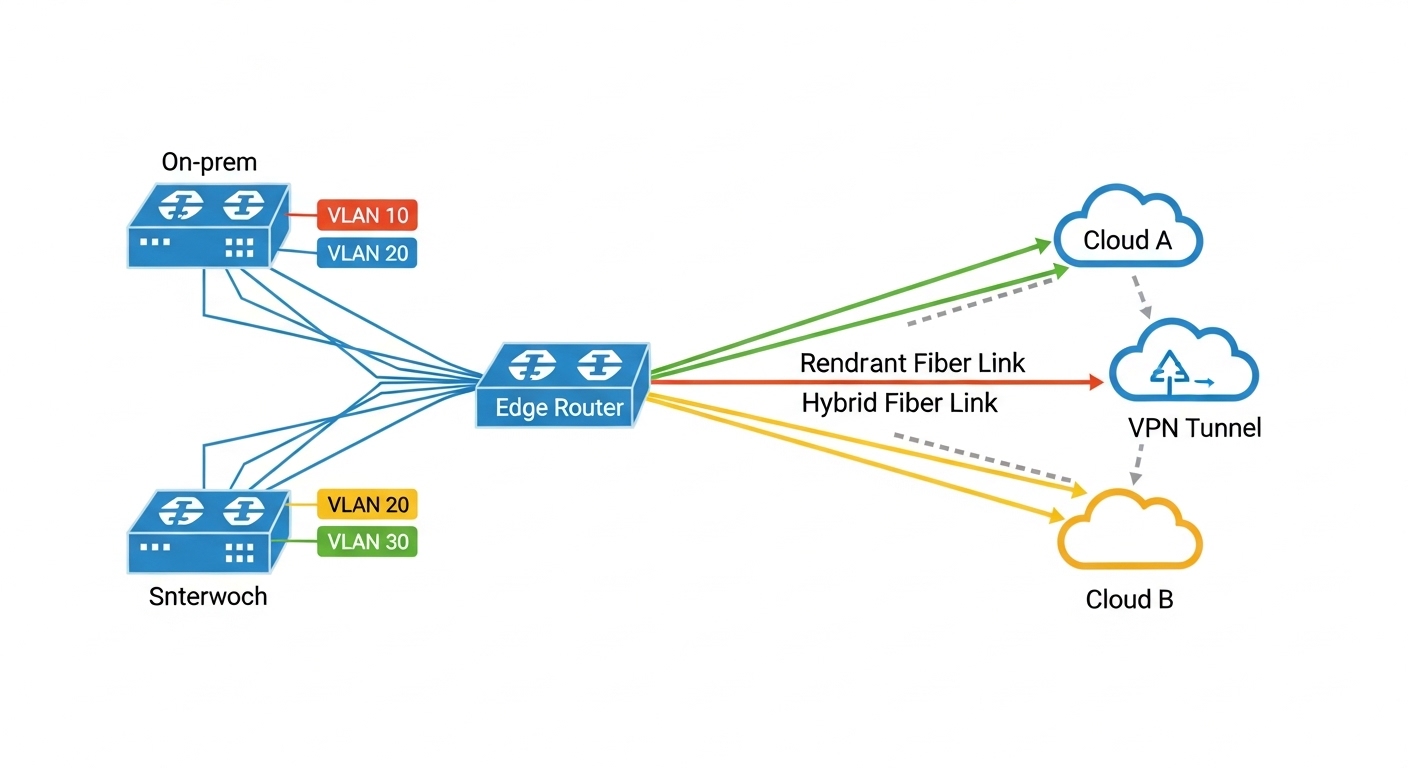
A common pattern is: ToR switches in the data center, aggregation/distribution switches, then a pair of edge routers. From there, you run redundant hybrid fiber links to a colocation meet-me room and onward to cloud edge locations. On the switching side, engineers map production networks into VLANs and often separate routing domains with VRFs to prevent accidental route leakage between clouds. On the transport side, link stability and optical health metrics drive uptime more than “link speed” alone.
Pro Tip: If your multi-cloud design relies on dynamic routing over a VPN, tune failure detection timers to match fiber reality. A fast BFD profile can react within tens of milliseconds, but if the optical link flaps due to marginal optics or bad patch cords, you may trigger route churn that looks like “cloud instability.” Always verify optical power, transceiver temperature, and connector cleanliness before adjusting routing timers.
Use cases: hybrid fiber links for multi-cloud workloads
Below are three real-world use cases where hybrid fiber links shine, plus the specific configuration goals you should expect: segmentation, predictable performance, and operational resilience.
Use case 1: Multi-cloud app tier with VLAN and VRF isolation
In a 3-tier design, you may host application services in Cloud A and Cloud B, while keeping databases on-prem for compliance. Engineers create VLANs on the on-prem access layer (for example, VLAN 120 for app, VLAN 220 for db replication) and then map each VLAN into the appropriate VRF on the edge router. Hybrid fiber provides a stable transport to a cloud interconnect or a colocation gateway, where IPsec VPN tunnels carry traffic. The result is clean separation: even if one cloud endpoint has an issue, the other VRF can remain unaffected.
Use case 2: Backup and disaster recovery across clouds with deterministic throughput
Backup windows are where multi-cloud designs often get squeezed. Teams replicate VM snapshots from on-prem to Cloud A and Cloud B, then fail over to the other cloud during outages. Hybrid fiber links help maintain steady throughput so replication stays within the RPO/RTO targets. A practical target many engineers aim for is sustaining 80% of negotiated throughput during peak backup hours, which depends heavily on transport stability and queue behavior on the edge.
Use case 3: Edge compute and content services with low-latency ingress
For edge compute, you may bring traffic into a colocation hub via hybrid fiber, then route it into the closest cloud region. For example, you can terminate a set of VLANs from an on-prem site into a cloud-facing gateway, then steer flows based on GeoIP and measured RTT. This is especially effective when you have multiple cloud regions and want consistent ingress paths. Here, optical health and link redundancy matter because packet loss and jitter directly impact TCP retransmits and application performance.

Optics and link budget basics that impact multi-cloud performance
Multi-cloud connectivity is only as good as your optical layer. If you deploy SR optics for short reaches and accidentally overshoot the budget with dirty connectors or degraded patch cords, your “WAN problem” becomes a physical-layer issue. For hybrid fiber, engineers typically choose pluggables based on distance, connector type, and temperature requirements, then validate with measured receive power and error counters.
Quick specs comparison for common enterprise optics
Use this table to sanity-check reach and compatibility when selecting transceivers for hybrid fiber links between switches and routers.
| Spec | 10G SR (850 nm) | 10G LR (1310 nm) | 25G SR (850 nm) |
|---|---|---|---|
| Typical data rate | 10.3125 Gbps | 10.3125 Gbps | 25.781 Gbps |
| Wavelength | 850 nm | 1310 nm | 850 nm |
| Fiber type | OM3/OM4 multimode | Single-mode OS2 | OM3/OM4 multimode |
| Typical reach | 300 m (OM3) / 400 m (OM4) | 10 km (single-mode) | 100 m (OM3) / 150 m (OM4) |
| Connector | LC | LC | LC |
| Digital diagnostics | Commonly supported (DOM) | Commonly supported (DOM) | Commonly supported (DOM) |
| Temperature range | Often 0 to 70 C (commercial) | Often -5 to 70 C or 0 to 70 C depending SKU | Often 0 to 70 C |
| Examples (models) | Cisco SFP-10G-SR, Finisar FTLX8571D3BCL | FS.com SFP-10GSR-85 (verify reach), vendor LR SKUs | Cisco/FS 25G SR LC DOM SKUs |
Always verify the exact electrical and optical expectations from the switch/router datasheet and transceiver compatibility list. IEEE 802.3 defines Ethernet PHY behavior; vendor transceiver requirements define what will actually link up in your chassis. For authoritative baseline references, see [Source: IEEE 802.3] and vendor SFP/QSFP transceiver documentation via manufacturer datasheets such as Cisco and Finisar.
[[EXT:https://standards.ieee.org/standard/802_3][Source: IEEE 802.3]]
Fiber-to-cloud use in multi-cloud VPN and VLAN designs
Hybrid fiber links often carry your “secure underlay” for multi-cloud connectivity. Engineers commonly run IPsec VPNs over routed links, or use provider interconnect services that still require robust L2/L3 boundaries in your domain. VLANs help you group traffic types (voice, backup, replication) and VRFs prevent route mixing across clouds.
Practical deployment steps you can run during implementation
- Define segmentation first: map VLAN IDs to VRFs (example: VRF-A for Cloud A, VRF-B for Cloud B) and keep management networks isolated.
- Confirm routing domain boundaries: ensure your edge routers advertise only the intended prefixes per VRF.
- Use redundant physical paths: dual fiber routes or dual chassis links to avoid a single patch panel failure.
- Enable VPN health monitoring: track tunnel uptime and key renegotiation events; correlate with interface counters.
- Validate optical layer: check DOM values (Tx power, Rx power, bias current) and interface error counters before declaring the link “good.”
Selection criteria checklist for multi-cloud hybrid fiber
Engineers choosing optics, patching strategy, and transport components for multi-cloud should weigh the factors below in order. This prevents rework during acceptance testing and reduces the “mystery outages” that come from mismatched optics and connector hygiene.
- Distance and fiber type: multimode vs single-mode, and actual installed reach including patch cords.
- Switch/router compatibility: confirm SFP/SFP+/QSFP model support and DOM expectations in the platform datasheet.
- Connector and patch strategy: LC vs MPO, APC vs UPC polish, and how many mated cycles you can tolerate.
- DOM support and monitoring: if you need alarm thresholds for optical degradation, prioritize modules with reliable digital diagnostics.
- Operating temperature and airflow: confirm transceiver temperature range against your rack conditions.
- Budget vs risk: OEM modules may cost more but reduce compatibility friction; third-party can be cost-effective if validated.
- Vendor lock-in risk: evaluate whether the platform accepts third-party optics and whether firmware updates change compatibility.
Cost & ROI reality check
In many enterprises, transceivers and optics represent a small fraction of the overall TCO, but outages and rework can dominate the cost. OEM pluggables frequently run roughly 2x to 4x the price of third-party, yet they often reduce compatibility issues and speed up RMA cycles. For hybrid fiber links, the ROI comes from fewer failed patch points, lower error rates, and faster troubleshooting because DOM and vendor diagnostics match your tooling. A realistic approach is: buy OEM for critical sites with strict uptime requirements, and third-party only after you complete a compatibility test in a staging rack.
Common mistakes and troubleshooting for hybrid fiber in multi-cloud
When multi-cloud traffic “mysteriously” breaks, the root cause is often physical or configuration-level rather than cloud-side. Below are frequent failure modes you can recognize quickly.
Link up but high CRC or interface flaps
Root cause: marginal optics, dirty connectors, or a patch cord with excessive loss. Multimode SR optics are especially sensitive to cleanliness and graded-index assumptions.
Solution: clean connectors with approved lint-free methods, re-seat optics, replace patch cords, and compare DOM Rx power to vendor guidance. Then confirm interface error counters stabilize.
VPN comes up but traffic stalls only for one cloud
Root cause: VRF or route-policy mismatch causing asymmetric routing, or NAT overlap between VRFs. In multi-cloud, one tunnel may be correct while the other silently blackholes return traffic.
Solution: verify tunnel routing tables per VRF, check return path with traceroute from both sides, and confirm no overlapping subnets exist across VRFs unless you have explicit NAT and policy design.
Works during acceptance, fails after a maintenance window
Root cause: transceiver incompatibility introduced by a swap, or a firmware change that tightens transceiver requirements. Teams sometimes replace optics with “functionally similar” models that do not meet DOM or electrical thresholds.
Solution: standardize part numbers, keep a validated optics matrix for each chassis, and document optics model, DOM behavior, and optical thresholds. After changes, run automated optical and interface health checks before moving to production traffic.
Unexpected latency spikes aligned with backup or replication
Root cause: bufferbloat or congestion on the edge router, often amplified by QoS misconfiguration across VLANs and VPN encapsulation overhead.
Solution: apply QoS policies per VLAN/VRF, validate queue discipline, and monitor jitter and packet loss during replication. If possible, measure RTT to each cloud endpoint and correlate with interface utilization.

FAQ
What is the best hybrid fiber setup for multi-cloud connectivity?
Most teams use redundant hybrid fiber from access/aggregation to an edge router pair, then terminate into VRFs that map cleanly to Cloud A and Cloud B. The “best” design depends on distance and whether you need single-mode for longer spans. Start with redundant physical paths and validated optics, then layer VPN and routing policy.
Should I use VLANs or VRFs for multi-cloud segmentation?
VLANs are great for grouping L2 traffic types, while VRFs provide L3 separation that prevents route leakage. In practice, many multi-cloud designs use both: VLANs for traffic classification and VRFs for routing boundaries. If you only use VLANs without VRFs, you risk accidental overlap during scaling.
Can third-party optics work reliably in multi-cloud environments?
Yes, but only after compatibility testing with your exact switch or router models and firmware versions. Validate DOM behavior, link stability, and optical power thresholds in a staging rack. For high-impact sites, OEM modules often reduce operational risk, especially during emergency swaps.
How do I troubleshoot multi-cloud outages caused by hybrid fiber links?
Begin with optical health: DOM readings, interface error counters, and optical alarms. Then validate routing and tunnel state per VRF, looking for asymmetric paths or policy mismatches. Correlate timestamps across optics, interface counters, and VPN logs to pinpoint the first failure event.
What reach should I plan for with SR vs LR optics?
For SR, plan within the rated reach for your fiber type (for example, OM3 vs OM4 multimode) and include patch cord losses. For longer hybrid spans, LR on single-mode is the usual choice. Always measure installed loss when possible and keep a margin for connector aging and future re-patching.
Where does ROI typically show up in multi-cloud hybrid fiber projects?
ROI appears in fewer incidents, faster troubleshooting, and better adherence to replication and failover windows. Power savings from efficient link utilization and reduced retransmits can also matter, but the biggest gain is operational certainty. Treat optics and patching as reliability infrastructure, not as an afterthought.
Updated on 2026-05-01. If you want a practical next step, review your current VLAN and VRF mapping and run a measured optics validation for every hybrid fiber path in your multi-cloud design.
Author bio: I am a veteran network admin who designs and troubleshoots routing, switching, VLAN segmentation, and fiber-based interconnects for enterprise and colocation environments. I focus on measurable link health, predictable failover behavior, and multi-cloud connectivity that survives real maintenance events.