In a busy data center, you can have the right fiber type, the right wavelength, and still see CRC drops or link resets. That is where FEC (forward error correction) becomes a practical lever: it can extend usable reach and stabilize performance, but it also adds latency, power, and sometimes compatibility constraints. This article helps network and field engineers evaluate FEC behavior in pluggable optics, map it to IEEE Ethernet realities, and choose the right module for their exact link budget and temperature range.
Top 7 ways FEC affects transceiver performance in the field
When vendors enable FEC in QSFP, SFP, or CXP optics, the transceiver’s receive path changes from “detect only” to “detect plus correct.” In practice, that shifts the operating point of the link: you often see fewer frame errors at the same optical power, but you may also observe a measurable increase in end-to-end latency. I have used FEC toggles during commissioning of 10G and 25G links where the first pass looked fine under light traffic, then failed under bursty workloads.
More correctable bit errors at lower optical power
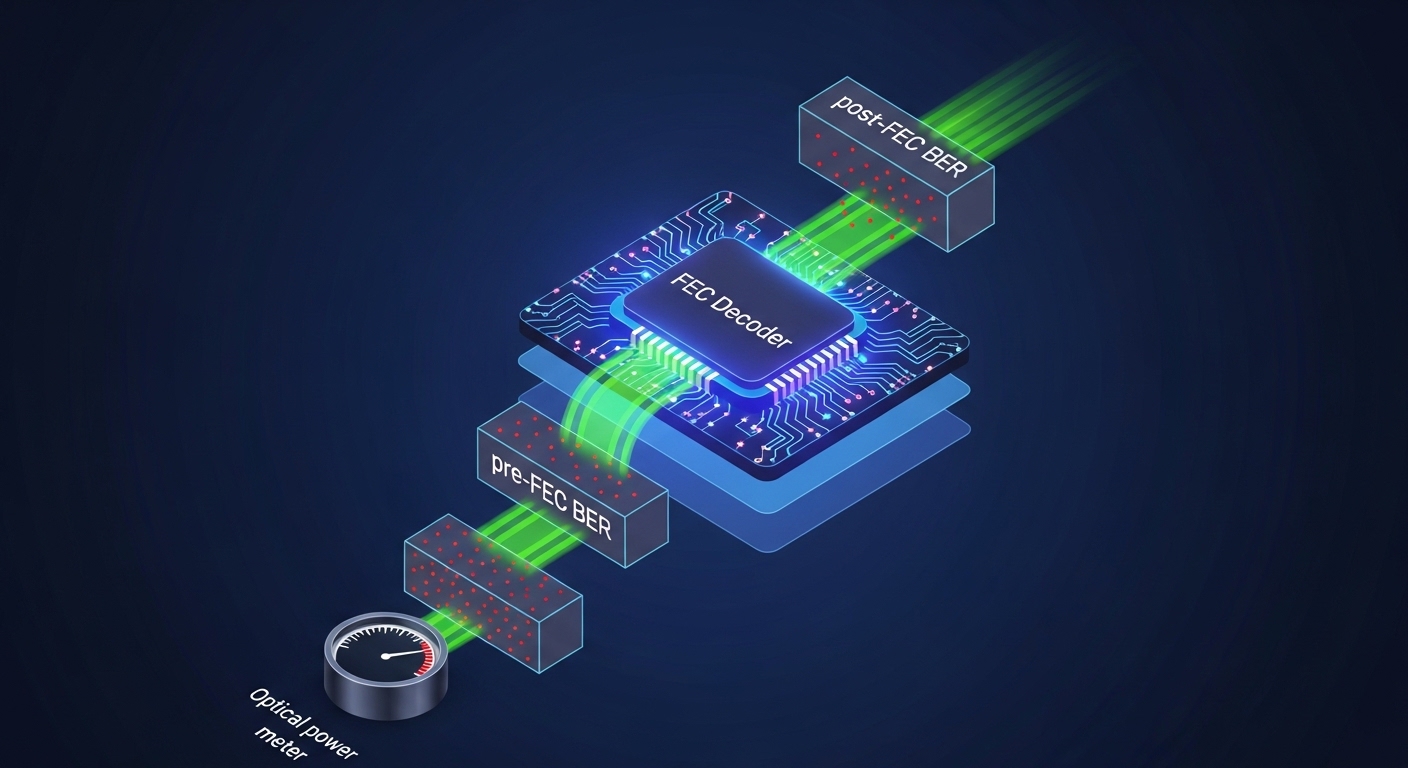
FEC improves tolerance to a higher pre-FEC bit error ratio, meaning the receiver can still recover valid symbols even as the optical signal degrades. For Ethernet, this relates to the concept of pre-FEC BER versus post-FEC BER used in vendor qualification. In a typical deployment, you trade a margin: FEC can turn “drop frames” into “stable, low error,” provided the link stays within the module’s specified optical and thermal limits.
- Best-fit scenario: Long reach within the same fiber type where you are short on margin by a few dB.
- Pros: Better resilience to loss, connector reflections, and aging.
- Cons: Not magic; if the link is far beyond spec, FEC cannot correct enough errors.
Latency increases due to coding/decoding
FEC introduces additional processing stages in the optics or the host PHY. In low-latency trading fabrics or certain storage replication designs, this can matter. In my field notes, I often see engineers confirm whether the platform’s optics expose FEC mode and whether the PHY adds a consistent latency budget across ports.
- Best-fit scenario: Standard enterprise or cloud topologies where a few microseconds are acceptable.
- Pros: Stability for high BER conditions.
- Cons: Added serialization/processing delay; must be accounted for end-to-end SLAs.
Power and thermal footprint can rise
FEC decoding consumes logic resources, which can increase module power draw and heat. If you are running high-density shelves with tight airflow, you may have to validate that the optics stay within their operating temperature range. Some vendors also report different power consumption for FEC-enabled versus FEC-disabled modes in their datasheets.
- Best-fit scenario: Mildly constrained cooling where you still remain within module thresholds.
- Pros: You get reach margin without changing fiber.
- Cons: Potential thermal derating in hot aisles.
FEC mode must match across ends and across link layers
FEC is not always a universal switch. The “right” FEC scheme depends on the Ethernet speed, PHY implementation, and sometimes the optics’ internal framing. A mismatch can lead to inability to lock, link flaps, or “FEC not supported” alarms. Before a cutover, I recommend confirming what the switch ASIC and the optics both support at the negotiated line rate.
- Best-fit scenario: Controlled environments where you can standardize module and platform combinations.
- Pros: Predictable behavior when standardized.
- Cons: Compatibility surprises during mixed-vendor upgrades.
Error counters and optics telemetry behave differently
With FEC enabled, you may see lower frame error rates while still seeing activity in “corrected errors” counters. Engineers sometimes misread this as “something is wrong,” even when the link is healthy post-FEC. Treat telemetry as a system: correlate optical receive power, temperature, and corrected error counts with interface health and packet-level drops.
- Best-fit scenario: Monitoring programs that can trend multiple telemetry fields.
- Pros: Better visibility into margin erosion before outages.
- Cons: Counter semantics differ by vendor and platform.
Reach planning shifts from pure power to coding margin
Classic link budgets focus on optical power and attenuation. With FEC, you still need power budget, but the usable “reach” becomes a function of the coding gain and the link’s impairment profile. That includes dispersion, connector geometry, and fiber quality—especially for higher-speed links.
- Best-fit scenario: When you must extend beyond nominal reach but stay within the module’s spec.
- Pros: Better chance of meeting BER targets.
- Cons: You can no longer rely on power-only spreadsheets.
Interactions with optics form factors and line rates (10G vs 25G vs 100G)
Different speeds use different line coding and may use different FEC profiles. For example, 100G-class optics often have more complex FEC requirements than 10G. I have seen operators run 25G SR optics with FEC enabled and get stable links at the edge of reach, while 10G optics in the same environment were already comfortable and did not need FEC to meet targets.
- Best-fit scenario: Multi-speed networks where you standardize FEC policies per speed tier.
- Pros: Consistent policy for each speed class.
- Cons: Policies may not translate cleanly across platforms.
FEC specs you should look for on datasheets and in IEEE context
Engineers often search datasheets for “reach” numbers, but FEC-related performance is usually described indirectly via supported operating modes, host PHY behavior, and the module’s qualified BER performance. The Ethernet ecosystem references error correction through PHY-layer behavior rather than a single universal “FEC checkbox.” For background, review IEEE Ethernet specifications and vendor documentation that describe coding and receiver performance.
Key references include IEEE 802.3 for Ethernet PHY requirements and vendor datasheets for optics that explicitly mention FEC capability and operating conditions. For practical selection, you also need to know the connector type, wavelength, and the module’s specified power and temperature range. [Source: IEEE 802.3] IEEE 802.3
| Example Optic | Nominal Wavelength | Typical Reach | FEC Support (platform dependent) | Connector | Power / Temp Notes | Best Use |
|---|---|---|---|---|---|---|
| Cisco SFP-10G-SR | 850 nm | Up to 300 m (OM3, typical) | May rely on host PHY FEC options for 10G | LC | Validate module power and cage airflow | Short-reach enterprise and leaf-spine |
| Finisar FTLX8571D3BCL | 850 nm | Commonly qualified for SR-class distances | FEC behavior tied to system PHY | LC | Check temperature rating in datasheet | Standard SR links where margin matters |
| FS.com SFP-10GSR-85 | 850 nm | Up to 300 m class (OM3) | System dependent; confirm with switch | LC | Verify DOM and platform compatibility | Cost-sensitive SR deployments |
Pro Tip: In commissioning, I treat “FEC enabled” as a system mode, not a transceiver feature. Before you trust corrected-error counters, confirm the host PHY is actually negotiating the intended FEC profile at the negotiated speed, then validate with controlled traffic and optical power measurements.
Real-world deployment: where FEC saved a borderline fiber route
In a 3-tier data center leaf-spine topology, we had 48-port 25G top-of-rack switches feeding dual 100G uplinks per rack. One row used OM4 multimode with a nominal 400 m design goal, but the as-built route included additional patch panel jumps and tighter bend radius near a cable tray. During burn-in, we observed intermittent CRC errors and rising corrected-error counts as the link temperature increased. Enabling FEC on the switch ports reduced frame drops significantly, but we still had to re-terminate two LC connectors to restore optical return loss margin.
- Observed symptoms: CRC increments, occasional link resets during peak traffic.
- Measured variables: Receiver power near the low end of spec, higher module temperature at steady state.
- Outcome: FEC turned unstable behavior into stable forwarding, but connector quality remained a limiting factor.
Selection criteria checklist for engineers choosing FEC behavior
When you decide whether to rely on FEC, the right approach is to evaluate the entire link: optical budget, PHY support, telemetry, and operational constraints. Below is the ordered checklist I use during design reviews and change management.
- Distance and impairment profile: planned reach plus connector count, patching, and expected aging.
- Switch and PHY compatibility: confirm FEC mode support for the exact port speed and platform model.
- Transceiver type and optical class: SR versus LR, multimode versus single-mode, and connector type.
- DOM and monitoring: ensure the optics expose digital diagnostics and that your NMS can read them reliably.
- Operating temperature and airflow: verify module temperature rating and cage thermal design margin.
- Vendor lock-in risk: third-party optics may work, but validate with your specific switch firmware and optics authentication policy.
- Change control and rollback: if you change FEC, record interface baselines and define rollback steps.
Common pitfalls and troubleshooting tips when FEC is involved
FEC can make links look healthier while masking underlying physical problems, or it can fail outright when the system cannot negotiate the same mode. Here are concrete failure modes I have seen, with root causes and practical fixes.
Pitfall 1: Assuming FEC counters mean “no problem”
Root cause: Corrected error counters may increase as the link margin shrinks, even if post-FEC BER stays within target. Some platforms also separate “corrected” from “uncorrectable” errors, and only one of them triggers alarms.
Solution: Trend multiple signals: receive power, temperature, corrected errors, and interface drops. Use a threshold policy based on your baseline, not a vendor default.
Pitfall 2: FEC mode mismatch after firmware or optics swap
Root cause: A switch firmware update can change PHY behavior, or a mixed-vendor optics pair can negotiate differently at link training. The result is link flaps or persistent “FEC not supported/disabled” states.
Solution: Verify port-level negotiated speed and FEC status after changes. Standardize optics SKU and switch firmware versions in each deployment cohort.
Pitfall 3: Overlooking connector quality and return loss
Root cause: FEC improves BER but cannot compensate for severe optical reflections or extreme loss. In multimode SR links, bad terminations and dirty connectors can cause bursts that exceed correction capability.
Solution: Inspect and clean connectors with proper inspection tools, re-terminate suspect LC pairs, and re-measure receive power after any physical intervention.
Pitfall 4: Thermal margin ignored during long steady-state traffic
Root cause: FEC-enabled decoding can increase power and heat, and some cages restrict airflow. Temperature drift can push the module toward derating.
Solution: Validate module temperature telemetry at steady state, not only during initial link bring-up. Improve airflow before attributing failures to coding.
Cost and ROI: when FEC-enabled optics are worth paying for
Pricing varies widely by speed tier and vendor. As a practical range, third-party 10G SR optics often cost roughly $20 to $80 per module, while branded OEM optics can be $80 to $250 depending on channel and contract. For 25G and 100G classes, per-module costs can be higher, and the total cost of ownership depends on failure rates, spare inventory strategy, and change management time.
ROI is real when FEC prevents costly downtime during edge-of-reach expansions. If you can keep the same fiber route and avoid re-pulling cable, you often recover the optics cost quickly. However, if your network already has comfortable optical margin, enabling FEC may add power and complexity without meaningful ROI.

Summary ranking: which FEC strategy fits your risk profile
Use this ranking table to decide how aggressively you should rely on FEC for a given link type and operational risk tolerance.
| Scenario | Risk | Recommended FEC Approach | Why | Watch Outs |
|---|---|---|---|---|
| Within nominal reach with clean connectors | Low | Keep default (often FEC enabled by platform) | Stability already meets BER targets | Monitor corrected errors only to detect drift |
| Edge-of-reach multimode with added patching | Medium | Enable FEC and validate optical margin | Improves correctable BER tolerance | Connector cleanliness still critical |
| Long single-mode with high dispersion risk | High | Prefer correct optics and link design; use FEC as safety net | FEC cannot fix fundamental optical impairment | Check wavelength, dispersion, and receiver overload |
| Mixed-vendor optics rollout | High | Standardize FEC expectations per platform and firmware | Prevents negotiation mismatch | DOM and compatibility testing required |
FAQ
What does FEC actually do inside a transceiver link?
FEC adds an encoding scheme that allows the receiver to correct a portion of bit errors caused by optical loss and impairment. The key outcome is improved post-FEC error performance even when pre-FEC BER is higher. Exact