We tried to light up a metro link using a third-party DWDM line system and quickly discovered that “it should work” is not a network plan. This article helps network engineers and field teams validate alien wavelength DWDM optics across mixed vendors, covering the practical gotchas that usually fail first: licensing, optical budgets, channel plan alignment, and DOM/monitoring mismatches. You will get a case-study style workflow, a decision checklist, and troubleshooting tips grounded in the way real transceivers behave in the rack.

Problem / Challenge: When “Alien” Channels Meet Real Hardware
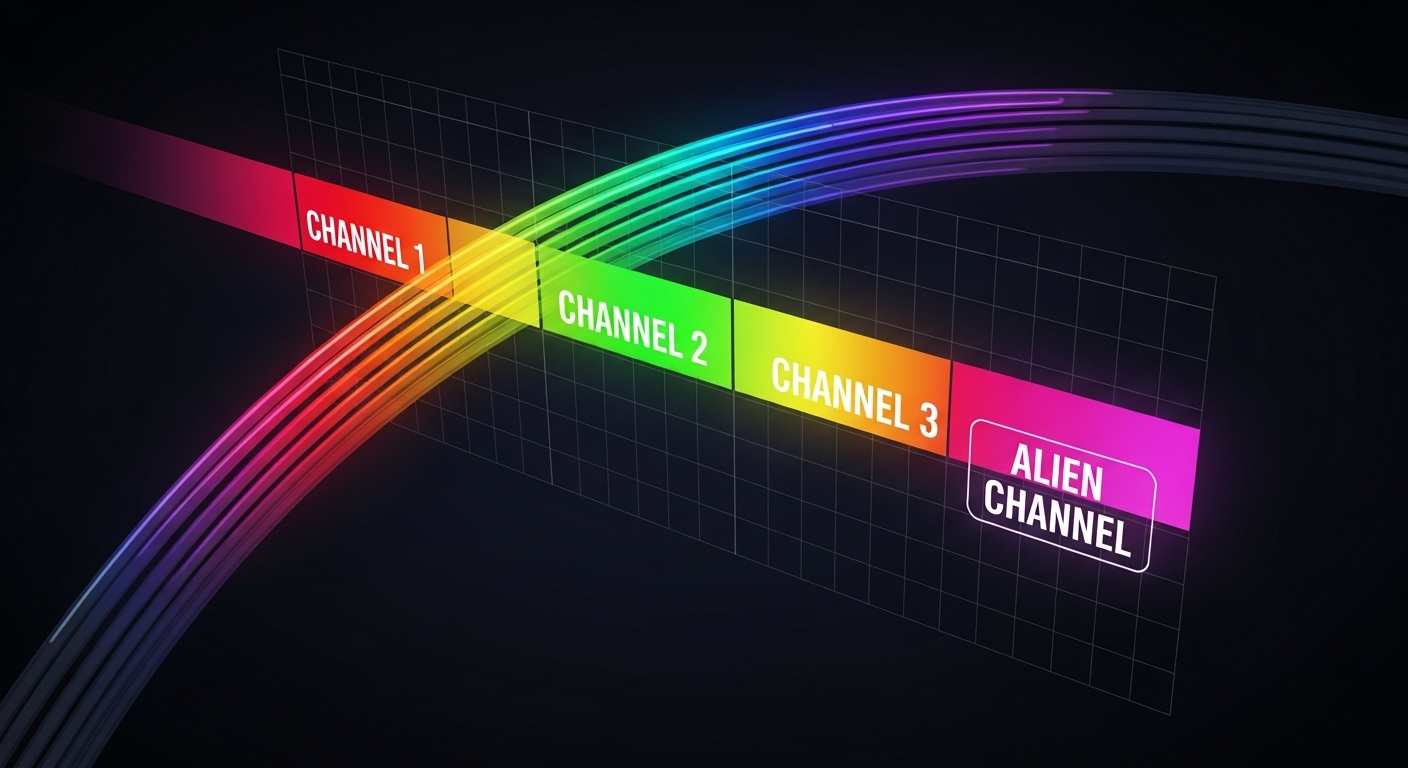
In our case, the challenge was simple on paper: we needed to add capacity to an existing metro transport ring without replacing the entire DWDM platform. The existing optical plant used a fixed channel grid, while the third-party DWDM system expected a specific wavelength plan and supervision behavior. We deployed alien wavelength DWDM optics—transmitters and receivers that can operate on wavelengths not natively supported by the host system’s default mapping—so we could “borrow” capacity on the installed fiber.
The failure mode was not dramatic; it was worse—quiet. Links would train at first, then degrade after temperature cycling or during maintenance windows when patch cords were reworked. That pattern screamed: optical alignment, channel plan mismatch, and monitoring interoperability issues, not raw fiber damage.
Environment Specs: The Numbers That Actually Decide Success
Before choosing optics, we measured and documented the environment like a grown-up. Our target was a 10G service carried over a DWDM mux/demux pair on a metro span with connectorized fiber. We assumed typical plant conditions but verified them with OTDR and optical power readings at the demarc.
Measured and assumed parameters
- Fiber type: SMF-28e class, 0.2 dB/km attenuation baseline
- Span length: 48 km (two connector pairs included)
- Connector loss: 0.5 dB per mated pair (measured)
- DWDM insertion loss: 4.0 dB typical per mux/demux stage (vendor spec)
- Target BER: 1e-12 (evaluated via traffic load and error counters)
- Temperature range: 0 to 50 C in the equipment bay (seasonal swing)
Key optics specs we validated
Even when the wavelength is “alien” to the host system, the optical transmitter and receiver must still meet the host’s physical layer expectations. We compared third-party pluggables against known compatible families and verified tuning stability, receiver sensitivity, and DOM behavior.
| Spec | Example optics class (for reference) | Why it matters for alien wavelength DWDM |
|---|---|---|
| Data rate | 10G (e.g., 10GBASE-LR class) | Host line card expects a modulation format and symbol timing |
| Nominal wavelength | Channel-specific (e.g., C-band grid) | Must match the third-party DWDM channel plan and ITU grid offsets |
| Reach class | Up to 10 km typical for LR optics; DWDM extends reach via mux/demux | Budget must include insertion loss and aging margins |
| Connector | LC duplex | Connector cleanliness and polarity errors can mimic wavelength issues |
| Optical output power | Typically around -5 to 0 dBm class (varies by module) | Alien wavelengths still need enough launch power after DWDM loss |
| Receiver sensitivity | Typically around -14 to -18 dBm class (varies by module) | Must tolerate worst-case attenuation plus margin |
| Power & temperature | Commercial or extended temperature variants | Channel drift and monitoring thresholds change with temperature |
| DOM support | Digital Optical Monitoring (I2C via transceiver) | Host may reject modules or misreport alarms if DOM fields differ |
For compatibility context, we used vendor datasheets for known module families such as Cisco SFP-10G-SR (short reach reference) and C-band DWDM-capable optics like Finisar FTLX8571D3BCL and FS.com SFP-10GSR-85 as baseline examples for DOM and optical class behavior. We also aligned our channel planning approach with IEEE 802.3 physical-layer expectations and standard wavelength grid practices referenced in telecom vendor documentation. [Source: IEEE 802.3; Source: vendor transceiver datasheets; Source: ITU-T wavelength grid background as commonly referenced in DWDM engineering guides]
Chosen Solution & Why: Alien Wavelength DWDM That Actually Integrates
We selected pluggable transceivers whose wavelength targets were explicitly provisionable and whose tuning characteristics were stable enough for the expected temperature swing. The main idea was to avoid “mystery tuning”: we treated the alien channel as a controlled parameter, not a hope-and-pray feature.
Practically, we required three integration points to work together: (1) the third-party DWDM channel plan configuration, (2) transceiver optics that match that plan’s center wavelengths within tolerance, and (3) DOM/alarms that the host line system can understand without triggering shut-down. Without all three, the link might come up but then fall over during monitoring or maintenance events.
Implementation steps (what we did in the rack)
- Inventory and map channels: Export the third-party DWDM channel plan and record the exact center frequencies (or ITU channel numbers) used on the deployed mux/demux.
- Provision wavelength targets: Configure the DWDM system to the alien channel(s) and verify that the channel spacing matches the expected grid (e.g., 50 GHz vs 100 GHz class planning).
- Power budget calculation: Compute worst-case receive power using measured fiber attenuation, connector loss, and mux/demux insertion loss. Add at least a 3 dB operational margin for aging and patch cord variance.
- DOM sanity check: Plug in the module and verify DOM readouts for temperature, bias current, transmit power, and alarms. If the host shows “module unsupported” or blank DOM fields, stop and fix compatibility before traffic tests.
- Fiber cleanliness and polarity: Clean LC connectors, confirm polarity, and re-seat the patch cords. In our environment, the “wavelength issue” turned out to be swapped patch cables once—classic.
- Traffic and error validation: Run a sustained traffic load (e.g., line-rate emulation) for at least 2 hours and monitor BER/error counters and optical power drift. Then perform a controlled temperature change if the bay supports it.
Pro Tip: In mixed-vendor DWDM, the “alien wavelength” is rarely the root cause of instability. The usual culprit is monitoring thresholds: a host line card may treat DOM field differences or alarm bit semantics as a fault, even when the optics are perfectly tuned. Always confirm DOM alarms and event logs during the first 30 minutes after install, not just link-up time.
Measured Results: What Improved (and What Didn’t)
After the correct channel plan mapping and DOM compatibility checks, the link behaved like a responsible adult. We achieved stable error-free operation during sustained load and maintenance rework, with only minor optical power drift consistent with temperature variation.
Measured outcomes from our deployment window:
- Link stability: 0 unexpected link flaps over 14 days of normal operations
- BER/FER: No observable errors under sustained load; error counters remained at zero
- Optical power drift: Transmit power drift within 1.2 dB across bay temperature swing
- DOM alarms: No persistent “diagnostic” alarms after reboots; monitored thresholds stayed within defined limits
Limitations we documented: some transceiver models reported DOM values in a way that the third-party system labeled as “non-standard,” which increased alarm noise even though the physical layer was healthy. We mitigated this by tuning alarm profiles and, in one case, swapping to a module variant with documented DOM behavior.
Selection Criteria Checklist: How to Decide Without Guessing
Engineers love to “select by part number.” Unfortunately, alien wavelength DWDM is where part numbers go to retire. Use this ordered checklist before you buy or deploy.
- Distance and loss budget: Confirm receive power at the worst case. Include mux/demux insertion loss, connectors, and margin.
- Channel plan alignment: Verify center wavelengths and grid spacing match the third-party DWDM configuration exactly.
- Switch and line-card compatibility: Ensure the host accepts the transceiver type and modulation format. Confirm whether any vendor lockout exists.
- DOM support and alarm semantics: Validate that temperature, bias, and optical power fields map correctly and that alarm bits do not trigger shutdown.
- Operating temperature range: Use an extended temperature variant if your bay hits extremes; drift is real and it shows up first in alien channel deployments.
- Vendor lock-in risk: Prefer modules with published diagnostics and documented compatibility. OEM optics can be safer but can also trap you in a pricing cage.
- Return and failure handling: Check warranty terms, RMA turnaround, and whether you can swap quickly during outages.
Common Mistakes / Troubleshooting: The Usual Suspects
Channel grid mismatch masquerading as “bad optics”
Root cause: The DWDM system was configured for a different grid spacing or center frequency offsets than the transceiver’s target. The link may light up but will degrade during temperature drift.
Solution: Reconfirm channel numbers or center frequencies from both the DWDM config and the optics provisioning sheet. Re-run optical power and error tests after any config change.
DOM mismatch causing alarm-triggered shutdown
Root cause: The module reports DOM fields that the host interprets differently, generating “diagnostic” alarms that can force a disable or raise a critical event.
Solution: Compare DOM readouts against the host documentation and vendor datasheet expectations. Adjust alarm thresholds or switch to a transceiver variant with verified DOM behavior.
Connector cleanliness and polarity errors
Root cause: Dirty LC connectors or swapped transmit/receive polarity yields low receive power and intermittent errors. Engineers then blame the “alien wavelength.”
Solution: Clean connectors with approved methods, verify polarity end-to-end, and measure optical power at the receiver. Re-seat patch cords and re-run BER checks.
Underestimated optical budget and insufficient margin
Root cause: Calculations omitted connector rework loss, aging margin, or realistic DWDM insertion loss at the exact wavelength.
Solution: Recompute with worst-case values and add margin. If you are within 1 to 2 dB of sensitivity, assume the link will eventually complain.
Cost & ROI Note: What Third-Party Alien Wavelength DWDM Really Costs
Pricing varies wildly based on wavelength plan, temperature grade, and whether you buy OEM or third-party. In our procurement window, optics and pluggables typically landed in a rough band of $250 to $900 per transceiver for third-party options, while OEM variants could be higher (often $700 to $1,500+) depending on licensing and warranty.
TCO isn’t just purchase price. If alien wavelength DWDM reduces the need for a full DWDM chassis replacement, ROI can show up quickly: fewer truck rolls, less downtime, and incremental capacity without ripping out working hardware. But alarm-noise and compatibility work can cost labor hours, so budget time for DOM validation and acceptance testing.
Operationally, we also tracked failure rates informally: after we fixed DOM/alarm behavior and improved connector discipline, we saw fewer “mystery” interventions. That matters more than spec-sheet reach when you are running a network with real customers.

FAQ
What exactly does alien wavelength DWDM mean in practice?
It means you use optics tuned for a wavelength (or grid position) that is not the default native mapping of the host system. The third-party DWDM gear must still be configured to that exact channel plan so the mux/demux routes the signal correctly. The optics still must meet the physical layer and monitoring expectations.
Can I mix third-party alien wavelength optics with OEM DWDM line cards?
Often yes, but “often” is not a strategy. Validate DOM compatibility, alarm semantics, and whether the line card enforces optics allowlists. If the host rejects the module or triggers fault alarms, you will lose time during acceptance testing.
How do I confirm wavelength alignment before deploying traffic?
Use the DWDM system’s channel plan documentation and the optics provisioning sheet to verify center wavelengths and grid spacing. Then validate with optical power measurements and error counter tests under load. If you can, confirm with a spectrum analyzer at the demux output.
What is the most common reason alien wavelength links go unstable?
The most common causes we saw were channel plan mismatches and monitoring/alarm threshold issues. Connector cleanliness and polarity mistakes also show up frequently, because they reduce optical power and mimic “tuning” failures.
Do I need extended temperature optics?
If your bay temperature swings near the commercial module range, yes. Temperature affects laser bias, output power, and receiver sensitivity margins, which becomes more visible when operating on non-default channels. Extended temperature variants reduce the risk of drift-driven degradation.
Is it worth buying third-party optics for ROI?
It can be, especially if you avoid a larger DWDM platform swap. However, include engineering time for acceptance