In XGS-PON rollouts, the hardware bottleneck is often not fiber or splice time, but picking the correct 10G PON module that your OLT and ONT ecosystem will actually negotiate with. This quick reference helps field and data center engineers choose XGS-PON SFP+ optics, verify compatibility, and avoid the common “it lights but won’t pass traffic” traps. You will also get a short troubleshooting playbook and realistic cost expectations for OEM versus third-party parts.

What a 10G PON module must do in XGS-PON
An XGS-PON SFP+ transceiver is designed for 10G downstream and 2.5G upstream over passive splitters, using standardized PON framing and timing. In practice, the optics need to meet wavelength, launch power, receiver sensitivity, and DOM reporting requirements so the OLT can lock timing and the ONTs can register. If you mix a module that is “10G-capable” but not truly XGS-PON compliant, you may see link light activity with persistent ranging failures.
Before ordering, confirm the exact optics class your vendor supports: some OLTs accept only specific vendor part numbers, even when physical cages are standard SFP+. Always check vendor compatibility matrices and the optical budget assumptions for your splitter ratio and fiber plant.
Key electrical and optical specs to verify
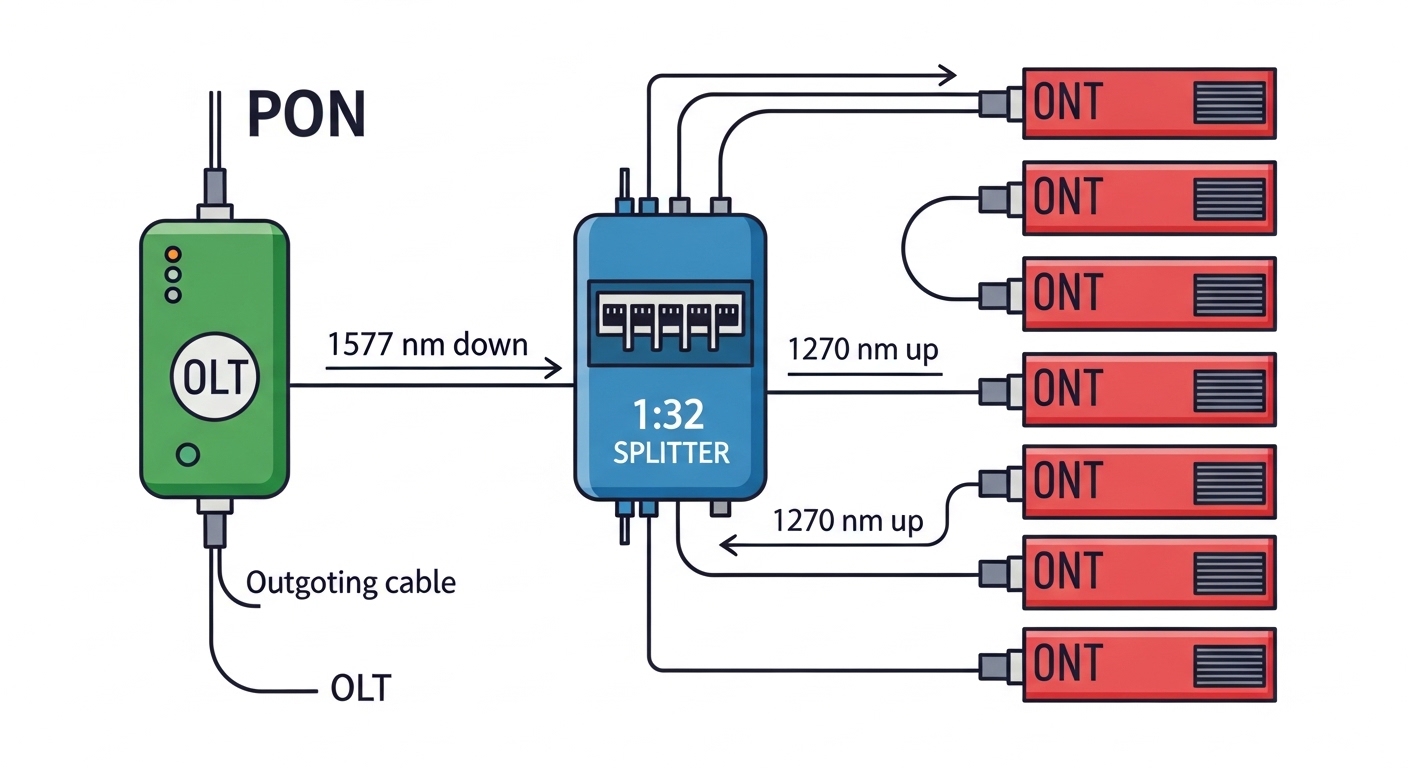
Different vendors publish slightly different numbers, but you should expect the same broad envelope: downstream in the 1577 nm band, upstream around 1270 nm, and power levels that fit the XGS-PON optical budget. Also check DOM support (temperature, voltage, bias current, sometimes received power) because operations teams rely on it for preventive maintenance.
| Spec | Typical XGS-PON SFP+ target | Why it matters |
|---|---|---|
| Downstream wavelength | ~1577 nm | Matches OLT transmit band for XGS-PON |
| Upstream wavelength | ~1270 nm | Matches ONT transmit band for XGS-PON |
| Data rate | 10G down / 2.5G up | Ensures correct PON framing and line rates |
| Connector | LC (often) | Prevents patching mistakes with wrong fiber types |
| DOM | Usually supported (vendor-dependent) | Used by NOC for aging and alarm thresholds |
| Temperature range | Often 0 to 70 C or -40 to 85 C | Matters for outdoor cabinets and high-heat rooms |
Reference points for standards and behavior include IEEE 802.3 guidance for Ethernet physical layers and vendor datasheets for exact optical budgets and safety limits. [Source: IEEE 802.3] [Source: Vendor transceiver datasheets]
Real-world deployment scenario: where bad optics show up fast
In a 3-tier regional access network, you might deploy a rack-mounted OLT with 48 to 96 PON ports, each feeding a 1:32 splitter to customer ONTs across a 6 km fiber reach. Assume a realistic plant with 0.35 dB/km attenuation and connector/splice loss totaling 3 dB per branch. During cutover, you plug a candidate 10G PON module into a port, see the OLT port state change to “up,” and then the ONTs fail ranging repeatedly. The root cause is often subtle: transmit power outside the OLT’s supported XGS-PON envelope, wrong optical class, or missing DOM fields that the OLT uses for alarm and register logic.
In the field, engineers typically confirm with a handheld optical power meter at the demarc when accessible, verify splitter loss assumptions, and check OLT logs for ranging and LOF/LOS style events. If you can’t measure end-to-end power, at least validate the module’s vendor-claimed optical budget and temperature grade against your environment.
Pro Tip: If the OLT shows the port as “link up” but all ONTs stay in “unregistered,” focus less on fiber continuity and more on XGS-PON optical compliance: wrong wavelength band, out-of-spec launch power, or DOM mismatch can allow optical presence yet prevent correct ranging and timing lock.
Selection checklist for a 10G PON module in XGS-PON
Use this ordered checklist so you don’t burn a day swapping optics after the first failed activation.
- Distance and splitter ratio: confirm your total loss budget (fiber attenuation + splice/connector loss + splitter insertion loss).
- OLT switch compatibility: verify the exact OLT model supports that SFP+ part number (not just “SFP+”).
- Wavelength and optical class: ensure the module is explicitly XGS-PON (downstream around 1577 nm, upstream around 1270 nm).
- DOM support and thresholds: confirm DOM works and matches what the OLT expects for alarms and provisioning.
- Operating temperature: match indoor rack specs or outdoor cabinet grades; verify it survives real ambient swings.
- Vendor lock-in risk: if you need third-party modules, test one port in a staging OLT before scaling.
- Lead time and spares strategy: keep one verified spare per OLT chassis type for faster MTTR.

Common mistakes and troubleshooting tips
1) Mistake: using a generic 10G SFP+ (Ethernet) module
Root cause: Ethernet optics are not XGS-PON compliant; they may transmit/receive at different bands or framing assumptions.
Solution: only install optics explicitly labeled for XGS-PON and confirm with the OLT compatibility list.
2) Mistake: ignoring optical budget math
Root cause: higher-than-expected splitter loss, extra patching, or aging splices push received power below sensitivity.
Solution: recalculate loss using measured fiber attenuation where possible; verify splitter insertion loss and number of connectors/splices.
3) Mistake: assuming DOM presence equals DOM compatibility
Root cause: some third-party modules report different DOM data formats or alarm thresholds that trigger provisioning failures.
Solution: test in a staging port; compare DOM readings and OLT event logs before deploying at scale.
4) Mistake: cleaning shortcuts on LC connectors
Root cause: dirty connectors can cause intermittent LOS, especially at 1270/1577 nm where reflective contamination shows up as unstable power.
Solution: clean with lint-free wipes and approved cleaning sticks; inspect with a fiber microscope if ranging is unstable.
Cost and ROI note: what you will realistically pay
Street pricing varies by region and volume, but a verified XGS-PON SFP+ module often lands in a broad range: roughly $80 to $250 for common third-party parts, and $150 to $400 for OEM-labeled optics (numbers depend heavily on temperature grade and DOM verification). The ROI angle is simple: OEM compatibility reduces activation failures and reduces truck rolls, while third-party modules can save unit cost but increase the risk of delayed cutovers. Over a year, total cost of ownership is dominated by labor and downtime from failed ranging, not just the purchase price.
FAQ
Q: Can I use any SFP+ module for XGS-PON?
No. A 10G PON module for XGS-PON must be specifically compliant for the XGS-PON wavelengths and PON behavior, and it must match your OLT’s supported optics list.
Q: What connector type should I expect?
Most XGS-PON SFP+ optics use LC connectors. Still, confirm before installation because some deployments may use specific patch panel conventions.
Q: How do I confirm DOM works?
After insertion, check OLT diagnostics for DOM fields (temperature, voltage, bias current, and any reported power). If the OLT logs DOM-related warnings, test another module in the same port.
Q: Why do ONTs fail registration even when optical power seems present?
Common causes are out-of-spec launch power, wrong optical class, or DOM incompatibility that prevents correct ranging and timing lock. Review OLT logs for ranging failures rather than only LOS/LOS-cleared events.
Q: Are third-party 10G PON modules reliable?
They can be, but you should validate one module per OLT model in staging. If your activation success rate drops below your threshold, switch to OEM or a vetted supplier.
Q: What temperature grade should I buy?
Match the environment: standard rack