
In many HPC cluster builds, the first “mystery outage” is not the fabric software, but the optics. This article helps platform engineers and field technicians choose the right HPC cluster SFP for InfiniBand HDR and NDR fiber links, with practical compatibility checks and troubleshooting steps. You will also get a clear comparison of wavelength, reach, power, connector type, and operating temperature, plus a cost and TCO view.
Top 7 HPC cluster SFP picks for InfiniBand HDR/NDR fiber links
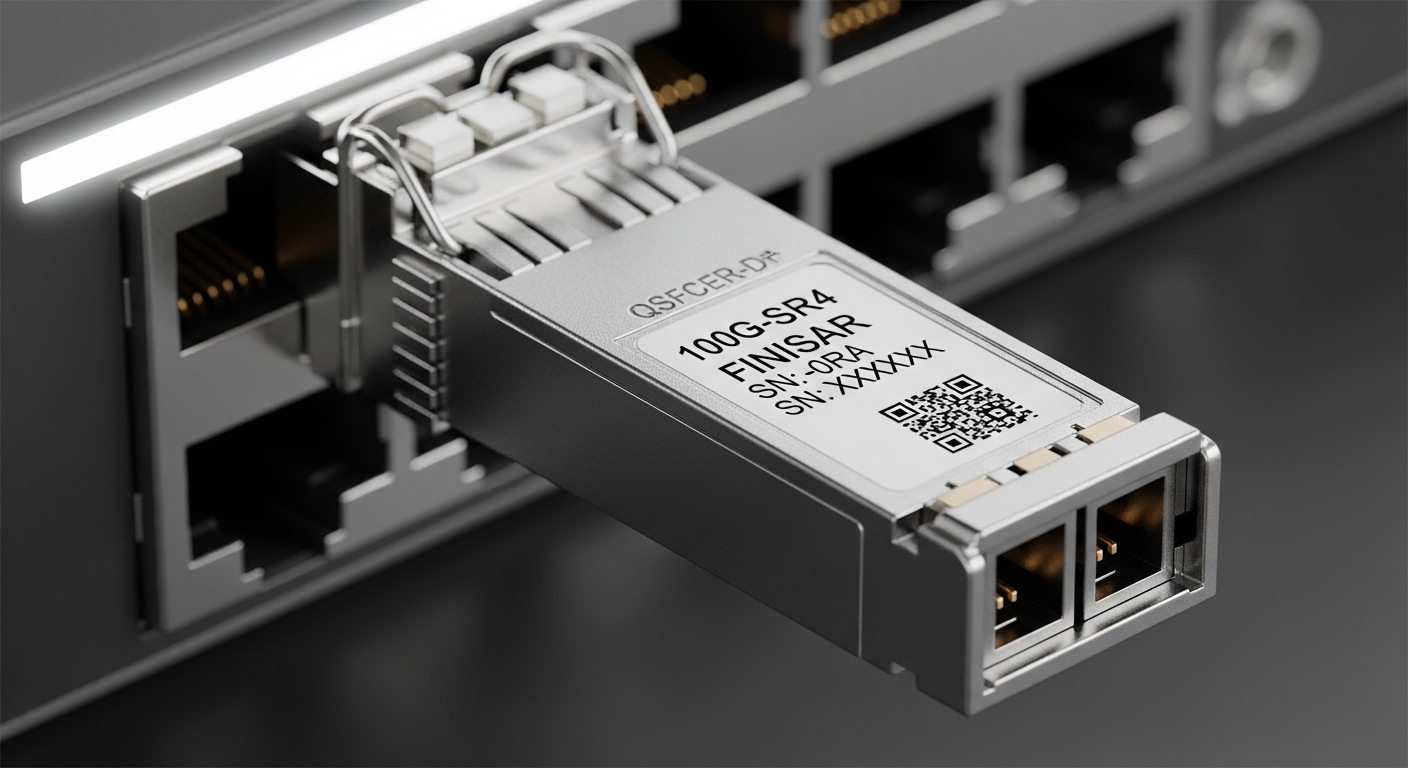
Below are the seven most common transceiver decision paths you will face when wiring an InfiniBand HDR or NDR cluster. Each item includes the key specs that actually affect link bring-up, a best-fit deployment scenario with realistic numbers, and a quick pros/cons summary. The goal is to map “what you bought” to “what will pass diagnostics” on day one.
Item 1: 100G HDR (single-lane 2x50G) SFP-style optics for short-to-mid reach
For HDR deployments, the most frequent early choice is a 100G-class fiber transceiver that matches InfiniBand HDR electrical lane mapping and optics timing. In practice, many clusters use optics compatible with IEEE 802.3-aligned optical characteristics while still relying on InfiniBand-specific link training. Field reality: you often deploy these for 50 m to 10 km depending on fiber type and transceiver class, but you must confirm the exact reach rating in the vendor datasheet.
Key specs to verify: wavelength (commonly 850 nm for MMF or 1310/1550 nm for SMF), connector (LC is typical), DOM support, and temperature range. If you are using MPO/MTP trunking, verify polarity expectations and whether the module expects a fixed polarity mapping.
Best-fit scenario: A 3-tier data center leaf-spine design for HPC storage access, where ToR switches connect to spine switches with 48 ports at 100G, and the average switch-to-switch path is 80 m of OM4 fiber in a controlled cable tray. In this case, you want low-cost MMF optics with deterministic polarity handling and stable DOM reporting.
- Pros: typically lower cost than long-reach optics; fast to deploy in structured cabling.
- Cons: reach is fiber-dependent; polarity mistakes cause link flaps.
Item 2: 200G NDR (single module) optics for high-density spine fabrics
NDR moves you into higher aggregate throughput per port, which changes the thermal and power budget. When engineers say “our NDR optics are unstable,” the root cause is often not the optics alone but the combined thermal envelope of the port cage, airflow, and module power draw. Select an HPC cluster SFP equivalent that supports the correct InfiniBand NDR electrical interface and includes verified DOM thresholds.
Key specs to verify: data rate compliance for NDR, optical wavelength, and the module’s maximum optical power and receiver sensitivity as stated in the datasheet. Also confirm whether your switch platform expects a specific transceiver type and whether it enforces compatibility via EEPROM vendor IDs.
Best-fit scenario: A production HPC cluster with 64-spine x 128-leaf connectivity, where each spine has 96 NDR ports and the path length averages 300 m across campus-style structured cabling. Here, long-reach SMF optics with robust DOM telemetry reduce time-to-isolate when a single cable segment degrades.
- Pros: higher throughput per port; better scaling for leaf-spine fabrics.
- Cons: higher module power and stricter thermal management requirements.
Item 3: SMF long-reach optics for NDR over campus or inter-rack routes
When your cable plant includes higher-loss segments, SMF optics become the safer engineering choice. For InfiniBand NDR, the reach you can claim is only valid under a defined fiber type and link budget. Pay attention to the datasheet’s assumed fiber attenuation (dB/km), connector loss, and whether the module is specified for a particular launch condition.
Key specs to verify: wavelength band (often 1310 nm or 1550 nm depending on class), maximum reach under worst-case link budget, and the optical safety class of the module. If you have to run through high-density patch panels, validate insertion loss and number of mated connectors.
Best-fit scenario: An HPC cluster spanning two adjacent rooms with a consolidated patch area. You have 1.5 dB worst-case per patch panel assembly and a typical path of 1.2 km of SMF. SMF long-reach optics with conservative link budgets reduce the probability of “works at install, fails after retest” behavior caused by patch churn.
- Pros: supports longer distances; more consistent performance over mixed patching.
- Cons: higher cost; requires careful safety and fiber handling procedures.
Item 4: MMF short-reach optics for dense ToR-to-server or ToR-to-topology fanout
MMF short-reach optics are popular in dense clusters because they keep optics cost low and installation straightforward. However, the “gotcha” is that MMF reach depends heavily on OM grade, patch panel quality, and bend radius during installation. If your cable trays are tight or you reuse aged patch cords, you can lose margin quickly.
Key specs to verify: OM3 vs OM4 vs OM5 compatibility, connector type (LC duplex vs MPO/MTP), and whether the module includes a standardized DOM implementation. Also confirm the module’s operating temperature range; in some airflow-starved racks, the module reaches the high end of its spec even when ambient looks safe.
Best-fit scenario: A rack-dense HPC deployment with 42U servers where each ToR switch has 48 ports at 100G and the average cable run to server NICs is 12 m. With OM4 patching and strict bend radius control, MMF optics deliver stable link training and predictable serviceability.
- Pros: economical; excellent for short runs; easy to label and replace.
- Cons: sensitive to patch quality; bend radius and polarity errors are common.
Item 5: DOM-enabled optics with deterministic telemetry for fast isolation
DOM support is often treated as optional until you are troubleshooting intermittent CRC errors across hundreds of links. For HPC clusters, you want optics with DOM that exposes key parameters such as transmit power, receive power, temperature, and bias current. This enables a measurable approach: correlate CRC rates with receive power droop and identify failing patch segments.
Key specs to verify: DOM standard (commonly SFF-8472 for many generations; verify platform support), telemetry update behavior, and whether the switch reads DOM into standardized fields. Also check whether your monitoring stack expects specific thresholds for alarms.
Best-fit scenario: A 10,000-port cluster where you run daily link health audits. When a subset of NDR links shows rising errors, DOM data lets you isolate a patch panel that has drifted insertion loss by a few tenths of dB — enough to trigger marginal receiver operation.
- Pros: accelerates root cause analysis; reduces mean time to repair.
- Cons: requires monitoring integration; some third-party optics can present nonstandard DOM behavior.
Item 6: Vendor-validated optics to reduce compatibility and EEPROM enforcement risk
Many switch platforms enforce transceiver compatibility by reading EEPROM fields and vendor identifiers. This is not just a procurement issue; it can directly affect whether the port comes up, how link training behaves, and whether the switch applies the correct electrical equalization. If you choose third-party optics, validate compatibility in a staging environment before scaling.
Key specs to verify: switch vendor compatibility list, EEPROM fields (vendor ID, part number mapping), and whether the module meets the electrical interface requirements for HDR/NDR. If you are using OEM optics, verify that they are not “functionally compatible” only in one firmware version.
Best-fit scenario: A government or regulated environment that mandates change-control. You must demonstrate that all optics meet platform acceptance tests. Using vendor-validated modules for initial deployment reduces commissioning time and audit overhead.
- Pros: higher probability of first-try bring-up; fewer firmware-specific surprises.
- Cons: higher unit cost; potential vendor lock-in.
Item 7: Power and thermal envelope optimized modules for high-density NDR cages
Thermal constraints are a silent limiter in high-density optics deployments. NDR-class optics can dissipate enough heat that port-to-port airflow interference becomes a limiting factor, especially in front-to-back hot aisle designs. Treat optics selection as part of your cooling design: confirm maximum module power and ensure your airflow meets the platform requirements.
Key specs to verify: module power consumption (TX and RX portions), maximum case temperature, and the switch’s recommended airflow and fan speed settings. Also check whether the vendor datasheet provides derating guidance under elevated temperature.
Best-fit scenario: A cluster with NDR line cards in a constrained cold aisle where measured inlet air temperature rises to 28°C during peak utilization. By selecting thermally optimized optics and adjusting fan curves, you prevent receiver margin collapse and reduce error bursts.
- Pros: fewer intermittent link errors under load; better long-term reliability.
- Cons: may require airflow changes; can increase BOM complexity.
HDR vs NDR optics: the specs that actually decide link success
HDR and NDR are not interchangeable, even when they share similar connector types and form factors. The decisive factors are wavelength and reach, but also receiver sensitivity, transmitter power, and the module’s electrical/optical compliance for the exact InfiniBand generation. Always cross-check against the vendor datasheet and the switch vendor’s supported optics list.
| Spec | Typical HDR fiber optics | Typical NDR fiber optics | What to check in your environment |
|---|---|---|---|
| Data rate | 100G-class (InfiniBand HDR) | 200G-class (InfiniBand NDR) | Ensure your switch port is rated for HDR vs NDR optics |
| Wavelength | Often 850 nm (MMF) or 1310/1550 nm (SMF) | Often 1310/1550 nm (SMF) with specific classing | Match to your fiber plant and loss budget |
| Connector | LC duplex or MPO/MTP (varies by class) | LC duplex or MPO/MTP (varies by class) | Verify polarity mapping and patch panel type |
| Reach | Fiber-dependent; commonly tens of meters (MMF) to kilometers (SMF) | Fiber-dependent; often longer reach for NDR SMF classes | Use worst-case budget including connectors and splices |
| DOM telemetry | Commonly supported; verify platform ingestion | Commonly supported; verify thresholds and alarms | Enable monitoring to detect receive power droop early |
| Operating temperature | Vendor-defined; confirm for cage airflow conditions | Vendor-defined; often stricter in NDR density | Check derating behavior at high inlet temps |
| Power draw | Lower than NDR in most implementations | Higher power; impacts thermals and PSU margins | Validate cooling and power budgets per line card |
Standards context: While InfiniBand defines link behavior, optics and electrical characteristics are often aligned with broader Ethernet optical frameworks. For baseline optical and management concepts, IEEE 802.3 and SFF transceiver management references are commonly used when interpreting vendor claims. See [Source: IEEE 802.3] and [Source: SFF Committee] for background on optical interfaces and management concepts. For vendor-specific HDR/NDR compliance, rely on the module datasheets and switch vendor compatibility lists.
Pro Tip: In the field, engineers often discover that “reach is fine” yet links still fail because connector contamination and polarity are eroding the receiver margin. Add a pre-commissioning step: inspect every MPO/MTP polarity key and clean LC/MPO endfaces with validated procedures before you trust the link budget math.
Selection checklist for HPC cluster SFP procurement
Use this ordered checklist during qualification. It is optimized for bring-up speed and for minimizing rework after you rack and cable at scale.
- Distance and fiber loss budget: Use worst-case attenuation plus connector and splice losses. Confirm against the exact reach class in the datasheet.
- InfiniBand generation match: HDR optics are not automatically NDR-ready. Validate that the module is explicitly supported for your InfiniBand mode and switch firmware.
- Switch compatibility and EEPROM enforcement: Confirm the switch vendor’s supported optics list; test a small batch in staging.
- DOM support and telemetry mapping: Verify DOM fields are readable and that your monitoring stack interprets alarms correctly.
- Operating temperature and airflow: Ensure both module and switch port cage operate within spec at measured inlet air temperatures under load.
- Connector and polarity strategy: Standardize LC duplex vs MPO/MTP and enforce polarity labeling and patch panel standards.
- Vendor lock-in risk and lifecycle: Evaluate OEM vs third-party. Ask about availability windows, warranty terms, and end-of-life timelines.
Common mistakes and troubleshooting tips in HDR/NDR optics
These failure modes show up repeatedly during commissioning and later during maintenance windows. Each one includes a root cause and a practical solution you can apply quickly.
Link comes up intermittently, CRC/BER rises under load
Root cause: Receiver margin is being consumed by excess loss (dirty connectors, aged patch cords, or unaccounted splice loss), and heat reduces sensitivity. Even if the link trains, it can become marginal as temperature increases.
Solution: Clean connectors with an approved endface cleaner, verify polarity, and measure optical receive power with a calibrated meter. Compare measured values against DOM transmit/receive readings and vendor sensitivity expectations.
Port stays down after insertion, or switch reports “unsupported transceiver”
Root cause: EEPROM vendor ID and part mapping do not match what the switch firmware expects, or the port is not configured for the correct mode.
Solution: Confirm the switch model supports the optics part number for your firmware. Use vendor validation or stage-test third-party optics in a lab. Re-seat the module and verify the cage connector alignment, then check switch logs for explicit transceiver rejection messages.
Works on day one, fails after patch panel changes
Root cause: Polarity mapping errors with MPO/MTP trunks, or a patch panel assembly with incorrect keying. This can silently pass link training with reduced margin, then fail when traffic patterns change.
Solution: Standardize polarity labeling (including MPO key orientation), verify patch panel wiring with a polarity tester, and run a deterministic BER test after every patch change. Keep a record linking each port to a specific patch panel and polarity standard.
Overheating symptoms: errors increase as fan speeds change
Root cause: Airflow short-circuiting or blocked intake vents causes module temperature to exceed the specified operating range, leading to derating and unstable optical output.
Solution: Measure inlet air temperature and module cage temperatures during peak load. Adjust airflow configuration, remove obstructions, and verify that the hot aisle containment is functioning as designed.
Cost and ROI note: OEM vs third-party optics for HPC cluster SFP
Pricing varies widely by reach class, DOM support, and vendor validation. In many deployments, OEM optics cost more per unit but reduce commissioning time and compatibility risk, which can be decisive when you have tight maintenance windows. Third-party modules can reduce BOM cost, but plan for qualification labor, staging tests, and potential downtime if EEPROM enforcement differs by firmware revision.
Realistic budget ranges (typical market observation, not a guarantee): short-reach optics for HDR-class links may land in the low hundreds of USD per module, while NDR-class long-reach optics can be several times higher depending on the fiber class and vendor. TCO should include: labor for testing, cleaning supplies, spares stocking strategy, and the cost of a failed link event (including engineer time and potential job disruption).
For ROI, the best approach is often a hybrid: use OEM optics for the first wave and for the most critical paths, then qualify third-party spares once telemetry and compatibility are proven in your specific switch firmware and monitoring stack.
Summary ranking table: which HPC cluster SFP path to choose first
Use this ranking table to decide quickly. “Best first” assumes you want reliable bring-up with minimal rework under typical HPC commissioning constraints.
| Rank | Optics decision path | Best for | Primary risk | Best validation step |
|---|---|---|---|---|
| 1 | DOM-enabled optics | Fast isolation and measurable link health | Monitoring misalignment | Confirm DOM fields and alarm thresholds in your telemetry system |
| 2 | Switch-validated optics (EEPROM-safe) | First-wave commissioning stability | Firmware compatibility rejection | Stage-test the exact part number on the exact firmware |
| 3 | MMF short-reach optics | Dense racks with short runs | Patch polarity and connector contamination | Polarity and endface inspection before traffic tests |
| 4 | SMF long-reach optics | Campus or inter-rack distances | Link budget optimism | Measure receive power at commissioning and validate worst-case budget |
| 5 | Thermal envelope optimized modules | High-density NDR cages | Airflow short-circuiting | Thermal measurement under peak load |
| 6 | 200G NDR module path | Spine fabrics needing higher per-port throughput | Power and thermal complexity | Validate port power and airflow assumptions |
| 7 | 100G HDR short-to-mid reach path | Cost-sensitive deployments | Reach drift from patch aging | Verify fiber grade and patch cord quality |
FAQ
What does an “HPC cluster SFP” mean for InfiniBand HDR and NDR?
In many HPC designs, engineers use “SFP” loosely to refer to the pluggable transceiver concept, even when the physical form factor may be SFP-compatible or SFP-like in the platform. For InfiniBand HDR and NDR, you must confirm the exact module type supported by your switch port and firmware, not just the connector shape.
How do I confirm reach for an HDR or NDR fiber link?
Use the vendor datasheet reach class and combine it with your measured worst-case loss budget. Include fiber attenuation, connector mated loss, patch panel insertion loss, and any splices. Then validate with commissioning measurements: DOM receive power and a BER/CRC health test under realistic traffic.
Are third-party optics safe to use in production HPC clusters?
They can be
