
In modern data centers, a single mismatched optic can turn a clean rollout into days of link flaps. This article helps network engineers and field technicians choose and deploy QSFP56 QSFP112 transceiver optics for 200G and 400G connectivity, with practical checks you can perform on the bench and in racks. You will get step-by-step commissioning guidance, a specs comparison table, and troubleshooting paths grounded in real vendor interoperability behavior. Updated for current deployment practices as of 2026-04.
Prerequisites before you touch a QSFP56 QSFP112 transceiver
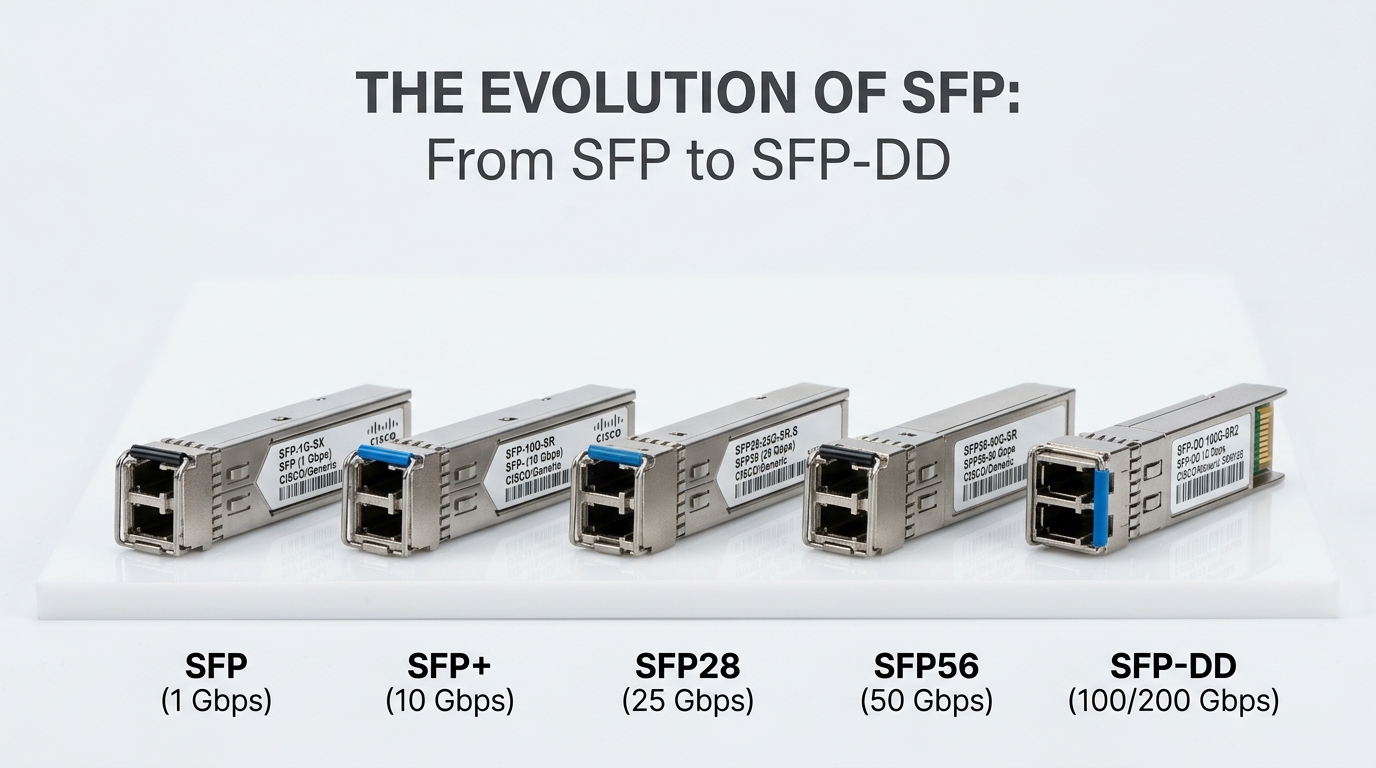
Before installing any QSFP56 or QSFP112 optics, confirm that both the switch ports and your fiber plant are designed for the same signaling and lane mapping. A QSFP56 form factor typically carries 56 Gbps-class lanes per device, while QSFP112 is commonly used for higher aggregate rates and specific vendor implementations. Your goal is not just “it fits,” but “it negotiates safely and stays within optical power and temperature limits.”
What you should have on hand
- Switch model documentation for port optics support (for example, Cisco Nexus or Arista platforms with explicit QSFP56/QSFP112 lists).
- Approved optic part numbers from the switch vendor or the transceiver’s vendor datasheet.
- Fiber plant details: OM4/OM5 type, core size, patch panel loss, and route length.
- Optical test tools (optional but ideal): a light source and power meter, or an OTDR workflow for troubleshooting.
- Console access to the switch to verify link state and optics diagnostics.
Operational limits you must respect
In practice, optics failures often come from exceeding link budget or running transceivers outside their specified temperature and power envelope. Always verify the operating temperature range from the datasheet and ensure the chassis airflow matches the vendor’s recommended front-to-back or side-to-side flow. If your deployment uses high-density top-of-rack (ToR) layouts, watch for local hot spots near the port bank.
Step-by-step deployment for 200G and 400G links
This section treats each rollout like a field procedure: verify compatibility, stage optics, connect fiber correctly, and confirm link integrity. The same discipline applies whether you are using OEM optics (for example, Cisco-branded modules) or third-party optics such as Finisar or FS.com units, but the verification steps are where downtime is prevented.
Confirm switch port compatibility and lane mapping
Start by mapping your intended speed to the port capability. Many modern switches support 200G and 400G using different lane groupings, and the optic’s internal lane count must align with the switch’s expected breakout mode. Use the switch CLI to check the port’s configured speed and supported optics types. For example, on platforms that expose port diagnostics, you should see whether the port expects QSFP56 at 200G or a particular QSFP112 configuration at 400G. If the switch requires a specific optical type, an “it lights up” outcome can still be a silent negotiation mismatch.
Expected outcome: You can state, per port, the exact required optic type and speed setting before you insert anything.
Choose transceiver optics by wavelength and reach class
Pick the correct transceiver variant for your fiber and target distance. For short and medium reach in data centers, common choices include 850 nm multimode optics (often MPO/MTP connectors) and 1310 nm or 1550 nm variants for longer reach over single-mode. When selecting a QSFP56 QSFP112 transceiver, confirm that the wavelength, reach, and connector type match the fiber plant and patching method.
Validate connector and polarity conventions
For multimode MPO/MTP links, polarity rules vary by system design. Ensure your patch cords follow the vendor-specified polarity mapping (for example, MPO polarity “A” vs “B” conventions) and that transmit lanes align with receive lanes. For single-mode SC or LC connections, polarity is typically simpler, but you still must verify that you are not cross-wiring TX and RX.
Expected outcome: Every fiber patch cord and polarity adapter matches the optic’s expected lane directionality.
Insert optics with ESD and handling discipline
Use an ESD-safe workflow: handle modules by the body, avoid touching the optical windows, and confirm that dust caps are removed only at insertion time. In dense racks, take care not to disturb neighboring modules during insertion; a slight mechanical stress on a cage can affect seating. After insertion, wait for the switch to recognize the optic and report DOM values.
Expected outcome: The switch shows the optic present and the port transitions from “no module” to “link detected” states.
Commission with explicit speed configuration and optics diagnostics
Configure port speed to the intended data rate (for example, 200G or 400G) and verify that the link comes up without continuous resets. Then check DOM (Digital Optical Monitoring) readings such as transmit power, receive power, laser bias current, and temperature. If your network uses automation, record these values as a baseline for drift detection. A stable link should show consistent receive power and no recurring CRC or FEC error storms.
Expected outcome: Link is stable for at least 15–30 minutes with no recurring interface flaps and with DOM values within datasheet thresholds.
QSFP56 vs QSFP112 for 200G and 400G: specs that actually matter
On paper, both QSFP56 and QSFP112 belong to the QSFP family, but what engineers feel is the difference in aggregate rate implementation, lane group behavior, and vendor-specific compatibility matrices. The right optic is the one whose electrical interface, optical parameters, and connector type match both the switch and the installed fiber. Below is a practical comparison of common deployment variants you will encounter in the field.
| Spec category | QSFP56 transceiver (typical) | QSFP112 transceiver (typical) |
|---|---|---|
| Target link rate | 200G class implementations common | 400G class implementations common |
| Wavelength options | 850 nm multimode; also 1310/1550 variants depending on vendor | 850 nm multimode and longer-reach variants depending on vendor |
| Reach (typical in data centers) | OM4: often ~70 m class; OM5 can extend depending on spec | OM4/OM5: often ~100 m class for 850 nm variants (check exact part) |
| Connector | MPO/MTP (8-fiber lanes typical) for multimode; LC/SC for single-mode variants | MPO/MTP configurations are common for multimode; single-mode variants use LC/SC |
| Power class | Varies by vendor; multimode 850 nm typically lower than long-haul | Varies by vendor; 400G optics may draw more under load |
| DOM support | Usually supported via I2C with temperature, voltage, bias, TX/RX power | Usually supported with similar diagnostics |
| Operating temperature | Commonly 0 to 70 C for commercial; extended options may exist | Commonly 0 to 70 C for commercial; check datasheet |
| Compatibility caveat | Must match switch’s optics table and supported breakout mode | Must match switch’s QSFP112 electrical interface expectations |
For concrete part references engineers often test during rollouts, you may see examples like Cisco SFP-10G-SR for 10G analogs, but for 200G/400G the ecosystem typically includes QSFP56/QSFP112 variants from major suppliers. Third-party optics such as Finisar and FS.com offer numerous 200G/400G QSFP56/QSFP112 options; always validate exact part number, wavelength, and connector before procurement. For standards context, consult IEEE 802.3 for Ethernet PHY behavior and vendor documentation for the specific optical interface implementation. [Source: IEEE 802.3 Ethernet specifications], [Source: vendor transceiver datasheets and switch interoperability guides].
Pro Tip: In many deployments, the fastest “is this optic compatible?” test is not the initial link-up; it is whether DOM receive power remains inside the vendor’s allowable window after the chassis reaches steady-state airflow. Insert the module, wait for temperature to equilibrate, then re-check optical power and error counters.
Selection criteria checklist engineers use before ordering
Procurement mistakes are expensive, but they are preventable. Use this ordered checklist to reduce risk when selecting a QSFP56 QSFP112 transceiver for 200G and 400G links. Each factor below maps to a failure mode you are likely to see during commissioning or later during thermal drift.
- Distance and link budget: confirm reach based on fiber type (OM4 vs OM5), patch loss, and splitter or splice counts if applicable.
- Switch compatibility: verify the exact port supports QSFP56 vs QSFP112 and the intended speed mode; consult the switch optics compatibility list.
- Wavelength and connector type: match 850 nm multimode to MPO/MTP cabling; match single-mode optics to LC/SC cabling.
- DOM and monitoring requirements: ensure the optics expose I2C DOM fields needed by your monitoring stack (thresholds, alarms, and temperature readings).
- Operating temperature and airflow: confirm 0 to 70 C (or extended) is appropriate for your enclosure and that the port bank is not starving for airflow.
- Power and thermal load: check total power per optic and confirm PSU and airflow assumptions for high-density banks.
- Vendor lock-in risk: decide whether you will standardize on OEM optics or qualify third-party modules; plan a compatibility retest process for upgrades.
- FEC and error tolerance: ensure the switch expects the same coding behavior; verify that error counters behave normally under load.
If you want a reference point for how transceiver monitoring and behavior are expected to work, cross-check vendor transceiver documentation and relevant Ethernet PHY behavior. [Source: IEEE 802.3], [Source: vendor DOM and transceiver datasheets].
Common mistakes and troubleshooting in the first 24 hours
Even careful teams encounter optic issues. Below are the top failure modes that repeatedly show up in real rollouts, including root cause and what to do next. Treat this as a triage map: identify the symptom, then jump to the likely cause.
Troubleshooting failure point 1: Link flaps immediately after insertion
Root cause: Electrical or protocol mismatch between optic and switch port mode, or a speed setting that does not align with the optic’s supported configuration. Sometimes the optics are “present” but the port is negotiating an unsupported lane mapping.
Solution: Re-check port speed and breakout mode in the switch CLI, confirm the optic type in the switch’s optics table, and reboot the port interface if your platform requires a renegotiation cycle. If you have another known-good optic, swap to isolate whether the issue is optic-specific.
Troubleshooting failure point 2: Receive power out of range or excessive optical errors
Root cause: Incorrect fiber polarity on MPO/MTP, a patch cord type mismatch, or exceeding link budget due to high patch panel loss. In single-mode, TX/RX may be swapped or connectors may be contaminated.
Solution: Inspect and clean connectors with proper lint-free wipes and approved cleaning tools, then verify MPO polarity mapping against the vendor’s guidance. If you can, measure receive power and compare to the datasheet thresholds; for persistent issues, use OTDR to confirm route loss and locate anomalous bends or bad splice regions.
Troubleshooting failure point 3: DOM alarms but link appears up
Root cause: Temperature drift after airflow stabilizes, marginal optics aging, or a monitoring threshold mismatch in your telemetry system. Some platforms may show link up while error counters quietly climb.
Solution: Allow 15–30 minutes for thermal equilibrium, then check CRC/FEC error counters and DOM thresholds. If the switch exposes optics alarms via syslog or SNMP, confirm whether the alarms correspond to real optical degradation or to a telemetry scaling issue in your collector.
Troubleshooting failure point 4 (bonus): Port reports “unsupported module” despite physical fit
Root cause: The switch uses a strict compatibility policy and rejects optics whose identification fields do not match required profiles, even when the electrical form factor is correct.
Solution: Use the switch’s approved optic list and procure the exact compatible part number. If you are using third-party modules, confirm that the module’s DOM identification aligns with the switch’s whitelist behavior.
Cost and ROI: what to budget for QSFP56 QSFP112 transceiver rollouts
Pricing varies by vendor, reach class, and connector type, but you should plan for meaningful variance between OEM and third-party optics. In many enterprise and service-provider contexts, OEM optics can cost roughly 1.5x to 3x more than qualified third-party equivalents, while third-party pricing may be lower but can carry qualification overhead. Total cost of ownership (TCO) is driven by procurement price, installation labor, compatibility retries, and the failure rate under your actual thermal and cleaning conditions.
Practical budgeting guidance: For 200G and 400G-class QSFP56/QSFP112 optics, typical street pricing ranges can span from “mid-hundreds” to “over a thousand USD per module” depending on reach (850 nm multimode often less than longer-reach single-mode). Your ROI improves when you standardize on a small set of qualified part numbers, document DOM baselines, and enforce cleaning and polarity discipline. If you run high-density racks with frequent service events, the cost of one avoidable truck roll can outweigh the savings from cheaper optics.
Expected outcome: You can justify whether to buy OEM or qualified third-party optics by comparing not only unit price, but also expected downtime risk, qualification time, and spares strategy.
FAQ for engineers buying and deploying QSFP56 QSFP112 transceivers
What fiber type should I use for QSFP56 QSFP112 transceiver 200G and 400G?
For short-reach data center links, many 850 nm multimode optics pair with OM4 or OM5 using MPO/MTP cabling. Your exact reach depends on patch panel loss, connector quality, and the transceiver’s specified link budget. Always validate with the datasheet’s reach and your installed fiber measurements rather than relying on nominal maximum meters.
How do I verify compatibility with my switch before ordering?
Check your switch vendor’s optics compatibility list and confirm the port supports the intended QSFP56 or QSFP112 type at the target speed. Then plan a lab test using the exact part number and connector type you intend to deploy. If the switch uses strict identification rules, “physically fitting” is not enough.
Do QSFP56 QSFP112 transceivers support DOM monitoring?
Most modern QSFP56 and QSFP112 transceivers support DOM via I2C, exposing temperature, voltage, bias current, and optical power. Your monitoring stack may also require specific threshold fields to generate alarms. Confirm the DOM feature set in the transceiver datasheet and test that your telemetry collector reads it correctly.
Why is link up but performance is unstable?
Common causes include incorrect polarity on MPO/MTP links, exceeding link budget, or contaminated optics connectors. Another frequent issue is a thermal condition where the optics remain “up” but error counters rise after airflow stabilizes. Verify receive power and check CRC/FEC error counters over time, not just at link-up moment.
Are third-party optics safe to use in production?
They can be safe when you qualify them against your specific switch model and port type, using the exact part number and verifying DOM and error behavior under your thermal and traffic conditions. However, compatibility varies by switch generation and sometimes by firmware revision, so plan a repeat qualification when you upgrade network software.
What is the fastest way to troubleshoot a suspected bad module?
Swap with a known-good optic of the same exact part number and connector type, then compare DOM readings and error counter trends. If the issue follows the optic, replace it; if it stays with the port, inspect fiber polarity, cleaning state, and port configuration. For MPO links, always verify polarity adapters and patch cord mapping before declaring a module defective.
If you follow the compatibility checklist, commission each link with DOM baselines, and treat fiber polarity and cleaning as first-class citizens, QSFP56 QSFP112 transceiver deployments become predictable rather than mysterious. Next, you can expand your rollout playbook with fiber polarity and MPO/MTP best practices to reduce recurring optical faults.
Author bio: I design and commission high-density network optics workflows with a field engineer mindset, focusing on measurable link budgets, DOM baselines, and airflow-aware deployment. I write interfaces and procedures that keep optics, cabling, and telemetry aligned so teams ship faster with fewer surprises.
