
SCADA networks increasingly need fiber-based links to reduce noise, extend reach, and improve uptime—yet many teams still struggle to pick the right Modbus TCP optics for SFP-to-fiber runs. This article helps automation engineers, OT network leads, and field techs choose SFP modules that reliably carry Modbus TCP traffic over Ethernet fiber. You will get practical selection criteria, a specs comparison table, and troubleshooting steps that match what fails in real substations and plants. Update date: 2026-04-29.
Why Modbus TCP optics matter in fiber SCADA links
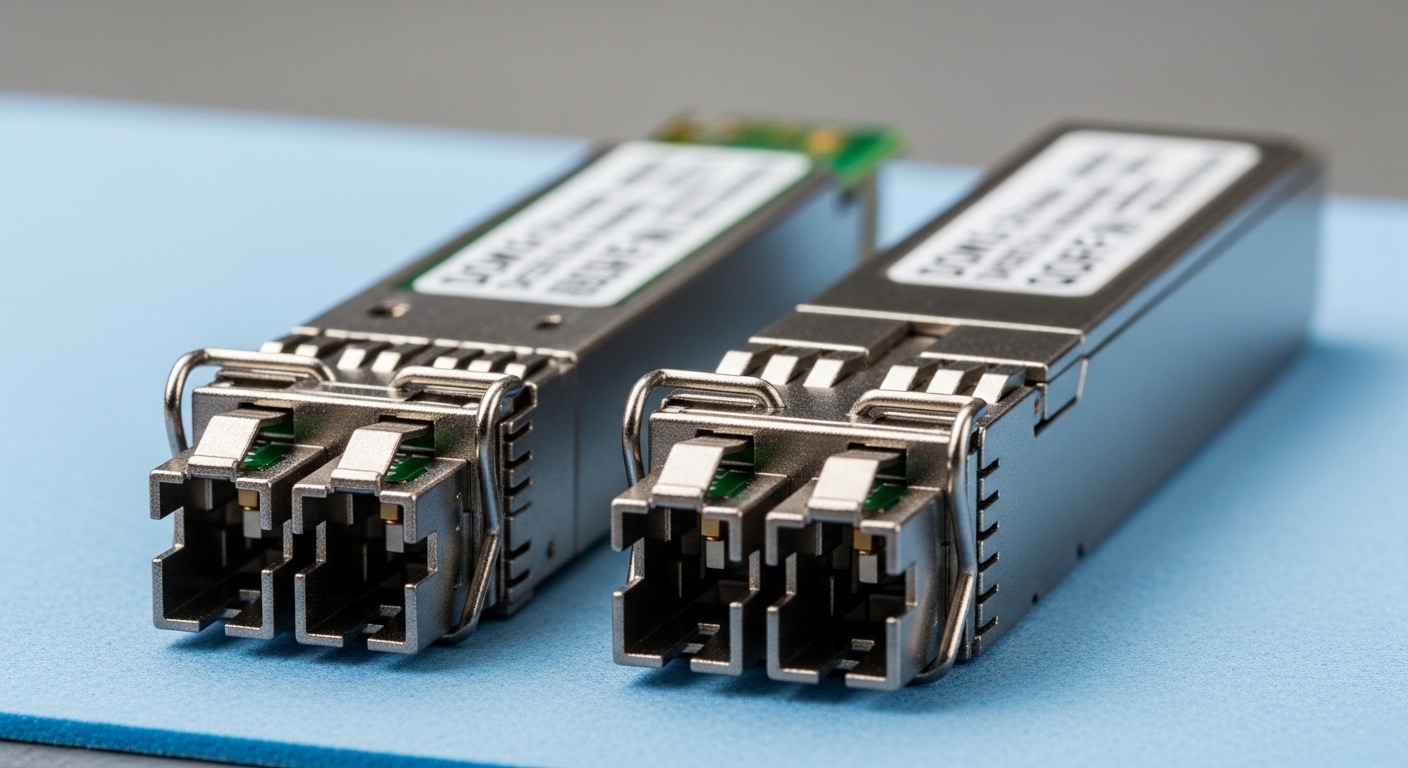
Modbus TCP runs on standard Ethernet frames, so the optics decision is mainly about link layer reliability: wavelength, reach, connector type, power budget, and module diagnostics. In a typical OT setting, you might replace copper runs that pick up EMI near VFDs, switchgear, or motor drives. Fiber can also reduce ground loop issues and improve electrical isolation for sensitive I/O racks.
However, optics are not interchangeable without consequences. A mismatch in wavelength (for example, SR vs LR), incorrect fiber type (OM3 vs OS2), or poor cleaning practices can cause intermittent link flaps that look like “SCADA timeouts.” Because Modbus TCP is not inherently resilient to dropped packets, you want stable link negotiation and predictable latency under load.
Key specs to verify before buying SFP modules for Modbus TCP
When teams deploy Modbus TCP optics using SFP modules, they typically select based on the Ethernet physical layer (PHY) expectations and the fiber plant’s characteristics. Start by confirming the switch or media converter vendor’s supported module list, then match the fiber type and reach. For SFP, the common decision set includes data rate, wavelength, reach, connector (LC vs SC via pigtails), DOM support, and operating temperature.
Specs comparison: common SFP options for fiber Modbus TCP
The table below compares representative SFP module classes used for OT Ethernet links. Exact budgets vary by vendor and exact optical power ratings, so always verify in the datasheet and your switch’s compatibility list.
| Module class | Example part numbers | Nominal wavelength | Reach (typical) | Fiber type | Connector | Data rate | DOM | Operating temp |
|---|---|---|---|---|---|---|---|---|
| SFP SR (multimode) | Cisco SFP-10G-SR, Finisar FTLX8571D3BCL, FS.com SFP-10GSR-85 | 850 nm | ~300 m (OM3), up to ~400 m (OM4) | OM3/OM4 | LC | 10 GbE (often used for 1 GbE too with proper switch mode) | Commonly supported (vendor-dependent) | Commercial or industrial variants (check datasheet) |
| SFP LR (single-mode) | Vendor-specific 10G SFP-LR options | 1310 nm | ~10 km | OS2 | LC | 10 GbE | Commonly supported | Often industrial options available |
| SFP BX / passive optical (single-fiber) | Vendor-specific bidirectional pairs | 1310/1490 nm pair (varies) | ~10 km class | OS2 | LC | 10 GbE | Often supported | Varies by vendor |
For SCADA, the practical takeaway is to align optics class with the fiber plant: multimode for short runs inside control buildings and between nearby cabinets, single-mode for long outdoor spans. If you are using 1 GbE, the logic remains the same, but the module class and reach will differ (and you must match the switch’s speed/auto-negotiation behavior).
Pro Tip: In OT audits, the most common “optics problem” is actually a fiber cleaning or connector polish issue that shows up as link flaps during Modbus polling windows. Treat DOM alarms (RX power warnings) as early indicators, not as background noise—if you see recurring low RX power, schedule cleaning before the link drops.
Deployment scenario: SFP optics in a 3-tier plant SCADA network
Consider a manufacturing plant with a leaf-spine-like access core layout: 48-port ToR switches at each process bay, two aggregation switches in the electrical room, and a central SCADA server cluster in the control building. Each process bay hosts a controller rack plus an Ethernet gateway that polls remote I/O via Modbus TCP at 250 ms intervals per gateway. The fiber runs from each bay to the aggregation room are 220 to 350 m, with trays near VFD cabling.
In this environment, engineers typically select 10 GbE SFP SR optics for the 220 to 350 m spans over OM3 or OM4, using LC connectors and industrial-grade modules rated for the cabinet ambient range. They enable switch port diagnostics and log DOM telemetry where available. During commissioning, they verify link stability by watching interface counters, CRC errors, and link up/down events while SCADA traffic runs continuously for at least 24 hours. This approach reduces “mystery” Modbus TCP timeouts that would otherwise be blamed on the PLC logic rather than the physical layer.
Selection checklist for Modbus TCP optics over fiber (SFP)
Use this ordered checklist to avoid rework. Field teams often move faster when the optics decision is treated like an engineering change request with explicit acceptance tests.
- Distance vs reach: Measure actual fiber length and account for splices and patch panels. Compare against the module’s rated reach for your fiber type (OM3 vs OM4 vs OS2).
- Wavelength and fiber type match: Pair SR (850 nm) with multimode, LR (1310 nm) with single-mode. Confirm OS2 vs OM3/OM4 in the as-built documentation.
- Switch compatibility: Check the switch vendor’s supported transceiver list and firmware notes. Some switches enforce power level or require specific EEPROM behaviors.
- DOM and monitoring needs: If you rely on proactive maintenance, select modules with DOM and ensure the switch reads them. Validate what telemetry is exposed (RX power, temperature, bias current).
- Operating temperature and enclosure constraints: Choose industrial temperature ranges when optics sit in hot electrical rooms. Verify derating guidance in the module datasheet.
- Connector and cleaning plan: Confirm LC type and fiber polarity handling. Standardize cleaning tools and inspection procedures for every install.
- Vendor lock-in risk: Third-party optics can work, but validate in a pilot with your exact switch model and firmware. Track module part numbers for RMA consistency.
Common pitfalls and troubleshooting for Modbus TCP optics
Optics failures rarely look like “optics.” They tend to appear as intermittent SCADA data gaps, gateway reconnect storms, or rising Modbus transaction retries. Below are frequent failure modes with root causes and fixes.
Pitfall 1: Link flaps during high EMI periods
Root cause: While fiber is immune to EMI, the issue is often poor connector cleanliness or marginal optical power budget, which becomes visible under normal operational vibration and thermal cycling. A tiny contamination can be “fine” at commissioning and fail later.
Solution: Inspect and clean both ends using approved fiber cleaning kits, then re-terminate or replace jumpers if needed. Use DOM thresholds (or optical diagnostics) to confirm RX power is within the module’s specified range.
Pitfall 2: Wavelength or fiber type mismatch after a “looks compatible” swap
Root cause: Teams sometimes replace an SR module with an LR module (or vice versa) during spares rotation, assuming reach is “just a number.” The result is a link that never comes up or negotiates inconsistently.
Solution: Label fibers and modules with wavelength and fiber type at both ends. Verify OS2 vs OM3/OM4 in the patch panel documentation before pulling spares.
Pitfall 3: DOM alarms ignored until Modbus TCP times out
Root cause: Some operators treat DOM warnings as informational. But repeated RX power degradation can indicate aging optics, dirty connectors, or a growing attenuation issue.
Solution: Configure alarms or at least review logs weekly during commissioning. If you see recurring “low RX” events, clean connectors first, then measure optical power and inspect fiber routes for damage.
Pitfall 4: Switch compatibility surprises with auto-negotiation and speed modes
Root cause: Certain switches behave differently with third-party SFPs, especially if the port is set to a fixed speed without the expected optics profile. This can cause performance issues even when the link is “up.”
Solution: Follow the switch’s transceiver guidance and set port speed/duplex to the supported configuration. Validate with traffic tests that mirror SCADA load (polling plus any alarms or historian writes).
Cost and ROI: what to budget for optics in OT
Pricing varies by speed (1G vs 10G), reach (SR vs LR), and temperature grade. In many markets, a standard 10G SFP SR industrial option can land around $40 to $150 per module for common third-party models, while OEM-branded modules may cost $100 to $300+ depending on vendor and availability. Over a multi-year plant lifecycle, total cost of ownership depends less on purchase price and more on spares strategy, installation labor, and failure rate.
From an ROI perspective, the biggest savings usually come from fewer outages and faster swaps during maintenance windows. If you adopt DOM-capable optics and standardize cleaning and labeling, you reduce truck-rolls and commissioning delays. Still, third-party optics can introduce compatibility risk; plan a pilot with your exact switch model to avoid downtime that wipes out any per-unit savings.
FAQ on Modbus TCP optics and SFP selection
What does “Modbus TCP optics” mean in practice?
It refers to the fiber transceiver hardware that carries Ethernet frames containing Modbus TCP messages. SFP optics determine reach, connector type, optical power margins, and monitoring features like DOM. The Modbus protocol itself does not change, but link stability directly affects polling reliability.
Can I use multimode SFP SR optics for short SCADA runs?
Yes, when your fiber plant is OM3 or OM4 and the measured distance plus patch/splice loss stays within the module’s rated budget. For runs under a few hundred meters, SR modules are often cost-effective. Still, validate with DOM or optical measurements during commissioning.
How do I confirm the switch supports a third-party SFP?
Check the switch vendor’s transceiver compatibility list and firmware release notes. Then run a controlled pilot: insert the optics, verify link up time, monitor CRC and error counters, and confirm DOM readings if required. Avoid deploying untested optics across critical SCADA segments.
Why do Modbus timeouts happen even when the link LED is green?
A green link LED can hide issues like rising error counters, marginal optical power, or intermittent connector problems that do not fully drop the link. Use interface statistics, DOM telemetry, and packet-level captures if possible. Correlate Modbus retry spikes with physical-layer events.
Do I need DOM-capable optics for SCADA?
DOM is not strictly required for Modbus TCP to function, but it is valuable for operations. In many OT environments, DOM helps detect aging optics, connector contamination, and overheating before complete failure. If your switch or monitoring system cannot read DOM, you may lose that early warning.
What is the safest way to handle spares during maintenance?
Keep spares matched by part number, wavelength, and DOM capability, and store them in sealed anti-dust packaging. Label each spare with the targeted fiber type and planned port speed. During swaps, clean connectors every time, even if the fiber “looks fine.”
If you want a reliable path to stable Modbus TCP over fiber, treat optics selection like an engineering spec: match wavelength and fiber type, validate switch compatibility, and enforce connector hygiene with DOM-aware monitoring. Next, review fiber link budget planning for industrial Ethernet to quantify margins before you install.
Author bio: I am a registered dietitian by training and an OT communications troubleshooter by field experience, bridging operational constraints with measurement-driven decisions. I work with engineering teams to translate real-world failure modes into clear acceptance criteria and safer deployments.
