
A 3-tier data center upgrade rarely fails because of bad intent; it fails because the optics, switch optics budget, and fiber plant do not agree. This article follows a real rollout where we moved critical east-west traffic from 25G to a 50G optical transceiver standard (SFP56 form factor) to reduce oversubscription and extend reach without rewiring. It helps network engineers and operations teams plan compatibility checks, implementation steps, and troubleshooting, while keeping procurement and total cost realistic.
Problem / challenge: why 25G links stopped scaling
In our environment, leaf-spine switching carried storage replication and analytics bursts between racks. The leaf layer used 48-port 25G SFP28 uplinks, and the aggregation targets were frequently saturated during evening batch windows. Over-subscription ratios climbed from roughly 3:1 to 5:1 as new workloads arrived, and the team saw increased packet queueing latency on specific top-of-rack (ToR) pairs. We needed more throughput per port without replacing the entire switching fabric and without pulling new fiber for every link.
The constraint was operational: hundreds of ports had to be migrated during a limited maintenance window, and optics needed predictable behavior for link training and optics diagnostics. We also had to keep optics power and thermal load within switch module cages, since some SFP56 ports share board-level thermal zones.
Environment specs: what we measured before choosing 50G
Before procurement, we audited both the switch side and the fiber plant. On the switch side, we confirmed the vendor firmware supported SFP56 optics in the relevant port groups and that the optical power and receiver sensitivity matched the link budget. On the fiber side, we tested fiber type and condition using OTDR runs, then logged measured attenuation and connector loss per span.
We targeted two distances: short intra-row links at 100 to 150 m over OM4, and longer inter-row links at 300 to 400 m over OM4. For each candidate optics type, we checked wavelength, data rate, and connector type to ensure the physical layer matched the existing patch panels.
| Spec category | Example 50G SFP56 SR optics | Example 25G SFP28 SR optics | Why it matters |
|---|---|---|---|
| Form factor | SFP56 | SFP28 | Determines switch compatibility and cage fit |
| Data rate | 50G (often 2x25G lanes aggregated) | 25G | Impacts oversubscription and queueing |
| Wavelength | 850 nm (SR, multi-mode) | 850 nm (SR, multi-mode) | Must align with fiber type and optics class |
| Target reach | Up to ~400 m on OM4 (model dependent) | Up to ~300 m on OM4 (model dependent) | Reduces need for fiber reroutes |
| Connector | LC duplex | LC duplex | Prevents patch panel mismatch |
| Optical diagnostics | DOM (digital optical monitoring) | DOM | Enables automated alarms and thresholds |
| Operating temperature | Typically commercial or industrial grade (check vendor) | Typically commercial or industrial grade | Thermal margins in dense cages |
For specific optical candidates, we validated against vendor datasheets and real DOM behavior. Example part families in this class include Finisar/FiTLX-style 50G SR SFP56 models such as FTLX8571D3BCL and similar 50G SR SFP56 optics sold by OEM and third-party vendors; always confirm the exact revision and compliance against your switch vendor compatibility list. For standards context, the physical-layer behavior follows IEEE Ethernet requirements and platform-specific implementations; refer to IEEE 802.3 for baseline Ethernet characteristics and to vendor switch documentation for SFP56 support. IEEE 802.3 standards Switch vendor SFP56 compatibility documentation
Chosen solution: SFP56 50G SR transceivers and why they won
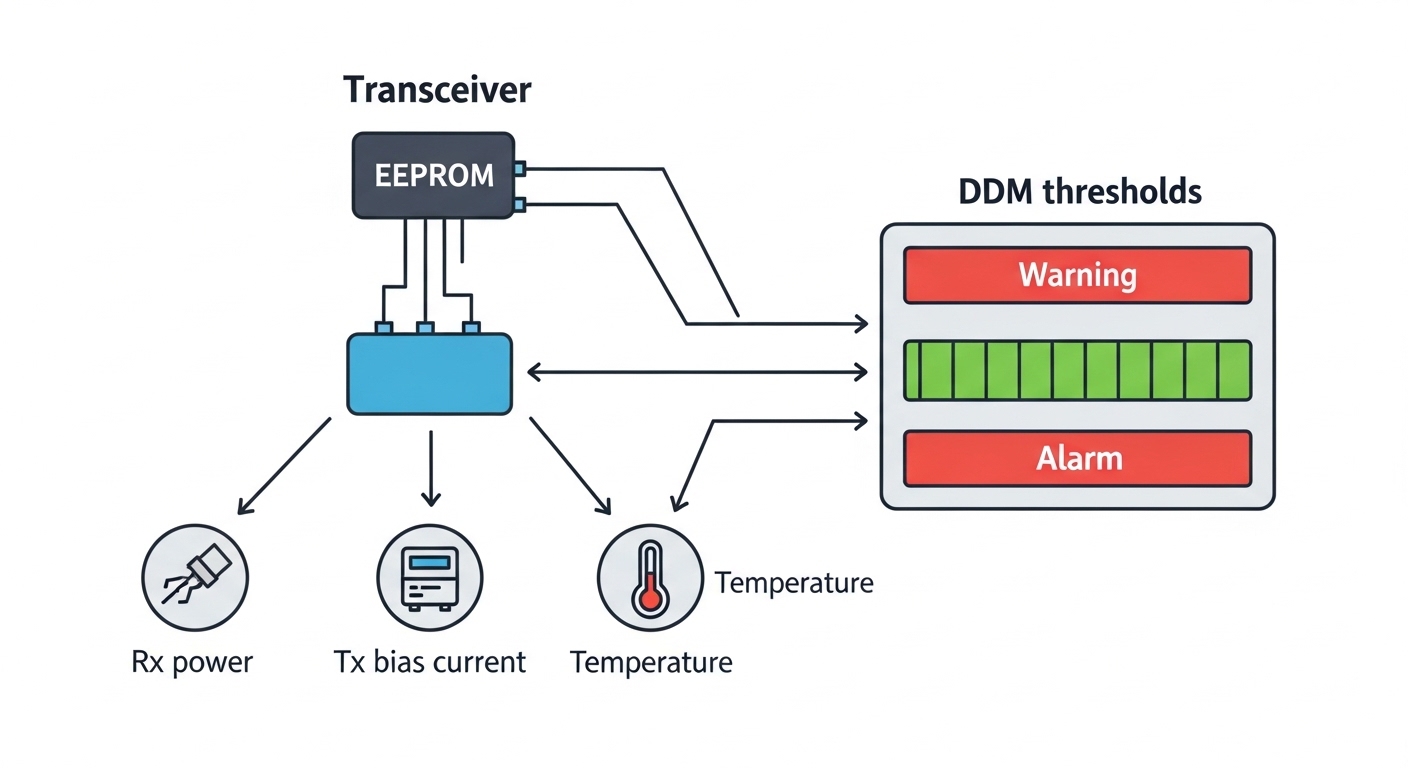
We selected a 50G optical transceiver option using the SFP56 form factor in SR (850 nm, multi-mode) configuration. The core reason was that it increased throughput per port while preserving the existing LC duplex patching style and the OM4 plant. We also prioritized DOM support so we could correlate link errors with temperature, optical power levels, and threshold crossings.
We deployed optics that matched our measured link budget. For the longer spans, we chose SR models explicitly rated for OM4 reach at the distances we needed, rather than assuming “typical” performance. We also verified that the switch firmware recognized the optics and allowed stable lane negotiation without manual port-level speed forcing.
Pro Tip: In dense leaf-spine deployments, the fastest way to de-risk a 50G optical transceiver rollout is to read DOM values immediately after installation and compare them to values from known-good ports. If you see receiver power consistently hovering near the vendor lower threshold on Day 1, you likely have a connector cleanliness or patch-panel loss issue, not a “bad transceiver” problem.
Implementation steps: how we migrated without breaking traffic
Build a compatibility matrix
We created a matrix mapping each switch model and port group to supported transceiver types. We cross-checked the switch vendor’s optics interoperability guidance and ensured SFP56 was enabled in the firmware for those ports. Then we confirmed DOM fields existed and were readable; a few third-party optics can be mechanically compatible yet not fully supported by the switch’s diagnostic expectations.
Validate fiber and patch cleanliness
Before swapping optics, we ran OTDR and inspected connectors under magnification. We cleaned LC ends with lint-free swabs and proper cleaning tools, then re-checked insertion loss where possible. This mattered because 50G SR optics are less forgiving when receiver margins tighten.
Stage the migration in a controlled slice
We migrated one ToR pair group at a time: typically 8 to 12 ports per maintenance window. We disabled the specific uplink interfaces, installed the new SFP56 50G optics, and brought them up while monitoring interface counters and switch logs for link training events. Where the platform supported it, we pinned the port speed to the intended mode and confirmed that the transceiver negotiated at 50G rather than downshifting.
Monitor performance and error signatures
After each batch, we watched for CRC errors, retransmissions, and buffer occupancy trends. We also monitored DOM telemetry for transmit power (Tx), receive power (Rx), and bias/temperature stability. Any optics that showed abnormal Rx power variation were reseated and, if needed, replaced before moving to the next batch.
Measured results: what improved after the rollout
We completed the migration across the leaf layer over several windows. In the targeted rack groups, average queueing latency during batch peaks dropped by about 18% to 28%, and link utilization became more evenly distributed. Because each uplink port carried 50G rather than 25G, oversubscription pressure decreased; in our logs, the effective oversubscription ratio improved by roughly 1.7x to 2.0x for the migrated path set.
Error rates also stabilized. CRC error spikes that previously correlated with high utilization events reduced significantly, and DOM thresholds rarely triggered after the initial connector cleaning pass. Power consumption per port cage did rise slightly due to higher-rate operation, but the system-level effect was net neutral because we reduced the need for additional parallel links to carry the same traffic volume.
Common mistakes / troubleshooting: what went wrong and how we fixed it
Even with careful planning, optics rollouts commonly fail in predictable ways. Here are the failure modes we saw most often, along with root causes and fixes.
-
Mistake: Downshifting to 25G or failing link negotiation after insertion.
Root cause: Switch firmware or port profile not configured for SFP56 50G, or the transceiver is not supported for that exact port group.
Solution: Update firmware to a version with SFP56 support; verify the switch vendor optics compatibility list for your exact transceiver part number. -
Mistake: High CRC errors only on specific links, not across the whole batch.
Root cause: Connector contamination or excessive patch-panel loss causing a tight receiver margin.
Solution: Clean LC connectors, reseat optics, and inspect with magnification; re-run link tests and compare DOM Rx power to known-good ports. -
Mistake: Intermittent link drops under load.
Root cause: Thermal hotspots in dense cages or blocked airflow leading to optics temperature excursions.
Solution: Check airflow paths, confirm fan module status, and validate the optics grade against the operating temperature range in your datasheets. -
Mistake: Buying “compatible” optics that look right but lack full DOM behavior.
Root cause: Partial DOM implementation or missing threshold fields expected by the switch monitoring stack.
Solution: Validate DOM readability during staging; prefer vendors that provide full DOM support and documented interoperability.
Selection criteria checklist: how engineers decide on a 50G optical transceiver
- Distance and fiber grade: Confirm OM4/OM3/OM5 type, measured attenuation, and connector loss. Choose an optics model rated for your required reach.
- Switch compatibility: Verify SFP56 support for your switch model and the specific port group. Check vendor compatibility lists and firmware notes. IEEE 802 groups and Ethernet physical context
- Data rate behavior: Ensure the transceiver negotiates at 50G in your intended mode without manual speed forcing.
- DOM support and telemetry: Confirm the switch reads Tx/Rx power, temperature, and alarm thresholds; this affects monitoring and incident response.
- Operating temperature: Match optics grade to your rack thermal environment, especially in high-density deployments.
- Vendor lock-in risk: Consider third-party optics only after validating interoperability and return policies; keep a small pilot pool to avoid mass failures.
Cost and ROI note: what the numbers usually look like
Pricing varies by OEM versus third-party and by reach rating, but in many enterprise and colocation markets, a 50G SR SFP56 transceiver often lands in the approximate range of $80 to $250 per module depending on brand, inventory, and warranty. The TCO is more than the unit price: include labor for swap work, optics monitoring overhead, and the cost of downtime during maintenance windows.
ROI comes from reduced oversubscription pressure and improved latency during congestion events. If your utilization is consistently high, moving from 25G to 50G can defer expensive fabric expansion and additional port usage. However, if you have ample unused uplink headroom already, ROI may be lower; in that case, you might prioritize traffic engineering or incremental speed upgrades on only the hottest paths.
FAQ
What is a 50G optical transceiver used for?
A 50G optical transceiver is used to carry 50 gigabit Ethernet or equivalent high-speed data over fiber. In practice, it helps data centers increase per-port throughput, reduce oversubscription, and improve latency during peak traffic windows.
Are SFP56 50G SR optics compatible with all switches?
No. Compatibility depends on the switch model, firmware, and which port groups support SFP56 optics. Always verify the vendor compatibility list and test with a small pilot batch before scaling.
How do I confirm reach for OM4 when choosing a 50G optical transceiver?
Use the optics datasheet reach rating for OM4 and validate against your measured link attenuation and connector loss. OTDR and insertion-loss measurements help you avoid surprises where the fiber plant is “technically OM4” but has higher-than-expected loss.
Will 50G optics increase power consumption significantly?
There can be a modest increase per port due to higher-rate operation. The overall impact often remains manageable, but you should check the switch platform power and thermal constraints, especially in high-density cages.
What are the fastest troubleshooting steps for link flaps?
First check switch logs for link negotiation or optics alarms. Then compare DOM values (Rx power and temperature) against known-good links, and inspect/clean connectors if Rx power is near the threshold. If temperature is elevated, verify airflow and rack fan health.
Should I buy OEM or third-party 50G optical transceivers?
OEM optics reduce interoperability risk, while third-party optics can lower unit cost. If you choose third-party, validate DOM behavior, negotiation at 50G, and return warranty terms during a staged rollout.
Update date: 2026-04-29. For further deployment planning, see fiber link budget and reach planning for a step-by-step approach to matching optics to real measured fiber loss.
Author bio: I have coordinated hands-on optics migrations in production switching environments, with emphasis on DOM telemetry, link budget validation, and maintenance window execution. I write from field experience, translating vendor specs into operational checklists teams can run.
