
When a storage area network link flaps at 2 a.m., the cause is often not the switch but the fiber channel SFP optic path: wavelength mismatch, DOM misread, or a marginal power budget. This guide helps storage, network, and field teams choose compatible transceivers for FC ports, validate performance quickly, and avoid the failure modes that turn planned maintenance into outages. Expect practical checks you can run on-site, plus a short ROI lens for OEM versus third-party optics.
What a fiber channel SFP must match in a SAN
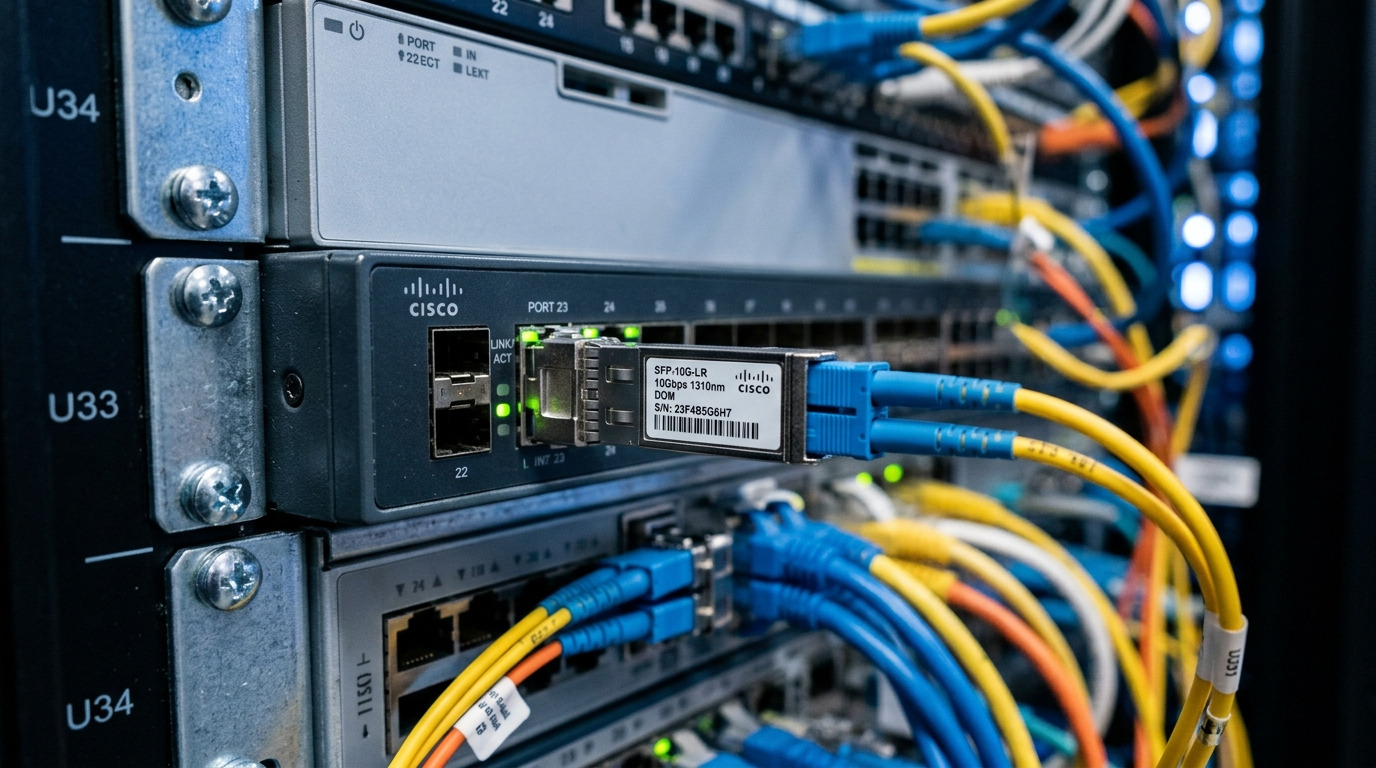
Fiber Channel transceivers are not interchangeable by speed alone; they must align with the FC generation, optics type, connector style, and the vendor’s electrical requirements for the host port. In practice, teams match the SFP to the switch or HBA optics profile, then confirm link parameters using port counters and DOM telemetry. If the SAN uses mixed media (OM3/OM4, single-mode), you must also respect reach and end-to-end loss, not just the module spec.
Core compatibility checklist (on the bench)
- FC data rate: 1G, 2G, 4G, 8G, 16G (and sometimes vendor-specific variants).
- Optics type and wavelength: typical examples include 850 nm (multimode) and 1310 nm (single-mode).
- Connector: LC is common for SFP; confirm whether your SAN uses LC or SC patching.
- DOM support: verify host firmware compatibility with digital optical monitoring.
- Temperature range: enterprise switches often require industrial-grade modules for airflow extremes.
Key specifications: comparing common fiber channel SFP optics
Engineers choose optics by reach and budget, then confirm power and temperature margins. The table below compares representative fiber channel SFP module classes used in SAN deployments; always validate against your switch or HBA compatibility list before purchase.
| Module class | Typical wavelength | Typical reach (example) | Connector | Data rate | DOM | Operating temp |
|---|---|---|---|---|---|---|
| 850 nm MMF SFP | 850 nm | ~300 m on OM3 (class-dependent) | LC | 1G to 8G FC (varies) | Often supported | 0 C to 70 C typical |
| 1310 nm SMF SFP | 1310 nm | ~10 km typical | LC | 1G to 8G FC (varies) | Often supported | -5 C to 70 C typical |
| Extended-reach variants | 1310 nm or 1550 nm (model-dependent) | ~20 km class-dependent | LC | 1G to 8G FC (varies) | Often supported | -5 C to 75 C (some) |
For standards grounding, FC optics and link behavior are guided by IEEE 802.3 for optical interfaces and by vendor implementation details for module electrical/DOM interfaces. Cross-check vendor datasheets and your platform’s optics support matrix. [Source: IEEE 802.3 (optical PHY framework), Source: vendor transceiver datasheets]
Pro Tip: In the field, DOM pass/fail is not the whole story. A module can report “present” telemetry yet still be out of the host’s expected optical budget due to connector contamination or patch-cord insertion loss; always inspect and clean LC endfaces before you blame the transceiver.
Storage SAN deployment scenario: making reach and budget real
In a 3-tier data center SAN with 48-port 8G FC ToR switches feeding storage controllers, a team often runs short-reach multimode within the row and single-mode for inter-rack hops. Suppose you have 24 links between director cabinets across a mezzanine: each link is 420 m of OM4 patching plus two mated LC couplers and one inline splice cassette. The team selects an 850 nm MMF fiber channel SFP only if the end-to-end loss stays within the module’s optical budget and the patch cords are low-loss; otherwise they choose a 1310 nm SMF SFP with a longer reach margin.
Operationally, field validation is fast: you map each port to its fiber ID, run port login and error counters, then compare DOM metrics (Tx bias current and received power) against documented thresholds. When a port shows increased CRC-like symptoms (vendor-specific), you perform a connector inspection sweep, then re-test with a known-good patch cord. This prevents “module swapping” from masking an optical contamination root cause.
Selection criteria: the ordered decision list that prevents rework
Use this checklist in order, because the early choices constrain everything downstream. It is optimized for storage teams that must manage spares, firmware constraints, and maintenance windows.
- Distance and fiber type: measure end-to-end length, confirm OM3/OM4 or SMF, and account for couplers, splices, and patch-cord quality.
- FC generation and optics profile: ensure the module supports the exact FC speed your host negotiates.
- Switch/HBA compatibility: consult the platform’s supported optics list to reduce DOM and electrical mismatch risk.
- DOM support and firmware behavior: confirm the host accepts the module’s diagnostic page and alarms.
- Operating temperature and airflow: verify the module’s temperature range against the cabinet’s measured inlet conditions.
- Vendor lock-in risk: consider OEM versus third-party policies, warranty terms, and how quickly you can RMA without extended downtime.
When evaluating known models, teams commonly encounter OEM and compatible optics from multiple vendors; examples include Cisco-branded optics and third-party modules such as Finisar and FS.com offerings (model numbers vary by reach and speed). Always align the exact part number to the FC speed and fiber type, not just wavelength. [Source: Cisco transceiver datasheets, Source: Finisar/Fabrinet datasheets, Source: FS.com product pages]
Common mistakes and troubleshooting that saves your night
Most FC link incidents that appear “transceiver-related” trace to a predictable set of issues. Below are common failure modes with root causes and fixes.
-
Mistake: Installing an 850 nm module into a link expecting single-mode reach behavior.
Root cause: Fiber type mismatch or connector patching to the wrong fiber plant.
Solution: Verify fiber plant labels, run an optical loss check, and confirm the patch path matches the optics plan. -
Mistake: Ignoring connector contamination after a “link down” event.
Root cause: LC endfaces accumulate dust from repeated handling; BER rises and the host logs link instability.
Solution: Clean with approved methods (lint-free wipes and proper inspection), then re-seat and re-test with a known-good patch cord. -
Mistake: Assuming DOM “present” means “within optical budget.”
Root cause: Transceiver telemetry can be nominal while the received power margin is still insufficient due to insertion loss.
Solution: Compare DOM received power and Tx bias to vendor thresholds; measure end-to-end loss and verify patch-cord quality. -
Mistake: Mixing module grades across different cabinet thermal profiles.
Root cause: A module rated for mild environments is used in a hot aisle with higher inlet temperatures.
Solution: Ensure the module temperature range matches measured inlet temperatures; adjust airflow if needed.
Cost and ROI note: balancing OEM reliability with budget reality
Pricing varies by speed and reach, but a practical range for fiber channel SFP modules often falls around tens to low hundreds of currency units each, with OEM typically higher than third-party. TCO should include: expected failure rate, warranty length, RMA turnaround, and the cost of downtime during storage controller maintenance windows. If you buy third-party optics, mitigate risk by testing in a staging rack, validating DOM behavior, and keeping a small OEM spare for urgent recovery.
FAQ
Q: Are all fiber channel SFP modules interchangeable across FC speeds?
A: No. FC speed support and optics profiles vary by generation and vendor implementation. Verify the exact FC data rate and platform compatibility list before swapping in production.
Q: How do I confirm the right reach without guessing?
A: Measure fiber length end-to-end and include couplers, splices, and patch cords. Then compare against the module’s optical budget and validate with DOM received power after installation.
Q: What should I check first when a port won’t come up?
A: Start with connector inspection and patch path verification, then confirm DOM presence and link error counters. Only after physical optics hygiene and path mapping should you replace the module.
Q: Does DOM support affect interoperability?
A: Yes. Some hosts expect specific diagnostic pages and thresholds; incompatible DOM behavior can trigger alarms or inhibit stable operation. Check the switch or HBA optics support matrix.
Q: Is third-party fiber channel SFP worth it for SAN spares?
A: Often yes if you test and standardize part numbers, but weigh warranty terms and RMA speed. For mission-critical links, many teams keep at least one OEM spare for worst-case recovery.
Q: Which standard should I reference when documenting optics decisions?
A: IEEE 802.3 provides a framework for optical PHY behavior, but vendor datasheets and your platform’s compatibility list are the practical authority for module-specific constraints. Record both in your change request.
Fiber channel SFP selection is less about “buying an optic” and more about engineering a reliable optical budget across the whole patch path. Start with distance and FC generation, validate DOM behavior, and treat connector hygiene as part of the operating procedure—then you will move from reactive swaps to controlled maintenance using SAN transceiver compatibility and DOM validation.
Author bio
