
If you have ever swapped an optics module and watched ports stay down after an otherwise clean reboot, you already know the real risk: compatibility drift. This article helps network engineers and field techs choose the right Extreme Networks transceiver for ExtremeXOS-based switches, validate it with DOM and link characteristics, and avoid the common failure modes that waste maintenance windows. You will also get a practical checklist, a troubleshooting section grounded in real diagnostics, and deployment guidance for typical leaf-spine and access networks.
ExtremeXOS SFP compatibility: what the switch actually checks
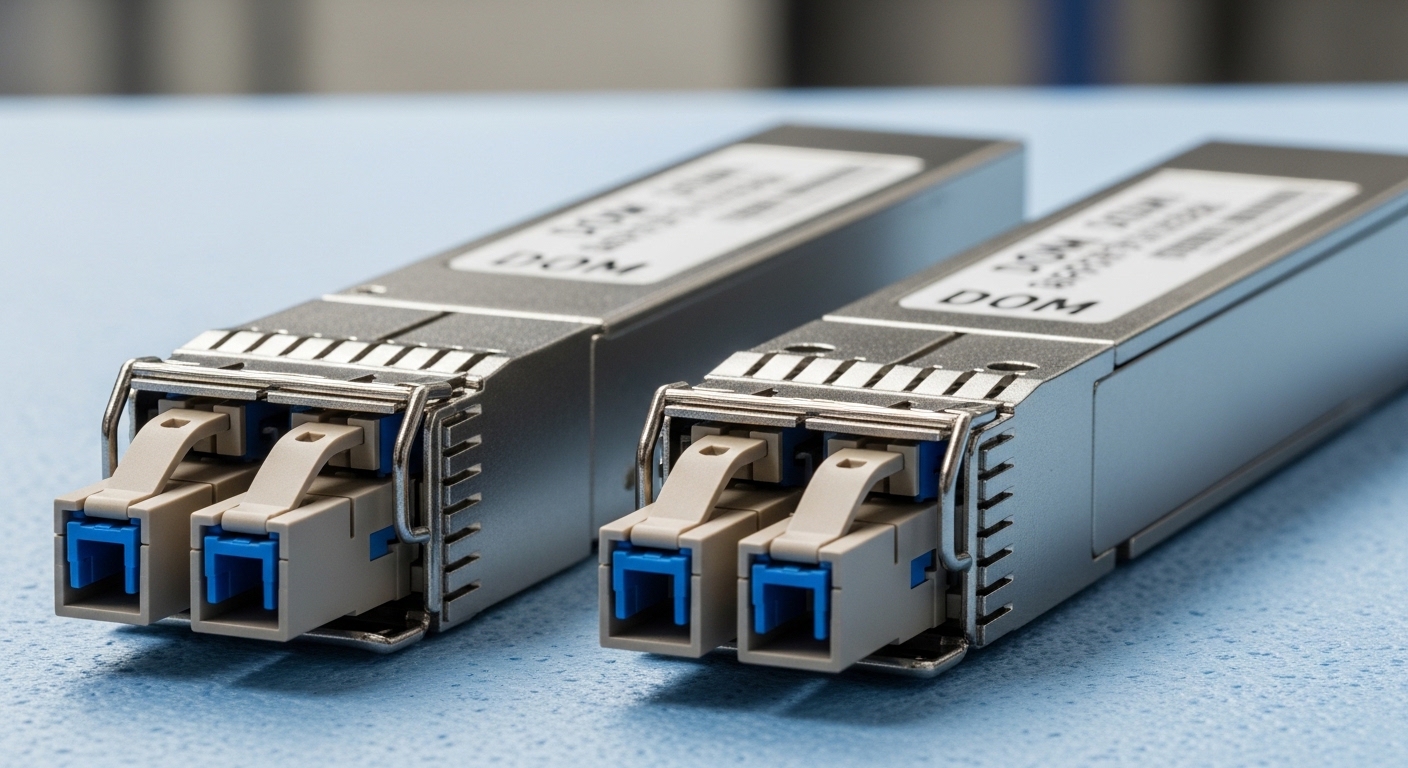
ExtremeXOS does not validate only the physical form factor; it also checks electrical and optical expectations such as transmit/receive wavelength pairing, link rate, and optics diagnostics availability. In practice, most port bring-up failures come from one of three categories: wrong fiber type or wavelength, DOM or vendor-specific behavior, or unsupported module rate/format for that specific interface. Even when an SFP “looks right,” the switch may refuse link training if the module reports inconsistent capability fields or if the optics fails threshold checks.
On the standards side, the industry aligns on IEEE 802.3 for link-layer behavior and on SFF specifications for module interfaces, while vendor implementations add their own guardrails. For example, IEEE 802.3 defines the Ethernet physical layer requirements for 1000BASE-SX and 1000BASE-LX, while SFF-8472 defines much of the digital optical monitoring interface for SFP modules. When a module’s DOM EEPROM fields do not match what the switch expects, the port can remain administratively up but operationally down.
For credible baselines, consult [Source: IEEE 802.3] for the Ethernet physical layer requirements and [Source: SFF-8472] for DOM and module identification fields. For vendor-specific constraints, use the ExtremeXOS transceiver guidance from your platform documentation set and the optics compatibility matrix published by Extreme Networks for your switch model. IEEE 802.3 SFF-8472 background
Operational fields that matter in the field
- Wavelength and fiber mode pairing: SX typically targets multimode short reach using 850 nm optics; LX targets longer reach with 1310 nm.
- Rate and signaling: A 1G port will not reliably train with a module whose reported capability mismatches the port PHY profile.
- DOM support: If the switch expects DOM values (temperature, bias current, received power) and the module reports invalid ranges, alarms can block stable operation in some policies.
- Connector and patching: LC vs SC is physical, but polarity and cleaning are operational. Wrong polarity can look like a “bad transceiver.”
Pro Tip: Before you reseat or replace optics, capture the port state and the optics diagnostics snapshot. Many ExtremeXOS deployments log a distinct sequence: module detection, DOM read, then optical power threshold evaluation. If DOM reads but RX power stays below threshold, you likely have a fiber polarity or cleaning issue rather than a transceiver compatibility issue.
Key specs comparison: match wavelength, reach, and connector reality
Engineers often select optics by reach alone, but ExtremeXOS link stability depends on a tighter set of physical-layer attributes. When you compare candidate Extreme Networks transceiver models (or third-party equivalents), verify wavelength, supported data rate, DOM implementation, and connector type. Temperature range also matters in cabinets with restricted airflow, where bias current thresholds can drift.
Below is a practical spec table for common SFP scenarios you will encounter on ExtremeXOS access and aggregation ports. Use it as a sanity check before you rely on any compatibility list.
| Transceiver type | Wavelength | Typical reach | Data rate | Fiber type | Connector | DOM | Operating temp |
|---|---|---|---|---|---|---|---|
| SFP-SX (multimode) | 850 nm | Up to 550 m | 1G / 10G depends on model | OM3/OM4 | LC | Usually SFF-8472 compatible | About -5 to 70 C |
| SFP-LX (single-mode) | 1310 nm | Up to 10 km | 1G / 10G depends on model | OS2 | LC | Usually SFF-8472 compatible | About -5 to 70 C |
| 10G SFP+ SR (short reach) | 850 nm | Up to 300 m (OM3 typical) | 10G | OM3/OM4 | LC | DOM supported | About -5 to 70 C |
| 10G SFP+ LR (long reach) | 1310 nm | Up to 10 km | 10G | OS2 | LC | DOM supported | About -5 to 70 C |
Model-specific diligence you should not skip
Even within the same wavelength category, vendors implement slightly different calibration parameters. For example, a Finisar 10G SR module such as FTLX8571D3BCL (commonly used in enterprise optics) is designed for specific link budgets and DOM behavior. Similarly, Cisco-branded optics like Cisco SFP-10G-SR or FS.com optics such as FS.com SFP-10GSR-85 may work electrically but still vary in DOM EEPROM content and threshold defaults. ExtremeXOS policies may treat those differences differently across switch generations.
Therefore, when you are aligning an Extreme Networks transceiver to ExtremeXOS compatibility, treat wavelength and reach as minimum filters, not final approval. Use the vendor compatibility matrix for your exact switch model and port speed, then confirm with DOM and link status after installation.
Selection criteria checklist for ExtremeXOS optics decisions
Use this ordered checklist to reduce trial-and-error. It is built around what field teams typically validate during a change window: first feasibility, then operational stability, then long-term maintainability.
- Distance and fiber type: Confirm OM3/OM4 vs OS2, and measure or validate the planned link distance against the optics budget.
- Port speed and PHY profile: Verify the ExtremeXOS interface supports the module’s data rate and signaling mode at that port.
- ExtremeXOS compatibility matrix: Select optics explicitly listed for your switch model and interface family.
- DOM support and alarm thresholds: Confirm the module supports SFF-8472-style monitoring and that readings remain within expected ranges under load.
- Operating temperature and airflow: Check cabinet thermal conditions; optics can derate near upper limits and trigger threshold alarms.
- Connector and polarity plan: LC/SC compatibility is necessary, but polarity, dust prevention, and cleaning procedures are often the real culprits.
- Vendor lock-in risk: Decide whether you will standardize on OEM optics or allow vetted third-party modules with consistent DOM behavior.
Compatibility is more than “it seats”
When a switch refuses link, the cause is commonly mispaired optics (850 vs 1310), incompatible fiber mode (multimode module on single-mode fiber with the wrong expectations), or a DOM behavior mismatch. In maintenance windows, teams often reseat the module multiple times; the better approach is to validate DOM read success and optical receive power values, then inspect fiber polarity and cleanliness.
Common mistakes and troubleshooting that actually works
Below are frequent failure modes encountered when deploying an Extreme Networks transceiver on ExtremeXOS. Each includes the root cause and a concrete fix path.
Port stays down after module insertion
Root cause: Wrong wavelength pairing or wrong fiber type for the module class (for example, 850 nm SX attempted over OS2 single-mode links with incorrect expectations). Solution: Identify the module class (SX vs LX vs SR vs LR), then confirm the fiber strand type and connector mapping. If you have test results, compare received optical power to the module’s expected sensitivity range.
DOM alarms, intermittent link flaps, or “module not recognized”
Root cause: DOM EEPROM fields that do not align with what the platform expects, or a module that only partially implements monitoring. This can happen with non-vetted third-party optics or with optics that are electrically compatible but not operationally identical. Solution: Check DOM read status and whether temperature or bias current values exceed thresholds. If DOM values appear invalid or missing, replace with a module explicitly listed for your switch model and port speed.
Link works briefly, then fails under load
Root cause: Fiber contamination or insufficient cleaning/polishing quality leading to marginal optical budget. Under higher utilization, the margin tightens and the receiver crosses error thresholds. Solution: Clean both ends using approved fiber cleaning procedures, re-terminate or inspect connectors, then re-test with an optical power meter or an OTDR where available.
Polarity mismatch after patching
Root cause: Transmit and receive fibers swapped, especially after cabinet moves or patch panel rework. Solution: Verify polarity with a polarity tester or by following the site’s patching standard (for example, standard duplex polarity mapping). Swap patch cords and retest link stability.
Temperature-induced derating in constrained cabinets
Root cause: Optics operating above recommended ambient conditions due to blocked airflow or fan failures. Solution: Measure cabinet ambient temperature near the switch and confirm airflow paths. If the environment is near the upper operating limit, improve cooling and re-evaluate.
Cost and ROI: OEM optics vs vetted third-party modules
In most enterprise and campus environments, OEM optics pricing can be higher, often reflecting tighter DOM calibration and compatibility validation. As a realistic planning range, many 1G SFP optics land roughly in the tens of dollars per module, while 10G SFP+ optics commonly cost more, with OEM parts often priced above vetted third-party equivalents. Your total cost of ownership depends less on purchase price and more on failure rate, RMA handling time, and maintenance downtime.
Third-party optics can deliver good ROI when you standardize on a known-good catalog item and confirm DOM behavior on your exact ExtremeXOS platforms. However, the risk is not purely technical; it is operational. If an optics batch behaves differently across temperature or DOM reads inconsistently, you may lose time during incident response and increase spares complexity.
For ROI calculations, include: module unit cost, expected RMA rate over a 3 to 5 year window, labor hours per incident, and the cost of downtime for the affected topology. In many networks, one avoidable outage costs far more than the delta between OEM and third-party optics.
IEEE optics and Ethernet references SFF-8472 DOM monitoring references
FAQ: ExtremeXOS transceiver fit, DOM behavior, and deployment
Which Extreme Networks transceiver types work best with ExtremeXOS SFP ports?
The safest starting point is the optics listed in the ExtremeXOS compatibility matrix for your exact switch model and port speed. In general, match wavelength class (850 vs 1310), fiber type (OM3/OM4 vs OS2), and ensure DOM monitoring is supported. After installation, confirm link up time and DOM thresholds remain stable.
Do I need the exact Extreme-branded module, or will third-party optics work?
Third-party modules can work if they are vetted and consistent in DOM behavior and optical parameters. The compatibility risk grows when you change vendors frequently or use modules with partial DOM support. If the switch logs DOM read errors or blocks stable link, switch to an optics SKU explicitly validated for your platform.
How can I tell whether the issue is optics compatibility or fiber problems?
Check whether the module is detected and whether DOM values read successfully. If DOM reads but optical receive power is low or fluctuates, treat it as a fiber budget, polarity, or cleanliness issue. If the module is not recognized or DOM fields look invalid, treat it as a compatibility or DOM implementation issue.
What DOM alarms should worry me most?
Bias current, temperature, and received power values that consistently exceed thresholds indicate a likely margin problem. Occasional minor fluctuations can be normal, but repeated threshold crossings correlate with link errors and flaps. Use your switch logs and the module’s DOM calibration expectations from the vendor datasheet.
Is polarity testing required for every patch panel change?
It is strongly recommended, especially after any cabinet move, re-termination, or re-cabling event. Polarity mistakes are a top root cause of “bad transceiver” incidents because the wrong fibers still physically connect. A polarity tester plus a consistent patching standard prevents most of these outages.
Where do I find the authoritative compatibility information?
Use the ExtremeXOS transceiver guidance and the optics compatibility matrix for your specific switch model. Then cross-check with IEEE 802.3 physical layer requirements and the optics module datasheet for wavelength, reach, and DOM behavior. For baseline DOM interface behavior, reference SFF-8472 materials. IEEE standards
Choosing the right Extreme Networks transceiver for ExtremeXOS is a systems problem: wavelength, DOM behavior, and fiber hygiene all interact during link bring-up. Next, build a small lab validation plan using your actual switch model, test fiber types, and your planned patch cords, then standardize on a vetted optics SKU set. optics compatibility lab validation
Author bio: I am a hands-on network engineer who deploys and troubleshoots optical links in live data centers, focusing on DOM telemetry, link budgets, and change-window safety. I write from field experience with ExtremeXOS and standards-based Ethernet optics validation.
