
I have installed more than a few transceivers that looked fine on the bench and then promptly refused to link in the field. This article helps network engineers and telecom ops folks choose the right DSL aggregation SFP for Westell and Calix DSLAMs, with the kind of operational details you only learn after a midnight truck roll. You will get a checklist, troubleshooting patterns, and a ranked short list so you can stop guessing and start lighting ports.
Top 1: Map your DSLAM aggregation need to an SFP data interface
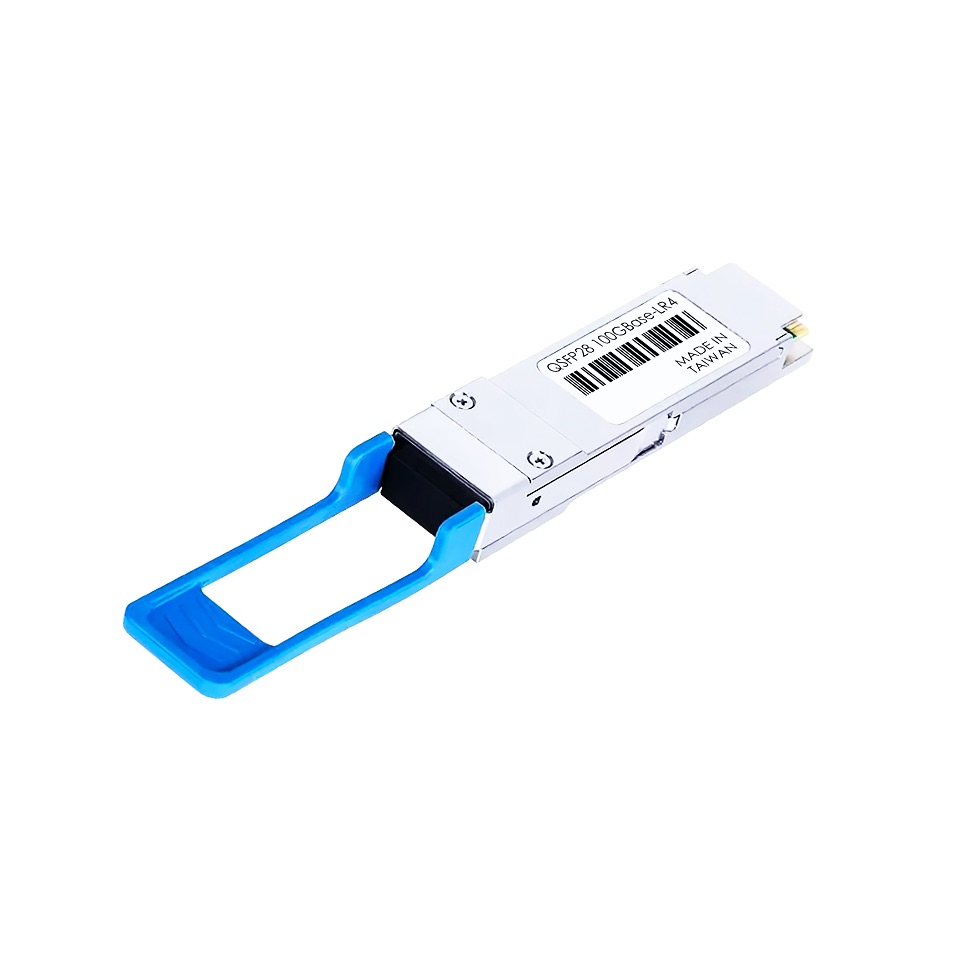
Before you pick optics, confirm what the DSLAM is actually aggregating on that specific uplink. In many Westell and Calix deployments, the aggregation side uses 10G Ethernet or 1G Ethernet depending on the era and equipment tier, often running over multimode fiber (MMF) with LC connectors. The “DSL aggregation SFP” label gets used loosely in the wild, but the switch fabric and uplink module must match the port’s expected speed and signaling.
From a practical standpoint, I verify the uplink line card spec (or the vendor-maintained compatibility list) and then cross-check the port speed on the aggregation switch. If the port is configured for 10GBASE-SR, a 1G SFP will never negotiate; if the port is expecting 1000BASE-SX and you insert a 10G SR module, you will get link-down and a lot of sadness.
Best-fit scenario: A regional access network with Westell or Calix DSLAMs feeding a leaf aggregation switch, where the uplink is provisioned as 10GBASE-SR over MMF.
- Pros: Prevents wrong-speed installs and saves time on RMA returns.
- Cons: Requires you to confirm the exact uplink mode per slot and port.
Top 2: Choose the right optics type: SR vs ER and MMF vs SMF
“Aggregation SFP” can mean different fiber reach budgets. In most DSL aggregation rings inside metro sites, you will see MMF for shorter spans (typically within the same building or across a small campus), using SR style optics such as 850 nm multimode. If you are spanning larger distances or crossing dark-fiber handoffs, you may need SMF-based ER optics at 1310 nm.
I usually treat the reach rating as a starting point, not a guarantee. Real life includes connector loss, patch panel quality, bend radius, and the fiber vendor’s attenuation profile. For MMF, also watch for the exact fiber grade: OM3 vs OM4 can change the effective budget, especially when you stack patch cords and splices.
Best-fit scenario: Calix DSLAM uplinks to an aggregation switch located on the same floor or within a nearby equipment room, using OM3/OM4 MMF with LC jumpers.
- Pros: Correct reach choice reduces link flaps and CRC errors.
- Cons: Mixing MMF/SMF accidentally is a fast path to link failure.
Top 3: Specs comparison table for common DSL aggregation SFP options
Here is the field-friendly comparison I use when vendors list “compatible” modules but do not explain the underlying link budget. These are typical optics families that show up in Westell/Calix aggregation contexts. Always confirm the port speed and whether your plant is MMF or SMF before ordering.
| Module family | Typical wavelength | Reach (typ.) | Data rate | Connector | Temperature range | Example model numbers |
|---|---|---|---|---|---|---|
| 10GBASE-SR SFP+ | 850 nm | 300 m over OM3 / 400 m+ over OM4 (varies by spec) | 10.3125 Gbps | LC | Commercial: 0 to 70 C; Extended: about -5 to 85 C | Cisco SFP-10G-SR, Finisar FTLX8571D3BCL, FS.com SFP-10GSR-85 |
| 1GBASE-SX SFP | 850 nm | 550 m over OM2 (varies by spec) | 1.25 Gbps | LC | Commercial/Industrial options exist | Broadcom-based SX SFP variants (vendor dependent) |
| 10GBASE-ER SFP+ | 1310 nm | Up to 40 km (single mode) | 10.3125 Gbps | LC | Commercial/Industrial options exist | Generic 10G ER SFP+ models (confirm ITU compliance) |
Note: IEEE 802.3 defines Ethernet PHY behavior, while the transceiver datasheets define optical budgets, transmitter power, receiver sensitivity, and DOM reporting. For baseline Ethernet PHY expectations, see [Source: IEEE 802.3]. For transceiver electrical and optical parameters, rely on each module’s datasheet and the host’s compatibility guidance.
Best-fit scenario: You need to standardize on 10G SR optics across multiple Westell and Calix sites, and you want consistent connectorization and temperature behavior for spares.
- Pros: Quick elimination of wrong-wavelength or wrong-speed modules.
- Cons: Reach claims depend on fiber type and link loss details.
Top 4: DOM, EEPROM ID, and switch compatibility are not optional
In the real world, optics are not just “optics.” Many DSLAM and aggregation platforms read EEPROM fields such as vendor OUI, part number, and DOM parameters (laser bias current, received optical power, and temperature). If your host expects specific DOM behavior or blocks unknown vendor IDs, you may see “not supported” messages or intermittent link behavior.
I have seen mismatches where a third-party SFP passes basic optical tests on the bench but fails the host’s transceiver sanity checks in the field. For troubleshooting, I typically pull the transceiver diagnostics from the host (or a management interface) and compare thresholds with the module datasheet. If the host platform supports it, check whether it expects a specific SFP speed ID or SFP+ profile.
Pro Tip: When a DSLAM port shows link-down after inserting a “compatible” DSL aggregation SFP, do not immediately blame fiber. First compare the host-reported DOM values (especially received optical power and temperature) against the module’s stated ranges; some modules will work optically but still fail host policy checks due to EEPROM ID or DOM threshold expectations.
Best-fit scenario: Multi-vendor spares program where you want to reduce truck rolls but must keep strict host compatibility for Westell/Calix line cards.
- Pros: DOM-aware monitoring improves mean time to repair.
- Cons: Host policy differences can cause “looks fine” failures.
Top 5: Installation logistics that actually matter: clean fiber, power budget, bend radius
If you want fewer outages, treat fiber handling like a safety procedure, not a hobby. Cleanliness matters because dust and micro-scratches raise insertion loss and reduce receiver margin, leading to CRC errors and dropouts. Use proper connector cleaning tools and inspect under a microscope when you have repeated link issues.
Operationally, I measure end-to-end loss with a fiber tester when deploying new links, and I keep a loss spreadsheet per circuit. For MMF SR links, the budget is typically tight when you have many patch panels, older couplers, and extra jumpers. Also respect the bend radius guidance from the cable manufacturer; I have watched “mystery link flaps” disappear after re-routing a slack loop away from a sharp rack edge.
Best-fit scenario: A rollout across 30 sites where patch panels and jumper lengths vary; you standardize cleaning and loss measurement to keep link behavior consistent.
- Pros: Reduces intermittent faults and improves optics longevity.
- Cons: Adds initial labor for cleaning and testing.
Top 6: Selection criteria checklist for a DSL aggregation SFP purchase
Here is the ordered checklist I use before clicking “buy.” It is designed to minimize returns and keep compatibility with Westell and Calix DSLAM uplinks. If you can answer each item, your odds of a smooth install jump dramatically.
- Distance and reach budget: Determine actual link length plus patch/jumper/splice loss; do not rely on nominal reach alone.
- Data rate and PHY type: Confirm whether the uplink is configured for 10GBASE-SR, 1GBASE-SX, or 10GBASE-ER.
- Fiber type: Verify MMF grade (OM3/OM4) or SMF; match wavelength accordingly.
- Switch or DSLAM compatibility: Check vendor compatibility lists and confirm supported transceiver profiles.
- DOM support: Ensure the module provides DOM fields your host can read and does not reject.
- Operating temperature: Confirm module temp range fits the cabinet environment; extended temp can matter in hot telecom rooms.
- Vendor lock-in risk: Decide whether you accept OEM-only spares or can standardize on third-party modules with verified DOM and EEPROM behavior.
Best-fit scenario: Procurement for a regional carrier where you need a repeatable spec sheet across many sites.
- Pros: Converts “tribal knowledge” into a buying standard.
- Cons: Requires you to document fiber and host details per site type.
Top 7: Common mistakes and troubleshooting tips from the trenches
Let’s talk about failure modes that waste time and create the illusion that optics are “unreliable.” They are usually reliable; the environment and mismatches are not.
Mistake 1: Wrong speed profile (10G vs 1G) causes link-down
Root cause: Installing a transceiver whose PHY rate does not match the configured port speed or expected transceiver ID. This can happen when a site is upgraded partially (old aggregation switch ports, new DSLAM line cards, mixed configs).
Solution: Confirm port speed and admin state on the host side, then install the correct module family for that PHY (e.g., 10G SR SFP+ for 10GBASE-SR).
Mistake 2: Fiber type mismatch (MMF vs SMF) yields no optical link
Root cause: Using an 850 nm MMF SR module where the link is SMF for longer reach, or vice versa. Even if connectors fit, the optical wavelength and fiber mode discipline do not.
Solution: Verify the fiber strand type and wavelength plan before swapping modules. Confirm with labeling and, when uncertain, test with a known-good module.
Mistake 3: Dirty connectors create intermittent CRC errors
Root cause: Dust on LC end faces increases insertion loss; the receiver margin shrinks and errors spike under temperature swings or vibration.
Solution: Clean connectors properly, re-seat, and inspect with an optical inspection scope. After cleaning, monitor interface counters (CRC, FCS, and discards) for improvement.
Mistake 4: Exceeding bend radius or cable stress causes flapping
Root cause: Over-tight bends near rack edges or cable management rails can micro-bend fiber, raising attenuation.
Solution: Re-route with correct bend radius, secure slack loops, and retest link stability over a 1 to 2 hour window.
Best-fit scenario: You are supporting a fleet of DSLAMs with recurring optics alarms and want a fast triage playbook.
- Pros: Reduces repeat incidents and speeds MTTR.
- Cons: Requires standard monitoring and a clean test process.
Top 8: Cost and ROI reality check for OEM vs third-party optics
Yes, price matters. No, the cheapest transceiver is not always the bargain. In telecom spares, I typically see OEM 10G SR SFP+ modules priced higher than third-party equivalents, but OEMs often come with stronger host-compatibility documentation and predictable DOM behavior.
Realistic street pricing varies by region and volume, but a common pattern is: OEM modules costing roughly 1.5x to 3x third-party for the same optics class. Total cost of ownership (TCO) should include labor for swaps, downtime risk, and failure rates. If third-party modules cause more field returns or compatibility issues, the “savings” vanish faster than a coffee break during outage response.
Best-fit scenario: You run a hybrid model: OEM for mission-critical sites, third-party for low-risk expansion and non-critical capacity, with a verification lab step.
- Pros: Better budget control and faster spare replenishment.
- Cons: Needs validation for DOM and host acceptance.
Top 9: Ranked shortlist: what I would buy for typical Westell and Calix DSLAM aggregation
Below is a practical ranking based on common deployment patterns: short-to-moderate MMF spans, LC connectors, and 10G uplinks. Your final choice still depends on the exact DSLAM uplink mode and fiber plant details, but this shortlist matches what I see most often in the field.
| Rank | Best match | When it fits | Typical example models | Main caution |
|---|---|---|---|---|
| 1 | 10GBASE-SR SFP+ | MMF OM3/OM4, short reach within metro sites | Cisco SFP-10G-SR, Finisar FTLX8571D3BCL, FS.com SFP-10GSR-85 | Confirm MMF grade and link loss budget |
| 2 | 10GBASE-ER SFP+ | SMF longer reach aggregation spans | Vendor ER SFP+ modules (verify wavelength 1310 nm) | Confirm SMF type and connector cleanliness |
| 3 | 1GBASE-SX SFP | Legacy 1G aggregation ports or older DSLAM uplinks | Common SX SFP variants | Check that the host port is truly 1G |
| 4 | Third-party 10G SR SFP+ with verified DOM | Budget-sensitive spares with host acceptance confirmed | Validated third-party equivalents | DOM and EEPROM policy differences |
Best-fit scenario: You want a staged approach: standardize on SR for most sites, use ER for longer SMF routes, and reserve legacy SX only where the port is confirmed at 1G.
- Pros: Reduces SKU sprawl while staying compatible.
- Cons: Requires you to verify port speeds and fiber grades per site type.
FAQ
Q1: What does “DSL aggregation SFP” actually mean?
It is usually shorthand for an Ethernet transceiver used on the aggregation uplink from a DSLAM. Depending on the DSLAM generation and uplink configuration, it can be 10GBASE-SR or 1GBASE-SX over MMF, or 10GBASE-ER over SMF. Always confirm port speed and fiber type rather than trusting the label on a reseller page.
Q2: Can I use third-party DSL aggregation SFP modules in Westell or Calix gear?
Sometimes, yes, but compatibility depends on the host’s transceiver policy, EEPROM ID handling, and DOM support. I recommend verifying with the vendor compatibility list and doing a controlled lab test if the host is strict. If you see “unsupported transceiver” messages, stop and switch to a known-compatible part.
Q3: How do I confirm whether I need MMF OM3 vs OM4?
Check fiber documentation, patch panel labels, and strand records from the site build. If documentation is missing, measure end-to-end loss and validate with a known-good module under supervision. MMF reach can vary significantly based on fiber grade and system loss.
Q4: What optical diagnostics should I check first when a link won’t come up?
Check host interface status, then read module DOM values such as temperature and received optical power. If received power is near the receiver sensitivity limit or
